

1.0.0
release

OgiPlayerStats
All-rounder gui for displaying user statistics
 208
208
OgiPlayerStats
<p align="center"> <img src="https://raw.githubusercontent.com/ogidevs/mc-ogiplayerstats/main/logo.png" alt="OgiPlayerStats Banner" width="200"/> </p>
<h1 align="center">OgiPlayerStats</h1>
<p align="center"> <strong>A modern, powerful, and 100% free player statistics GUI for Minecraft servers.</strong> <br> Built with performance and versatility in mind. </p>
<p align="center"> <!-- GitHub Badges --> <a href="#"><img src="https://img.shields.io/static/v1?label=Minecraft&message=1.16.5%20-%201.21&color=brightgreen" alt="Supported Versions"></a> <a href="https://github.com/ogidevs/mc-ogiplayerstats/issues"><img src="https://img.shields.io/github/issues/ogidevs/mc-ogiplayerstats" alt="GitHub issues"></a> <a href="https://github.com/ogidevs/mc-ogiplayerstats/blob/main/LICENSE"><img src="https://img.shields.io/github/license/ogidevs/mc-ogiplayerstats?cacheSeconds=1" alt="License"></a> </p>
---
📖 Table of Contents
- A Note From The Developer - About the Plugin - ✨ Key Features - 🚀 Installation - ⚙️ Configuration - Adding a Built-in Stat - Adding a PlaceholderAPI Stat - 📝 Commands & Permissions - 🧩 PlaceholderAPI Integration - 🤝 Contributing - 🐛 Bug Reports
---
💬 A Note From The Developer
I was tired of seeing essential, high-quality server plugins locked behind a paywall. I believe powerful tools should be accessible to everyone in the Minecraft community. That's why I created OgiPlayerStats—to provide a premium, feature-rich experience for free. I hope you enjoy it!
---
🌟 About the Plugin
OgiPlayerStats provides a beautiful and intuitive in-game menu to display player statistics. Unlike other stat plugins, it's built from the ground up to be 100% configurable via a simple `config.yml` file. You can display anything from vanilla Minecraft stats (`PLAYER_KILLS`, `DIAMONDS_MINED`) to custom data from other plugins like Vault or EssentialsX using the powerful PlaceholderAPI integration.
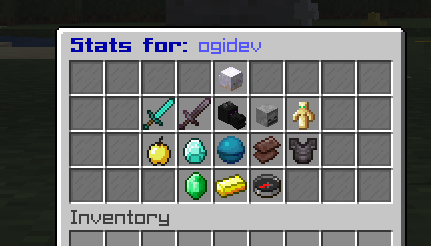
<img src="https://raw.githubusercontent.com/ogidevs/mc-ogiplayerstats/main/showcase/img1.png" alt="OgiPlayerStats Banner" width="200"/>
*An example of the default stats GUI.*
✨ Key Features
- 1.16.5 to 1.21+: No premium versions, no hidden costs. All features are available to everyone. - 1.16.5 to 1.21+: Control the title, size, items, names, lore, and slot for every stat. - 1.16.5 to 1.21+: Track any vanilla statistic, including those with subtypes (Blocks, Entities). - 1.16.5 to 1.21+: - 1.16.5 to 1.21+: Display placeholders from *any* other PAPI-enabled plugin. - 1.16.5 to 1.21+: Creates dynamic placeholders for every stat you configure (e.g., `%ogiplayerstats_player_kills%`). - 1.16.5 to 1.21+: Use `PLAYER_HEAD` material with a `skull-owner` to display player-specific skins. - 1.16.5 to 1.21+: Lightweight and designed to ensure minimal server impact. - 1.16.5 to 1.21+: A single JAR file supports all server versions from 1.16.5 to 1.21+.
🚀 Installation
1. Download the latest release from the (Optional but Recommended), %%MD1%%, or %%MD2%%. 2. Place the `OgiPlayerStats-X.X.X.jar` file into your server's `/plugins` directory. 3. (Optional but Recommended) Install %%MD3%% to unlock the full potential of the plugin. 4. Restart your server. The default configuration file will be generated at `/plugins/OgiPlayerStats/config.yml`.
⚙️ Configuration
All configuration is handled in the `config.yml` file. You can add, remove, or modify any stat in the `displayed-stats` list.
🚀 Installation
1. Download the latest release from the (Optional but Recommended), %%MD1%%, or %%MD2%%. 2. Place the `OgiPlayerStats-X.X.X.jar` file into your server's `/plugins` directory. 3. (Optional but Recommended) Install %%MD3%% to unlock the full potential of the plugin. 4. Restart your server. The default configuration file will be generated at `/plugins/OgiPlayerStats/config.yml`.
⚙️ Configuration
All configuration is handled in the `config.yml` file. You can add, remove, or modify any stat in the `displayed-stats` list.
Adding a Built-in Stat
To display a statistic native to Minecraft, use the `statistic` key. For stats that need a subtype (like breaking a specific block), also include `type` and `sub-type`.
```yaml - slot: 14 material: "DIAMOND_PICKAXE" name: "&bDiamonds Mined" lore: - "&7Diamond ore blocks broken." - "" - "&aValue: &f{value}" statistic: "MINE_BLOCK" type: "BLOCK" sub-type: "DIAMOND_ORE" ```
Adding a PlaceholderAPI Stat
To display a value from another plugin, simply use the `placeholder` key instead of `statistic`. The `{value}` in the lore will be replaced by the placeholder's output.
```yaml - slot: 13 material: "GOLD_INGOT" name: "&ePlayer Balance" lore: - "&7Your current balance." - "" - "&aValue: &f{value}" placeholder: "%vault_eco_balance_formatted%" ```
To display a statistic native to Minecraft, use the `statistic` key. For stats that need a subtype (like breaking a specific block), also include `type` and `sub-type`.
> For a full list of available statistics and material names, please refer to the Spigot Javadocs.
📝 Commands & Permissions
| Command | Permission | Description | | -------------------- | ------------------------------ | -------------------------------------------- | | `/stats [player]` | `ogiplayerstats.view` / `ogiplayerstats.view.others` | View your own or another player's statistics. | | `/stats reload` | `ogiplayerstats.reload` | Reloads the plugin's configuration file. |
🧩 PlaceholderAPI Integration
OgiPlayerStats automatically generates its own placeholders based on the `name` field of each stat in your configuration. The name is converted to lowercase, stripped of color codes, and spaces are replaced with underscores.
Example: A stat with `name: "&bPlayer Kills"` becomes `%ogiplayerstats_player_kills%`. A stat with `name: "&ePlayer Balance"` becomes `%ogiplayerstats_player_balance%`.
You can use these placeholders in any plugin that supports PlaceholderAPI, such as scoreboards, chat formatters, or holograms.
Example Config for GUI
```yaml
displayed-stats:
--- Player Info (Top Center) ---
- slot: 4 material: "PLAYER_HEAD" skull-owner: "{player}" name: "&b{player}'s Stats" lore: - "&7An overview of player's journey." - "" - "&ePlaytime: &f%statistic_time_played%" - "&eJoin Date: &f%player_first_join_date%"
--- Core PvP Stats (Row 2) ---
- slot: 11 material: "DIAMOND_SWORD" name: "&aPlayer Kills" lore: - "&7Foes vanquished in battle." - "" - "&eValue: &f{value}" statistic: "PLAYER_KILLS"
- slot: 12 material: "NETHERITE_SWORD" name: "&cDeaths by Player" lore: - "&7Times player was bested by another." - "" - "&eValue: &f{value}" statistic: "ENTITY_KILLED_BY" type: "ENTITY_TYPE" sub-type: "PLAYER"
- slot: 13 material: "DRAGON_HEAD" name: "&5Ender Dragon Kills" lore: - "&7How many times player've conquered" - "&7the Ender Dragon." - "" - "&eKills: &f{value}" statistic: "KILL_ENTITY" type: "ENTITY_TYPE" sub-type: "ENDER_DRAGON"
- slot: 14 material: "SKELETON_SKULL" name: "&cTotal Deaths" lore: - "&7Every time player've met end." - "" - "&eValue: &f{value}" statistic: "DEATHS"
- slot: 15 material: "TOTEM_OF_UNDYING" name: "&eTotems Popped" lore: - "&7How many times player've defied death." - "" - "&eValue: &f{value}" statistic: "USE_ITEM" type: "ITEM" sub-type: "TOTEM_OF_UNDYING"
--- Lifesteal & Resources (Row 3) ---
- slot: 20 material: "GOLDEN_APPLE" name: "&6Golden Apples Eaten" lore: - "&7The fruit of PvP champions." - "" - "&eValue: &f{value}" statistic: "USE_ITEM" type: "ITEM" sub-type: "GOLDEN_APPLE"
- slot: 21 material: "DIAMOND" name: "&bDiamonds Mined" lore: - "&7The foundation of wealth and power." - "" - "&eValue: &f{value}" statistic: "MINE_BLOCK" type: "BLOCK" sub-type: "DIAMOND_ORE"
- slot: 22 # Centerpiece Lifesteal Stat material: "HEART_OF_THE_SEA" name: "&c❤ Lifesteal Hearts" lore: - "&7Current maximum health." - "" - "&eHearts: &f{value}" placeholder: "%lifestealz_hearts%"
- slot: 23 material: "NETHERITE_SCRAP" name: "&8Ancient Debris Mined" lore: - "&7Forging the strongest armor." - "" - "&eValue: &f{value}" statistic: "MINE_BLOCK" type: "BLOCK" sub-type: "ANCIENT_DEBRIS"
- slot: 24 material: "NETHERITE_CHESTPLATE" name: "&6Mob Kills" lore: - "&7Creatures slain for loot and XP." - "" - "&eValue: &f{value}" statistic: "MOB_KILLS"
--- Economy & Server Info (Bottom Row) ---
- slot: 30 material: "EMERALD" name: "&aRevived" lore: - "&7How many times was a player revived" - "" - "&eValue: &f{value}" placeholder: "%lifestealz_revived%"
- slot: 31 # Bottom Centerpiece material: "GOLD_INGOT" name: "&ePlayer Balance" lore: - "&7Current wealth." - "" - "&eBalance: &f{value}" placeholder: "%vault_eco_balance_formatted%"
- slot: 32 material: "COMPASS" name: "&bOnline Status" lore: - "&7Is currently online?" - "" - "&eStatus: &f{value}" placeholder: "%player_online%"
```
🤝 Contributing
Contributions are welcome! If you'd like to contribute to the project, please follow these steps:
1. Fork the repository. 2. Create a new branch (`git checkout -b feature/YourAmazingFeature`). 3. Make your changes. 4. Commit your changes (`git commit -m 'Add some amazing feature'`). 5. Push to the branch (`git push origin feature/YourAmazingFeature`). 6. Open a new Pull Request.
🐛 Bug Reports
If you find a bug, please open an issue on the GitHub Issues page.
Please include the following information in your report: - Server version (e.g., Paper 1.21.5) - Plugin version - A detailed description of the bug - Steps to reproduce the bug - Any relevant errors from your console log
--- <p align="center"> Developed by Ogi. </p>