

1.4
release

Passwords
A simple Server Pasword / Login Plugin
 4,27k
4,27k
Passwords
Passwords
Secure your server with Passords! Passwords an easy to use and simple plugin to secure your minecraft server from strangers. If you dont want to use a whitlis you can simply give your friends the password and thats it.
<a href="https://www.codefactor.io/repository/github/hamburgbigj/passwords"><img src="https://www.codefactor.io/repository/github/hamburgbigj/passwords/badge" alt="CodeFactor" /></a>
---
Features
- Custom Passwords for Each Player Allow players to create unique passwords, ensuring personalized and secure access to their accounts.
- Admin Password Options Admins can set a master password for full permissions and Op status.
- Seamless Integration Works effortlessly with any Minecraft server without requiring complex setup.
---
Sample Config.yml
Below is an example configuration file to get you started:
Click to view config.yml
```yaml version: "2.6.2" debug: false
Password dose not supports PlaceholderAPI in messages.
Supported placeholders are: &player& -> Player Name
Placeholders are only supported in messages
settings:
check-type: server : One password for the entire server.
check-type: player : A unique password for each player. (Works only on the first join. To reset, delete player data or use the /setpassword command)
check-type: none : No password check.
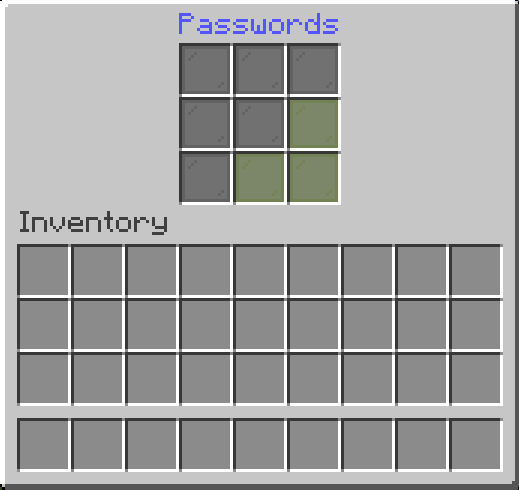
check-type: pattern : The player must enter a pattern like "o x o"
"x x x"
"x x x"
check-type: server
GUI Name
gui-name: Enter Passwords
Set password name
set-password-name: Set Password
Message that will be displayed as the kick reason.
fail-message: The password is incorrect!
When the UI is closed without a password
close-ui-message: You need to enter a password!
Enable welcome message.
welcome-message-enabled: true
Welcome message after login.
welcome-message: Welcome to ExampleServer
Welcome message second line (Only for title)
welcome-message-second: Passwords
Display type for the welcome message: message; actionbar; title
welcome-message-display-type: message
Enable login gamemode.
login-gamemode-enabled: true
Gamemode every player will have upon login: survival, creative, adventure, spectator
login-gamemode: survival
Player password length (for the check-type: player)
player-password-length: 4
Blocked passwords ( only for the check-type: player & server )
blocked-passwords: - 1111
Saves the player inventory on logout and restores it on login. ( !!!!! Waring: When the data folder or the player data in the passwords folder is deleted, the player inventory will be lost !!!!! )
save-player-inventory: false
Saves the player inventory automatically
enable-auto-save: true
Saves the player inventory every 5 minutes (if save-player-inventory is true)
save-player-inventory-intervall: 10 # in minutes ( min 3 )
Invulnerable on login (note: this will prevent fall damage when exploited)
invulnerable-on-login: true
server:
Server password (the password can be any length | for the check-type: server)
password: 1234
Staff password (the password can be any length | for the check-type: server)
staff-password: 8181
Staff permissions (will be given to the player after login)
staff-permissions: - passwords.*
Remove staff permissions on logout
remove-staff-permissions-on-logout: true
Password pattern (for the check-type: pattern)
pattern: - oxo - xxx - xxx ```
---
Commands
Click to view commands
- `/setpassword <Password>` → Set your password. - `/setplayerpassword <Player> <Password>` → Ser a Player's password. - `/logout <Player>` → Logout player.
---
For Developers: Maven/Gradle Setup
Click to view Maven/Gradle setup
Maven: ```xml <dependency> <groupId>cho.info</groupId> <artifactId>passwords</artifactId> <version>(Plugin version)</version> </dependency>
<repositories> <repository> <id>local-repo</id> <url>file:/path/to/my-local-repo</url> </repository> </repositories> ```
Gradle: ```gradle implementation files("$projectDir/lib/passwords-(Plugin version).jar") ```
Gallery
Versions
1.2
release
2.3
release
2.3-fix
release
2.6
release
2.6.2
release
2.1
release
2.2
release
2.5
release
2.4
release
2.6.1
release
1.0
release
2.0
release
0.1.3
release