




1.4
release

PostSpawner
A lightweight Minecraft plugin for managing Monster Spawner
 62
62
PostSpawner
简体中文 | English
PostSpawner
PostSpawner is a lightweight Minecraft plugin for managing monster spawners, providing control over spawner mining and placement.
📚 Features
- ✅ Update Check: Supports silk touch and normal tool mining of spawners - ✅ Update Check: Built-in Chinese and English language files, easily extendable - ✅ Update Check: Supports various actions like command execution, item drops, sound effects, etc. - ✅ Update Check: Compatible with PlaceholderAPI, ItemsAdder, MythicMobs, NeigeItems, Oraxen and more - ✅ Update Check: Fully customizable config and message system - ✅ Update Check: Optional update checking feature
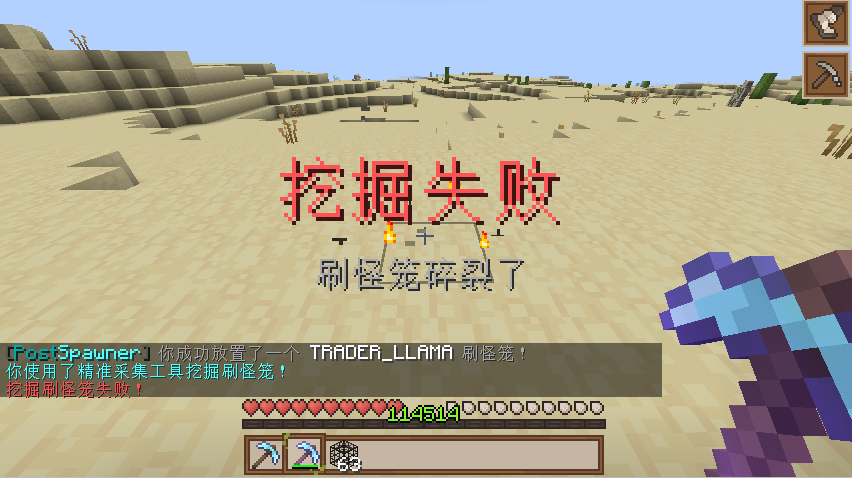
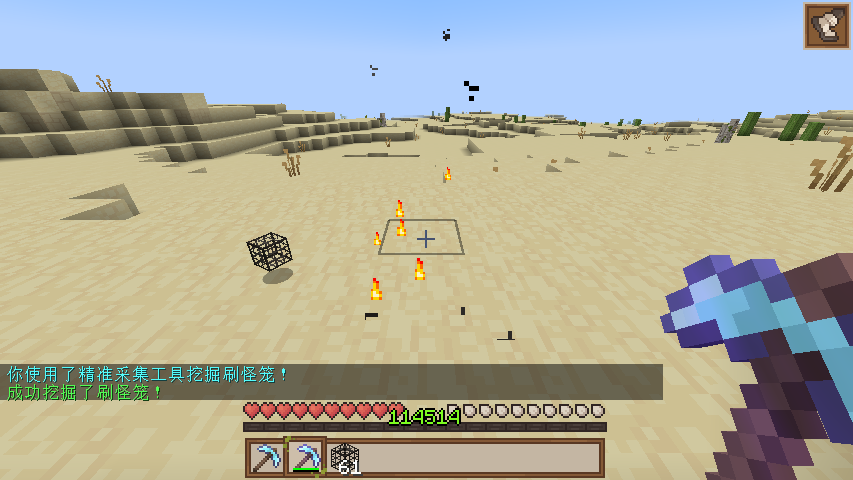
💻 Installation
1. Download the latest PostSpawner.jar 2. Place the plugin in your server's plugins folder 3. Start/Restart the server 4. Edit plugins/PostSpawner/config.yml for customization 5. Use `/ps reload` to reload plugin configuration
🔧 Commands
| Command | Description | Permission | |---------|-------------|------------| | `/ps reload` | Reload plugin config and language files | `postspawner.command.reload` | | `/ps version` | Show version information | `postspawner.command.version` | | `/ps help` | Show help information | `postspawner.command.help` | | `/ps update` | Check for updates | `postspawner.command.update` |
🔒 Permissions
| Permission | Description | Default | |------------|-------------|---------| | `postspawner.use.place` | Place spawners | All players | | `postspawner.use.break` | Break spawners | All players | | `postspawner.command.reload` | Reload command | OP | | `postspawner.command.version` | Version command | All players | | `postspawner.command.help` | Help command | All players | | `postspawner.command.update` | Update command | OP | | `postspawner.admin` | Includes all permissions | OP |
🛠️ Actions
PostSpawner provides a rich action system. Use the following action formats in config:
Format: `[]` for required parameters, `()` for optional parameters
| Action Syntax | Description | Example | |---------------|-------------|---------| | `[command] [command]` | Make player execute command | `[command] spawn` | | `[op] [command]` | Temporarily give player OP to execute command | `[op] gamemode creative` | | `[console] [command]` | Execute command from console | `[console] broadcast Someone mined a spawner!` | | `[sound] [sound] (volume) (pitch)` | Play sound for player | `[sound] BLOCK_ANVIL_LAND 1.0 1.5` | | `[message] [text]` | Send message to player | `[message] &aYou successfully mined a spawner!` | | `[title] [title] (subtitle)` | Show title to player | `[title] &aMining Success &7Got a spawner` | | `[drop_monster_spawner]` | Drop the broken spawner | `[drop_monster_spawner]` | | `[drop] [itemID] (amount)` | Drop item at location | `[drop] DIAMOND 5` | | `[give] [itemID] (amount)` | Give item to player | `[give] DIAMOND_SWORD 1` | | `[buff] [potion] (duration) (level)` | Give player potion effect | `[buff] SPEED 30 2` | | `[money] [action] [amount]` | Control player economy | `[money] give 100`, `[money] take 200`, `[money] set 50` | | `[points] [action] [amount]` | Control player points | `[points] give 100`, `[points] take 200`, `[points] set 50` |
Note: Breaking spawners in creative mode won't trigger any actions.
📦 Item Library Support
When using `[drop]` and `[give]` actions, the following item libraries are supported:
| Library | Format | Example | |---------|--------|---------| | Minecraft | `minecraft:itemID [amount]` | `minecraft:diamond_sword`, `diamond:5` | | ItemsAdder | `itemsadder:itemID [amount]` | `itemsadder:ruby_sword` | | MMOItems | `mmoitems:type:ID [amount]` | `mmoitems:SWORD:EXCALIBUR` | | NeigeItems | `neigeitems:itemID [amount]` | `neigeitems:test_item` | | Oraxen | `oraxen:itemID [amount]` | `oraxen:amethyst_helmet` | | MythicMobs | `mythicmobs:itemID [amount]` | `mythicmobs:special_bow` | | SX-Item | `sxitem:itemID [arg1:arg2...] [amount]` | `sxitem:magic_wand:arg1:arg2` | | Zaphkiel | `zaphkiel:itemID [amount]` | `zaphkiel:legendary_axe` | | CraftEngine | `craftengine:itemID [amount]` | `craftengine:magic_staff` | | AzureFlow | `azureflow:itemID [amount]` | `azureflow:wizard_robe` |
Simplified formats: - Default source is minecraft (can be omitted), e.g. `diamond:5` equals `minecraft:diamond:5` - If amount is 1, can be omitted, e.g. `itemsadder:ruby_sword` equals `itemsadder:ruby_sword 1`
📊 Variables
You can use these built-in variables in actions:
- `%player%` - Player name - `%block_x%` - Block X coordinate - `%block_y%` - Block Y coordinate - `%block_z%` - Block Z coordinate - `%block_world%` - Block world - `%entity_type%` - Entity type
Additionally, if PlaceholderAPI is installed, you can use PlaceholderAPI variables.
📫 Contact
- 
-  <-Click to join
- 
📜 License
This plugin is licensed under GNU General Public License v2.0.