

v1.4.5
release

RPUniverse
Take FiveM roleplay to Minecraft!
 1,24k
1,24k
RPUniverse

RPUniverse
FiveM Roleplay taken to minecraft!

RP Universe is a Minecraft plugin designed to control an entire game server and introduce the concept of role-playing (RP) into Minecraft. It offers control over various game aspects, from movement to communication. The plugin does not contain voice chat but adds functional commands like /status, /status, and /status, which allow players to express their emotions, activities, and statuses.
The job system in RP Universe is fully configurable in-game, providing moderators with the ability to create and edit jobs for players. Server owners have the flexibility to configure how and where to store data - locally (for example, in JSON format) or in a database.
The plugin also offers an API for developers to customize and extend the plugin, and plans for integration with the popular scripting plugin for Minecraft, Skript, are in place.
Additional features of RP Universe include a system to control player interactions with the plugin, a billing system, payments between players, property purchase, a comprehensive banking system, and a localization system.

The RP Universe plugin for Minecraft is sophisticated in its implementation of the /me, /do, and /status commands, similar to those found in FiveM, a modification framework for GTA V.
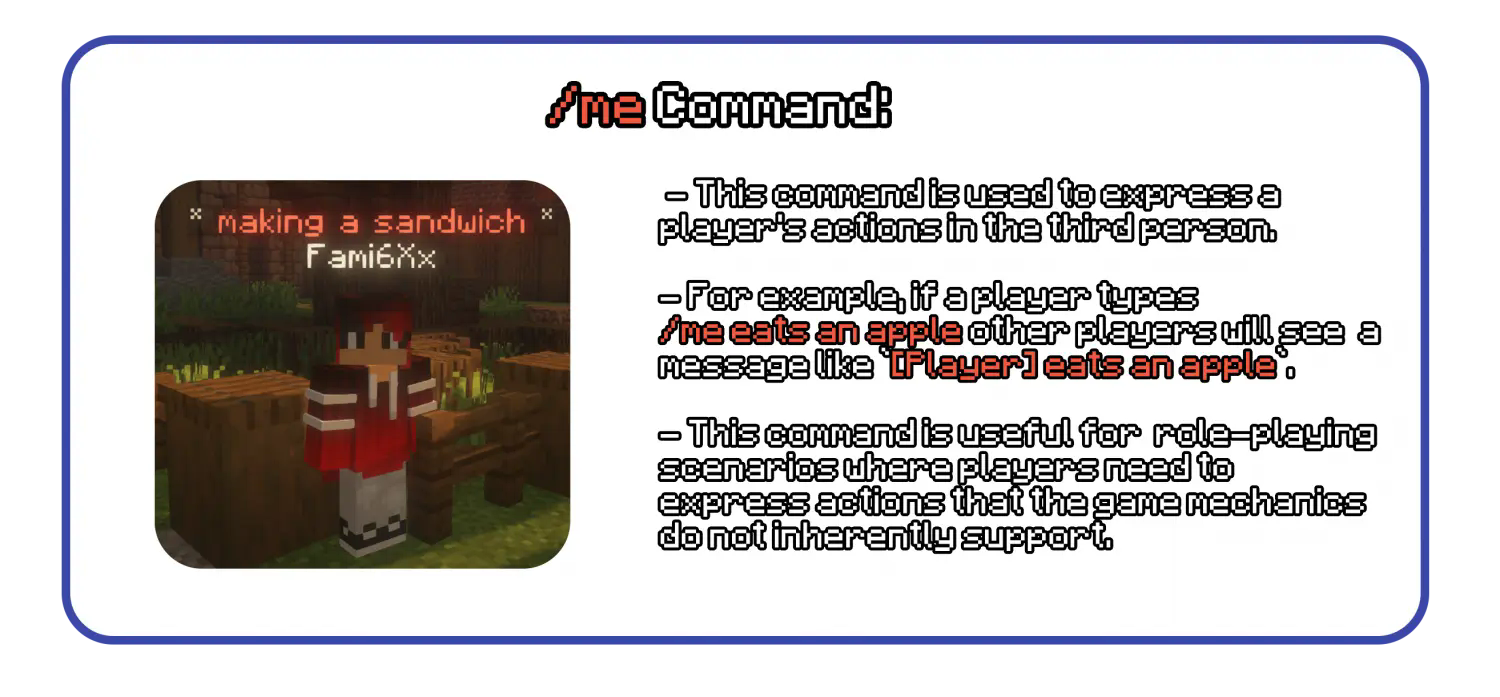
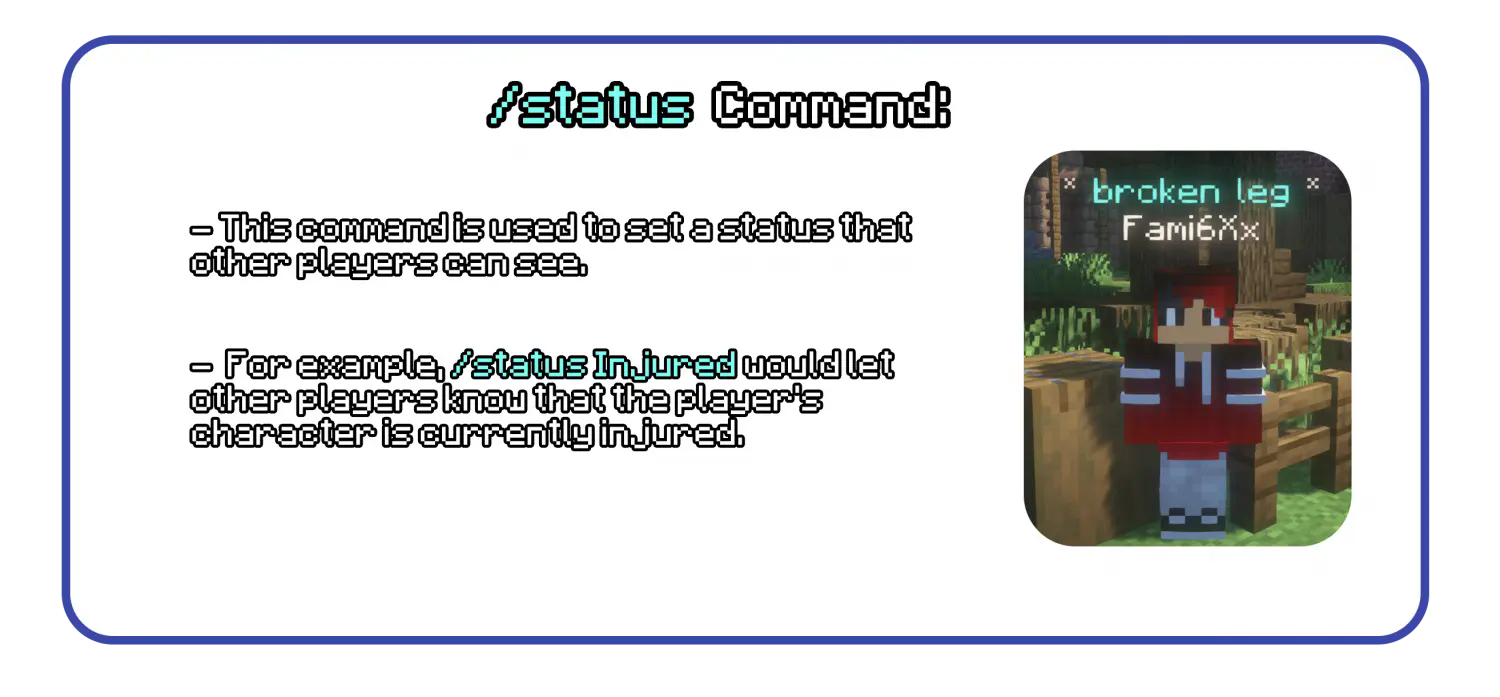
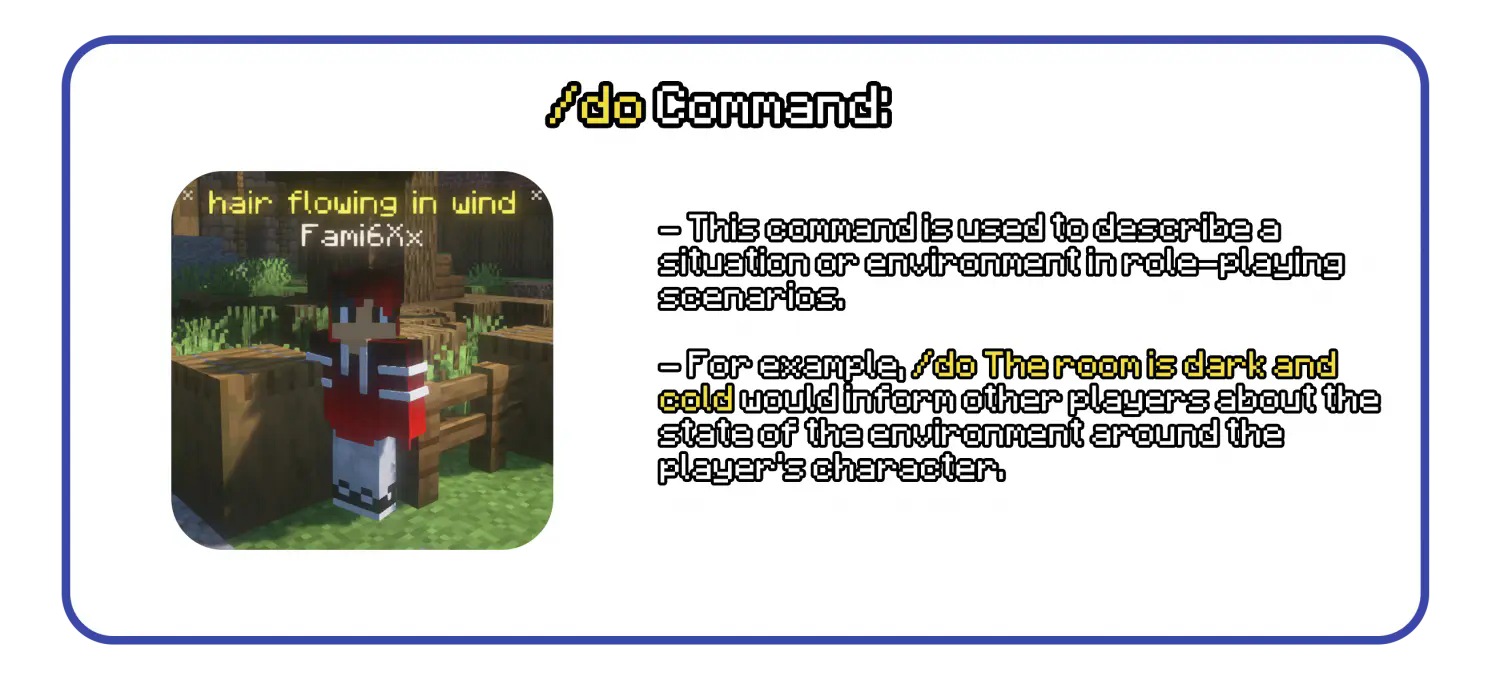
The implementation of these commands in the RP Universe plugin is done in a way that integrates seamlessly with the Minecraft environment. Holograms created by the plugin are visible in the configurable visible range and are not visible through walls so that players can't get information about the players position because of that.
An additional feature is an /settag and /settag for moderators and admins, so that when moderator or builder is doing something that is out of character and isn't in roleplay state right now, they can display it to the other players. These tags are visible through walls.


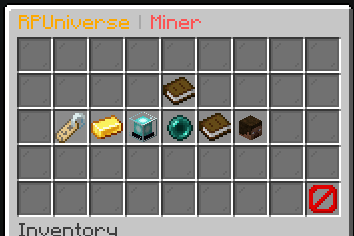
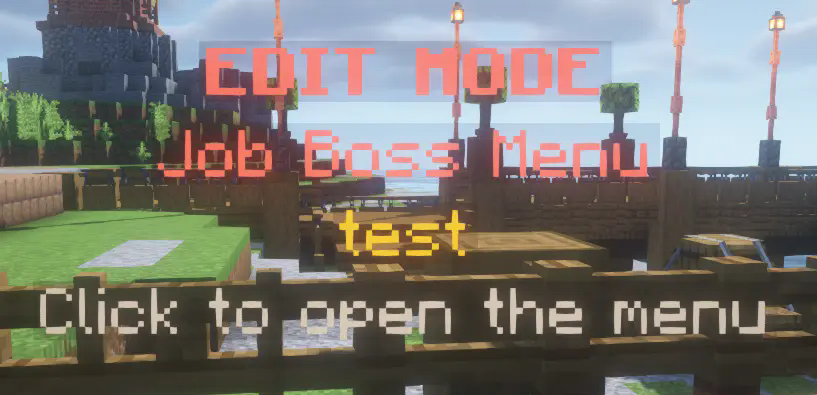
This plugin includes an very easy to use job system, where everything can be created in-game by admins and then some things are modifiable by bosses of the job. Everything is GUI based and can be localized in the locales.yml file generated in the plugins folder.
This is what the admin can see --
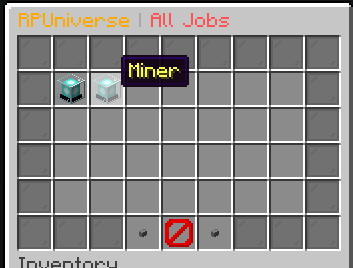
-- This is what player sees --
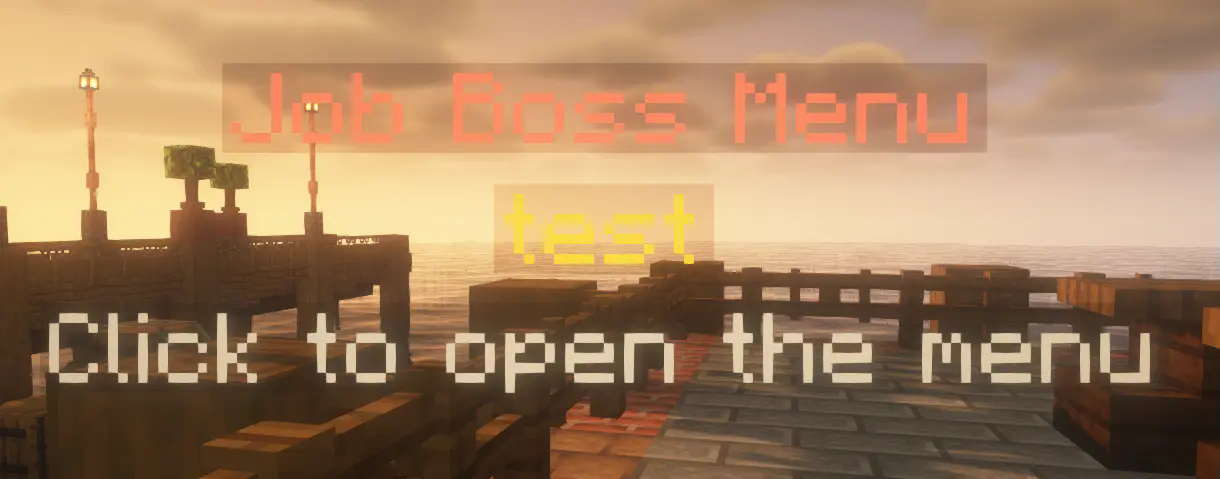


(The upper image is showing the players current selected job with his position)

```yaml
RPUniverse config file
This file contains all the settings for RPUniverse
If you don't know what you are doing, don't touch anything!
If you want to edit something, please stop the server first!
If you have any questions, please contact me on discord: https://discord.gg/SRzxwmBxk5
If there was an update changing something in the config, you need to
delete the config file and restart the server to generate a new one.
version: '0.8'
For any text, color codes are supported (use & instead of §) and RichText is not currently supported
The prefix for all messages (color codes are supported, RichText is not currently supported)
prefix: '&c&lRPU &8»&r'
General settings
bossBarColor: The color of the boss bar (BLUE, GREEN, PINK, PURPLE, RED, WHITE, YELLOW)
hideNicknames: If true, the plugin will hide the nicknames of the players
localOOC: If true, the OOC chat when player just types in the chat is local
localOOCRange: The range in which the OOC chat is visible
localOOCFormat: The format of the local OOC chat
logLocalToConsole: If true, the local OOC chat is logged to the console
globalOOC: If true, the global ooc command is registered
globalOOCFormat: The format of the global OOC chat
general: bossBarColor: RED hideNicknames: true localOOC: true localOOCRange: 15 localOOCFormat: '&b&lLocalOOC &7{player} &8» &r{message}' logLocalToConsole: true globalOOC: true globalOOCFormat: '&a&lGlobalOOC &7{player} &8» &r{message}'
Job settings
preferPermissionsOverModeForEdit: If true, the plugin will prefer permissions over the mode (ADMIN or MODERATOR) for editing jobs
neededModeToEditJobs: The mode needed to edit jobs (ADMIN or MODERATOR)
needsPermissionToHaveMultipleJobs: If true, the player needs the permission rpu.multiplejobs to have multiple jobs
maxJobsPerPlayer: The maximum amount of jobs a player can have
menuRange: The range in which the holograms are visible for the menus (For example boss menus)
distanceToAddToJob: The distance the player has to be near the boss to be added to the job
jobs: preferPermissionsOverModeForEdit: false neededModeToEditJobs: ADMIN needsPermissionToHaveMultipleJobs: true maxJobsPerPlayer: 3 menuRange: 5 distanceToAddToJob: 5
The settings for the holograms
range: The range in which the holograms are visible
timeAlive: The time in seconds the holograms are visible after they are created (For /me, /do etc..)
maximumAbovePlayer: The maximum amount of holograms the player can have above themselves
holograms: range: 15 timeAlive: 10 maximumAbovePlayer: 5
The settings for saving data
saveInterval: The interval in seconds in which the data is saved from save queue
completeSaveInterval: The interval in seconds in which the data is saved completely, ignoring the save queue
selectedSaveMethod: The method used to save the data (currently only json is supported)
data: saveInterval: 60 completeSaveInterval: 600 selectedSaveMethod: json
The settings for the basic needs
enabled: If true, the basic needs are enabled
interval: The interval in seconds in which the basic needs are updated
preferPermissionsOverModeForEdit: If true, the plugin will prefer permissions over the mode (ADMIN or MODERATOR) for editing the basic needs
neededModeToEdit: The mode needed to edit the basic needs (ADMIN or MODERATOR)
removedHunger: The amount of hunger removed every interval
removedThirst: The amount of thirst removed every interval
addedPoop: The amount of poop added every interval
addedPee: The amount of pee added every interval
basicNeeds: enabled: true interval: 60 preferPermissionsOverModeForEdit: false neededModeToEdit: ADMIN removedHunger: 4 removedThirst: 2 addedPoop: 4 addedPee: 2 ```

Implemented features - /me, /do, /status and /doc for roleplaying actions - Holograms are not visible through walls - Using our own raytrace - Isn't resource intensive - Basic needs (Eating, Drinking, Pooping, Peeing) - You can disable this in the config - Managable eatable / drinkable items using /consumables menu - Players need to poop, pee, drink and eat to stay alive, if not the system damages the player. - Job system - Creating of jobs in-game by admins - Job Bank - Player received paychecks from this job go from jobs bank - Job positions editable by boss of the job himself, without any need of config editation - Players are able to have multiple job, can be added only to VIPs as it is permission based. - Job locks for doors and chests - Player locks - Literally everything is localizable, even the items in the menus can be localized to your - language so that players don't need to be able to speak english - Data handlers - JSON Data handler - Developer API - Property system - In-game language editor (/rpu languages)
Incoming features - Skript integration - MySQL Data Handler

As said in what is RPUniverse, this plugin provides a very extensible API so that you can add almost anything and make your server even more unique then ever!
For integrating RPUniverse into your plugin, just add it from jitpack.io RPUniverse.. The javadocs are in the Github Repository.
Versions
1.3.1
release
1.2.1
release
v1.4.4
release
v1.4.2
release
1.0
release
1.02
release
0.9
release
1.2.4
release
1.1.2
release
1.3.0
release
v1.4.3
release
0.95
release
0.91
release
v1.5.0
release
1.2.1
release
1.3.2
release
0.8.1
release
1.3.0
release
1.3.2
release