

1
beta
Ruins of the Past
Datapack which overhauls archeology, pottery, and adds runes!
 358
358
Ruins of the Past
Fixed Buugs :D
<p align="center" style="text-align: center;"> <a href="https://discord.com/invite/YxRWAPUtDt"><img src="https://raw.githubusercontent.com/lukejw12/uistuff/refs/heads/main/mineraft/icon/discord.png" alt="Discord" style="margin: 5px 10px;"></a> <a href="https://github.com/lukejw12"><img src="https://raw.githubusercontent.com/lukejw12/uistuff/refs/heads/main/mineraft/icon/github.png" alt="GitHub" style="margin: 5px 10px;"></a> <a href="https://ko-fi.com/itsjustluke"><img src="https://raw.githubusercontent.com/lukejw12/uistuff/refs/heads/main/mineraft/icon/kofi.png" alt="Ko-Fi" style="margin: 5px 10px;"></a> </p>
<img src="https://raw.githubusercontent.com/lukejw12/uistuff/refs/heads/main/rotp/banner/stretch-icon.png" alt="Icon Seperator" style="margin: 5px 10px;">
<img src="https://raw.githubusercontent.com/lukejw12/uistuff/refs/heads/main/mineraft/text/description.png" alt="Description" style="margin: 5px 10px;">
Adds mysterious ancient structures, a full pottery system, and rune crafting to your survival world! This datapack introduces new structures to explore, functional blocks to craft with, and a deep pottery & rune system to master.
Since this is a Datapack and Resource pack, both can be installed once server side and will apply to all players that join, voiding the need for each player to install the pack!
<img src="https://raw.githubusercontent.com/lukejw12/uistuff/refs/heads/main/rotp/banner/stretch.png" alt="Seperator" style="margin: 5px 10px;"> <img src="https://raw.githubusercontent.com/lukejw12/uistuff/refs/heads/main/mineraft/text/features.png" alt="Features" style="margin: 5px 10px;">
> ### Forgotten Structures > - *Explore 3 mysterious structures scattered across your world!* > > - Desert Dig Site – A jungle pyramid filled with traps and loot > > - Desert Dig Site – An underground tomb with new pottery sherds > > - Desert Dig Site – An archaeological site where you can discover ancient tablets
> ### New Blocks > - *Craft & discover 5 new functional blocks!* > > - Runic Altar – Display your items, and dye it to match your style > > - Runic Altar – A decorative block > > - Runic Altar – Analyze ancient tablets to discover runes or structure maps > > - Runic Altar – Craft brand new pottery > > - Runic Altar – Imbue items with runes using XP
> ### Pottery System > - *Create pots with form and function!* > > - 6 base pot types: Thin, Small, Square, Large, Vase, and Slab > > - Dye system with 32 colors > > - Sherds on all 4 sides, with brand new sherds to collect > > - Crafted using bundles, reinforced bundles, Eye of Ender, TNT, and more
> ### Rune Crafting > - *Research tablets and apply powerful runes!* > > - Ancient Tablets can be researched to unlock runes or reveal maps to structures > > - Use the Runic Altar to apply runes to items (1 rune per item, permanent) > > - XP is consumed through the transcriber system
<img src="https://raw.githubusercontent.com/lukejw12/uistuff/refs/heads/main/rotp/banner/stretch.png" alt="Seperator" style="margin: 5px 10px;"> <img src="https://raw.githubusercontent.com/lukejw12/uistuff/refs/heads/main/mineraft/text/faq.png" alt="Faq" style="margin: 5px 10px;">
Q. How do I download the pack?
> #### A. Install the datapack in the vanilla world creation menu! ¹
Q. I cant find the resource pack!
> #### A. Go to the Versions tab, find the datapack version you want and click the name, then scroll to the bottom and install the resource pack. ²
Q. The Transcriber / Rune system feels incomplete?
> #### A. The Transcriber is still being actively reworked and will receive updated mechanics in future versions!
Q. I experienced a bug, what do I do?
> #### A. Join the Discord and file a bug report :D
<img src="https://raw.githubusercontent.com/lukejw12/uistuff/refs/heads/main/rotp/banner/stretch.png" alt="Seperator" style="margin: 5px 10px;">
<img src="https://raw.githubusercontent.com/lukejw12/uistuff/refs/heads/main/mineraft/text/jointhediscord.png" alt="Join The Discord" style="margin: 5px 10px;">
¹ How To Download!
Data Pack: 1. Click the latest Datapack version. 2. Scroll down and Download the Primary file. 3. If you want to create a World, go to Singleplayer > Create New World > Data Packs > Open Pack Folder. (It is not recommended to put it in an already existing world!) 4. Copy/Cut and Paste the downloaded file there. 5. Open/Create your world. 6. Note: You need to also install the Required Resource Pack.
Required Resource Pack: 1. Click the Datapack featured version. 2. Scroll down and Download the Required Resource Pack. 3. Open Minecraft and go to Options > Resource Packs > Open Pack Folder. 4. Copy/Cut and Paste the downloaded file there. 5. Activate the Resource Pack. (you can reload the resources with f3+t ingame)
See image below for reference
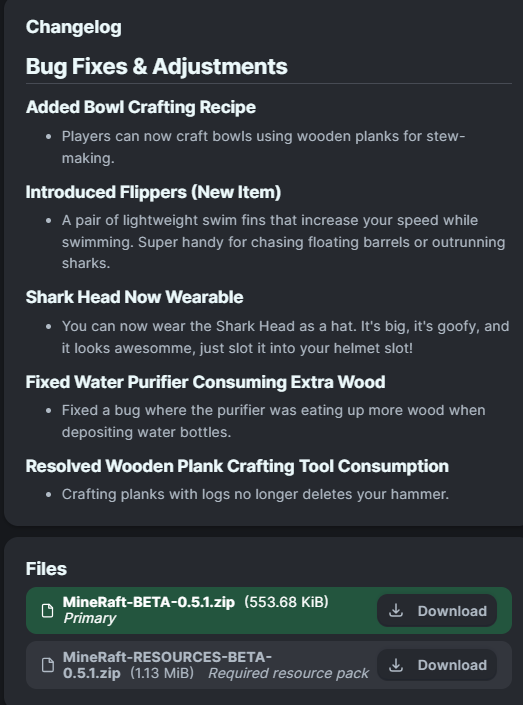
² How to get Resource Pack!

* Release Dates
There is no SET date for update releases, join the discord for more info!
Cool / Semi Secret Advancement
Stack a dyed Pedestal on top of itself 4 times to unlock a cool advancement.
Gallery
Versions
1.1
beta
1.5.1+mod
beta
1.4+mod
beta
1.5.1
beta
1.5
beta
1.1
beta
1.4
beta
1.5.1
beta
1.5
beta
1.4
beta
1.2
beta
1.3
beta
1.3
beta
1.3+mod
beta
1.2
beta
1
beta