

1.2.0
release

Show Me
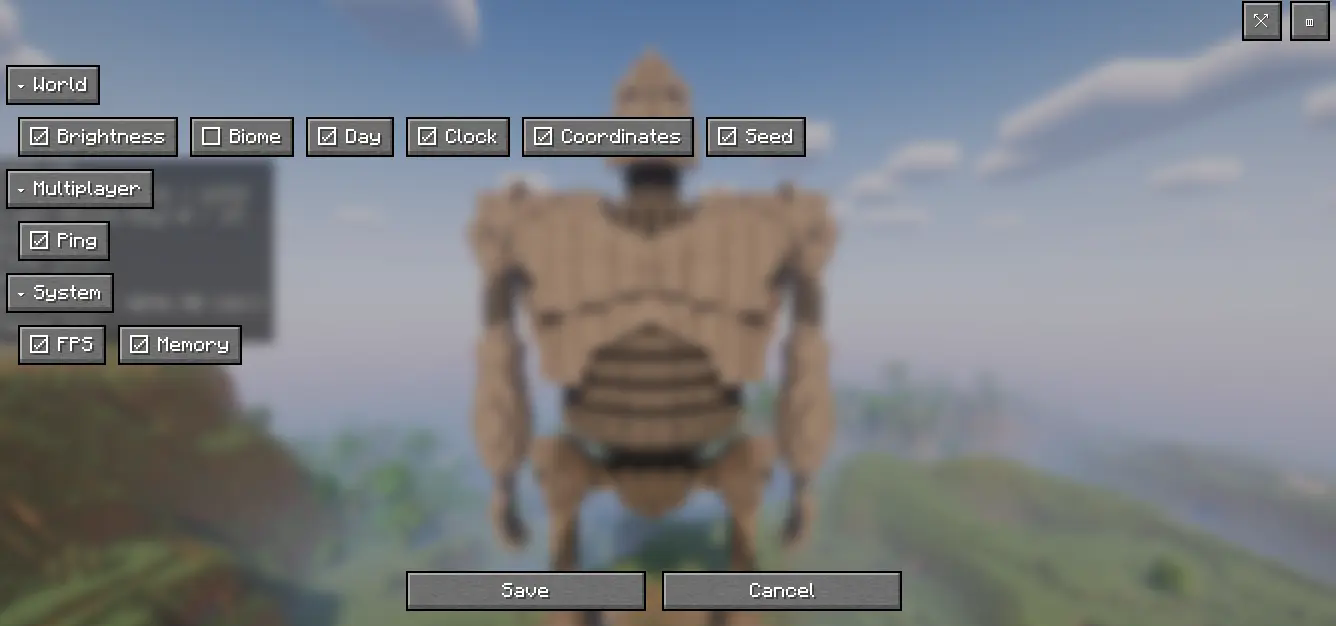
Show only the stats you want (FPS, coords, days, etc.)—modular HUD
 2,57k
2,57k
Show Me
🌐 Supported Languages
Show Me is now available in multiple languages to enhance the player experience:
- 🇺🇸 English (EN-US) - 🇧🇷 Portuguese (Brazil - PT-BR) - 🇪🇸 Spanish (Spain - ES-ES) ✅ New!
All HUD texts, menus, and settings are fully translated. Language is selected automatically based on the Minecraft client language.
<h2>🇺🇸 EN-US</h2> <p><strong>Show Me</strong> is a lightweight, fully customizable HUD for players who find the F3 screen too noisy. Instead of a massive debug panel, you choose exactly what to display and where.</p>
<h3>✨ Features</h3> <ul> <li><strong>Modular Display:</strong> Show only what you want – FPS, Coordinates, Brightness, Biome, World Day, Time of Day, Ping, World Seed, RAM usage, and more.</li> <li><strong>Two View Modes:</strong> Normal or Compact.</li> <li><strong>Live Settings:</strong> Adjust everything in-game, no restart required.</li> <li><strong>Customizable HUD:</strong> Drag and drop to position HUD elements anywhere on the screen.</li> <li><strong>Clean Visuals:</strong> Readable fonts and minimalistic style.</li> <li><strong>Hotkeys:</strong> Quickly hide/show or open settings.</li> </ul>
<h3>🧭 Quick Start</h3> <ol> <li>Open the <strong>Show Me</strong> settings in-game.</li> <li>Select your preferred modules (e.g., FPS + Coordinates).</li> <li>Choose Normal or Compact mode and position the HUD where you like.</li> <li>Play!</li> </ol>
<h3>⌨️ Default Hotkeys</h3> <ul> <li><strong>Hide/Show HUD:</strong> X</li> <li><strong>Open Settings:</strong> Z</li> </ul>
<hr>
<h2>🇪🇸 ES-ES</h2> <p><strong>Show Me</strong> es un HUD ligero y totalmente personalizable para jugadores que consideran que la pantalla F3 es demasiado cargada. En lugar de un panel de depuración enorme, tú decides exactamente qué mostrar y dónde.</p>
<h3>✨ Características</h3> <ul> <li><strong>Visualización Modular:</strong> Muestra solo lo que quieras – FPS, Coordenadas, Nivel de luz, Bioma, Día del mundo, Hora del día, Ping, Seed del mundo, Uso de RAM y más.</li> <li><strong>Dos Modos de Vista:</strong> Normal o Compacto.</li> <li><strong>Configuración en Vivo:</strong> Ajusta todo dentro del juego, sin necesidad de reiniciar.</li> <li><strong>HUD Personalizable:</strong> Arrastra y coloca los elementos del HUD en cualquier parte de la pantalla.</li> <li><strong>Estética Limpia:</strong> Tipografías legibles y estilo minimalista.</li> <li><strong>Teclas Rápidas:</strong> Oculta/muestra el HUD o abre la configuración al instante.</li> </ul>
<h3>🧭 Inicio Rápido</h3> <ol> <li>Abre la configuración de <strong>Show Me</strong> dentro del juego.</li> <li>Selecciona los módulos que prefieras (por ejemplo: FPS + Coordenadas).</li> <li>Elige el modo Normal o Compacto y coloca el HUD donde más te guste.</li> <li>¡A jugar!</li> </ol>
<h3>⌨️ Teclas Rápidas por Defecto</h3> <ul> <li><strong>Ocultar/Mostrar HUD:</strong> X</li> <li><strong>Abrir Configuración:</strong> Z</li> </ul>
<hr>
<h2>🇧🇷 PT-BR</h2> <p><strong>Show Me</strong> é um HUD leve e totalmente personalizável para jogadores que acham a tela F3 muito poluída. Em vez de um painel de depuração gigante, você escolhe exatamente o que exibir e onde.</p>
<h3>✨ Características</h3> <ul> <li><strong>Exibição Modular:</strong> Mostre apenas o que quiser – FPS, Coordenadas, Brilho, Bioma, Dia do Mundo, Horário do Dia, Ping, Seed do Mundo, Uso de RAM e muito mais.</li> <li><strong>Dois Modos de Visualização:</strong> Normal ou Compacto.</li> <li><strong>Configuração ao Vivo:</strong> Ajuste tudo dentro do jogo, sem precisar reiniciar.</li> <li><strong>HUD Personalizável:</strong> Arraste e posicione os elementos do HUD em qualquer lugar da tela.</li> <li><strong>Visual Limpo:</strong> Fontes legíveis e estilo minimalista.</li> <li><strong>Teclas de Atalho:</strong> Oculte/mostre rapidamente ou abra as configurações.</li> </ul>
<h3>🧭 Início Rápido</h3> <ol> <li>Abra as configurações do <strong>Show Me</strong> no jogo.</li> <li>Selecione os módulos desejados (ex.: FPS + Coordenadas).</li> <li>Escolha o modo Normal ou Compacto e posicione o HUD onde preferir.</li> <li>Jogue!</li> </ol>
<h3>⌨️ Teclas de Atalho Padrão</h3> <ul> <li><strong>Ocultar/Exibir HUD:</strong> X</li> <li><strong>Abrir Configurações:</strong> Z</li> </ul>