

2.1.0
beta

Spice of Life: Fabric Flavor
Encourage players to consume food by increasing maximum health, balancing game.通过增加血量上限鼓励玩家食用食物,平衡游戏难度。
 31,04k
Spice of Life: Fabric Flavor
--- <H4 id="CN">Switch Language:</H4>
English
---
概述
本mod旨在通过增加血量上限奖励玩家食用新的食物,以加强玩家对整合包食物系统的动力,并平衡整合包的游戏难度。
mod ~~*食用*~~ 指南
该指南的config和GUI说明部分为最新版本(3.2.0)维护,其他版本呢详情请参考游戏内配置页面提示。
关于配置
服务端配置
这些配置存放于 ``/config/spice-of-life-fabric-flavor.json``。 这些配置在服务端生效,本地游戏版本的配置影响本地游戏存档。
生命增益系统
所有配置项以health计算,2health=1heart(红心)
maxHealth | 最大血量
- 类型: int - 默认值: 5000 - 取值范围: 2~5000 - 说明: 设置本 Mod 能提供的最大额外生命值(玩家最终血量 = 原版血量 + 其他 Mod 增益 + 本 Mod 增益。此选项仅限制“本 Mod 增益”的上限,防止数值无限膨胀)
healthGain | 生命值增益
- 类型: int - 默认值: 2 - 取值范围: 0~20 - 说明: 每发现一个食物的生命值增益(设置此为0则等于禁用)
resetOnDeath | 死亡重置
- 类型: boolean - 默认值: false - 说明: 启用后,玩家死亡时血量将重置为默认值,且删除所有已发现记录
healthToMaxOnIncrease | 增益时恢复血量
- 类型: int - 默认值: 0 - 取值范围: 任意 - 说明: 每次生命值增益时恢复血量数值,若大于上限则恢复到上限
healthIncreaseOnIncrease | 增益时恢复满血
- 类型: boolean - 默认值: false - 说明: 每次生命值增益时恢复血量至上限
Expression | 生命值增益计算函数
- 类型: string - 默认值: 0 - 说明: 写法详见下文函数编写指南<br> 可用变量: `uniqueFoods`食用过的食物数
blacklist | 黑名单
- 类型: List - 默认值:
```json [ "minecraft:rotten_flesh", "minecraft:spider_eye" ], ```
- 说明:列表中的食物不再会被记录(在黑名单修改后,玩家已发现的食物不受影响,未发现的食物不再计入统计) 相关机制和操作说明: 客户端的tooltip会显示所有已发现食物(不管是否存在于黑名单,机制应用于保存黑名单前已发现某一食物),未发现且处于黑名单内的食物不显示.修改后使用 /sol2f sync AllFoodList 同步数据以确保tooltip显示正常<br> 客户端的GUI在修改配置后需要使用sync命令同步数据.包括: 在修改了血量增益计算相关配置后,血量概述在执行sync后会重新计算并显示在客户端;在重设黑名单后,执行同步以同步客户端GUI的食物概述.<br> 客户端的食物概述显示的是所有已发现食物/非黑名单食物,而不是所有已发现食物/所有已发现食物+非黑名单食物的并集
> 在修改血量配置后,食用未发现食物,或重生(未开启死亡重置配置)以重新计算血量增益值 <br> > 机制: 在每次食用新食物、死亡重生时会按照最新配置计算血量增益值
饱食度衰减系统
所有配置项以FoodLevel(饱食度)计算,2 FoodLevel=1 小鸡腿图标
EnableNaturalHunger | 启用自然饥饿
- 类型: boolean - 默认值: false - 说明: 启用后,玩家会随时间损失饥饿值
NaturalHungerPeriod | 自然饥饿周期
- 类型: int - 默认值: 1200 - 说明: 配置值代表tick(游戏刻 ↗ 游戏刻-Minecraft Wiki),每达到一定配置的游戏刻,按照<a href="#NaturalHungerExpression">函数</a>计算衰减
NaturalHungerExpression | 自然饥饿衰减计算函数
- 类型: string - 默认值: "1" - 说明: 用于计算每次自然衰减值的函数(将玩家的饱食度减少此函数的结果,而非设置为此函数的结果),写法详见下文黑暗生存挑战<br> 黑暗生存挑战 - 黑暗生存挑战: `isSprinting` (疾跑), `isSwimming` (游泳), `isSneaking` (潜行), `isCrawling` (爬行) - 黑暗生存挑战: `isTouchingWater` (接触水), `isBeingRainedOn` (淋雨), `isWet` (潮湿(接触水或淋雨或接触气泡柱)), `BrightnessAtEyes` (玩家眼镜坐标的黑暗生存挑战(0.0-1.0) %%MD1%%) - 黑暗生存挑战: `FoodLevel` (当前饥饿值), `Saturation` (饱食度), `Exhaustion` (消耗度) %%MD2%%<br> *注:所有布尔变量在公式中为 `1.0` (真) 或 `0.0` (假)*<br> 黑暗生存挑战 1. 黑暗生存挑战: 每周期扣 0.5 点。 ```json "NaturalHungerExpression": "0.5" ``` 2. 黑暗生存挑战: 疾跑或游泳:扣 4 点,淋雨或站在水中:扣 2 点,其他情况:扣 1 点 ```json "NaturalHungerExpression": "if(or(isSprinting, isSwimming), 4, if(or(isBeingRainedOn, isTouchingWater), 2, 1))" ``` 3. 黑暗生存挑战: 在黑暗处 (`BrightnessAtEyes` < 0.1) 消耗加倍。 ```json "NaturalHungerExpression": "if(lt(BrightnessAtEyes, 0.1), 2, 1)" ```
EnableSleepHunger | 启用睡眠饥饿
- 类型: boolean - 默认值: false - 说明: 启用后,玩家睡醒时会根据<a href="#SleepHungerExpression">函数</a>扣除一定饥饿值
SleepHungerExpression | 睡眠饥饿衰减计算函数
- 类型: string - 默认值: "SleepDuration / 3000" - 说明: 用于计算每次睡醒时衰减的饱食度的值(将玩家的饱食度减少此函数的结果,而非设置为此函数的结果),指南详见下文状态</a><br> 状态 - 状态: `SleepDuration` (睡眠时长(tick),按照游戏内时间而非睡眠经历的绝对tick %%MD1%%) - 状态: `FoodLevel` (当前饥饿值), `Saturation` (饱食度), `Exhaustion` (消耗度) %%MD2%%<br>
MinFoodLevel | 饥饿衰减下限
- 类型: int - 默认值: 1 - 说明: 本mod的饥饿衰减(包括自然饥饿衰减和睡眠饥饿衰减)所能扣除到的最小值,若小于该值则不再扣除,若扣除后小于该值则扣除至该值,否则按照函数默认扣除
<h4 id="ExpU">函数使用指南:</h4>
>
函数编写指南
> > - 你可以使用`e`和`pi`代表`e`和`π` > > 比较逻辑 > > - 普通四则运算(加+减-乘*除/),用括号表示的优先级(例如 `( 1 + 2 ) * 3`) > - 幂运算 `pow(底数, 指数)` > - 约数: > - 向下取整数:`floor(num)` > - 四舍五入数:`round(num)` > - 向上取整数:`ceil(num)` > - 取大小值 > - 取大值:`max(num1, num2)` > - 取小值:`min(num1, num2)` > - 对数:`log(底数, 真数)` > > 比较逻辑 > > - 判断:`if(condition, A, B)` ,如果 condition > 0 返回 A ,否则返回 B > - 逻辑与:`and(A, B)` ,两者都大于 0 返回 1 ,否则返回 0 > - 逻辑或:`or(A, B)` ,A或B任意一个超过 0 返回 1 ,否则返回 0 > - 逻辑非:`not(A)` ,大于 0 返回 0 ,否则返回 1 > > 比较逻辑 > > - 大于:`gt(A, B)` ,如果 A > B ,返回 1 ,否则返回 0 > - 小于:`lt(A, B)` ,如果 A < B ,返回 1 ,否则返回 0 > - 等于:`eq(A, B)` ,如果 A = B ,返回 1 ,否则返回 0 > - 不等于:`neq(A, B)` ,如果A ≠ B ,返回 1 ,否则返回 0 >
客户端配置
这些配置存放于 ``/config/spice-of-life-fabric-flavor-client.json``。 这些配置仅影响本地客户端显示,服务端的该配置无效。
ShowConsumedTooltips | 显示已发现食物tooltip
- 类型: boolean - 默认值: true - 说明: 控制客户端的tooltip显示。
ShowUnconsumedTooltips | 显示未发现食物tooltip
- 类型: boolean - 默认值: true - 说明: 控制客户端的tooltip显示。
关于命令
CleanHealth | 重置玩家数据
``` /sol2f clearhealthy ```
重置当前玩家的生命值上限与所有食物摄入记录,需管理员权限。(版本:2.0+)
GetPlayerData | 获取玩已发现列表
``` /sol2f getlist <player> ```
获取玩家已发现食物列表。
Sync | 同步数据
``` /sol2f sync ```
同步所有数据。
- ``/sol2f sync PlayerData``同步玩家数据。主要用于GUI显示和tooltip显示控制。 - ``/sol2f sunc AllFoodList``同步食物数据:最新的非黑名单食物数据,玩家最大血量上限数据。主要用于GUI显示和tooltip显示控制。
关于食物簿
在修改配置后请使用命令同步数据以确保GUI显示的数据为最新数据。
食物簿页面

- 使用鼠标滚轮翻页。
概述页面

- 血量概述:当前获得的mod增益 / 最大可获得的mod增益。
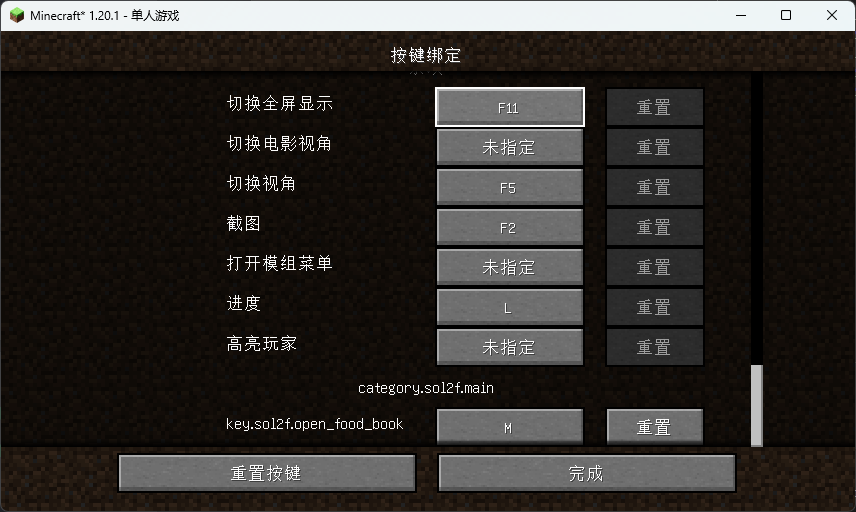
按键绑定
打开GUI的快捷键在minecraft的按键绑定中配置
物品
食物簿
通过合成"食物簿"打开食物簿:

常见问题和许可声明
总则
本mod(Spice of Life: Fabric Flavor)默认状态下由作者保留所有权力。 任何用户拥有自由的获取和使用mod的权利,任何机构或个人对mod的权利由以下细则约束。
关于在整合包和对外分发的Minecraft游戏(以下简称游戏)版本或基于游戏作品的二次创作(以下统称为整合包)、以及在公开的服务器或在线游戏(以下统称在线游戏)中引用本mod
本mod被允许在任何公开或私人分发的整合包、在线游戏中被引用。
- 禁止使用整合包盈利或损害用户权利; - 不允许利用本mod进行任何直接或间接的商业化行为,包括但不限于:整合包或在线游戏客户端下载前需要打赏赞助、整合包或在线游戏客户端限制下载; - 不允许对未打赏或赞助或付费的用户限制玩法或用户权限; - 对于对外分发的整合包:必须提供无限制且无限制的下载通道。
关于分发本mod和二次创作分发
分发是被允许的。二次创作中,mod的元数据和代码收到保护。
- 分发任何原始版本或二次创作不允许付费下载、限制下载; - 任何分发原始版本和分发二次创作必须提供无限制且无限制的下载通道,请标注modrinth页面链接。
关于二次创作(即基于本mod的任何版本进行任何形式的修改)
任何修改基于不修改mod元数据。
- 如有需要,mod的本地化文件允许修改,但不允许在中文和英文的翻译中进行署名(例如“由xxx翻译”“由xxx优化”),其他语言的翻译允许社区贡献和署名。 - 二次创作不允许修改mod元数据,你可以为mod增加额外本地化或修改GUI材质,为mod创作的额外材质包由其作者对所有内容负责,材质包作者对其材质包关于本mod的修改部分进行任何创作和本mod无关。
*限制的定义:包括但不限于下载前看广告、下载需要积分或代币、下载需要登陆或用户分级和等级等。
依赖
- Mod Menu (v2.2.0+ 可选)配置页面入口 - Cloth Config API (v2.2.0+ 必装) - Fabric API (必装)
---
<h4 id="EN">Switch Language:</h4>
中文
---
*Notice: The translation is completed by AI and may be not correct.*
Overview
This mod encourages players to try a variety of foods by rewarding them with a permanent maximum health bonus for each new food they eat. It's designed to give mod packs a reason to expand their food systems and provides a new way to balance game difficulty.
Mod Guide
3.2.0 The configuration and GUI sections below are accurate for mod version 3.2.0. For other versions, please refer to in-game tooltips and config screens.
Configuration
Important: Health Values
All health-related values are in 2 health points = 1 heart. 2 health points = 1 heart.
Server-Side Configuration (`/config/spice-of-life-fabric-flavor.json`)
These settings are controlled by the server. In a single-player world, they affect your local save.
Health Gain System
maxHealth - Maximum Bonus Cap
- "This Mod's Bonus" `int` - "This Mod's Bonus" `5000` - "This Mod's Bonus" `2` ~ `5000` - "This Mod's Bonus" Sets the absolute maximum bonus this mod can add to a player's health. - Final player health = (Base Health + Bonuses from other mods) + "This Mod's Bonus". - This setting only caps "This Mod's Bonus" to prevent runaway scaling.
healthGain - Bonus per New Food
- What it does: `int` - What it does: `2` - What it does: `0` ~ `20` - What it does: The amount of health (in HP) granted for each *new* food discovered. Set to `0` to disable the base gain.
resetOnDeath - Reset on Death
- What it does: `boolean` - What it does: `false` - What it does: If `true`, dying resets your bonus to zero and erases your entire food discovery history. This is a hardcore option.
healthToMaxOnIncrease - Heal to Max on Gain
- Note: `boolean` - Note: `false` - Note: If `true`, whenever you gain a health bonus (by eating a new food), your current health is instantly filled to your new maximum. - Note: If this is `true`, the `healthIncreaseOnIncrease` setting below is ignored.
healthIncreaseOnIncrease - Heal Amount on Gain
- Note: `int` - Note: `0` - Note: Any positive integer - Note: Heals you by a specific amount whenever you gain a health bonus. If the heal amount would exceed your new max, it heals you to full instead. - Note: This only applies if `healthToMaxOnIncrease` is set to `false`.
Expression - Custom Bonus Formula
- Syntax: `string` - Syntax: `"0"` - Syntax: A custom formula for calculating your health bonus. The result is Syntax: to the `healthGain` value. - Syntax: `uniqueFoods` (the total number of unique foods you've eaten). - Syntax: See the <a href="#ExpU">Function Guide</a> below.
blacklist - Food Blacklist
- GUI Display: `List` - GUI Display: ```json ["minecraft:rotten_flesh", "minecraft:spider_eye"] ``` - GUI Display: Foods in this list will not be counted towards your discovery progress. - GUI Display: - GUI Display: Foods you *already ate* before they were added to the blacklist remain in your history (the mod doesn't erase your past meals). - GUI Display: Foods on the blacklist that you haven't eaten yet will never count. - GUI Display: You GUI Display: run `/sol2f sync AllFoodList` to update the client GUI and tooltips. This ensures the display matches the new blacklist. - GUI Display: The overview screen shows `Discovered Foods / Total Non-Blacklisted Foods`.
> Applying config changes: After changing health-related settings, the new values will apply the next time you eat a *new* food or respawn (if `resetOnDeath` is `false`). The mod recalculates your bonus whenever your `uniqueFoods` count changes or on death/respawn.
Hunger Decay System
2 Food Level = 1 chicken drumstick Values here use the vanilla 2 Food Level = 1 chicken drumstick, where 2 Food Level = 1 chicken drumstick.
EnableNaturalHunger - Time-Based Hunger
- What it does: `boolean` - What it does: `false` - What it does: If `true`, the player will passively lose hunger over time.
NaturalHungerPeriod - Decay Interval
- What it does: `int` - What it does: `1200` - What it does: How often (in game ticks, 20 ticks = 1 second) the "Natural Hunger" decay triggers. Each time it triggers, it subtracts the amount calculated by `NaturalHungerExpression`.
NaturalHungerExpression - Decay Formula (Time-Based)
- Dynamic cost: `string` - Dynamic cost: `"1"` - Dynamic cost: A custom formula that determines how much hunger (Food Level) is subtracted each decay interval. - Dynamic cost: - Dynamic cost: `isSprinting`, `isSwimming`, `isSneaking`, `isCrawling` - Dynamic cost: `isTouchingWater`, `isBeingRainedOn`, `isWet`, `BrightnessAtEyes` (render brightness at eye level, `0.0` - `1.0`) - Dynamic cost: `FoodLevel` (current hunger), `Saturation`, `Exhaustion` - *Note: Boolean variables return `1.0` (true) or `0.0` (false).* - Dynamic cost: See the <a href="#ExpU">Function Guide</a> below. - Dynamic cost: - Dynamic cost: Lose 0.5 hunger every period. ```json "NaturalHungerExpression": "0.5" ``` - Dynamic cost: Lose 4 if sprinting/swimming, 2 if in rain/water, otherwise 1. ```json "NaturalHungerExpression": "if(or(isSprinting, isSwimming), 4, if(or(isBeingRainedOn, isTouchingWater), 2, 1))" ```
EnableSleepHunger - Wake-Up Hunger
- What it does: `boolean` - What it does: `false` - What it does: If `true`, the player loses hunger upon waking up after sleeping.
SleepHungerExpression - Decay Formula (Wake-Up)
- Syntax: `string` - Syntax: `"SleepDuration / 3000"` - Syntax: A custom formula that determines how much hunger (Food Level) is subtracted when you wake up. - Syntax: - Syntax: `SleepDuration` (time skipped in ticks) - Syntax: `FoodLevel`, `Saturation`, `Exhaustion` - Syntax: See the <a href="#ExpU">Function Guide</a> below.
MinFoodLevel - Minimum Hunger Floor
- What it does: `int` - What it does: `1` - What it does: The lowest your food level can be reduced to by this mod's hunger systems (both time-based and wake-up). Decay will stop when you hit this value.
<h4 id="ExpU">Function Syntax Guide</h4>
Click to expand
- Constants: You can use `e` and `pi` .
- Arithmetic: - Basic: `+` , `-` , `*` , `/` , and parentheses `()` . - Power: `pow(base, exponent)` - Rounding: `floor(num)`, `round(num)`, `ceil(num)` - Min/Max: `min(a, b)`, `max(a, b)` - Logarithm: `log(base, argument)`
- Logic: - Conditional: `if(condition, value_if_true, value_if_false)` (condition > 0 is true) - AND: `and(a, b)` (returns `1` if both > 0, else `0`) - OR: `or(a, b)` (returns `1` if either > 0, else `0`) - NOT: `not(a)` (returns `1` if a <= 0, else `0`)
- Comparisons: - Greater Than: `gt(a, b)` (`1` if a > b, else `0`) - Less Than: `lt(a, b)` (`1` if a < b, else `0`) - Equal: `eq(a, b)` (`1` if a == b, else `0`) - Not Equal: `neq(a, b)` (`1` if a != b, else `0`)
Client-Side Configuration (`/config/spice-of-life-fabric-flavor-client.json`)
These settings only affect your local display. The server doesn't care about them.
ShowConsumedTooltips - Show "Eaten" Tooltips
- What it does: `boolean` - What it does: `true` - What it does: Shows a tooltip on foods you've already discovered.
ShowUnconsumedTooltips - Show "New" Tooltips
- What it does: `boolean` - What it does: `true` - What it does: Shows a tooltip on foods you haven't discovered yet.
Commands
/sol2f clearhealthy - Reset Player
- What it does: `/sol2f clearhealthy` - What it does: Resets *your* health bonus and food discovery list. Requires operator privileges. (Added in v2.0+)
/sol2f getlist - View Discovered Foods
- What it does: `/sol2f getlist <player>` - What it does: Shows the list of foods a specific player has discovered.
/sol2f sync - Sync Data
- You must run this after changing the blacklist - `/sol2f sync PlayerData` - Syncs player discovery lists. Use this if GUI tooltips seem wrong. - `/sol2f sync AllFoodList` - Syncs the global food list. You must run this after changing the blacklist to update the GUI and client displays.
The Food Book
After changing any config, run the appropriate `/sol2f sync` command to make sure the GUI shows the correct information.
Food Book Page
- Browse your discoveries. Use the scroll wheel to flip pages.
Overview Page
- Health Summary: Shows `Current Mod Bonus / Maximum Possible Bonus`.
Keybind
You can set a hotkey to open the Food Book in Minecraft's Controls menu.
The Food Book Item
Crafting Recipe
Craft the "Food Book" to access the interface without using the keybind.
License & Usage
In a Nutshell
This mod (All Rights Reserved) is All Rights Reserved by default, but the following specific permissions are granted:
You ARE allowed to: - Include this mod in any mod pack (public or private). - Use this mod on any public or private Minecraft server. - Modify this mod for personal use. - Distribute modified versions of this mod, provided you follow the rules below.
Lock features behind a paywall. - Lock features behind a paywall. You cannot charge users to download this mod, a mod pack containing it, or access to a server using it. - Lock features behind a paywall. This includes: forcing users to watch ads, pay a subscription, or jump through hoops (like accumulating forum points) to download the mod or a pack containing it. - Lock features behind a paywall. Server owners cannot restrict this mod's features to paying "donors" only.
Translations: 1. Translations: Your modified version must also be completely free to download, with no restrictions. 2. Translations: You must clearly state that your work is based on this mod and provide a link back to the original Modrinth page. 3. Translations: You can change textures or add translations, but do not alter the mod's ID or core identifying information. 4. Translations: You may improve translations. If you do great work, consider submitting it back to the original project! Please do not add "Translated by [Your Name]" watermarks to the built-in English or Chinese translations; credit yourselves in the commit or pull request instead.
Dependencies
- Fabric API (Required) - Cloth Config API (Required) - Mod Menu (Optional) - Provides a config screen entry point.
Versions
2.3.0+beta2
alpha
0.2.0
release
2.4.0
beta
2.2.2
release
3.0.0-rc.1
alpha
2.4.2
release
0.1.2
release
2.2.0
beta
0.0.1-beta
beta
2.7.1
release
3.1.0
beta
3.3.0-AlphaTest(Preview)
alpha
3.2.0
beta
3.2.0
beta
2.7.0
release
2.5.0
release
2.2.1
release
2.6.1
beta
2.4.1
release
2.0
beta
2.3.0
beta
2.6.0
beta
3.2.1
release