

0.1.1
release

SpawnElytraCraftattack
SpawnElytraCraftattack is a tool that allows you to easily define areas using commands. Within these areas, it's possible to fly elytra without owning one.
 283
283
SpawnElytraCraftattack


SpawnElytraCraftattack English Description
without actually owning one is a tool that allows you to easily define areas using commands. In these areas, players can fly with an Elytra without actually owning one. This allows for "Start Island"-style gameplay similar to CraftAttack, a German Minecraft streamer/Youtuber project.
The Fabric mod works on both client and server side.
---
Features
- Compatible: Players automatically start flying with Elytra when in the air. - Compatible: Players can trigger a boost using Sneak-Tap (default Shift), similar to a firework rocket. - Compatible: Define custom flight zones – radius, box, or around the world spawn. - Compatible: Each Elytra area can have its own boost limit. - Compatible: Landing, water, or riding resets boosts automatically. - Compatible: All areas are saved in `config/elytra_areas.json`. - Compatible: Supports Survival, Adventure, and Creative (Creative/Spectator is ignored).
---
Elytra Areas
There are three types of areas:
| Type | Description | |----------------|-----------------------------------------------------------------------------| | Box | Circle around the world spawn with a configurable radius. | | Box | Circular area at any chosen position. | | Box | Rectangular area defined by two corner points. |
Each area can have individual MaxBoosts to limit the number of boosts per player.
---
Commands
All commands require admin permissions.
Area Management
```bash
Add an area around worldspawn
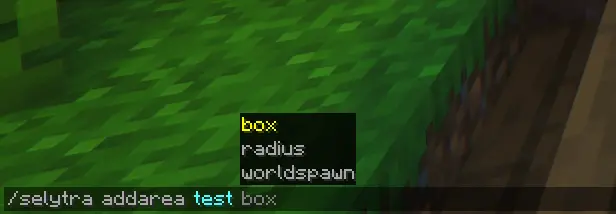
/selytra addarea <name> worldspawn <radius>
Add a radius-based area
/selytra addarea <name> radius <x> <y> <z> <radius>
Add a box area
/selytra addarea <name> box <x1> <y1> <z1> <x2> <y2> <z2>
Edit an existing area
/selytra editarea <name> worldspawn <radius> /selytra editarea <name> radius <x> <y> <z> <radius> /selytra editarea <name> box <x1> <y1> <z1> <x2> <y2> <z2>
Set the maximum number of boosts for an area
/selytra editmaxboosts <name> <value>
Remove an existing area
/selytra removearea <name>
List all defined areas
/selytra listarea ```
SpawnElytraCraftattack Deutsche Beschreibung
SpawnElytraCraftattack ist ein tool mitdem man einfach per Command Areas festlegen kann. In diesen Areas ist es möglich Elytra zu fliegen ohne eine zu besitzen. (es ermöglicht so eine Start Island wie bei CraftAttack ein Deutsches Streamer/Youtuber Projekt in Minecraft)
Die Fabric Mod Funktioniert Client seitig und Server seitig.
---
Funktionen
- Kompatibel: Spieler starten automatisch mit Elytra, sobald sie in der Luft sind. - Kompatibel: Spieler können mit Sneak-Tap (Standard Shift) einen Boost auslösen, ähnlich einer Feuerwerksrakete. - Kompatibel: Definiere beliebige Flugzonen – Radius, Box oder um den Worldspawn herum. - Kompatibel: Jede Elytra-Area kann eigene Boost-Limits haben. - Kompatibel: Landung, Wasser oder Reiten setzt Boosts automatisch zurück. - Kompatibel: Alle Areas werden in `config/elytra_areas.json` gespeichert. - Kompatibel: Unterstützt Survival, Adventure und Creative (Creative/Spectator wird ignoriert).
---
Elytra-Areas
Es gibt drei Arten von Areas:
| Typ | Beschreibung | |---------------|-----------------------------------------------------------------------------| | Box| Kreis um den Weltspawn mit definierbarem Radius. | | Box | Kreisförmige Area an beliebiger Position. | | Box | Rechteckige Area durch zwei Eckpunkte definiert. |
Jede Area kann individuelle MaxBoosts haben, um die Anzahl der Boosts pro Spieler zu limitieren.
---
Befehle
Alle Befehle erfordern Admin-Rechte.
Area Management
```bash
Fügt eine Area um den Worldspawn hinzu
/selytra addarea <name> worldspawn <radius>
Fügt eine radiusbasierte Area hinzu
/selytra addarea <name> radius <x> <y> <z> <radius>
Fügt eine Box-Area hinzu
/selytra addarea <name> box <x1> <y1> <z1> <x2> <y2> <z2>
Bearbeitet eine bestehende Area
/selytra editarea <name> worldspawn <radius> /selytra editarea <name> radius <x> <y> <z> <radius> /selytra editarea <name> box <x1> <y1> <z1> <x2> <y2> <z2>
Legt die maximale Anzahl an Boosts für eine Area fest
/selytra editmaxboosts <name> <value>
Löscht eine bestehende Area
/selytra removearea <name>
Listet alle definierten Areas
/selytra listarea ```