

1.2.0
release

SyncBoost
The simplest way to boost server performance and eliminate lag.
 300
300
SyncBoost
<div align="center"> <img src="https://raw.githubusercontent.com/Syncara-Host/syncboost/refs/heads/main/brand/logo-512.png" width="180" alt="SyncBoost Logo"> <h1>SyncBoost</h1> <p> <b>The simplest way to boost server performance and eliminate lag.</b> </p> <p> <a href="https://modrinth.com/plugin/syncboost"><img src="https://img.shields.io/badge/Download-Modrinth-00AF5C?style=for-the-badge&logo=modrinth" alt="Modrinth"></a> <a href="https://github.com/Syncara-Host/SyncBoost"><img src="https://img.shields.io/badge/Source-GitHub-181717?style=for-the-badge&logo=github" alt="GitHub"></a> <a href="https://syncara.host/discord"><img src="https://img.shields.io/badge/Support-Discord-5865F2?style=for-the-badge&logo=discord" alt="Discord"></a> </p> </div>
---
⚡ The Ultimate Performance Solution
SyncBoost is not just another "lag clear" plugin; it is a comprehensive, professional-grade performance engine. Re-engineered for maximum efficiency, SyncBoost targets the root causes of server degradation—identifying CPU bottlenecks, memory leaks, and excessive entity overhead—allowing your server to sustain high player counts without compromising gameplay quality.
Why SyncBoost?
- ⚡ Asynchronous Core: A stunning, modern GUI that brings visual elegance to server management. - ⚡ Asynchronous Core: Dynamic algorithms that sense lag spikes and proactively adjust server load. - ⚡ Asynchronous Core: Reduce AI overhead, optimize redstone, and limit entities with pinpoint accuracy. - ⚡ Asynchronous Core: Real-time MSPT charts via interactive maps and detailed hardware benchmarks. - ⚡ Asynchronous Core: Built to be ultra-lightweight, ensuring the optimization process never burdens your server.
> [!IMPORTANT] > SyncBoost is optimized for Java 17 but also fully supports Java 17. > Recommended Java 17, minimum Java 17.
---
📋 Requirements
| Requirement | Version | | :--- | :--- | | Server Software | 17 or newer (Server Software) | | Server Software | 1.17.1 - 1.21.4+ | | Server Software | Spigot, Paper, Purpur, Pufferfish, Folia, or compatible forks |
---
🚀 Key Modules
SyncBoost is modular by design. Enable or disable features as needed via the in-game GUI or `modules/` config files.
| Module | Impact | Description | | :--- | :--- | :--- | | ConsoleFilter | 🔴 Very High | Optimizes creature pathfinding and AI behavior. Essential for farm-heavy survival servers. | | ConsoleFilter | 🔴 High | Enforces limits on entity counts. Features ConsoleFilter effectively balancing mob density based on server TPS. | | ConsoleFilter | 🔴 High | Active monitoring that triggers safety measures (e.g., pausing spawners) when TPS drops critically. | | ConsoleFilter | 🔴 High | Efficiently handles TNT and crystal explosions to prevent physics ticks from stalling the main thread. | | ConsoleFilter | 🔴 High | Scans and identifies problematic chunks with high entity/tile entity counts. Features interactive GUI with teleportation. | | ConsoleFilter | 🟡 Medium | Periodically removes ground items. Features an "Abyss" system for item recovery via `/abyss`. | | ConsoleFilter | 🟡 Medium | Detects and suppresses rapid-pulsing redstone clocks that cause TPS drops. | | ConsoleFilter | 🟡 Medium | Optimizes boat and minecart collisions, movement logic, and removes mineshaft clutter. | | ConsoleFilter | 🟡 Medium | Limits rapid Trident/Elytra usage to prevent excessive chunk loading. | | ConsoleFilter | 🟡 Medium | Reduces hopper tick rates and optimizes item transfer logic to minimize lag. | | ConsoleFilter | 🔵 Low | Makes leaves decay instantly when trees are cut, reducing entity processing. | | ConsoleFilter | 🔵 Visual | Regex-based filtering to keep your server console clean and readable. |
---
🛠 Commands
All commands use the `/syncboost` (or alias `/sb`) prefix.
| Command | Description | | :--- | :--- | | `/syncboost` | Open the main configuration GUI. | | `/syncboost menu` | Open the main configuration GUI. | | `/syncboost help` | Display the full list of available commands. | | `/syncboost monitor` | View real-time server statistics (TPS, MSPT, RAM, CPU). | | `/syncboost map` | Get a map item that displays a live performance graph. | | `/syncboost benchmark` | Run a CPU/RAM stress test to measure server hardware performance. | | `/syncboost chunks [world]` | Analyze chunks for performance issues. Opens GUI or shows results for a specific world. | | `/syncboost memory [gc/gui/listeners]` | Analyze memory usage, detect leaks, and view GC metrics. | | `/syncboost free` | Force run the Java Garbage Collector (GC). | | `/syncboost clear <type>` | Manually clear entities: `items`, `creatures`, or `projectiles`. | | `/syncboost ping [player]` | Check average player latency or a specific player's ping. | | `/syncboost smartcap` | Toggle Smart Mob Cap feature on/off. | | `/syncboost reload` | Reload all configuration files and modules. |
Default Permission: `syncboost.admin`
---
🔗 Integrations
SyncBoost works seamlessly with popular plugins:
- PlaceholderAPI - Placeholders for TPS, MSPT, CPU usage, and cleaner countdown. - Spark - Performance profiling compatibility. - Stacker Plugins: WildStacker, RoseStacker, UltimateStacker
PlaceholderAPI Placeholders
Performance Metrics
| Placeholder | Description | | :--- | :--- | | `%syncboost_tps%` | Current TPS (formatted) | | `%syncboost_tps_raw%` | Current TPS (raw double) | | `%syncboost_tps_color%` | TPS with color code (green/yellow/red) | | `%syncboost_mspt%` | Current MSPT (formatted) | | `%syncboost_mspt_raw%` | Current MSPT (raw double) | | `%syncboost_mspt_color%` | MSPT with color code | | `%syncboost_cpu%` / `%syncboost_cpuprocess%` | Process CPU usage | | `%syncboost_cpuprocess_raw%` | Process CPU usage (raw) | | `%syncboost_cpusystem%` | System CPU usage | | `%syncboost_cpusystem_raw%` | System CPU usage (raw) |
Entity Counts
| Placeholder | Description | | :--- | :--- | | `%syncboost_entities%` / `%syncboost_entities_total%` | Total entity count | | `%syncboost_entities_mobs%` / `%syncboost_mobs%` | Living creature count | | `%syncboost_entities_items%` / `%syncboost_items%` | Ground item count | | `%syncboost_entities_projectiles%` / `%syncboost_projectiles%` | Projectile count | | `%syncboost_entities_vehicles%` / `%syncboost_vehicles%` | Vehicle count |
Memory Stats
| Placeholder | Description | | :--- | :--- | | `%syncboost_memory_used%` / `%syncboost_ram_used%` | Used memory (MB) | | `%syncboost_memory_used_raw%` | Used memory (raw MB) | | `%syncboost_memory_used_gb%` | Used memory (GB formatted) | | `%syncboost_memory_max%` / `%syncboost_ram_max%` | Max memory (MB) | | `%syncboost_memory_max_raw%` | Max memory (raw MB) | | `%syncboost_memory_max_gb%` | Max memory (GB formatted) | | `%syncboost_memory_free%` / `%syncboost_ram_free%` | Free memory (MB) | | `%syncboost_memory_free_raw%` | Free memory (raw MB) | | `%syncboost_memory_percent%` / `%syncboost_ram_percent%` | Memory usage percent | | `%syncboost_memory_percent_raw%` | Memory usage percent (raw) | | `%syncboost_memory_bar%` | Visual memory bar `[■■■■■■■■■■]` |
Server Stats
| Placeholder | Description | | :--- | :--- | | `%syncboost_players%` / `%syncboost_online%` | Online player count | | `%syncboost_players_max%` / `%syncboost_max_players%` | Max player slots | | `%syncboost_worlds%` | Number of loaded worlds | | `%syncboost_chunks%` / `%syncboost_loaded_chunks%` | Total loaded chunks | | `%syncboost_uptime%` | Server uptime (HH:MM:SS) | | `%syncboost_uptime_hours%` | Uptime in hours | | `%syncboost_uptime_minutes%` | Uptime in minutes | | `%syncboost_uptime_seconds%` | Uptime in seconds |
WorldCleaner Timer
| Placeholder | Description | | :--- | :--- | | `%syncboost_clearlag_timer%` / `%syncboost_worldcleaner%` | Time until next clear | | `%syncboost_clearlag_seconds%` | Seconds until next clear | | `%syncboost_clearlag_formatted%` | Formatted time (MM:SS) | | `%syncboost_clearlag_interval%` | Clear interval setting | | `%syncboost_clearlag_enabled%` | Whether cleaner is enabled | | `%syncboost_clearlag_progress%` | Progress percentage | | `%syncboost_clearlag_bar%` | Visual progress bar |
---
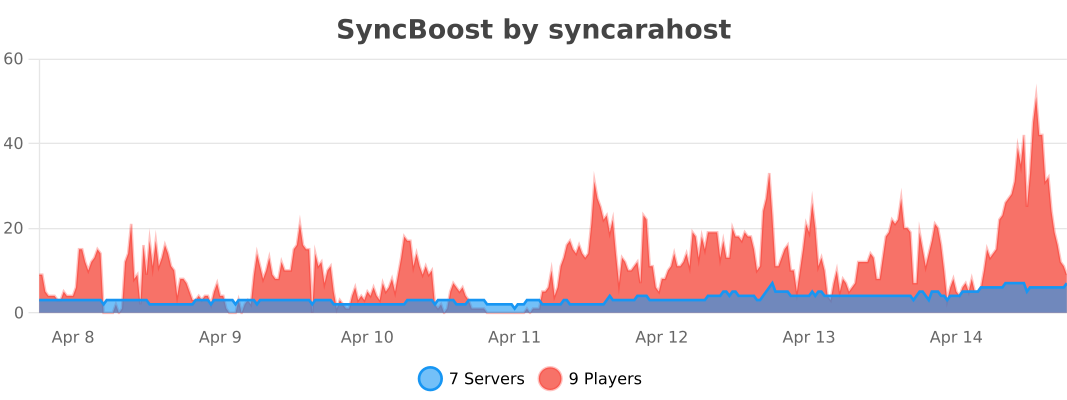
📊 Usage Statistics
SyncBoost anonymously collects data via bStats to help us improve performance. You can disable this in `plugins/bStats/config.yml`.
---
⚙️ Configuration
Configuration is split into: - `config.yml` - Main plugin settings (prefix, permissions, updater). - `lang.yml` - All user-facing messages. - `modules/*.yml` - Individual module settings.
You can edit configurations directly in-game using the GUI: ``` /syncboost ```
---
📦 Installation
1. Configure the latest `SyncBoost.jar` from Configure. 2. Configure your Minecraft server. 3. Configure the jar into your `plugins/` folder. 4. Configure the server. 5. Configure via `/syncboost` or edit files in `plugins/SyncBoost/`.
---
💰 Sponsored: Syncara Host
Cari host stabil di wilayah Indonesia? Syncara Host jawabannya!~
Mulai dari Lokasi Indonesia, kalian dapat server premium yang: - ✅ Lokasi Indonesia (Shared performa? Gak jaman). - ✅ Lokasi Indonesia (Settingan Java tuning terbaik). - ✅ Lokasi Indonesia (Ping rendah, koneksi stabil).
Visit: https://syncara.host
---
⭐ Credits
SyncBoost is built upon the strong foundation of LagFixer. We explicitly acknowledge and thank Jenya705 for their original work and contributions to the optimization community.
> SyncBoost is a forked and modernized continuation, designed to support the latest Minecraft infrastructure while respecting the legacy of the original project.
---
❓ FAQ
What Java version does SyncBoost require?
<p>SyncBoost requires minimum <b>Java 17</b> and recommends <b>Java 21</b> for optimal performance. Java 21 offers significant performance improvements for modern servers.</p>
Which Minecraft versions are supported?
<p>SyncBoost supports <b>Minecraft 1.17.1 - 1.21.4+</b>. Legacy versions (1.17.1 - 1.20.4) are fully supported, and 1.16.5 is available via manual build configuration.</p>
Is SyncBoost compatible with Folia?
<p>Yes! SyncBoost fully supports <b>Folia's regionized multithreading</b>. All optimization modules are compatible with Folia's architecture and use proper thread-safe operations.</p>
What server platforms are supported?
<p>SyncBoost works with <b>Spigot, Paper, Purpur, Pufferfish, Folia</b>, and any compatible fork. Paper or higher is recommended for best performance.</p>
Will SyncBoost conflict with other optimization plugins?
<p>SyncBoost is designed to work alongside other plugins. It integrates seamlessly with <b>Spark</b> for profiling and stacker plugins like <b>WildStacker</b>, <b>RoseStacker</b>, and <b>UltimateStacker</b>.</p>
How do I recover accidentally cleared items?
<p>Use the <b>Abyss</b> feature! Items cleared by WorldCleaner are temporarily stored and can be recovered using <code>/abyss</code> command within a configurable time window.</p>
---
<div align="center"> <p>Made with <3 by <b>Syncara Host</b></p> <p>© 2026 Syncara Host. All rights reserved.</p> </div>