

0.6.2+1.21.4
release

Technical Utilities
Tech Utils is a mod providing client-side tweaks for Litematica, WorldEdit and other small utilities.
 63,08k
Technical Utilities
Technical Utilities
Tech Utils is a mod providing client-side tweaks for Litematica, WorldEdit and other small utilities.
Mod config
To access mod config open Mod Menu and select this mod.
Features
- Inventory Verifier addon to Litematica's Schematic Verifier - Conveniently displays the difference between the expected and found inventory contents side-by-side. - Has semantic slot highlighting (view feature `inventoryScreenOverlay` further down). - Turning on `verifyItemComponents` will require item components to match and will also visualize them in the item tooltip for you to compare. - Enables schematic creators to use item predicates - a flexible way to specify what properties items should have. Here's an impractical but exhaustive example via Misode's handy generator.
Check out the feature's showcase video:
*This feature only works if your server has Servux (or PCA Protocol in 1.20.1-4), or you have nbt query permissions (e.g. by being an operator or installing a permissions mod/plugin), or you're in Singleplayer.* *On Multiplayer, make sure you have enabled `entityDataSync` and `entityDataSyncBackup` in Litematica's settings.*
- Sync WorldEdit selection Snap WorldEdit region to active Litematica selection - `autoWeSync`. *Region synchronizes shortly after you modify a selection, showing you a confirmation message above the hotbar.*

- Litematic preview (1.21 and below) Show 3D render of selected litematic in Load Schematics menu - `renderPreview`. *This only works for .litematic files.*

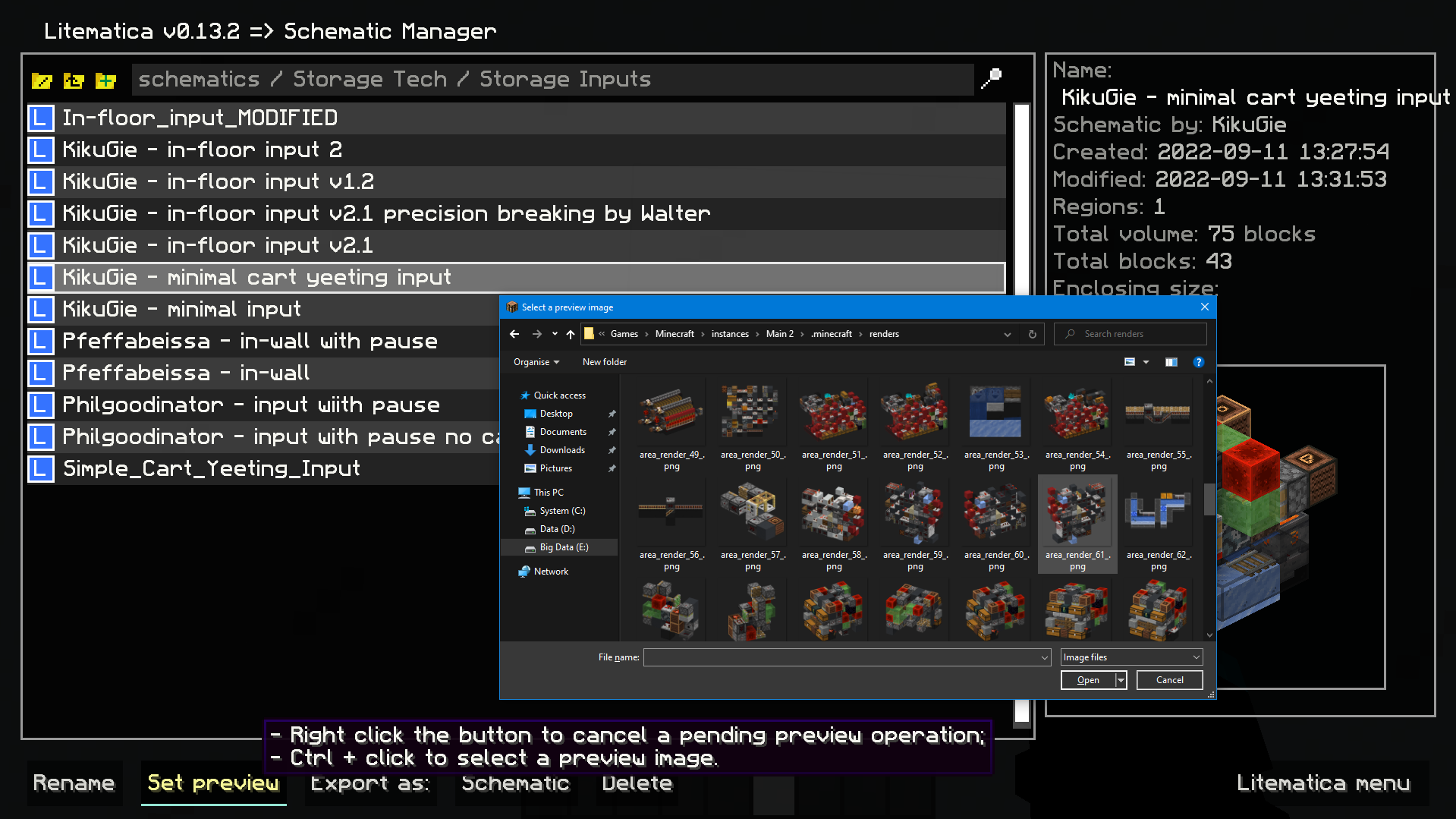
- Image selection dialog for litematica preview: Set litematic preview image to one you select, which unlike the 3D preview feature will be shown to any player, even without this mod. *In main Litematica menu go to Schematic Manager, select a litematic and ctrl + click on Set Preview button to open the prompt.*
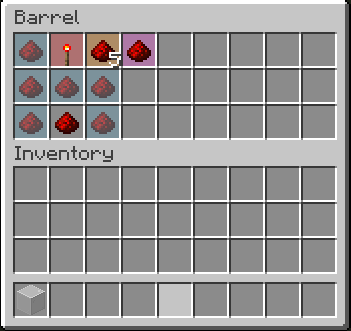
- Inventory setup preview: Show items that have to be in a container and highlights wrong or mismatched ones - `inventoryScreenOverlay`. *Item colors match your placement block colors. By default its: - Light blue: missing item; - Orange: mismatched amount or nbt data; - Magenta: extra item that shouldn't be present; - Red: wrong item type.*
- Compact scoreboard (ported from my old mod) - `compactScoreboard`. Using short number format: - 1000 -> 1k - 1000000 -> 1M - 1000000000 -> 1B - Disable WorldEdit neighbor updates on log-in - `autoDisableUpdates`. - Hotkeys for litematic placement rotation & mirror - `rotatePlacement` and `mirrorPlacement`. - `/isorender selection` shortcut for rendering current Litematica selection in Isometric Renders. - A hotkey to give yourself a container full of the item you're holding - `giveFullInv`. Supports boxes, chests, and bundles. Nesting them is possible. - A hotkey to refresh the material list - `refreshMaterialList`. - Make easy place act as if all blocks are full blocks. Useful for placing blocks with small hit boxes. - *And more to come!*
Dependencies
- Fabric API - MaliLib - Litematica
*Mod logo by Mizeno*
Gallery
Versions
0.3.0-beta.3+1.19.4
beta
0.5.0-beta.1+1.20.1
beta
0.6.3+1.21.11
release
0.6.1+1.21.11
release
0.6.2+1.21.10
release
0.3.0-beta.1+1.19.4
beta
0.6.1+1.21.10
release
0.1.2
alpha
0.6.1+1.21.7
release
0.6.2+1.21.1
release
0.5.7+1.21.4
release
0.5.4+1.21.1
release
0.5.0+1.21.5
release
0.6.2+1.21.7
release
0.6.1+1.21.7
release
0.4.1
release
0.6.2+1.21.5
release
0.5.6+1.21.1
release
0.4.1
release
0.7.0+26.1
release
0.4.0
release
0.3.0-beta.4+1.19.4
beta
0.6.1+1.21.4
release
0.6.2+1.21.11
release
0.3.0-beta.2+1.19.4
beta
0.6.0-beta.1+1.20.4
beta
0.3.0-beta.3+1.19.4
beta
0.5.3+1.21.4
release
0.6.2+1.21.11
release
0.6.0+1.21.10
release
0.6.0+1.21.1
release
0.3.0-beta.4+1.19.3
beta
0.6.1+1.21.10
release
0.6.0-beta.2+1.20.4
beta
0.6.0+1.21.4
release
0.6.0+1.21.7
release
0.5.0-beta.1+1.20.4
beta
0.6.1+1.21.11
release
0.5.4+1.21.1
release
0.6.1+1.21.5
release
0.6.1+1.21.5
release
0.5.0+1.20.1
release
0.6.2+1.21.5
release
0.6.1+1.21.1
release
0.5.8+1.21.1
release
0.2.0+1.19.3
release
0.6.1+1.21.1
release
0.5.6+1.21.1
release
0.3.0-beta.4+1.19.3
beta
0.6.2+1.21.7
release
0.6.0+1.20.1
release
0.6.2+1.21.1
release
0.2.0+1.19.3
release
0.6.0+1.21.7
release
0.6.3+1.21.11
release
0.5.5+1.21.1
release
0.4.0
release
0.5.6+1.21.4
release
0.5.5+1.21.4
release
0.5.7+1.21.1
release
0.3.0-beta.4+1.19.4
beta
0.5.3+1.21.4
release
0.6.0+1.21.5
release
0.6.1+1.21.4
release
0.6.0+1.21.10
release
0.6.1+1.20.1
release
0.5.5+1.21.4
release
0.6.2+1.21.4
release
0.7.0+26.1
release
0.6.2+1.21.10
release