

2.0.0
release
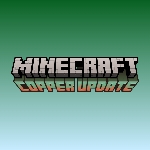
the copper age title
This resource pack, Copper Update Title, is a specialized creation designed to enhance the visual experience of Minecraft players, specifically targeting the aesthetic of the upcoming or recent Copper Update (version 1.21.9).
 248
248
the copper age title

English
Description
The the copper age title resource pack is a unique visual modification for Minecraft, meticulously crafted by emad611985. Its primary purpose is to introduce a thematic title screen that resonates with the highly anticipated Copper Update (version 1.21.9). Unlike resource packs that overhaul vast aspects of the game, this pack offers a focused and elegant change, specifically altering the `edition.png` file within the game's textures to display a custom "MINECRAFT COPPER UPDATE" title.
This pack is ideal for players who:
* Are excited about the Copper Update and wish to see its theme reflected from the moment they launch the game. * Appreciate subtle yet impactful visual enhancements. * Seek to personalize their Minecraft experience with thematic consistency.
The `pack.mcmeta` file indicates a `pack_format` of 34, ensuring compatibility with Minecraft versions that support this format, specifically targeting the 1.21.9 update. The description within the pack itself, "§eCopper update title", uses Minecraft's internal color codes to display the title in a vibrant yellow, further emphasizing the theme.
Key Features:
* Creator Attribution: Replaces the default title screen text with a custom "MINECRAFT COPPER UPDATE" graphic. * Creator Attribution: Provides a focused visual change without altering core gameplay textures. * Creator Attribution: Designed for Minecraft version 1.21.9 and compatible versions supporting `pack_format` 34. * Creator Attribution: Made by emad611985.
Installation Guide:
1. Activate in Minecraft: Obtain the `§a§lcopperupdatetittle.zip` file. 2. Activate in Minecraft: * Activate in Minecraft: Press `Win + R`, type `%appdata%.minecraft`, and press Enter. * Activate in Minecraft: Open Finder, click `Go` in the menu bar, hold `Option`, and click `Library`. Then navigate to `Application Support/minecraft`. * Activate in Minecraft: Navigate to `~/.minecraft`. 3. Activate in Minecraft: Inside your `.minecraft` directory, you will find a folder named `resourcepacks`. Open it. 4. Activate in Minecraft: Drag and drop the downloaded `§a§lcopperupdatetittle.zip` file directly into the `resourcepacks` folder. Activate in Minecraft: 5. Activate in Minecraft: * Launch Minecraft. * From the main menu, click `Options...`. * Click `Resource Packs...`. * Locate "Copper Update Title" in the list of available resource packs on the left. * Click the arrow button on the pack icon to move it to the "Selected Resource Packs" list on the right. * Click `Done`.
Your game's title screen should now reflect the Copper Update theme!
العربية
الوصف
حزمة موارد عنوان تحديث النحاس (the copper age) هي تعديل بصري فريد لماينكرافت، تم تصميمه بدقة بواسطة emad611985. هدفها الأساسي هو تقديم شاشة عنوان موضوعية تتوافق مع تحديث النحاس المرتقب بشدة (الإصدار 1.21.9). على عكس حزم الموارد التي تُحدث تغييرات شاملة في جوانب واسعة من اللعبة، تقدم هذه الحزمة تغييرًا مركزًا وأنيقًا، حيث تقوم بتعديل ملف `edition.png` داخل نسيج اللعبة لعرض عنوان مخصص "MINECRAFT COPPER UPDATE".
هذه الحزمة مثالية للاعبين الذين:
* متحمسون لتحديث النحاس ويرغبون في رؤية سمته منعكسة منذ لحظة إطلاق اللعبة. * يقدرون التحسينات البصرية الدقيقة ولكنها مؤثرة. * يسعون لتخصيص تجربتهم في ماينكرافت باتساق موضوعي.
يشير ملف `pack.mcmeta` إلى `pack_format` بقيمة 34، مما يضمن التوافق مع إصدارات ماينكرافت التي تدعم هذا التنسيق، وتستهدف بشكل خاص تحديث 1.21.9. الوصف داخل الحزمة نفسها، "§eCopper update title"، يستخدم أكواد الألوان الداخلية لماينكرافت لعرض العنوان باللون الأصفر الزاهي، مما يزيد من تأكيد السمة.
الميزات الرئيسية:
* نسبة للمنشئ: تستبدل نص شاشة العنوان الافتراضي برسم مخصص "MINECRAFT COPPER UPDATE". * نسبة للمنشئ: يوفر تغييرًا بصريًا مركزًا دون تغيير نسيج اللعب الأساسي. * نسبة للمنشئ: مصمم لإصدار ماينكرافت 1.21.9 والإصدارات المتوافقة التي تدعم `pack_format` 34. * نسبة للمنشئ: تم إنشاؤه بواسطة emad611985.
دليل التثبيت:
1. التنشيط في ماينكرافت: احصل على ملف `§a§lcopperupdatetittle.zip`. 2. التنشيط في ماينكرافت: * التنشيط في ماينكرافت: اضغط `Win + R`، اكتب `%appdata%.minecraft`، ثم اضغط Enter. * التنشيط في ماينكرافت: افتح Finder، انقر على `Go` في شريط القائمة، اضغط باستمرار على `Option`، ثم انقر على `Library`. ثم انتقل إلى `Application Support/minecraft`. * التنشيط في ماينكرافت: انتقل إلى `~/.minecraft`. 3. التنشيط في ماينكرافت: داخل دليل `.minecraft` الخاص بك، ستجد مجلدًا باسم `resourcepacks`. افتحه. 4. التنشيط في ماينكرافت: اسحب وأفلت ملف `§a§lcopperupdatetittle.zip` الذي تم تنزيله مباشرة في مجلد `resourcepacks`. التنشيط في ماينكرافت: 5. التنشيط في ماينكرافت: * شغل ماينكرافت. * من القائمة الرئيسية، انقر على `Options...`. * انقر على `Resource Packs...`. * حدد موقع "Copper Update Title" في قائمة حزم الموارد المتاحة على اليسار. * انقر على زر السهم الموجود على أيقونة الحزمة لنقلها إلى قائمة "Selected Resource Packs" على اليمين. * انقر على `Done`.
يجب أن تعكس شاشة عنوان لعبتك الآن سمة تحديث النحاس!
Gallery
Versions
1.0.0
release