

3.1.0
release

Better Sprinting
New ways to control sprinting, sneaking, and flying.
 39,51k
Better Sprinting
My Website | Twitter | Patreon | Ko-Fi
Better Controls
Better Controls is a new client-only mod that includes many more toggle keybinds and options than Better Sprinting. It's available for Forge and Fabric.
While not a direct replacement, I intend to support Better Controls in the future and eventually stop updating Better Sprinting.
Features
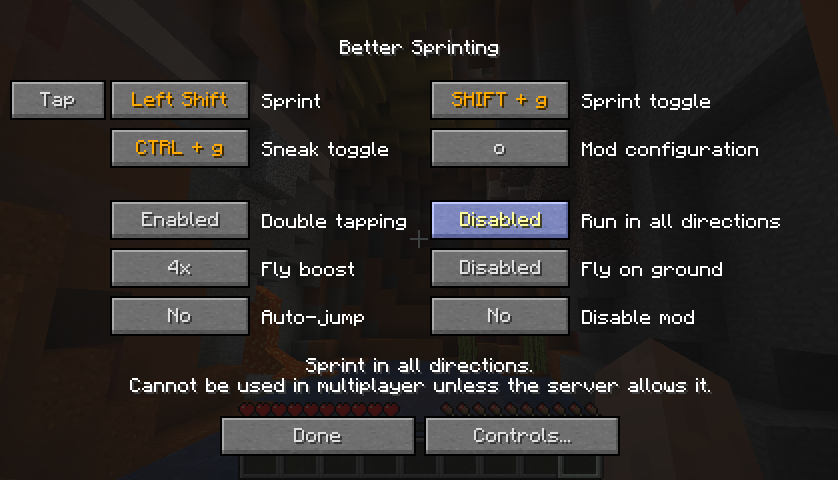
- Sprint key can be set to *Tap* or *Hold* mode - Toggle keys for sprinting and sneaking - Option to turn off double tapping W - Option to sprint in all directions in singleplayer - Configurable speed boost when flying in creative/spectator mode - Option to continue flying when touching the ground
- To configure the mod, click the Better Sprinting button in Controls, or press the configuration key in-game (default: 'O') - To configure update notifications in Minecraft 1.13/1.14, open the *config* folder (same location as the *mods* folder), and edit the *bettersprinting-client.toml* file in a text editor
Tips
- While sprinting, press the Sprint key again to stop - Opening a GUI while toggle sneaking makes you automatically stand up until you close it - LAN multiplayer allows sprinting in all directions if the host has the mod installed
Servers
Use the /bettersprinting admin command to enable special features, or automatically disable the mod for players on the server. If you don't have a Forge server, you can read about the /bettersprinting to implement a custom plugin and benefit from the features.
Installation Guide
Client
1. Download and run mods 2. Select mods, and click OK 3. Start the mods 4. Visit the mods tab, and click the mods profile 5. Open the folder shown in mods, and create a folder named mods inside it 6. %%MD1%% and place the file into the mods folder
Server
1. Download and run forge-<version>.jar 2. Select forge-<version>.jar, don't forget to forge-<version>.jar, and click OK 3. Create a folder named forge-<version>.jar in the server folder 4. %%MD1%% and place the file into the forge-<version>.jar folder 5. Start the server by running forge-<version>.jar
Old Versions
- Old releases for Minecraft versions between 1.2.5 - 1.8 are available in the archive - If you experience a mod conflict, try installing PlayerAPI Core (only applies to versions 2.0.3 and older) - In 1.7.10, vanilla clients cannot join Forge servers; if you install the mod on a 1.7.10 server, your users will need to install Forge (the mod itself is not required)
License / Modpacks
Official files released after 12 June 2019 are licensed under MPL-2.0, which allows you to use them in modpacks.
To verify, open the *.jar* file in an archive program, view the included *LICENSE* file, and ensure the first line reads *Mozilla Public License Version 2.0*.
If the *LICENSE* file is missing, you must follow Hardcore Ender Expansion 1's License and Modpack Guidelines.
Versions
1.1.4b
release
2.0.3
release
2.0.0
release
3.0.0
release
2.3.0
release
1.1.8
release
1.1.3
release
2.0.2
release
2.2.1
release
3.0.1
release
1.1.5
release
3.2.0
release
3.0.1
release
1.1.2
release
3.2.0
release
1.1.4
release
1.1.1
release
2.3.0
release
3.1.0
release
3.0.0
release
1.1.9
release
2.3.0
release
3.0.0
release
2.1.0
release
2.3.0
release
3.2.0
release
1.1.4a
release
2.3.0
release
3.0.1
release
2.1.1
release
2.1.2
release
1.1.3
release
1.1.6
release
1.1.7
release
2.0.1
release
3.0.1a
release
2.2.0
release