

1.0
release

CustomCommands
A velocity plugin to create custom commands
 2,04k
2,04k
CustomCommands
CustomCommands <sub>for Velocity</sub>
This is a Velocity plugin that allows you to create custom commands. It offers you a simple way to create commands that can be executed by players. These commands can be customized to your liking.
Installation
1. Download the latest release from modrinth. 2. Put the jar file in `plugins/`. 3. Restart your server.
Usage
| Command | Description | Permission | |---------------------------|-----------------------------------------------------------|--------------------------| | `/customcommands reload` | Reload the configuration file and all the custom commands | `customcommands.reload` | | `/customcommands list` | List all custom commands | `customcommands.list` | | `/customcommands help` | Show the help page | `customcommands.help` | | `/customcommands version` | Show the plugin's version | `customcommands.version` | | `/customcommands` | Show the help page | `customcommands.help` |
All these commands require their respective permissions or the `customcommands.admin` permission. They can also be executed via `/cc`.
`/customcommands list`
This command displays a list of all custom commands, which looks like this: <br>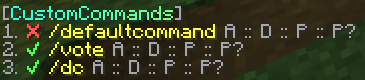 <ul> <li>The ✔/❌ indicates whether the command is enabled or disabled.</li> <li>The yellow string is the command name. Click to suggest the command in the chat input.</li> <li>Hover A to see an array of all the aliases.</li> <li>Hover D to see the description.</li> <li>Hover P to see the permission.</li> <li>Hover P? to see whether the prefix should be added to the response message.</li> </ul>
Configuration
`config.toml`
The config is located at `plugins/customcommands/config.toml`.
Content of config.toml
```toml
CustomCommands Configuration
This is the prefix that will be displayed in front of all messages
Only supports MiniMessage, see https://docs.advntr.dev/minimessage/format.html and https://webui.advntr.dev/ for more information
Prefix = "<gray>[<gradient:#38ffdb:#8aff8c>CustomCommands<gray>]"
This is the default message that will be displayed when a player does not have permission to execute a command
No-Permission = "<red>You do not have permission to execute this command."
This is the default message that will be displayed when a command is run from the console, but the command is not allowed to be run from the console
No-Console-Command = "This command cannot be run from console!"
This is the default message that will be displayed when a command has been executed successfully
Command-Executed = "<green>Command executed successfully."
Do not change this
Config-Version = 1.0 ```
Custom Commands
Create your custom commands in `plugins/customcommands/Commands/`. Each command is saved in a separate toml file.
Content of the default command file (DefaultCommand.toml)
```toml
Command Configuration
Enabled?
Enabled = true
This is the command name that will be used to call the command in the chat
Name = "defaultcommand"
These are the aliases. Empty the array if you don't need any aliases, like so: Aliases = []
Aliases = ["default", "defaultcmd"]
This is the description of the command that will be displayed in the help command
Description = "This is the default command of CustomCommands"
This is the permission required to use the command. Leave empty for no permission
Permission = "customcommands.defaultcommand"
This is the response that will be sent when the command is called. Leave empty for no response
Only supports MiniMessage, see https://docs.advntr.dev/minimessage/format.html and https://webui.advntr.dev/ for more information
Response = "<green>Command executed successfully!"
Add the plugins Prefix configured in config.toml to the response message
UsePrefix = true
This is the cooldown of the command in seconds
Cooldown = 0
Proxy command to execute. This code is run on console, without any permission checks. Leave empty for no proxy command
To view all placeholders, see https://github.com/thevalleyy/CustomCommands?tab=readme-ov-file#placeholders
Example: ProxyCommand = "send %player% hub"
ProxyCommand = ""
```
Placeholders
* `%player%` - The player who executed the command