

1.21.8.0+mod
release

Day Counter
An easy to read Day Counter
 8,07k
8,07k
Day Counter
Day Counter
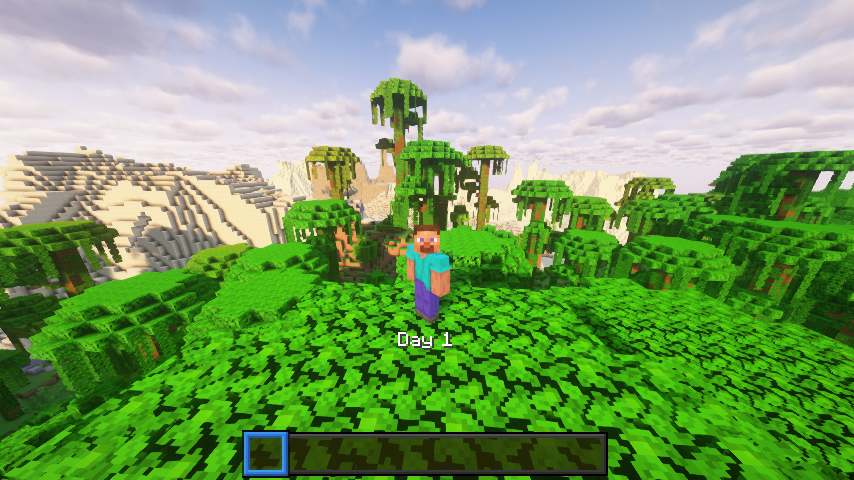
A lightweight Minecraft 1.21.5 datapack that displays the current in‑game day number above your hotbar. No commands, functions, or dependencies, just a simple day tracker.
What It Does
- Shows “Day X” (where X is the current day) in the action bar every time the sun rises. - Works in any world type (survival, hardcore, creative).
Example Uses
- Casual players – Let viewers see which day of your survival series they’re watching. - Casual players – Keep track of how many days you’ve survived without building a clock. - Casual players – Know when to celebrate milestones like Day 100.
Installation
1. Download the DayCounter datapack ZIP or clone from the repo. 2. Put the `DayCounter` folder into your world’s `datapacks/` directory. 3. Start Minecraft 1.21.5 or newer, then run: ``` /reload ``` 4. Verify it's active: ``` /datapack list ``` You should see `DayCounter` enabled.
Usage
1. Load into your world. 2. Each new day you’ll see the “Day X” update above your hotbar. 3. No further setup needed.
Details
Namespace: 71 (1.21.5) Namespace: `daycounter`
License
This datapack is released under the MIT License. Feel free to modify and share.
Gallery
Versions
1.0.0+mod
release
1.21.6.0+mod
release
1.21.6.0
release
1.21.7.0
release
1.21.8.0
release
1.21.7.0+mod
release
1.0.0
release