



1.3
release

AdminWatchdog
AdminWatchdog lets you monitor what staff members do on your server. When an admin runs a command, changes gamemode, or takes items from creative mode, the plugin sends a message to your Discord channel. This helps server owners keep track of staff activit
 311
311
AdminWatchdog
AdminWatchdog
<div align="center">
Monitor what your admins are doing and get notified on Discord
Documentation | Report Bug | Request Feature
</div>
---
What is AdminWatchdog?
AdminWatchdog monitors what staff members do on your server. When an admin runs a command, changes gamemode, or takes items from creative mode, the plugin sends a message to your Discord channel. Helps you keep track of staff activity and catch misuse.
What it does
- Sends Discord messages when admins run commands - Tracks gamemode switches - Logs items taken from creative inventory - Sets up custom alerts for specific commands - Only monitors who you want to monitor - Lets trusted admins bypass monitoring
Screenshots
Discord messages
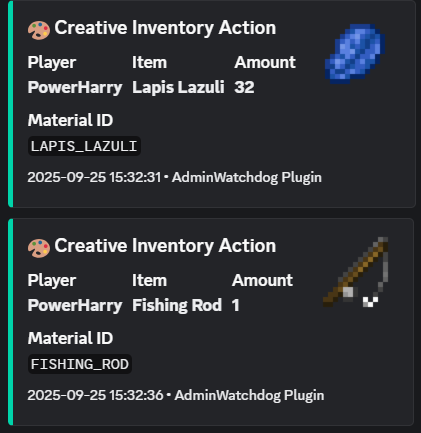
Creative inventory tracking
When someone takes items from creative mode, you get a Discord message showing exactly what they took:
Command alerts
<img width="993" height="150" alt="image" src="https://github.com/user-attachments/assets/31d78544-8499-4ab1-89ea-0edcb153023a" />
Custom alerts
Set up special messages for important commands:
<img width="806" height="70" alt="image" src="https://github.com/user-attachments/assets/e64af8ac-be4c-403a-b376-a0694cce6191" />
Gamemode changes
<img width="641" height="144" alt="image" src="https://github.com/user-attachments/assets/de961a9e-2f48-41a2-b208-d2fe41ddab50" />
Features
Discord alerts
- Instant notifications in your Discord server - Nice looking messages with item pictures - Ping specific roles for important commands - Works with any Discord channel using webhooks
What gets monitored
- Commands run by admins - Commands run from console - Gamemode changes - Items taken from creative inventory
Who gets monitored
You choose:
- Only OPs - Only players with certain permissions - Or everyone
You can also give trusted admins a bypass permission so they don't get logged.
Custom command alerts
Set up special alerts for commands you care about. You can even match specific command patterns:
- `ban` - matches any ban command - `lp user` - matches LuckPerms user commands - `lp user * permission set *` - matches only when someone sets a permission
Get pinged only for the important stuff, like when someone grants a dangerous permission.
How to install
1. Download the plugin from the Downloads tab 2. Put the JAR file in your server's `plugins` folder 3. Restart your server 4. Edit `plugins/AdminWatchdog/config.yml` 5. Add your Discord webhook URL 6. Run `/adminwatchdog reload`
Setting up Discord
1. In Discord, go to your channel settings 2. Click "Integrations" then "Webhooks" 3. Create a new webhook 4. Copy the webhook URL 5. Paste it in your config.yml
Configuration
Basic setup
```yaml discord: webhook-url: "YOUR_WEBHOOK_URL_HERE" enabled: true ```
Custom alerts
Set up alerts for specific commands:
```yaml custom-responses: enabled: true
Alert when someone uses /ban
ban: "BAN - %player% banned someone at %time%"
Alert and ping a role when someone uses /op
op: "CRITICAL - %player% used OP! <@&YOUR_ROLE_ID> at %time%"
Alert for specific LuckPerms commands
"lp user * permission set *": "PERMISSION - %player% set permission: %command%" ```
What the placeholders mean
- `%player%` - The player who ran the command - `%sender%` - For console commands - `%command%` - The full command they typed - `%time%` - When it happened
Mentioning roles in Discord
To ping a role, you need the role ID. In Discord, type `@RoleName` to get the ID, then use it like `<@&123456789>` in your config.
Commands
| Command | What it does | |---------|--------------| | `/adminwatchdog` or `/aw` | Shows plugin info | | `/adminwatchdog version` | Shows version number | | `/adminwatchdog reload` | Reloads the config | | `/adminwatchdog update` | Checks for updates |
Permissions
| Permission | What it does | Who has it | |------------|--------------|------------| | `adminwatchdog.reload` | Lets you reload config | OPs only | | `adminwatchdog.monitor` | Makes you get monitored | OPs only | | `adminwatchdog.bypass.commands` | Stops your commands being logged | Nobody | | `adminwatchdog.bypass.creative` | Stops creative inventory being logged | Nobody | | `adminwatchdog.bypass.customresponses` | Stops custom alerts for you | Nobody | | `adminwatchdog.bypass.gamemode` | Stops gamemode changes being logged | Nobody |
How to stop being monitored
Give yourself one of the bypass permissions. For example, if you don't want custom responses pinging you:
``` /lp user YourName permission set adminwatchdog.bypass.customresponses true ```
Need help?
1. Check if someone already asked about your problem in Issues 2. Join the Discord server 3. Open a new issue on GitHub
Requirements
- Paper or Spigot server (Paper recommended) - Minecraft 1.20 or newer - Java 21 or newer
License
This plugin has a proprietary license. You can use it on your server, but you cannot modify the code or redistribute it.
---
<div align="center">
Made by TejasLamba2006
</div>
Versions
1.0
release
1.1
release
1.4.2
release
1.4.0
release
1.2
release
1.4.1
release