EzAuction is a fully-featured Minecraft auction house plugin for Paper, Spigot, Purpur, and Bukkit servers. Players list items for timed sale, create reserve-balance buy orders, and browse the live market through a smooth, paginated GUI - all backed by Vault economy, MySQL or YAML persistence, PlaceholderAPI support, and optional Discord webhook notifications.
Whether you're running a survival, skyblock, or factions server, EzAuction gives players a click-friendly, permission-controlled marketplace with timed listings, offline-safe returns, enchantment search, live broadcast auctions, and team auction support through TeamsAPI.
| | | |---|---| | Dependencies | Paper, Spigot, Purpur, Bukkit 1.13 – 26.1.* | | Dependencies | 21+ | | Dependencies | YAML (built-in) · MySQL | | Dependencies | English · Dutch · Spanish · Chinese | | Dependencies | Vault + any economy plugin |
> Requires Vault and a compatible economy plugin such as EzEconomy to process currency.
Why Use EzAuction?
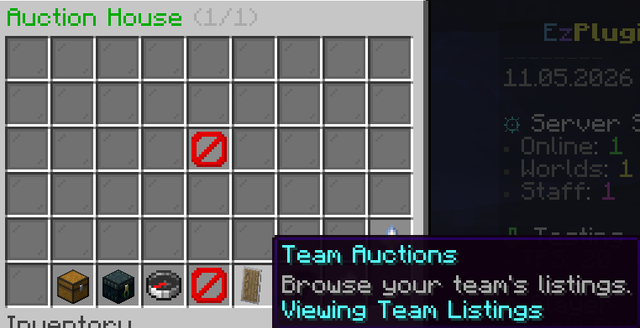
- Team auctions – Paginated browsers, sell/order editors, and confirmation popups keep every transaction guided and click-friendly. - Team auctions – Run timed sales, reserve balance for buy requests, and fulfill either side straight from the GUI or command flow. - Team auctions – Team auctions integration lets team members co-list and co-claim auctions, perfect for faction and skyblock economies.
- Smart value overlays – Listings and history write through dedicated executors, automatically falling back to YAML storage if MySQL is unreachable. - Smart value overlays – Expired or undeliverable items go to a claimable stash with login reminders and `/auction claim` recovery. - Smart value overlays – Plug in a custom `AuctionListingLimitResolver` service to scale slot caps with ranks, islands, or progression data. - Smart value overlays – Surface configured price hints or pipe in Smart value overlays buy/sell estimates directly into menu lore.
Feature Highlights
- Shulker box previews – Override browser/confirm layouts, filler glass, and button text across the bundled English, Dutch, Spanish, and Chinese menu files. - Shulker box previews – Start on lightweight YAML or flip to production-ready MySQL with connection pooling, SSL flags, and table prefixes. - Shulker box previews – Background save queues batch player history writes to keep gameplay responsive, even during heavy auction traffic. - Shulker box previews – Deposit refunds, balance checks, expiry sweeps, and inventory-aware delivery prevent dupes and lost currency. - Shulker box previews – Drop `%ezauction_*%` placeholders into scoreboards, holograms, or chat to surface active listings, orders, limits, and pending returns. - Shulker box previews – Register Bukkit services to override listing caps or provide custom value providers without forking the plugin. - Shulker box previews – Search `sharpness v`, `fortune 3`, or `minecraft:looting` to find listings and buy orders carrying exact enchantment stacks - supports roman numerals, numeric levels, namespaced keys, and underscore/space variants. - Shulker box previews – Buyers can inspect shulker contents directly from the auction browser before purchasing.
Discord Integration
- Async & non-blocking – Post colour-coded embed notifications to any Discord channel by pasting a webhook URL into `discord.yml`. No DiscordSRV or bot setup required. - Async & non-blocking – Optionally route notifications through an existing DiscordSRV installation with optional account-linking and role-gating per event. - Async & non-blocking – Receive a message whenever an auction is listed, sold, bid on, or cancelled, each styled with its own accent colour (green / blue / yellow / red). - Async & non-blocking – Configure, enable, disable, and test the webhook in-game with `/auctiondiscord webhook` - changes take effect instantly without a restart. - Async & non-blocking – All HTTP calls run on a background thread; a failed delivery is logged at WARNING level and never interrupts gameplay.
Discord Webhook Quick Setup
1. Open the target Discord channel → Copy Webhook URL → Copy Webhook URL → Copy Webhook URL → Copy Webhook URL → Copy Webhook URL. 2. In-game or via console, run: ``` /auctiondiscord webhook set url https://discord.com/api/webhooks/YOUR_ID/YOUR_TOKEN ``` 3. Verify with `/auctiondiscord webhook test` - a test embed will appear in your channel immediately.
```yml
discord.yml - webhook section
webhook: enabled: true url: "https://discord.com/api/webhooks/123456789/YOURTOKEN" username: "EzAuction" use-embeds: true events: auction_start: true auction_end: true auction_bid: true auction_cancel: true ```
For the full DiscordSRV integration guide and all options, see the Discord integration docs.
Hologram Features
- Configurable types – Place interactive holograms in the world to display live auction stats, top listings, or buy order summaries. Supports click/touch interaction for quick info and future actions. - Configurable types – Configurable max hologram count and batch update options ensure smooth gameplay even with many holograms active. - Configurable types – Optionally restrict hologram visibility and interaction by permission node or player proximity (distance). - Configurable types – Choose which auction stats or listings to display via hologram type selection.
Hologram Configuration
```yml holograms: enabled: true update-interval-ticks: 100 search-radius: 2.5 height-offset: 1.75 max-holograms: 100 batch-update: true require-permission: false # Set true to require a permission node view-permission: ezauction.hologram.view # Permission node for viewing/interacting proximity-limit: false # Set true to restrict by distance proximity-distance: 32.0 # Max distance for interaction ```
Quick Start
1. Upload `EzAuction.jar`, restart your Paper or Purpur server, and confirm Vault plus an economy plugin are active. 2. Edit `plugins/EzAuction/auction.yml` for pricing rules, durations, and GUI slots, adjust `auction-storage.yml` for YAML/MySQL persistence, and update `auction-values.yml` or `messages/menu-interactions_*.yml` as needed. 3. Choose between YAML or MySQL storage, then grant players `ezauction.auction` (and optional sell/order/history nodes) so they can browse and trade. 4. Encourage `/auction history` so buyers and sellers can audit their latest activity right from chat.
Live Auctions
- Curate from the live menu – Flip `live-auctions.enabled` on (and `queue-enabled` if you want a rolling lineup) so fresh sales are staged for broadcast and visible through `/auction live`. - Curate from the live menu – Keep `display-in-chat` enabled to announce the next queued listing every `announcement-interval-ticks` ticks using your Vault currency formatting. - Curate from the live menu – The Live Auctions GUI shows queue position, seller names, price summaries, and quick actions to refresh or jump back into the main browser.
Commands & Permissions
| Command | Description | Permission | |---------|-------------|------------| | `/auction` | Open the auction browser, claim items, and cancel listings. | ezauction.auction | | `/auction sell <price> [duration]` | List the held item instantly or open the sell GUI. | ezauction.auction.sell | | `/auction order <price> <amount> [duration]` | Create a buy order with reserved funds. | ezauction.auction.order | | `/auction cancel [id]` | Review and cancel active listings or buy orders. | ezauction.auction | | `/auction history [buy/sell]` | Show the latest transactions for each category. | ezauction.auction.history | | `/auction live` | Preview upcoming live auction broadcasts and refresh the queue. | ezauction.auction.live | | `/auction claim` | Withdraw stored return items. | ezauction.auction | | `/auction search <query>` | Open the auction browser filtered by item name, enchantment, or keyword. | ezauction.auction.search | | `/auctionhologram <create/remove/list> [args]` | Manage auction holograms: create, remove, or list in-world auction displays. | ezauction.hologram.manage |
Setup Guide
Installation & Configuration
Need more details? See the Need more details? for all YAML, MySQL, menu, and advanced settings options.
Requirements
| Requirement | Notes | |-------------|-------| | Java 21+ | Matches the Paper 1.21+ API target used by EzAuction. | | Paper / Spigot / Purpur 1.21+ | The plugin relies on Paper-compatible server APIs. | | Vault | Provides the economy bridge for deposits, buy orders, and payouts. | | Economy plugin (recommended: EzEconomy) | A Vault-compatible provider is required. EzEconomy is recommended for best compatibility and modern features. | | Optional: EzShops | Unlock live value overlays via `values.mode = ezshops-buy` or `ezshops-sell`. | | Optional: Custom limit resolver | Expose `AuctionListingLimitResolver` as a Bukkit service to scale listing caps. | | Optional: Menu localisation overrides | Duplicate the bundled `_nl`, `_es`, or `_zh` menu files to keep translations in sync with your branding. |
Configuration Overview
- Value display – Toggle `storage.type` between `yaml` and `mysql`; MySQL connections support SSL flags and pool tuning. - Value display – `menu.browser` and `menu.confirm` control inventory sizes, filler panes, and navigation slots across all language variants. - Value display – Configure default price suggestions and click adjustments for both listing and buy-order editors. - Value display – Clamp durations, enforce minimum pricing, schedule custom duration options, and reserve refundable deposits, with automatic executor-based expiry sweeps. - Value display – Tweak click increments, confirmation buttons, and chat prompts through `messages/menu-interactions_*.yml` per locale. - Value display – Manage `live-auctions.enabled`, `queue-enabled`, `display-in-chat`, and `announcement-interval-ticks` to stage listings for announcements or GUI previews. - Value display – Display configured material prices or EzShops-sourced estimates, templated through `values.format`.
Optional Integrations
- Expose a custom `AuctionListingLimitResolver` service to scale listing caps with ranks, islands, or other progression data. - Install EzShops so the auction browser can display buy or sell prices directly in listing lore when configured. - Install PlaceholderAPI to unlock `%ezauction_*%` placeholders for leaderboards, scoreboards, or Discord relays.
Network Setup (Bungee/Velocity)
1. Switch `storage.type` to `mysql` and point each Paper/Purpur backend to the same credentials so listings, buy orders, and returns are stored centrally. The bundled MySQL driver implements `DistributedAuctionListingStorage` so inserts and claims remain atomic across servers. 2. Drop the same `EzAuction.jar` on every gameplay server behind your proxy, then copy a single set of tuned configs (`auction.yml`, `auction-storage.yml`, `messages/*.yml`) to keep menus, limits, and language consistent network-wide. 3. Restart each backend (avoid /reload) after editing the configs so every instance warms its cache from MySQL before players join. The manager only serves listings once storage is marked ready. 4. If a lobby should not show auctions, leave EzAuction off that node or point it at a different `table-prefix` so it maintains a separate pool. 5. Confirm every server shares the same Vault economy provider or synchronised balance backend. Currency withdrawals happen locally, so mismatched economy data across nodes can desync deposits and reserved funds.
Bundled menu translations
- EzAuction ships with `menu-layout_*.yml` and `menu-interactions_*.yml` bundles for English, Dutch, Spanish, and Chinese (`_en`, `_nl`, `_es`, `_zh`). - Copy any bundle to another locale tag (for example `_de`) to introduce custom language support without touching code. - Keep button text consistent across languages so navigation slots and confirmation buttons remain aligned with the GUI configuration.
Custom listing limit resolver example
```java package com.example.auctionlimits;
import com.skyblockexp.ezauction.api.AuctionListingLimitResolver; import org.bukkit.Bukkit; import org.bukkit.plugin.ServicePriority; import org.bukkit.plugin.java.JavaPlugin;
public final class AuctionLimitPlugin extends JavaPlugin {
@Override public void onEnable() { saveDefaultConfig();
AuctionListingLimitResolver resolver = (sellerId, baseLimit) -> { int bonus = getConfig().getInt("extra-slots." + sellerId.toString(), 0); return Math.max(0, baseLimit + bonus); };
Bukkit.getServicesManager().register( AuctionListingLimitResolver.class, resolver, this, ServicePriority.Normal ); }
@Override public void onDisable() { Bukkit.getServicesManager().unregisterAll(this); } } ```
```yml name: AuctionLimitPlugin version: 1.0.0 main: com.example.auctionlimits.AuctionLimitPlugin loadbefore: [EzAuction] ```
```yml
plugins/AuctionLimitPlugin/config.yml
extra-slots: 123e4567-e89b-12d3-a456-426614174000: 2 2a2f4982-0c7a-4f13-86a1-4f85c4a94cf7: 4 ```
This companion plugin registers before EzAuction enables and adds any configured bonus slots per player UUID on top of EzAuction's base limit. Update the UUID keys or compute the bonus however you like to reflect your network's progression rules.
Configuration at a Glance
auction.yml
```yml storage: type: yaml # or mysql mysql: host: localhost port: 3306 database: skyblock username: root password: secret use-ssl: true table-prefix: ezauction_ pool: maximum-pool-size: 10 minimum-idle: 2 connection-timeout-millis: 10000 idle-timeout-millis: 600000 max-lifetime-millis: 1800000 menu: browser: title: "&2Auction House &7({page}/{total_pages})" size: 54 filler: material: GRAY_STAINED_GLASS_PANE display-name: "&8 " navigation: previous-slot: 45 close-slot: 49 next-slot: 53 empty-listing-slot: 22 confirm: title: "&2Confirm Purchase" size: 27 filler: material: GRAY_STAINED_GLASS_PANE display-name: "&8 " confirm-slot: 11 listing-slot: 13 cancel-slot: 15 listings: default-duration-hours: 24 max-duration-hours: 72 minimum-price: 10.0 listing-deposit-percent: 5.0 max-listings-per-player: 3 live-auctions: enabled: false queue-enabled: true display-in-chat: true announcement-interval-ticks: 200 values: enabled: false format: "&7Value: &6{value}" materials: diamond: 2500.0 ```
auction-storage.yml
```yml type: yaml # or mysql mysql: host: localhost port: 3306 database: skyblock username: root password: secret use-ssl: true table-prefix: ezauction_ pool: maximum-pool-size: 10 minimum-idle: 2 connection-timeout-millis: 10000 idle-timeout-millis: 600000 max-lifetime-millis: 1800000 ```
auction-values.yml
```yml enabled: false mode: configured # or ezshops-buy / ezshops-sell format: "&7Value: &6{value}" materials: diamond: 2500.0 ```
Support & Links
- Documentation: %%MD2%% for help, bug reports, and release announcements. - Documentation: %%MD3%% - Documentation: - Modern Vault economy plugin, recommended for best compatibility. - %%MD1%% - Dynamic player shops and GUI, integrates with EzAuction value overlays.
---
Ready to add an auction house to your Minecraft server?
Deploy EzAuction today - a polished, GUI-driven auction house plugin for Paper, Spigot, Purpur, and Bukkit. Download, drop in the jar, configure Vault, and your players are trading in minutes.


