

1
release

Dark GUI
Dark mode gui for modern minecraft versions
 2,33k
2,33k
Dark GUI
Dark GUI – Minimal Dark Mode Interface
Version: 1.20+ Resolution: 16x Category: GUI / Interface Style: Dark Mode, Minimal, Vanilla Friendly
---
Description
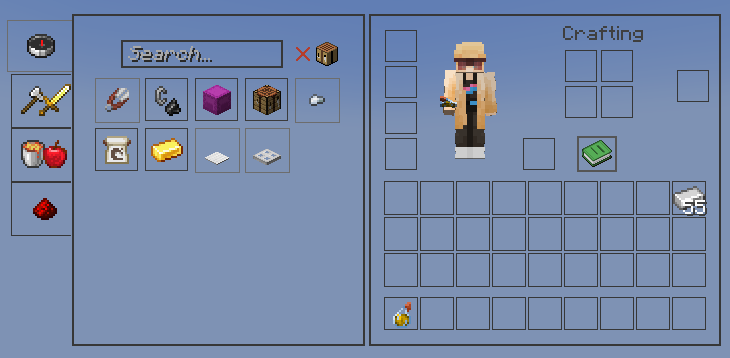
Dark GUI replaces Minecraft’s bright default menus with a clean and modern dark interface. The pack keeps the familiar vanilla layout while introducing a minimal black and dark gray design that improves readability and reduces eye strain.
It is designed for players who prefer a darker aesthetic without changing the overall feel of Minecraft. All menus, containers, and interface elements are adjusted to create a consistent dark theme while remaining simple and functional.
Dark GUI works well for long play sessions, night gameplay, PvP, building, and general survival worlds.
---
Features
• Complete dark GUI overhaul • Dark inventory, crafting, chest, and menu interfaces • Minimal and modern design that stays close to vanilla • Improved icon contrast for better visibility • Supports Minecraft 1.20+ interfaces • Compatible with OptiFine, Fabric, Sodium, and most mods • Lightweight 16x resolution with no performance impact
---
Why Use Dark GUI
Minecraft’s default interface is very bright, especially during nighttime gameplay. Dark GUI provides a darker alternative that is easier on the eyes while keeping menus clear and readable.
This pack is ideal for players who want a simple dark mode UI without changing textures, items, or blocks.
---
Screenshot
---
Installation
1. Download the .zip file 2. Move the file into the following folder:
.minecraft/resourcepacks
3. Open Minecraft 4. Go to Options → Resource Packs 5. Enable Dark GUI
---
Compatibility
Minecraft 1.20+ OptiFine / Fabric / Forge / Sodium Compatible with most resource packs
---