

2.0.1-5a5bea6
alpha

HuskHomesGUI
Show your HuskHomes homes and warps in an easy-to-use GUI menu
 5,30k
5,30k
HuskHomesGUI
> 🚨 HuskHomesGUI has been discontinued 🚨 and is no longer actively maintained. It may cease to function with newer versions of Minecraft/HuskHomes. We no longer provide support for it. Thank you for your understanding.
<center> <img src="https://github.com/WiIIiam278/HuskHomesGUI/blob/master/images/banner.png?raw=true" /> <b><a href="https://github.com/WiIIiam278/HuskHomesGUI">GitHub</a></b> — <b><a href="https://william278.net/docs/huskhomes/gui">Docs</a></b> — <b><a href="https://github.com/WiIIiam278/HuskHomes/">Issues</a></b> — <b><a href="https://discord.com/invite/tVYhJfyDWG">Discord</a></b> </center> <br/>
HuskHomesGUI is a GUI add-on plugin for HuskHomesGUI on Spigot servers. It provides a chest-style graphical user interface (GUI) for browsing home and warp lists as well as editing homes.
It replaces the chat menu system that is built into HuskHomes when you type `/homelist`, `/phomelist` or `/warplist` and includes anvil-based rename and description editing functionality to allow for easy editing.
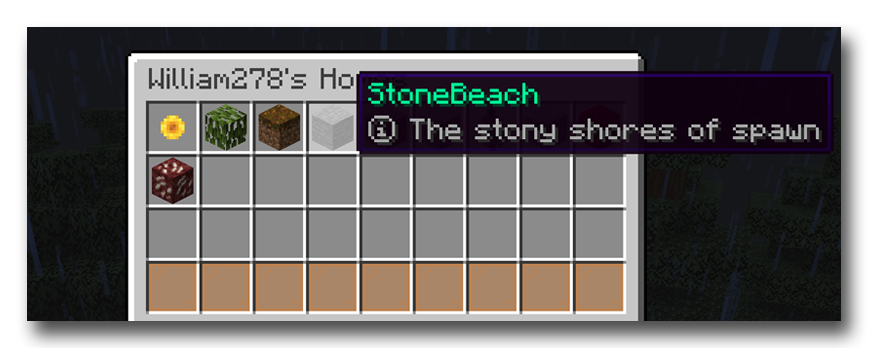
If you prefer to browse using a menu, or would like better support for Bedrock players connecting over Geyser, then this add-on is for you.
Setup
1. Have HuskHomes v3.x+ installed on your server(s) 2. Download HuskHomesGUI and place it in your server's `~/plugins/` folder
Usage
Simply use the list commands you are familiar with to bring up a list of homes or warps. Then you can left-click to teleport to a home/warp, right click to edit it, and shift-left click to change the icon of the home in the list to match the type of item in your main hand. Use the page navigation buttons to switch pages.
Versions
2.1-7a8fc24
alpha
2.2
release
2.3-dd3cd42
alpha
2.3-e55e278
alpha
2.0-57c4fab
alpha
2.3.1-86640b9
alpha
2.1-0e88701
alpha
2.3-b74e822
alpha
2.2-1f233ac
alpha
2.2-5a444a7
alpha
2.3-55edf27
alpha
2.3-7f6d625
alpha
2.1-35c0f15
alpha
2.3-4db8571
alpha
2.1
release
2.3-43bb96d
alpha
2.3-d41a575
alpha
2.1-670c749
alpha
2.3-e1a7115
alpha
2.0.1-49fcb92
alpha
2.3-e2588e6
alpha
2.3-d539df0
alpha
2.3-f846a41
alpha
2.0.1
release
2.3-d33d822
alpha
2.3-442beaa
alpha
2.3
release
2.3-c85cd76
alpha
2.3-7a0a9bb
alpha
2.3-b641eb9
alpha
2.3-8702876
alpha
2.3-d6045ce
alpha
2.3.1-89adfe1
alpha
2.2-0570dd4
alpha
2.3-bdf10ac
alpha
2.1-6e422fe
alpha
2.1-00cff6c
alpha
2.1-79177cc
alpha
1.2.2
release
2.3-7b7f211
alpha
2.0-333b097
alpha
2.3-b862713
alpha
2.0
release
2.3-51e4d43
alpha
2.1-52f6048
alpha
2.3-3062b59
alpha