

1.1-SNAPSHOT
release
ItemKeybind
Quickly select any item from your hotbar by pressing a configured key
 22
22
ItemKeybind
Features
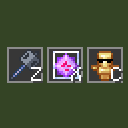
Instant hotbar selection — press a key, the slot with that item gets selected immediately Unlimited binds — configure as many item→key pairs as you need HUD overlay — shows all your binds as item slots with key labels, just like the vanilla hotbar Draggable HUD — reposition the overlay anywhere on screen
How to use
1. Open Mod Menu and click Config on ItemKeybind 2. Add a bind: enter an item ID (e.g. minecraft:end_crystal) and a key (e.g. key.keyboard.z) 3. Press Save & Close 4. In-game, press your configured key to instantly switch to that item in your hotbar. If the item is not in your hotbar, nothing happens.
Gallery
Versions
1.0-SNAPSHOT
release