

1.0.0
release

KastNPC
KastNPC — the best alternative to NewNPC. Create and customize poseable NPCs with skins, mobs, equipment, presets and animations.
 51
51
KastNPC
🎬 KastNPC — Идеальный инструмент для твоих превью!
KastNPC — это мощный мод для создания декоративных и настраиваемых NPC в Minecraft, разработанный специально для контент-мейкеров, строителей карт, ролевых проектов и постановочных сцен.
С помощью KastNPC ты можешь ставить персонажей прямо в мире, менять им внешний вид, выбирать модель игрока или моба, настраивать позу, скин, броню, предметы в руках, имя и анимацию. Забудь о сложных программах для рендеринга — теперь профессиональные сцены для превью, скриншоты и кинематографичные кадры можно делать прямо в Minecraft.
🛠️ Технические характеристики
| Параметр | Значение | | :--- | :--- | | Mod ID | 1.0.0 | | Mod ID | 1.21.4 | | Mod ID | Fabric | | Mod ID | 0.19.2+ | | Mod ID | Требуется | | Mod ID | 21+ | | Mod ID | kastnpc |
> ⚠️ Важно: Требуется наличие Fabric API
✨ Возможности для создания контента
* 📸 «Волшебная палочка NPC» Используй предмет «Волшебная палочка NPC», чтобы быстро поставить персонажа в кадр.
Пример скриншота
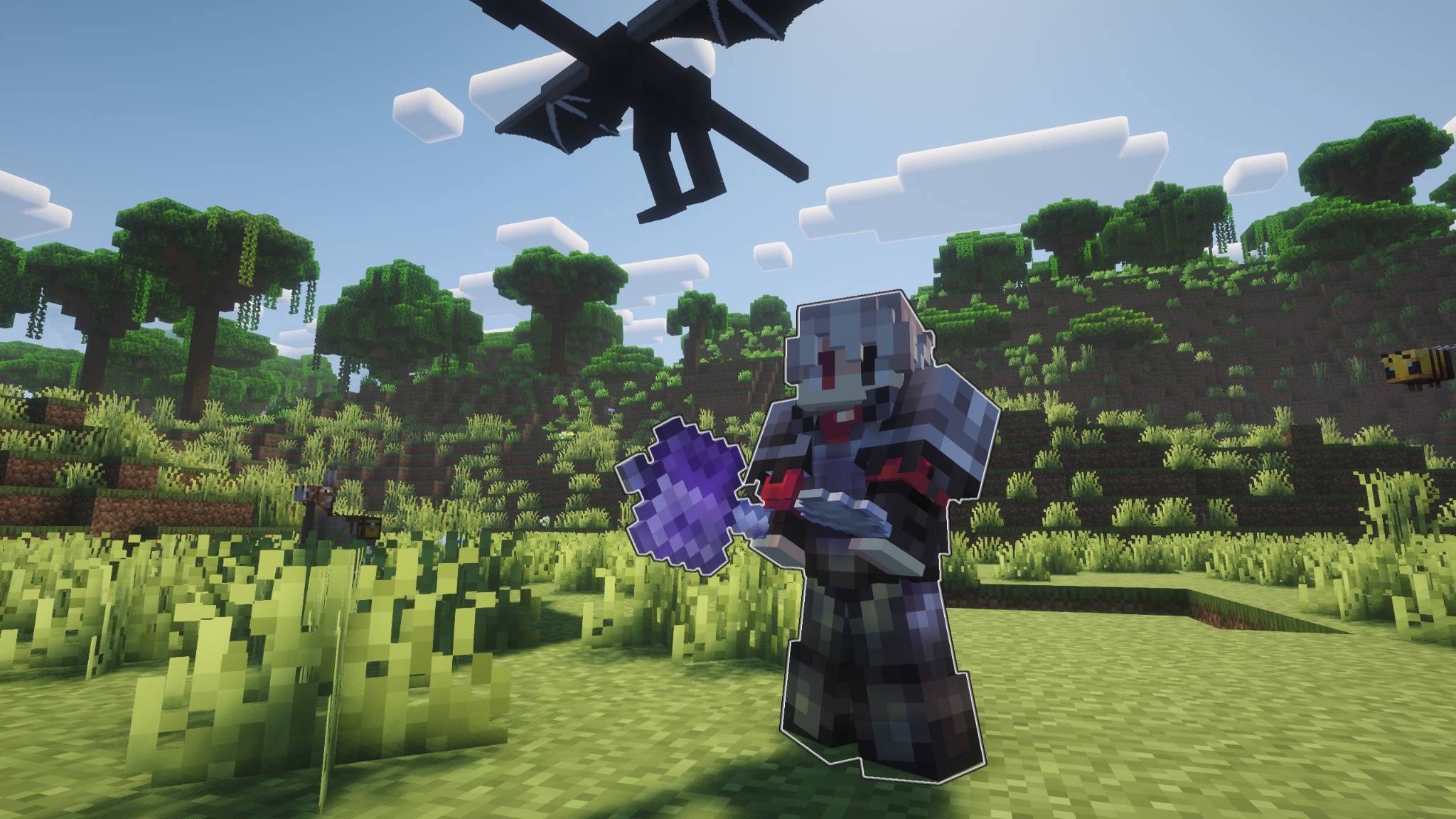
* ⌨️ Right Shift Нажми Right Shift, чтобы открыть меню и быстро перейти к настройкам NPC.
Пример меню NPC
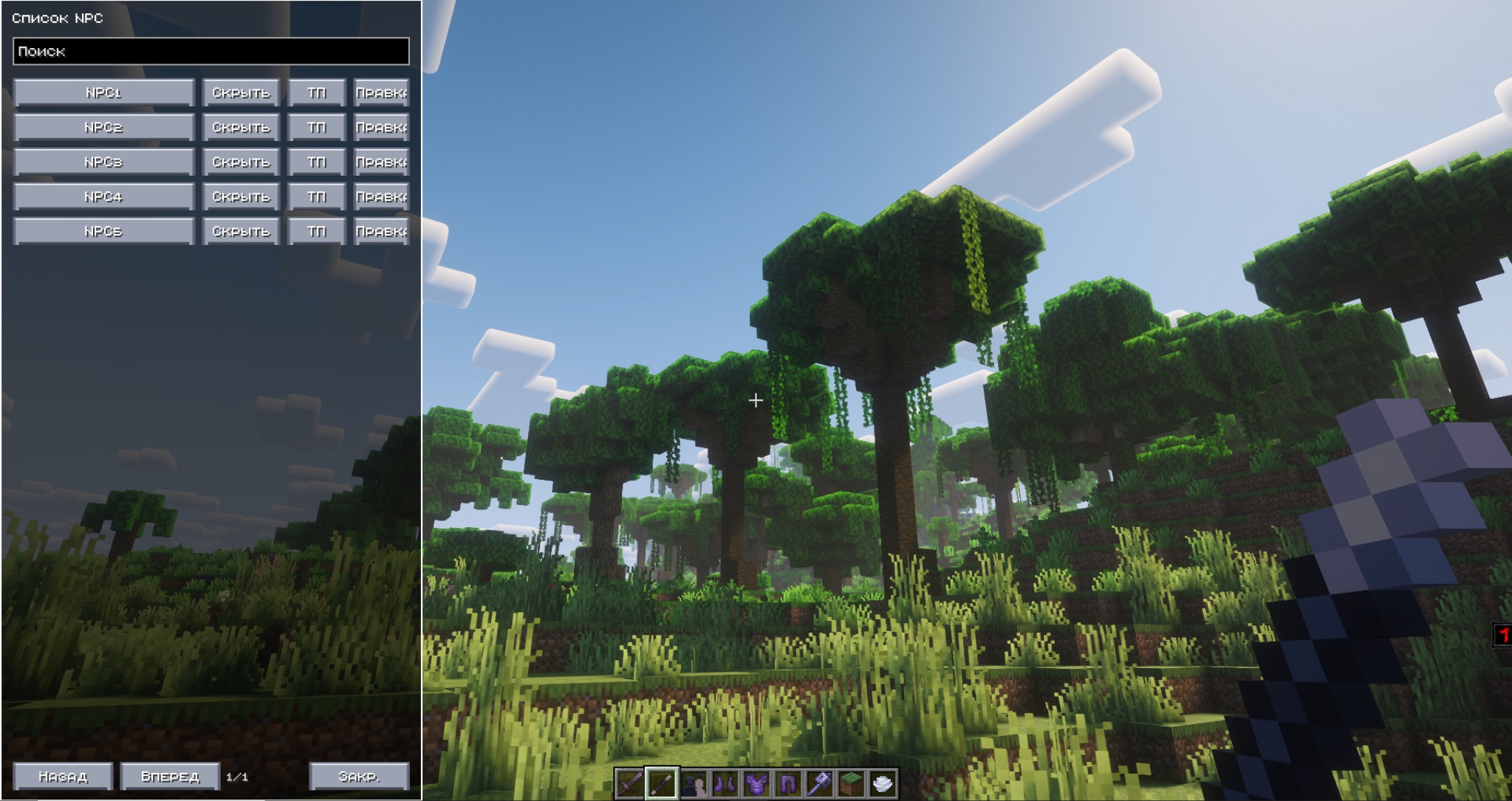
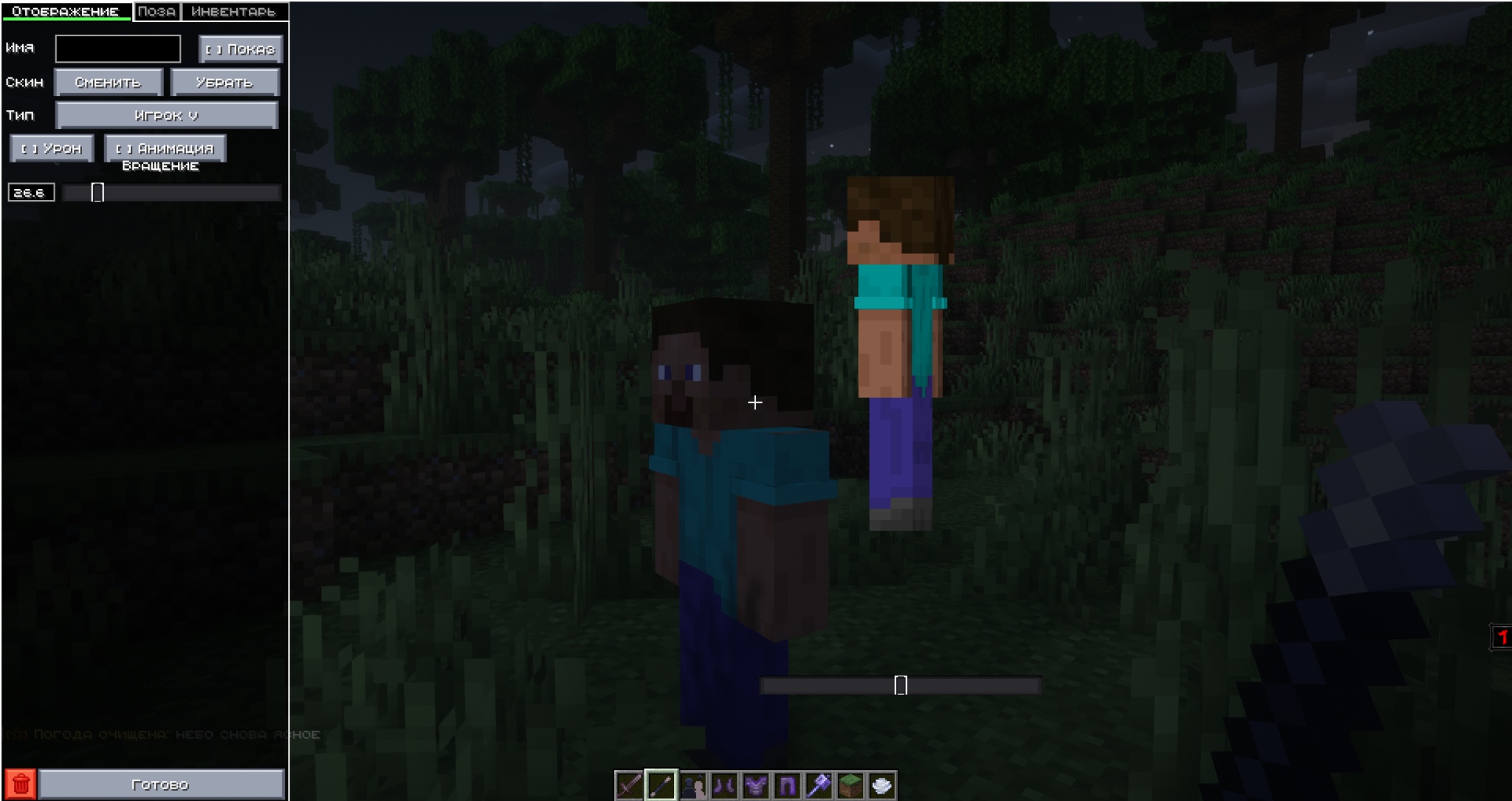
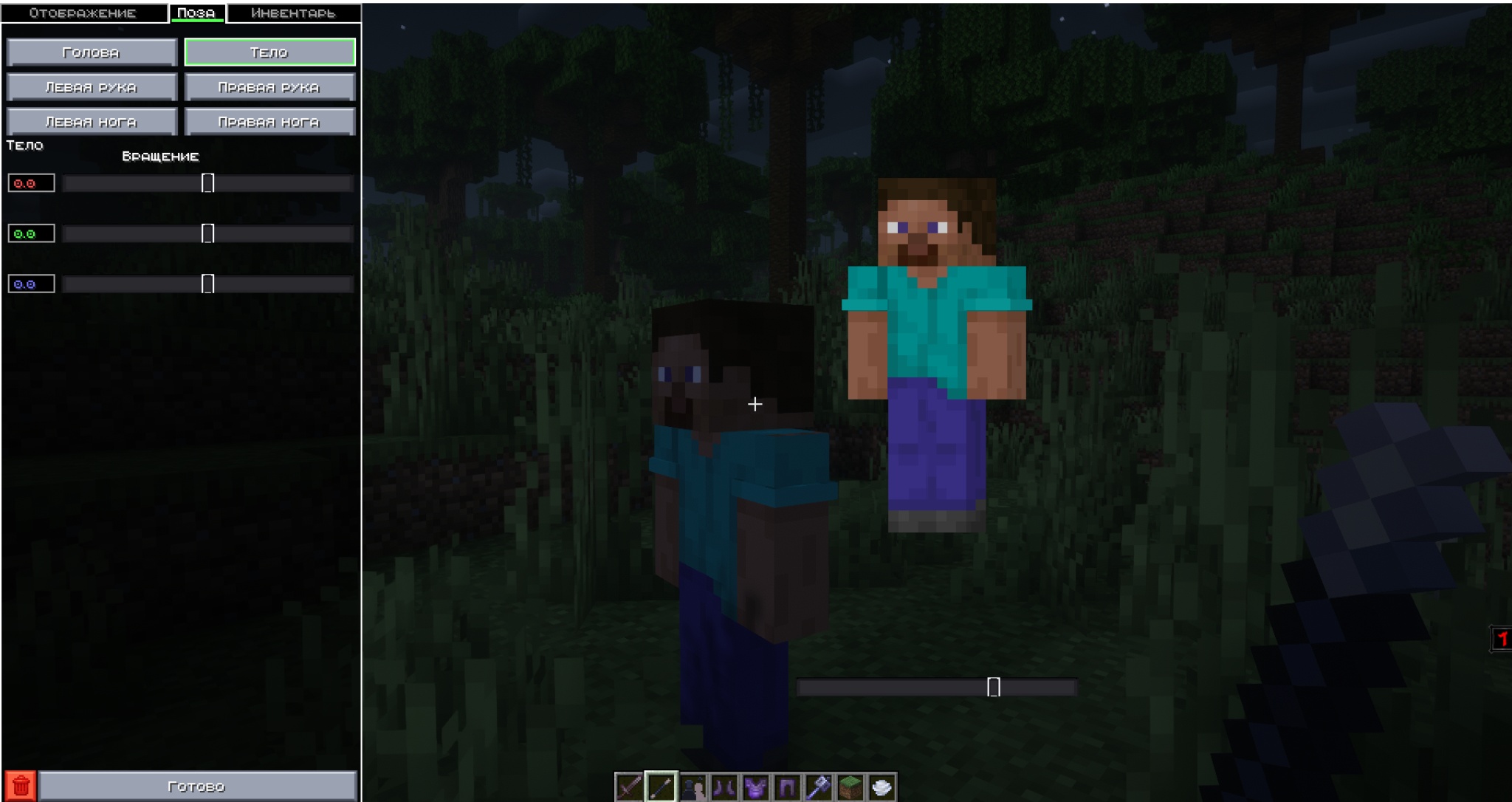
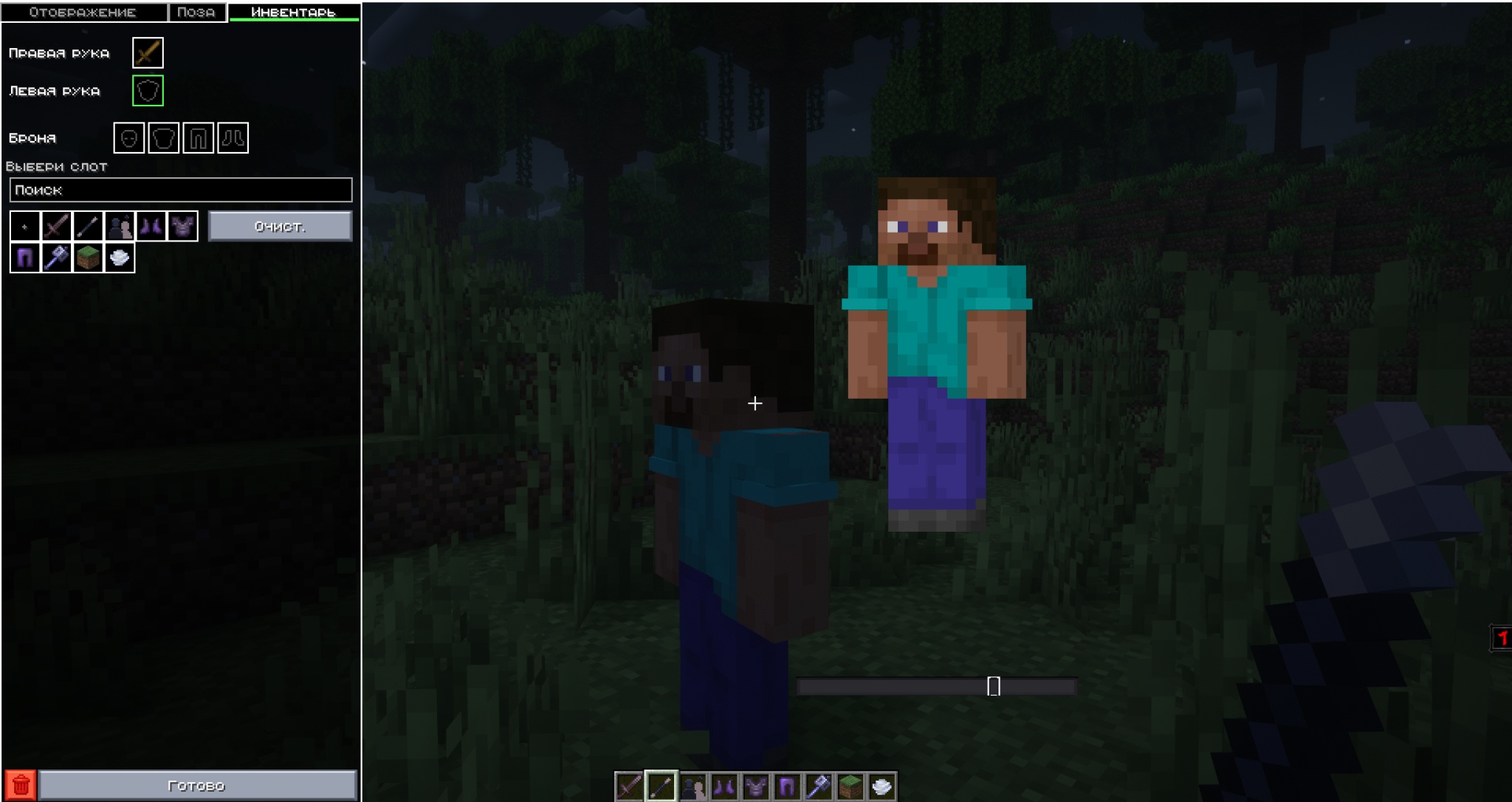
* 🖼️ Без дропа: Открывай редактор, телепортируйся к NPC, скрывай или показывай NPC прямо через удобный список. * 🎭 Без дропа: Настраивай отображение, позу и инвентарь через отдельные вкладки. * 👤 Без дропа: Поддержка моделей Steve и Alex. * 👾 Без дропа: Поддержка большого количества мобов Minecraft 1.21.4. * 🏷️ Без дропа: Можно задать имя NPC и включить или скрыть отображение имени над головой. * 👕 Без дропа: Можно сменить скин игрока или загрузить свой PNG-скин. * 🧍 Без дропа: Поддерживаются PNG-скины 64x64 и 64x32 размером до 256 KB. * 🤸 Без дропа: Голова, тело, левая рука, правая рука, левая нога и правая нога настраиваются вручную. * 💤 Без дропа: Можно включить анимацию стояния/idle. * 🐺 Без дропа: Для мобов используется их ванильная модель и родная анимация, где это возможно. * 🧎 Без дропа: Можно включить позу приседа. * 💥 Без дропа: Можно включить эффект получения урона. * ⚔️ Без дропа: NPC может держать предмет в правой и левой руке. * 🛡️ Без дропа: Можно надеть ботинки, поножи, нагрудник и шлем. * ✋ Без дропа: Есть настройки использования правой и левой руки. * 🏹 Без дропа: Есть настройка натянутого лука и отображения стрелы/снаряда. * 🚫 Без дропа: NPC не дропает предметы и используется как декоративная сущность.
🌟 3D Skin Layers и освещение
KastNPC имеет встроенную поддержку мода 3D Skin Layers.
Если 3D Skin Layers установлен, у NPC-игроков могут работать объемные слои скина. Благодаря этому персонажи выглядят более живыми, детализированными и качественными на превью: одежда, волосы, аксессуары и внешние слои скина получают дополнительный объем.
При этом 3D Skin Layers не является обязательной зависимостью. KastNPC запускается и работает без него, но с установленным 3D Skin Layers не является обязательной зависимостью NPC-игроки могут выглядеть заметно лучше.
NPC также отображаются как сущности внутри игрового мира, поэтому на них влияет освещение сцены. На персонажей может падать свет от солнца, луны, факелов, светящихся блоков и других источников освещения. Это помогает естественно вписывать NPC в окружение, делать атмосферные скриншоты, кинематографичные кадры и качественные превью без отдельного рендера.
💾 Пресеты NPC
* Есть отдельный предмет «Пресеты NPC». * Можно сохранить готового NPC как пресет. * Пресет сохраняет имя, модель, скин, позу, анимацию, броню и предметы. * Через предмет пресетов можно быстро создать NPC из сохраненного шаблона. * Это удобно для повторного использования персонажей в новых сценах, роликах, картах или превью.
👾 Поддерживаемые модели
Игрок
Steve, Alex.
Мобы
allay, armadillo, axolotl, bat, bee, blaze, bogged, breeze, camel, cat, cave spider, chicken, cod, cow, creaking, creeper, dolphin, donkey, drowned, elder guardian, ender dragon, enderman, endermite, evoker, fox, frog, ghast, giant, glow squid, goat, guardian, hoglin, horse, husk, illusioner, iron golem, llama, magma cube, mooshroom, mule, ocelot, panda, parrot, phantom, pig, piglin, piglin brute, pillager, polar bear, pufferfish, rabbit, ravager, salmon, sheep, shulker, silverfish, skeleton, skeleton horse, slime, sniffer, snow golem, spider, squid, stray, strider, tadpole, trader llama, tropical fish, turtle, vex, villager, vindicator, wandering trader, warden, witch, wither, wither skeleton, wolf, zoglin, zombie, zombie horse, zombie villager, zombified piglin.
🔌 Совместимость
* Мод рассчитан на Fabric API. * Fabric API. * Для корректной работы на сервере мод должен быть установлен и на клиенте, и на сервере. * Для работы требуется Fabric API. * Fabric API поддерживается, но не является обязательной зависимостью.
⌨️ Дополнительные команды
Команды помогают быстро настроить окружение для идеального скриншота или превью:
* `/gm 0`, `/gm 1`, `/gm 2`, `/gm 3` * `/gm survival`, `/gm creative`, `/gm adventure`, `/gm spectator` * `/gm0`, `/gm1`, `/gm2`, `/gm3` * `/day` * `/night` * `/sun` * `/rain` * `/enchant <зачарование> <уровень>`
🚀 Как использовать
1. Установи Fabric Loader для Minecraft 1.21.4. 2. Установи Fabric API. 3. Закинь `kastnpc-1.0.0.jar` в папку `mods`. 4. Зайди в мир. 5. Возьми предмет «Волшебная палочка NPC» из вкладки KastNPC. 6. ПКМ по блоку — создать NPC. 7. ПКМ предметом в воздух — открыть список NPC. 8. Right Shift — открыть меню NPC. 9. В редакторе выбери модель, скин, имя, позу, анимацию, броню и предметы. 10. При необходимости сохрани NPC в пресет через кнопку сохранения пресета.
📌 Важно
* NPC предназначены в первую очередь для декора, сцен, карт, ролеплея, скриншотов, превью и постановки персонажей. * Это не полноценные боевые мобы с искусственным интеллектом. * Анимации берутся из ванильных моделей Minecraft, поэтому у разных мобов они выглядят по-разному. * Ручная поза может накладываться поверх ванильной анимации. * Некоторые очень сложные модели могут отличаться от настоящего моба, потому что NPC использует декоративный рендер, а не полный AI/рендер живого моба.
EN
🎬 KastNPC — The Perfect Tool for Your Thumbnails!
KastNPC is a powerful mod for creating decorative and customizable NPCs in Minecraft, designed especially for content creators, map makers, roleplay projects, and staged scenes.
With KastNPC, you can place characters directly in the world, change their appearance, choose a player or mob model, adjust their pose, skin, armor, held items, name, and animation. Forget about complicated rendering software — now you can create professional thumbnail scenes, screenshots, and cinematic shots directly in Minecraft.
🛠️ Technical Specifications
| Parameter | Value | | :--- | :--- | | Mod ID | 1.0.0 | | Mod ID | 1.21.4 | | Mod ID | Fabric | | Mod ID | 0.19.2+ | | Mod ID | Required | | Mod ID | 21+ | | Mod ID | kastnpc |
> ⚠️ Important: Fabric API is required.
✨ Features for Content Creation
* 📸 “NPC Magic Wand” Use the “NPC Magic Wand” item to quickly place a character in your scene.
Screenshot examples
* ⌨️ No drops: Press No drops: to open the NPC menu and access settings. * 🖼️ No drops: Open the editor, teleport to NPCs, hide or show NPCs through a convenient list. * 🎭 No drops: Configure display, pose, and inventory through separate editor tabs. * 👤 No drops: Support for Steve and Alex models. * 👾 No drops: Support for many Minecraft 1.21.4 mob models. * 🏷️ No drops: Set an NPC name and show or hide the name above the head. * 👕 No drops: Change the player skin or upload your own PNG skin. * 🧍 No drops: PNG skins 64x64 and 64x32 are supported, up to 256 KB. * 🤸 No drops: Head, body, left arm, right arm, left leg, and right leg can be adjusted manually. * 💤 No drops: Standing/idle animation can be enabled. * 🐺 No drops: Mobs use their vanilla model and native animation where possible. * 🧎 No drops: Crouching pose can be enabled. * 💥 No drops: Damage effect can be enabled. * ⚔️ No drops: NPCs can hold items in the right and left hand. * 🛡️ No drops: Boots, leggings, chestplate, and helmet can be equipped. * ✋ No drops: Right and left hand usage can be configured. * 🏹 No drops: Bow drawing and arrow/projectile rendering can be configured. * 🚫 No drops: NPCs do not drop items and are used as decorative entities.
🌟 3D Skin Layers and Lighting
KastNPC has built-in support for 3D Skin Layers.
If 3D Skin Layers is installed, player NPCs can use volumetric skin layers. This makes characters look more detailed, alive, and high-quality in thumbnails: clothing, hair, accessories, and outer skin layers can gain extra depth.
At the same time, 3D Skin Layers is not a required dependency. KastNPC launches and works without it, but with 3D Skin Layers is not a required dependency installed, player NPCs can look noticeably better.
NPCs are also rendered as entities inside the game world, so they are affected by scene lighting. Light from the sun, moon, torches, glowing blocks, and other light sources can fall onto NPCs. This helps characters blend naturally into the environment and makes it easier to create atmospheric screenshots, cinematic shots, and high-quality thumbnails without external rendering.
💾 NPC Presets
* There is a separate “NPC Presets” item. * You can save a finished NPC as a preset. * A preset saves the name, model, skin, pose, animation, armor, and items. * Using the preset item, you can quickly create an NPC from a saved template. * This is useful for reusing characters in new scenes, videos, maps, or thumbnails.
👾 Supported Models
Player
Steve, Alex.
Mobs
allay, armadillo, axolotl, bat, bee, blaze, bogged, breeze, camel, cat, cave spider, chicken, cod, cow, creaking, creeper, dolphin, donkey, drowned, elder guardian, ender dragon, enderman, endermite, evoker, fox, frog, ghast, giant, glow squid, goat, guardian, hoglin, horse, husk, illusioner, iron golem, llama, magma cube, mooshroom, mule, ocelot, panda, parrot, phantom, pig, piglin, piglin brute, pillager, polar bear, pufferfish, rabbit, ravager, salmon, sheep, shulker, silverfish, skeleton, skeleton horse, slime, sniffer, snow golem, spider, squid, stray, strider, tadpole, trader llama, tropical fish, turtle, vex, villager, vindicator, wandering trader, warden, witch, wither, wither skeleton, wolf, zoglin, zombie, zombie horse, zombie villager, zombified piglin.
🔌 Compatibility
* The mod is designed for Fabric API. * Fabric API. * For correct server usage, the mod must be installed on both the client and the server. * Fabric API is required. * Fabric API is supported but not required.
⌨️ Additional Commands
These commands help you quickly set up the perfect screenshot or thumbnail environment:
* `/gm 0`, `/gm 1`, `/gm 2`, `/gm 3` * `/gm survival`, `/gm creative`, `/gm adventure`, `/gm spectator` * `/gm0`, `/gm1`, `/gm2`, `/gm3` * `/day` * `/night` * `/sun` * `/rain` * `/enchant <enchantment> <level>`
🚀 How to Use
1. Install Fabric Loader for Minecraft 1.21.4. 2. Install Fabric API. 3. Put `kastnpc-1.0.0.jar` into the `mods` folder. 4. Enter a world. 5. Take the “NPC Magic Wand” item from the KastNPC tab. 6. Right-click a block to create an NPC. 7. Right-click with the item in the air to open the NPC list. 8. Press Right Shift to open the NPC menu. 9. In the editor, choose the model, skin, name, pose, animation, armor, and items. 10. If needed, save the NPC as a preset using the preset save button.
📌 Important
* NPCs are mainly intended for decoration, scenes, maps, roleplay, screenshots, thumbnails, and character staging. * They are not full combat mobs with artificial intelligence. * Animations are taken from vanilla Minecraft models, so different mobs may look different. * Manual poses can be layered over vanilla animations. * Some very complex models may differ from the real mob because NPCs use decorative rendering, not the full AI/rendering system of a living mob.