

1.20.2-1.0.0
release

LabyModpack
Performance mods for LabyMod
 29,40k
LabyModpack
If you having issues with the modpack, please let me know: Bug Report
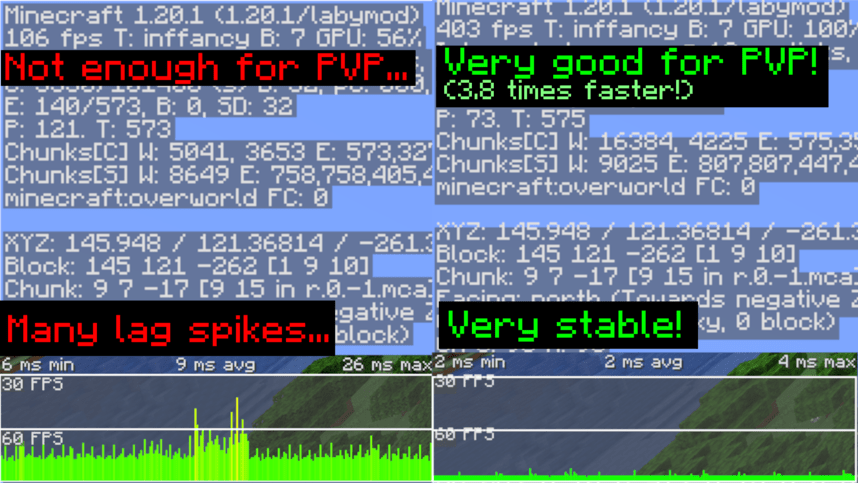
LabyModpack
A modpack specially designed to run LabyMod 4 Client smootly without having multiple issues & crashes.
📥 Installation
To install LabyModpack, You will need to use LabyMod Launcher. 1. Press "CTRL + Shift + M" in LabyMod Launcher. 2. Click on "Fabric Mods" next to "LabyMod Addons" 3. Click on filter button. 4. Uncheck "Show Installed" and "Only Show Recommended" 5. Check "Show Modpacks" 6. Search "LabyModpack" 7. Install LabyModpack
📈 Test Results
Tested on Ryzen 7 5800X, RTX 3060 and 32GB RAM.
32 Chunks Singleplayer Superflat world
Tested with Minecraft Performance Flags Benchmark
* Outdated. will update it.
| | 201.41 | 201.41 | |:---------------------------------------------:|:---------------------:|:------------------------:| | 201.41 | 817.94 FPS | 201.41 | | 201.41 | 2.96ms | 201.41 | | 201.41 | 2563.06 | 201.41 |
❓ FAQ
Q: I can't see texts on signs when I'm far away from sign!
A: This is because of FeyTweaks mod's default settings. Go to options menu, click on icon next to Online option, click on FeyTweaks and disable "Hide text in distance"
Versions
1.20.4-1.0.0
release
1.20.2-2.0.0
release
1.20.4-2.0.0
release
1.20.2-3.0.0
release
1.20.1-2.0.0
release
1.20.1-3.0.0
release