

1.0.0
release

Level = Attributes
This datapack links each player's attributes to their current experience level.
 648
648
Level = Attributes
Level = Attributes
This datapack links each player's attributes to their current experience level. Each time you gain or lose an experience level, your player's attributes will increase or decrease by a certain amount. This datapack also works on multiplayer servers!
Attributes
Attributes are values which dictate certain properties of mobs, specifically players for this datapack. 18 attributes are utilised in this datapack: - `scale` - `max_health` - `max_absorption` - `knockback_resistance` - `movement_speed` - `attack_damage` - `armor` - `armor_toughness` - `step_height` - `attack_speed` - `luck` - `block_interaction_range` - `entity_interaction_range` - `gravity` - `safe_fall_distance` - `fall_damage_multiplier` - `block_break_speed` - `jump_strength`
You can learn more about each attribute here.
Configuration
To access the configuration scoreboard, run the command `/scoreboard objectives setdisplay sidebar level_attributes_config`. Here you can configure which attributes you want to enable/disable and set a custom max level. Do note that not all attributes are displayed on the scoreboard at once as there are too many attributes.
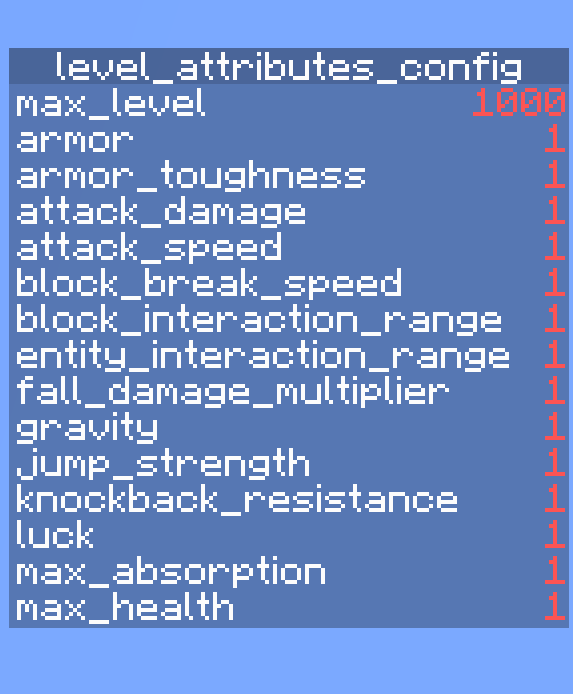
Enabling/disabling Attributes
Enabling an attribute links it to your current xp level while disabling unlinks it. All attributes are enabled by default.
Enabling: `/scoreboard players set <attribute_name> level_attributes_config 1` Disabling: `/scoreboard players set <attribute_name> level_attributes_config 0`
Setting Custom Max Level
`max_level` refers to the maximum xp level that each enabled attribute will scale towards. This means the higher the `max_level`, the slower each attribute increases towards its max value with each xp level gained. The default `max_level` is set to 1000. To customise it, run `/scoreboard players set max_level level_attributes_config <level>`. Valid values are integers between 10 and 1,000,000. Setting a value outside this range may break the datapack!
Other Things To Note...
- Run the command `/trigger level_attributes_list` to see the current values of all your player's attributes. - If you want to remove the datapack, run the command `/function level_attributes:uninstall` and then disable/delete the datapack
--- This datapack was originally inspired by Level = Border and the newly added attributes in Minecraft Snapshot 23w51a.
Gallery
Versions
1.0.2
release
0.2.0
beta
1.0.1
release
0.3.0
beta
0.4.0
beta
0.1.0
beta