


4.2.4
release

Mc2Discord
Link your Minecraft server chat with your Discord (integration, bridge)
 22,68k
Mc2Discord
<center><h3 align="center">Link your Minecraft server chat with your Discord</h3></center>
<br> <br>
/! This mod needs configuration to work properly. Please take a look to the wiki: https://github.com/DenisD3D/Mc2Discord/wiki
Features
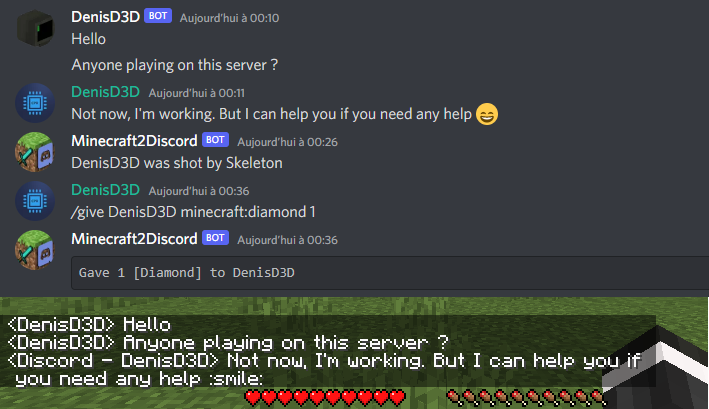
* Send Minecraft chat message to your Discord server * Send message in your Discord server to the Minecraft chat * Send game events message to Discord (player join, player leave, death, etc.) * Display player's head as profile picture in Discord thanks to webhook mode * Execute Minecraft commands on Discord * Customize bot presence (eg: playing at xxx) and channel name / topic * Provide an invitation link to your Discord server with the /discord command * Forward the server console to discord (useful for admins) * Hide player on Discord (useful for admins, integrate with VanishMod) * Account linking (forced or optional) * Fully customizable, easy configuration (messages, behavior, etc.) * Relay others mods announcements * Works with Emojiful to display emojis ingame
Try without installing
Join the official demo server hosted by MtxServ * Join the demo discord channel #access-demo * Start the sever with /start command (server is usually stopped) * Connect to m2d-demo.denisd3d.fr with minecraft 1.20.2 Vanilla
Installation
A quick configuration is mandatory for the mod to work. Steps are described on the wiki: https://github.com/DenisD3D/Mc2Discord/wiki
If you need any help or want new features, you can join the Discord support server
You can also watch the video tutorial:
Misc
Links
* Discord (Support): https://discord.gg/rzzd76c * CurseForge (Download): https://www.curseforge.com/minecraft/mc-mods/mc2discord/ * Modrinth (Download): https://modrinth.com/mod/mc2discord * Github (Source): https://github.com/DenisD3D/Mc2Discord * Wiki: https://github.com/DenisD3D/Mc2Discord/wiki
Versions
4.2.7
release
4.2.4
release
4.2.0
release
4.2.3
release
1.19.x-3.2.8
release
1.16.x-3.3.0
release
4.2.3
release
4.2.6
release
4.2.0
release
4.1.0
release
4.2.2
release
4.2.4
release
4.2.2
release
4.2.2
release
4.2.1
release
1.12.2-3.2.9
release
4.1.1
release
4.0.1
release
4.2.1
release
4.2.3
release
4.0.1
release
4.2.3
release
4.1.1
release
4.2.4
release
4.2.3
release
forge-1.19.x-3.2.10
release
4.2.5
release
forge-1.18.x-3.2.10
release
1.12.2-3.3.0
release
4.2.0
release
1.16.x-3.2.9
release
4.2.5
release
4.0.2
release
1.19.x-3.2.9
release
4.2.2
release
4.2.3
release
4.2.2
release
4.2.6
release
4.2.1
release
4.2.4
release
4.2.7
release
4.2.0
release
4.1.0
release
4.2.4
release
4.2.4
release
4.0.0
release
4.2.1
release
4.1.0
release
forge-1.18.x-3.2.6
release
4.2.6
release
4.2.6
release
4.0.0
release
4.0.2
release
4.2.7
release
3.3.0
release
4.1.0
release
4.2.6
release
1.18.x-3.2.9
release
4.2.1
release
forge-1.19.x-3.2.6
release
4.2.3
release
1.12.2-3.2.8
release
4.2.6
release
3.3.2
release
4.0.2
release
1.19.x-3.3.0
release
4.2.6
release
4.2.4
release
4.2.7
release
4.2.4
release
4.2.4
release
4.2.7
release
forge-1.16.x-3.2.6
release
forge-1.16.x-3.2.10
release
4.2.1
release
4.2.2
release
4.2.4
release
4.2.3
release
4.1.1
release
4.2.0
release
1.16.x-3.2.8
release
4.2.4
release
forge-1.19.x-3.2.7
release
4.1.1
release
4.2.0
release
1.18.x-3.2.8
release
4.0.1
release
4.2.6
release
3.3.1
release
1.16.x-3.3.0
release
4.2.7
release
4.2.6
release