Automatic Operator


Requires the library mod Collective.
Automatic Operator was initially created to make testing server-side mods easier in Fabric. By default, Fabric chooses a random name (Player1 -> Player999) as the username. This caused some issues in the development server where I needed cheat-access for testing. This mod makes it so that any player that joins, is automatically given operator permission. Released to the public in case someone else has a use for it as well.
Can be added to modpacks, but keep in mind your players might not want this functionality. This is why the mod is disabled by default.
Set ‘enableAutomaticOperator‘ in the config to true to enable it.
Configurable: ( how do I configure? )
enableAutomaticOperator (default = false): If the mod should be enabled. Turned off by default to prevent unwanted behaviour in modpacks.
onlyRunOnDedicatedServers (default = true): If the mod should only run on dedicated servers.
onlyMakeSpecificPlayerNamesOP (default = false): If enabled, only player names specified in ‘specificOperatorPlayerNames’ will be made operators. If disabled, everyone will.
specificOperatorPlayerNames (default = “Player1,Player2”): The specific names of players that the mod automatically makes operators. Seperated by a comma ( , ).
Whenever a player logs in, they’ll automatically be made a server operator (OP-ed):
Show Spoiler

——————
You may freely use this mod in any modpack, as long as the download remains hosted within the Modrinth ecosystem.
Serilum.com contains an overview and more information on all mods available.
Comments are disabled as I’m unable to keep track of all the separate pages on each mod.
For issues, ideas, suggestions or anything else there is the Github repo. Thanks!
Automatic Infinite Elytra
Minecraft has a vanilla glitch where moving your head in a specific up-down pattern can allow you to fly infinitely
This mod simulates those patterns automatically.
_Note: Video is **not** made by me_
### Features:
1. Customizable keybind to activate flight
2. Configurable automatic flight settings.
3. Configurable (and toggleable) HUD display which shows elytra information including
– Flight Mode (Automatic | Manual)
– Altitude
– Flight Speed
– Elytra Durability
– Autopilot destination coords and distance
4. Automatic Collision Detection Utility
5. Autopilot
6. Automatic music player (plays a series of tracks during auto-piloted flights, tracks are created by **[Swaritz](https://github.com/Swaritz)**)
### How to use Automatic Mode?
**Step 1:** You will need to be flying in the air using an Elytra.
**Step 2:** Gain a bit of height; 100 blocks above ground level is recommended.
**Step 3:** Press the keybind (default ‘right alt’) to toggle Automatic Flight on.
**Step 4:** Enjoy!
### Collision Detection Utility
The Collision Detection Utility will automatically activate when in Automatic flight mode. If an obstacle appears in front of the player, the Utility will:
– Deactivate automatic flight
– Turn the player 180° in order to avoid the obstacle
– Print a warning in chat
### How to use Autopilot?
**Step 1:** You will need to be flying in the air with Automatic Flight Mode enabled (see above).
**Step 2:** Enter the command /setDestination where x z are your destination coordinates.
**Step 3:** Enjoy!
**Step 4:** The mod will automatically land if ‘Perform Automatic Landing’ is enabled in the Config.
**Step 5:** To unset your current destination, use /removeDestination. To reuse your previously set destination, enter /setDestination without any further coordinates.
### Flight Analytics ###
Each autopiloted (where destination is set with /setDestination) flight’s stats are recorded and stored on a per-flight basis. When a new autopiloted flight starts, the old data will be cleared.
The analytics includes the following data:
– Distance
– Time
– Average speed
– Elytra durability used
You can see the stats by using the command /flightanalytics.
Alternatively, you can enable “Automatically print analytics” in the config.
If you do not wish for the analytics data to be recorded, you can disable it entirely in the config.
### Explore Area ###
This feature explores and generates all chunks within the boundries of the rectangle set by the coordinates x1, z1, x2, z2
where x1 and z1 are the bottom-left coords of the rectangular area you want to explore
and x2 and z2 are the top-right coords of the rectangular area you want to explore.
To use, run the command _/exploreArea _
### Config
You can access the Config in the [ModMenu](https://modrinth.com/mod/modmenu) Config Screen. Detailed instructions are given in the sidebar for each option.
Automatic Elytra
# Automatic Elytra
Automatic Elytra is a client side mod that will equip and unequip their elytra for them.
The player simply has to have an elytra in their inventory and when they try to fly it will be equiped.
The chestplate that was swapped out with the elytra will be re-equiped when the player touches the ground or water.

Note: This mod may be considered a cheat to some people / servers. Use at your own risk, I am not responsible for anyone getting banned for using this mod.
—
This is a fork of Areuthreateningme’s implementation of the mod, as the original hasn’t received any updates for several years.
I won’t be doing backports, only updates when new versions of MC come out, and minor fixes in these, not in the previous ones.
[Here is the link](https://www.curseforge.com/minecraft/mc-mods/automatic-elytra) to Areuthreateningme’s original mod page on CurseForge.
Automatic Doors
Requires the library mod Collective.
This mod is part of The Vanilla Experience modpack and Serilum’s Quality of Life Bundle mod.
Automatic Doors is a minimalistic configurable mod which automatically opens doors around the player and closes them with a delay. The doors will only be closed if the player isn’t near after opening. By default iron doors will also be opened, but you may change that in the config.
Configurable: ( how do I configure? )
doorOpenTime (default = 2500, min 0, max 10000): The time in ms the door should stay open.
shouldOpenIronDoors (default = true): When enabled, iron doors will also be opened automatically.
preventOpeningOnSneak (default = true): When enabled, doors won’t be opened automatically when the player is sneaking.
The effect in action:
Show Spoiler

——————
You may freely use this mod in any modpack, as long as the download remains hosted within the Modrinth ecosystem.
Serilum.com contains an overview and more information on all mods available.
Comments are disabled as I’m unable to keep track of all the separate pages on each mod.
For issues, ideas, suggestions or anything else there is the Github repo. Thanks!
Automated Item Frames
When an item frame is placed on a chest or a barrel, the item with the higher count within the chest/barrel inventory will be automatically placed inside the item frame and substract it from the item stack on the chest’s inventory.
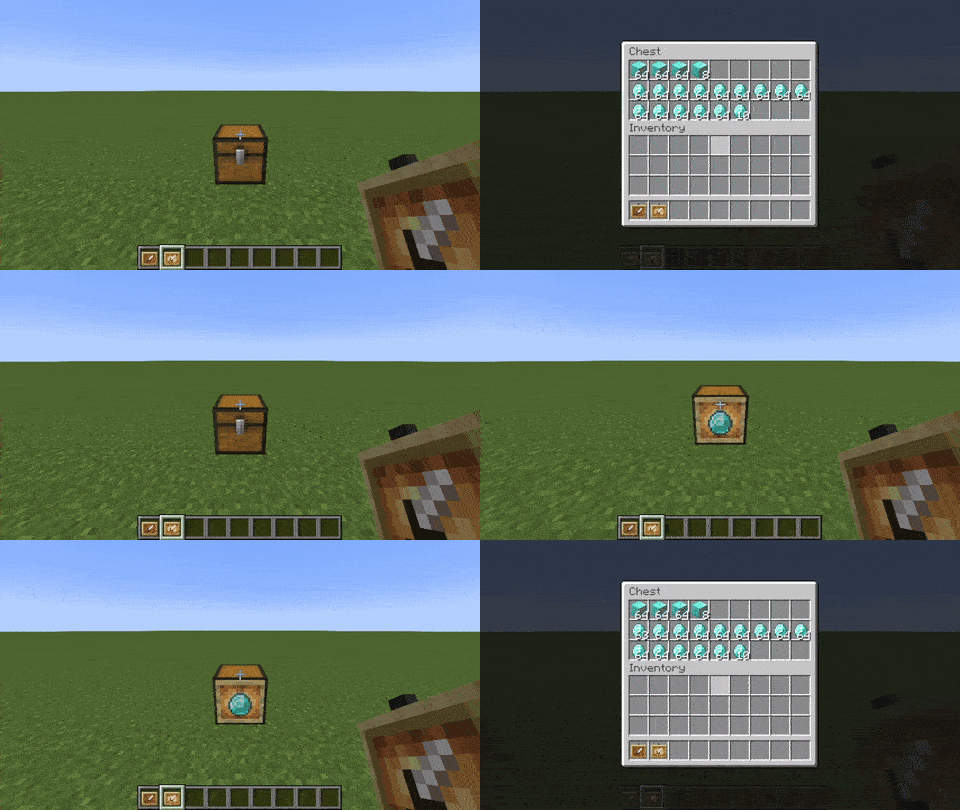
Works with glow item frames as well.
If installed client-side it will work in single player worlds, if installed server-side it will work for everyone (no need to have it on client).
Automated Crafting
—
### Adds a simple autocrafter block. Has a simple mode and a… not simple mode.
Must be installed on both client and server.
Adds a single block: the Automated Crafting Table.
—
### Automated Crafting is discontinued on Minecraft 1.21+ because of the vanilla Crafter
There’s a [converter](https://modrinth.com/mod/automated-crafting/version/1.0.0+MC1.21)
that can be used to turn Automated Crafting Tables into Crafters when updating a world to 1.21.
Converter details
Use the converter when updating a pre-1.21 world with Automated Crafting Tables to 1.21.
Contraptions that used the Automated Crafting Table are unlikely to work with the Crafter, but this will at least
minimize the loss of blocks and items.
Automated Crafting Tables’ input will be copied to its Crafter replacement, but its output will be lost because
Crafters’ output slots don’t hold items.
—


Any stripped wood or logs may be substituted for those shown in the recipe above.
Basically, you insert items (with hoppers and droppers) so that a recipe pattern is in its inventory, then give it a redstone signal and it crafts the recipe.
—
Configuration
Supports [Cloth Config](https://modrinth.com/mod/cloth-config/versions) and
[Mod Menu](https://modrinth.com/mod/modmenu/versions) for configuration, but neither is required.
Options will use their default values if [Cloth Config](https://modrinth.com/mod/cloth-config/versions) is absent.
If [Cloth Config](https://modrinth.com/mod/cloth-config/versions) is present, options can be configured either through
[Mod Menu](https://modrinth.com/mod/modmenu/versions) or by editing `config/automated_crafting.json` in your
instance folder (`.minecraft/` by default for the vanilla launcher).
– Enable Simple Mode; default: `true`
> In simple mode you can set a recipe template
– Enable Quasi-Connectivity; default: `false`
> If the block above an auto crafter would be powered, the auto crafter is powered (but not updated)
– Enable Redstone Dust Redirection; default: `false`
> Redstone dust next to auto an auto crafter will point into the auto crafter
– Craft Continuously While Powered; default: `false`
> When an auto crafter is powered and contains a valid recipe, that recipe will be crafted immediately
– Comparator reads 15 if output isn’t empty; default: `false`
> A comparator reading an auto crafter with anything in its output slot will read 15
– Download translation updates; default: `true`
> Download translations from Crowdin when the game launches
—
Translating
[](https://crwd.in/automated-crafting)
If you’d like to help translate Automated Crafting, you can do so on
[Crowdin](https://crwd.in/automated-crafting).
New translations will be added once approved without the mod needing an update thanks to
[CrowdinTranslate](https://github.com/gbl/CrowdinTranslate).
—
This mod is only for Fabric (works on Quilt, too!) and I won’t be porting it to Forge. The license is MIT, however, so anyone else is free to port it.
I’d appreciate links back to this page if you port or otherwise modify this project, but links aren’t required.
Create: Automate stones
## Create: Automate Stones is Create Mod addon that adds multiple stone recipes
**All blocks and items that can be crafted:**
*You can see recipes in gallery*

Auto-Lan
# Auto-Lan
**Info:**
* This mod’s codes are inspired by [Custom-LAN](https://github.com/DimiDimit/Custom-LAN)
***Requires [Cloth Config Api](https://modrinth.com/mod/cloth-config)**
**Functions:**
* Customize more of your integrated server (Online Mode, Max Players, MOTD)
* Use ampersands (`&`) for [formatting codes](https://minecraft.wiki/w/Formatting_codes) instead of section signs (`§`) and variables (e.g. `${username}`, `${world}`) in the MOTD
* Change the settings mid-game (including the port) and stop the server without quitting the world
* Save the settings globally or per-world (they are loaded automatically with per-world settings taking priority over the global ones, which take priority over the system defaults)
* Change who can use cheats individually using the `/op` and `/deop` commands and cheat in singleplayer without opening to LAN (replaces the Allow Cheats button)
* Manage bans with `/ban`, `/ban-ip`, `/banlist`, `/pardon` and `/pardon-ip`, and whitelist players with `/whitelist` (use `/whitelist on`/`off` to enable/disable)
* Expose your server outside your LAN without port forwarding using tunnels (currently only ngrok is supported)
Commands:
“`
/publish [port] [onlineMode] [maxPlayers] [defaultGameMode] [tunnel] [motd]
/publish [perworld|global|system] [port] [onlineMode] [maxPlayers] [defaultGameMode] [tunnel] [motd]
/publish stop
“`
The global settings are stored in `.minecraft/config/autolan.toml`, while the per-world ones are stored in `data/autolan.dat` in the respective world’s directory.
The files used are also per-world and the same as on dedicated servers—`banned-players.json`, `banned-ips.json`, `whitelist.json`—though whether the whitelist is enabled is stored in `data/autolan.dat`.
AutoJump KeyBind
#
AutoJump KeyBind Mod – a mod that allows you to configure the button to enable and disable auto jump.
####
In minecraft 1.18, bigger mountains and rocks were added, and because of this, auto-jumping, in my opinion, made much more sense. However, auto-jump is not always needed and can sometimes get in the way. Going into the settings every time to turn it on or off is very inconvenient, but that’s what I made this mod for. It adds the ability to configure a key (default “R”) to enable and disable autojump.
####
You can also set the key to only turn on or only turn off individually if you suddenly need it.
#### At the moment, I have not yet figured out how to signal the user about the auto-jump on or off, so for now, the mod does not report switching in any way.
######
This is my first mod so I welcome suggestions and comments.
AutoHibernate
**AutoHibernate** is a server-side Fabric mod that automatically puts your Minecraft server into deep hibernation when no players are connected, and seamlessly wakes it up the moment someone joins. By hibernating the server, you save significant CPU and power resources while keeping your world exactly as players left it.
## ✨ Key Features
* **Zero Idle Resource Usage** — Server CPU usage drops to 0% (or near 0%) when the server is empty.
* **Preserves World State** — Block updates, entity movements, crop growth, and random ticks are completely paused.
* **Freezes Local Difficulty** — In-game time stops ticking, preventing regional difficulty from artificially increasing while nobody is playing.
* **Seamless Resuming** — The server instantly wakes up without any noticeable lag or delay when a player connects.
* **Console Support** — Commands entered into the server console continue to work perfectly fine while the server is hibernating.
## 🎮 Commands
You can manually control the hibernation behavior using the `/autohibernate` command:
| Command | Description |
| :— | :— |
| `/autohibernate` | Shows the current status |
| `/autohibernate autopause true` | Enables automatic hibernation when the server is empty |
| `/autohibernate autopause false` | Disables automatic hibernation |
| `/autohibernate sleep` | Instantly forces the server to hibernate |
| `/autohibernate wake` | Instantly wakes the server from hibernation |
## ❓ FAQ
**Can you update this to a newer version of Minecraft?**
Try using the latest version of the mod first! It often works perfectly fine even if Modrinth doesn’t explicitly list the newest Minecraft snapshot or minor version as supported.
**Can you port this to an older version of Minecraft?**
Probably not, as this would likely require porting to a completely different mod loader.
**Can you port this to Forge/NeoForge/Paper?**
I may port this to other mod loaders in the future if I have the time, but for now, it remains a Fabric mod.