AuryxChat
# 💬 AuryxChat – Advanced Chat Management System




**AuryxChat** is a powerful, feature-rich chat management plugin designed as a modern alternative to EssentialsX Chat. Built for **Paper**, **Folia**, and other modern Minecraft platforms with advanced formatting, moderation, and cross-version compatibility.
—
## ✨ **Key Features**
### 💬 **Advanced Chat System**
– **Local & Global Chat** – Radius-based local chat with global override
– **Chat Mode Toggle** – Easy switching between local/global modes
– **Visual Indicators** – `[L]` and `[G]` prefixes show current chat mode
– **Force Global** – Use `!` prefix to send global messages from local mode
### 🎨 **Rich Formatting**
– **Custom Chat Formats** – Per-group chat formatting (Admin, VIP, Default)
– **Color Support** – Full legacy color code support (`&c`, `&a`, etc.)
– **Placeholder Integration** – PlaceholderAPI and AuryxCore placeholders
– **Hover Text** – Rich hover information with player stats
### 🛡️ **Chat Moderation**
– **Word Filter** – Configurable word/phrase blocking with regex support
– **Anti-Spam** – Intelligent spam detection and prevention
– **Mute Integration** – Full integration with AuryxCore mute system
– **Action Logging** – Comprehensive moderation logging
### 🔔 **Player Mentions**
– **@Player Mentions** – Highlight and notify players when mentioned
– **Sound Notifications** – Configurable mention sounds
– **Visual Highlighting** – Mentioned players see highlighted messages
—
## 🎮 **Commands Overview**
| Command | Description | Permission |
|———|————-|————|
| `/auryxchat` | Main plugin command | `auryxchat.admin` |
| `/auryxchat reload` | Reload configuration | `auryxchat.reload` |
| `/auryxchat about` | Plugin information | `auryxchat.use` |
| `/auryxchat announce ` | Server announcement | `auryxchat.announce` |
| `/chat toggle` | Toggle chat mode | `auryxchat.toggle` |
| `/chat local` | Switch to local chat | `auryxchat.local` |
| `/chat global` | Switch to global chat | `auryxchat.global` |
| `/chat status` | Check current mode | `auryxchat.use` |
—
## 🎯 **Chat Modes Explained**
### 🏠 **Local Chat**
– **Radius-based** – Only players within configured range can see messages
– **Prefix**: `[L]` (Green, Bold)
– **Default Range**: 100 blocks (configurable)
– **Perfect for**: Roleplay servers, survival gameplay
### 🌍 **Global Chat**
– **Server-wide** – All online players receive messages
– **Prefix**: `[G]` (Red, Bold)
– **Always Available** – Use `!` prefix to force global from local mode
– **Perfect for**: Announcements, general discussion
### ⚡ **Quick Global Override**
“`
# In local mode:
Hello nearby players → [L] Player: Hello nearby players
! Hello everyone on server → [G] Player: Hello everyone on server
“`
—
## 🎨 **Chat Format Examples**
### **Default Player**
“`
[L] [Member] Sqrilizz: Hello world!
“`
### **VIP Player**
“`
[G] [VIP] ProPlayer: Check out my base!
“`
### **Admin**
“`
[G] [Admin] ServerOwner: Welcome to the server!
“`
—
## 🛡️ **Moderation Features**
### **Word Filter**
– **Regex Support** – Advanced pattern matching
– **Custom Actions** – Block, replace, or warn
– **Bypass Permission** – `auryxchat.filter.bypass`
– **Real-time Updates** – No restart required for filter changes
### **Anti-Spam Protection**
– **Message Similarity** – Detects repeated messages
– **Rate Limiting** – Configurable cooldown periods
– **Smart Detection** – Ignores case and spacing variations
– **Automatic Warnings** – Progressive punishment system
### **Mute Integration**
– **AuryxCore Sync** – Seamless integration with AuryxCore mutes
– **Command Blocking** – Prevents muted players from using chat commands
– **Bypass Permissions** – Staff can always communicate
—
## 🔧 **Installation & Setup**
### **Requirements**
– **AuryxCore** – Required for full functionality
– **Java 21+** – Recommended version
– **Paper 1.8.8+** – Or compatible server platform
### **Installation Steps**
1. **Install AuryxCore** first (dependency)
2. **Download AuryxChat** from Modrinth
3. **Place JAR** in your `plugins/` folder
4. **Restart server** to generate configuration
5. **Configure** settings in `plugins/AuryxChat/`
### **Optional Dependencies**
– **PlaceholderAPI** – Enhanced placeholder support
– **VaultUnlocked** – Permission group prefixes
– **LuckPerms** – Advanced permission integration
—
## ⚙️ **Configuration Highlights**
### **Chat Formats** (`config.yml`)
“`yaml
chat:
formats:
default: “&7[{chat_prefix}] &7[&f%luckperms_prefix%&7] &f: &f”
admin: “&7[{chat_prefix}] &c[Admin]&r : &e”
vip: “&7[{chat_prefix}] &a[VIP]&r : &b”
prefixes:
local: “&a&lL&r” # Green [L]
global: “&c&lG&r” # Red [G]
“`
### **Local Chat Settings**
“`yaml
local:
enabled: true
radius: 100.0
default-mode: “local”
“`
### **Filter Configuration** (`filters.yml`)
“`yaml
filters:
enabled: true
action: “block” # block, replace, warn
words:
– “badword”
– “spam.*pattern”
replacement: “***”
“`
—
## 🌐 **Platform Compatibility**
| Platform | Status | Features |
|———-|——–|———-|
| **Paper** | ✅ Full Support | All features available |
| **Folia** | ✅ Full Support | Thread-safe implementation |
| **Spigot** | ✅ Compatible | Core features work |
| **Bukkit** | ✅ Compatible | Basic functionality |
| **Purpur** | ✅ Enhanced | Additional optimizations |
—
## 🔗 **Integration & API**
### **AuryxCore Integration**
– **Player Data** – Balance, language, mute status
– **Economy Placeholders** – `%auryxcore_balance%`
– **Permission Sync** – Seamless permission handling
### **PlaceholderAPI Support**
– **Built-in Placeholders** – `%auryxchat_mode%`, `%auryxchat_local_players%`
– **External Placeholders** – Full PAPI placeholder support
– **Custom Formats** – Use any PAPI placeholder in chat formats
### **Developer API**
“`java
// Get AuryxChat API
AuryxChatAPI api = AuryxChat.getAPI();
// Chat mode management
api.setPlayerChatMode(player, ChatMode.LOCAL);
ChatMode mode = api.getPlayerChatMode(player);
// Send formatted messages
api.sendLocalMessage(player, “Hello local players!”);
api.broadcastAnnouncement(“Server announcement!”);
“`
—
## 📊 **Performance & Optimization**
– **⚡ Async Processing** – Non-blocking chat operations
– **🧵 Folia Compatible** – Thread-safe for modern servers
– **💾 Smart Caching** – Efficient format and data caching
– **🔄 Hot Reload** – Configuration changes without restart
– **📱 Cross-Version** – Single JAR for all supported versions
—
AuroraQuests

You need the latest AuroraLib to run this plugin. [Click here to download](https://github.com/AuroraNetworkStudios/Aurora/releases).
[Documentation](https://docs.auroramc.gg/auroraquests)
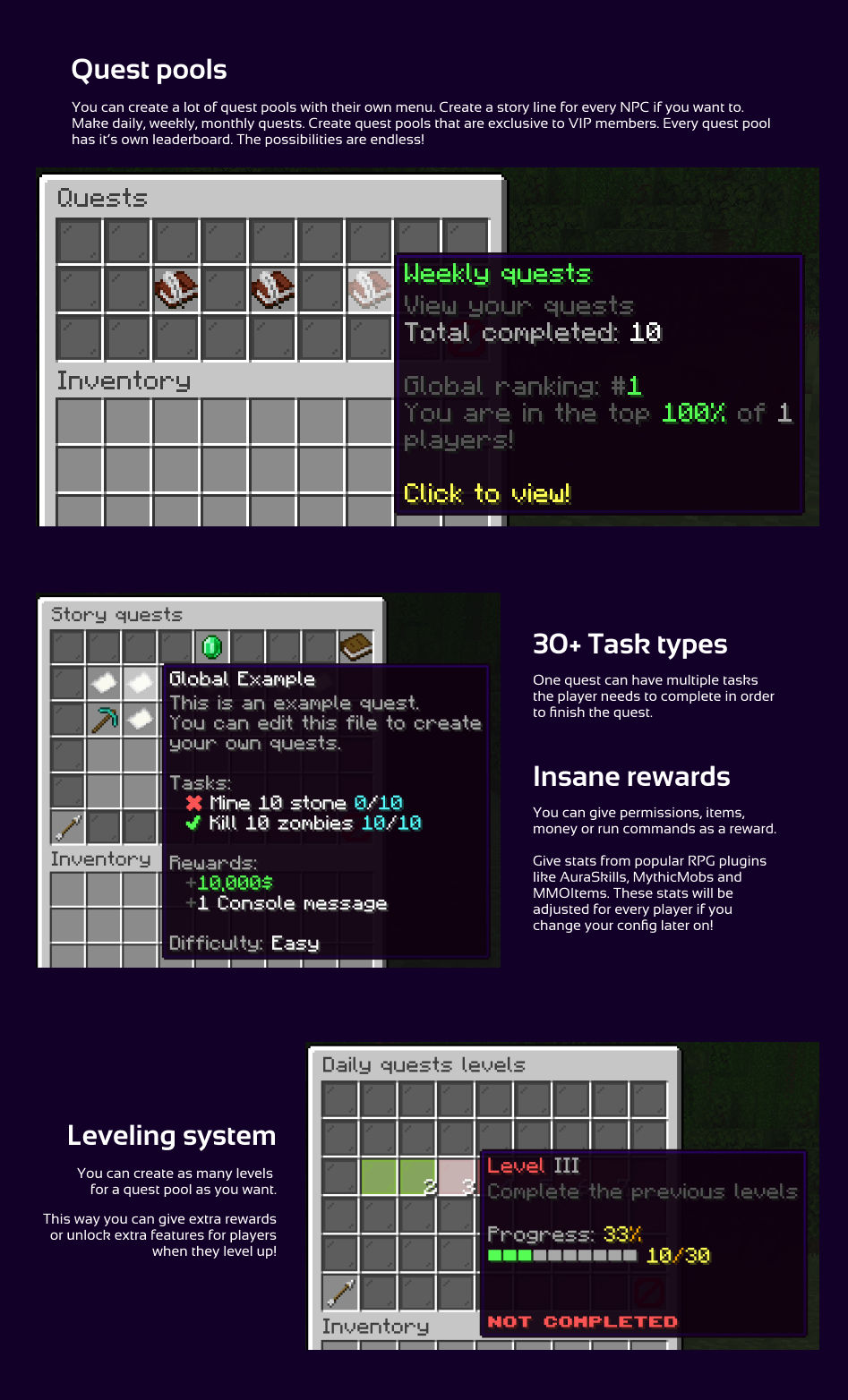
AuroraQuests is a powerful and flexible Minecraft plugin designed to bring immersive questing experiences to your server. Featuring fully configurable GUI menus, AuroraQuests allows you to create diverse quest pools, including global storylines and timed random quests with cron scheduling. With support for over 30 task types, multiple rewards, and integration with popular plugins, AuroraQuests ensures a seamless and engaging experience. The plugin also boasts features like configurable difficulties, per-pool leaderboards, leveling systems, MySQL cross-server sync, PlaceholderAPI placeholders, and a Developer API, making it the ultimate tool for crafting compelling quests.
# Features
– **Fully Configurable GUI Menus**: Customize every aspect of the plugin’s user interface.
– Multiple Quest Pools:
– Global: Complete quests only once, perfect for story mode.
– Timed Random: Randomly select quests using a configurable cron scheduler.
– **Configurable Difficulties**: Set varying levels of challenge for quests.
– **Per-Pool Leaderboards**: Track player progress based on completed quests.
– **Leveling System**: Define levels by the number of quests completed in each pool.
– **30+ Task/Objective Types**: Diverse quest objectives to keep players engaged. One quest can have any number of tasks that needs to be completed.
– **Multiple Rewards per Quest**: Offer a variety of incentives, including RPG stats, commands, money, permissions, and items.
– **Cross-Server Sync with MySQL**: Synchronize player data across multiple servers.
– **PlaceholderAPI Integration**: Use placeholders for dynamic content.
– **Folia Support**: Compatible with Folia servers. (**Do note, that you can’t use biome filters on Folia**)
– Developer API: Extend and customize the plugin with ease.
– **Auto-correcting Stats and Permissions**: Automatically adjust rewards when configurations change.
– **WorldGuard Integration**: Prevent quest progression in specific regions with custom flags.
– **Additional Plugin Integrations**: Compatibility with CustomFishing, Eco series, MMOLib/MMOItems, Oraxen, EconomyShopGUI, ShopGUI+, MythicMobs, AuraSkills and more for enhanced functionality.
AuroraQuests

You need the latest AuroraLib to run this plugin. [Click here to download](https://github.com/AuroraNetworkStudios/Aurora/releases).
[Documentation](https://docs.auroramc.gg/auroraquests)
AuroraQuests is a powerful and flexible Minecraft plugin designed to bring immersive questing experiences to your server. Featuring fully configurable GUI menus, AuroraQuests allows you to create diverse quest pools, including global storylines and timed random quests with cron scheduling. With support for over 30 task types, multiple rewards, and integration with popular plugins, AuroraQuests ensures a seamless and engaging experience. The plugin also boasts features like configurable difficulties, per-pool leaderboards, leveling systems, MySQL cross-server sync, PlaceholderAPI placeholders, and a Developer API, making it the ultimate tool for crafting compelling quests.

# Features
– **Fully Configurable GUI Menus**: Customize every aspect of the plugin’s user interface.
– Multiple Quest Pools:
– Global: Complete quests only once, perfect for story mode.
– Timed Random: Randomly select quests using a configurable cron scheduler.
– **Configurable Difficulties**: Set varying levels of challenge for quests.
– **Per-Pool Leaderboards**: Track player progress based on completed quests.
– **Leveling System**: Define levels by the number of quests completed in each pool.
– **30+ Task/Objective Types**: Diverse quest objectives to keep players engaged. One quest can have any number of tasks that needs to be completed.
– **Multiple Rewards per Quest**: Offer a variety of incentives, including RPG stats, commands, money, permissions, and items.
– **Cross-Server Sync with MySQL**: Synchronize player data across multiple servers.
– **PlaceholderAPI Integration**: Use placeholders for dynamic content.
– **Folia Support**: Compatible with Folia servers. (**Do note, that you can’t use biome filters on Folia**)
– Developer API: Extend and customize the plugin with ease.
– **Auto-correcting Stats and Permissions**: Automatically adjust rewards when configurations change.
– **WorldGuard Integration**: Prevent quest progression in specific regions with custom flags.
– **Additional Plugin Integrations**: Compatibility with CustomFishing, Eco series, MMOLib/MMOItems, Oraxen, EconomyShopGUI, ShopGUI+, MythicMobs, AuraSkills and more for enhanced functionality.
AuroraLib
# AuroraLib
This is the base plugin for every Aurora plugin.
It requires **PaperMC** as the server software and **Java 21** or higher.
Folia is also supported.
You can view the full documentation [here](https://docs.auroramc.gg/aurora).
It provides the following utilities:
– chat/actionbar messaging, text building using every possible color formats and styles.
– custom logger
– automatic yaml to class mapping and config versioning
– plugin dependency management
– inventory menu/gui builder with premade configs
– user data management via file or mysql (mysql can sync between servers as well)
– builtin user metadata store with placeholder support
– economy expansion with builtin providers (CMI, EssentialsX, Vault)
– placeholder expansion to interact with PAPI
– configurable number formatting (regular and short formats as well)
– player placed block tracker (supporting flatfile or sqlite as storage)
which integrates with Multiverse-Core and WildRegeneration for cleanup. It can even handle manual chunk deletions.
– WorldGuard expansion to provide events like `PlayerRegionEnterEvent` and `PlayerRegionLeaveEvent`
– `CommandDispatcher` to easily dispatch commands from config files
– Common leveler / level matcher / level reward utilities.
– Item resolver/builder interface which supports items from other plugins.
– Leaderboard APIs
## Include it in your project
### Maven
“`xml
auroramc
https://repo.auroramc.gg/releases/
“`
“`xml
gg.auroramc
Aurora
{VERSION}
provided
“`
### Gradle
**Groovy DSL:**
“`gradle
repositories {
maven {
url “https://repo.auroramc.gg/releases/”
}
}
dependencies {
compileOnly ‘gg.auroramc:Aurora:{VERSION}’
}
“`
**Kotlin DSL:**
“`Gradle Kotlin DSL
repositories {
maven(“https://repo.auroramc.gg/releases/”)
}
dependencies {
compileOnly(“gg.auroramc:Aurora:{VERSION}”)
}
“`
AuroraLib
# AuroraLib
This is the base plugin for every Aurora plugin.
It requires **PaperMC** as the server software and **Java 21** or higher.
Folia is also supported.
You can view the full documentation [here](https://docs.auroramc.gg/aurora).
It provides the following utilities:
– chat/actionbar messaging, text building using every possible color formats and styles.
– custom logger
– automatic yaml to class mapping and config versioning
– plugin dependency management
– inventory menu/gui builder with premade configs
– user data management via file or mysql (mysql can sync between servers as well)
– builtin user metadata store with placeholder support
– economy expansion with builtin providers (CMI, EssentialsX, Vault)
– placeholder expansion to interact with PAPI
– configurable number formatting (regular and short formats as well)
– player placed block tracker (supporting flatfile or sqlite as storage)
which integrates with Multiverse-Core and WildRegeneration for cleanup. It can even handle manual chunk deletions.
– WorldGuard expansion to provide events like `PlayerRegionEnterEvent` and `PlayerRegionLeaveEvent`
– `CommandDispatcher` to easily dispatch commands from config files
– Common leveler / level matcher / level reward utilities.
– Item resolver/builder interface which supports items from other plugins.
– Leaderboard APIs
## Include it in your project
### Maven
“`xml
auroramc
https://repo.auroramc.gg/releases/
“`
“`xml
gg.auroramc
Aurora
{VERSION}
provided
“`
### Gradle
**Groovy DSL:**
“`gradle
repositories {
maven {
url “https://repo.auroramc.gg/releases/”
}
}
dependencies {
compileOnly ‘gg.auroramc:Aurora:{VERSION}’
}
“`
**Kotlin DSL:**
“`Gradle Kotlin DSL
repositories {
maven(“https://repo.auroramc.gg/releases/”)
}
dependencies {
compileOnly(“gg.auroramc:Aurora:{VERSION}”)
}
“`
AuroraLevels

You need the latest AuroraLib to run this plugin. [Click here to download](https://github.com/AuroraNetworkStudios/Aurora/releases).
# Global player leveling
[Documentation](https://docs.auroramc.gg/auroralevels)
Make a dynamic global leveling system for players and give them great shiny rewards when they level up! The plugin is fully GUI based which by the way also customizable even with your own items and click actions. You can define your rewards for levels using a very dynamic config pattern. If you want to create custom rewards for specific levels you can also do that! Many rewards types are automatically corrected for players after your modify your configs (eg: Missing permissions are added, stats are recalculated). This plugin is compatible with a lot of other plugins like PlaceholderAPI, AuraSkills, LuckPerms, MythicMobs, MMOItems, Eco plugins etc.

# Features
* GUI Menus – Fully customizable GUI menus. You can even add your own items with click actions!
* Rewards – Multiple built in rewards types for permissions, commands, rpg stats, items etc.
* Placeholders – PlaceholderAPI placeholders
* Level up actions – Send a message, play a sound, send a title or anything you want when a player levels up.
* Leaderboard
* MySQL support for cross server sync
* Built with Folia support in mind. Folia support is tested and it works! Yay!
* Developer API – You can add XP to players or set their levels through the API.
# Compatible plugins
* Vault, Essentials, CMI – For money rewards and other economy tasks
* LuckPerms – For permission rewards
* MythicMobs – To add global Mythic stats to players as rewards. It also adds some mechanics and conditions regarding to player level and XP
* MythicLib (MMOLib/MMOItems) – To add global mmolib stats to players as rewards
* AuraSkills – To add global AuraSkills stats to players as rewards
* EcoSkills – To add global EcoSkills stats to players as rewards
* WorldGuard – New flags to restrict region entry based on min/max player levels
* And a ton of other plugins for item rewards and menu items! (Oraxen, ItemsAdder, ExecutableItems just to name a few)
AuroraLevels

You need the latest AuroraLib to run this plugin. [Click here to download](https://github.com/AuroraNetworkStudios/Aurora/releases).
# Global player leveling
[Documentation](https://docs.auroramc.gg/auroralevels)
Make a dynamic global leveling system for players and give them great shiny rewards when they level up! The plugin is fully GUI based which by the way also customizable even with your own items and click actions. You can define your rewards for levels using a very dynamic config pattern. If you want to create custom rewards for specific levels you can also do that! Many rewards types are automatically corrected for players after your modify your configs (eg: Missing permissions are added, stats are recalculated). This plugin is compatible with a lot of other plugins like PlaceholderAPI, AuraSkills, LuckPerms, MythicMobs, MMOItems, Eco plugins etc.

# Features
* GUI Menus – Fully customizable GUI menus. You can even add your own items with click actions!
* Rewards – Multiple built in rewards types for permissions, commands, rpg stats, items etc.
* Placeholders – PlaceholderAPI placeholders
* Level up actions – Send a message, play a sound, send a title or anything you want when a player levels up.
* Leaderboard
* MySQL support for cross server sync
* Built with Folia support in mind. Folia support is tested and it works! Yay!
* Developer API – You can add XP to players or set their levels through the API.
# Compatible plugins
* Vault, Essentials, CMI – For money rewards and other economy tasks
* LuckPerms – For permission rewards
* MythicMobs – To add global Mythic stats to players as rewards. It also adds some mechanics and conditions regarding to player level and XP
* MythicLib (MMOLib/MMOItems) – To add global mmolib stats to players as rewards
* AuraSkills – To add global AuraSkills stats to players as rewards
* EcoSkills – To add global EcoSkills stats to players as rewards
* WorldGuard – New flags to restrict region entry based on min/max player levels
* And a ton of other plugins for item rewards and menu items! (Oraxen, ItemsAdder, ExecutableItems just to name a few)
AuMenus
# AuMenus
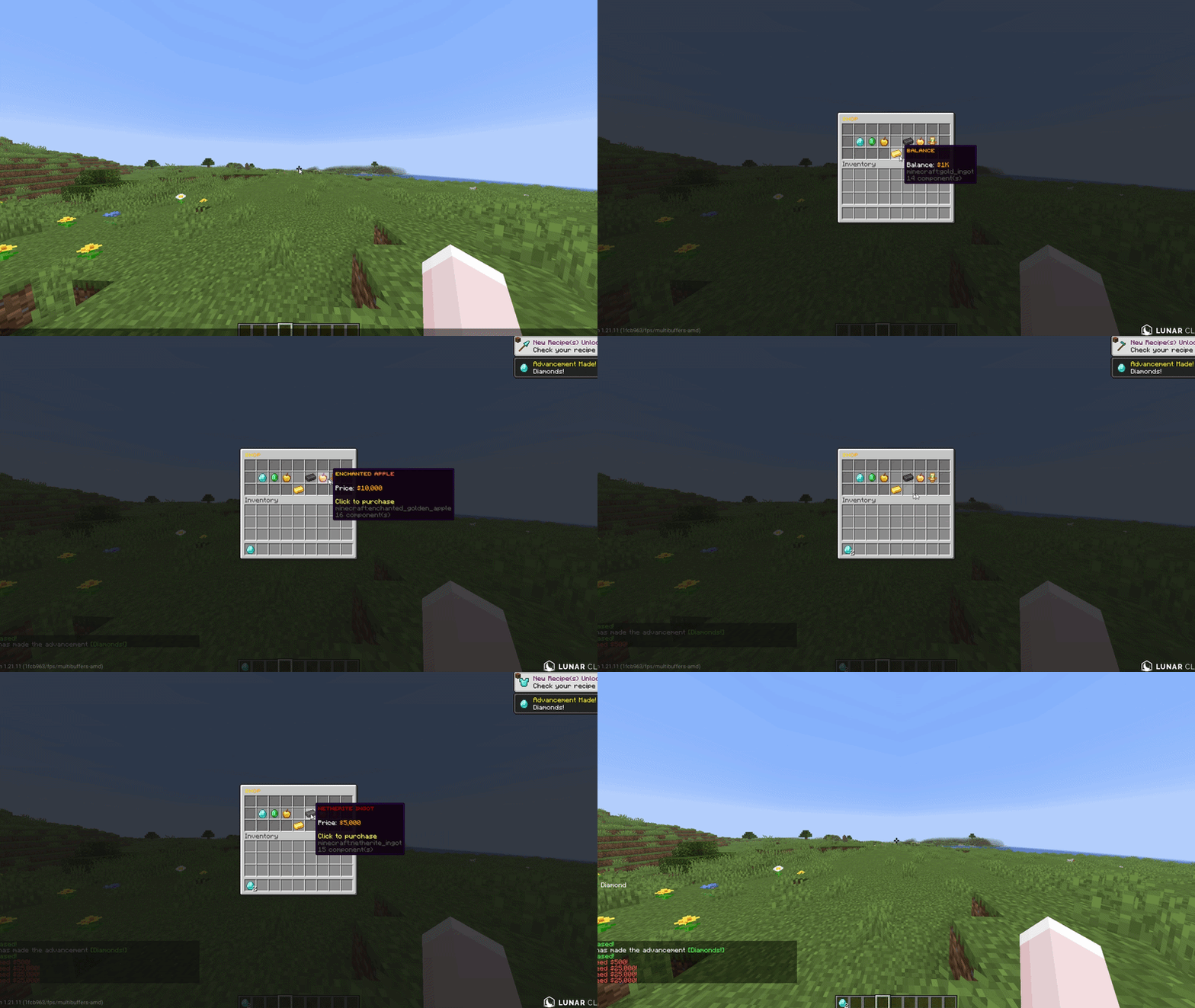
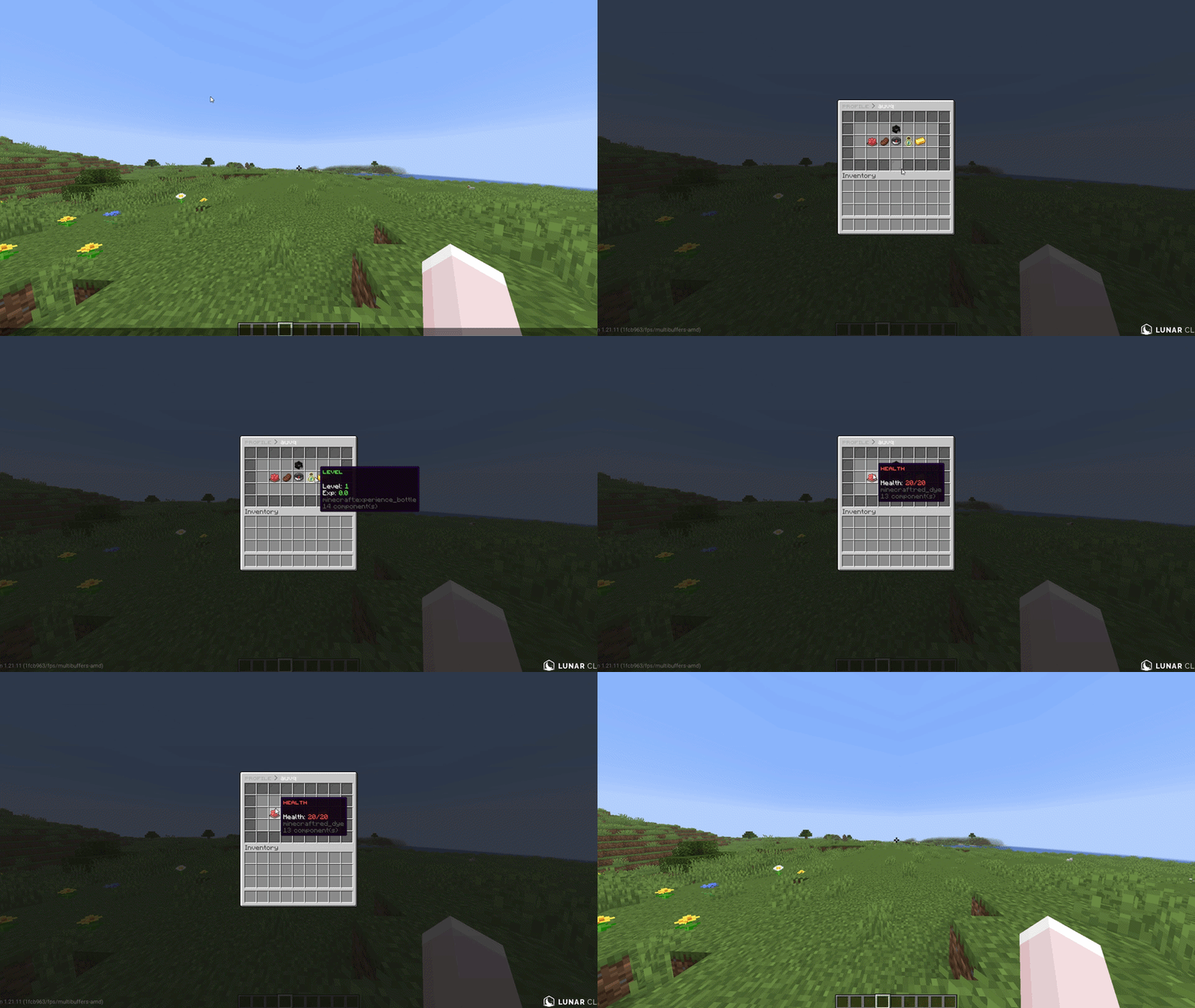
A lightweight, open-source GUI menu plugin for Paper & Folia 1.21.1+. The modern DeluxeMenus alternative with native Folia support, MiniMessage formatting, and zero required dependencies. One command migrates your existing DM configs.
—
## Key Things That Set It Apart
**01. Open source (MIT).** Fork it, modify it, no restrictions. Most menu plugins are closed source or paid.
**02. Native Folia & Paper support.** Built on the region-threaded scheduler from day one. No compat layer, no external scheduler library.
**03. Zero dependencies.** Drop the jar in and it works. Vault and PlaceholderAPI are optional, not required.
**04. Built-in DeluxeMenus migration tool.** One command converts your existing configs.
**05. Supports modern text formatting.** Gradients, hover text, click events. MiniMessage native, not bolted on.
—
## Features
### MiniMessage Formatting
Modern text formatting with gradients, hover text, and click events. Legacy color codes still work for migration.
### Requirement System
Conditions that control who can open menus, click items, and see items. Permissions, money, exp, items, metadata, regex, math expressions, location, and inverted checks. The expression engine handles `&&`, `||`, parentheses, and string methods natively. DeluxeMenus needs a JavaScript engine for the same thing.
### In-Game Editor
Drag and drop menu editing without touching config files. Move items around, add new ones, pick items up to clear slots. Closing the editor saves the YAML. DeluxeMenus does not have this.
### Pagination
Multi page menus for large item lists. Built-in `prev_page` and `next_page` actions, plus `{page}` and `{max_page}` placeholders that work in titles, item names, and lore.
### Smooth Menu Transitions
Page changes and same-size menu opens (like shop categories spread across multiple YAMLs) reuse the existing window instead of closing and reopening it. No flicker, even when the title contains the page number. No other menu plugin does this. Toggleable in `config.yml`.
### Target Player
View another player’s data through any menu by passing `-p:playername` to the command, or as the first argument with tab completion. Placeholders resolve against the target. Works online and (optionally) offline.
### Persistent Player Metadata
Store per player data (strings, numbers, booleans) that survives restarts. No database file, no extra storage. Backed by Minecraft’s PersistentDataContainer, stored on the player object directly. Set, add, subtract, switch, or remove via menu actions or `/am meta`. Read it back with PlaceholderAPI or check it in requirements.
### Anvil and Chat Text Input
Collect free text from players. Anvil input opens an anvil GUI where the player types into the rename field. Chat input closes the menu and waits for the next chat message. Build search menus, naming systems, custom forms. DeluxeMenus does not have this.
### Item Templates
Define a reusable item once in `templates/`, then use it across menus with variable substitution. Set `material`, `name`, `lore`, click actions, and requirements with `{variable}` placeholders, then fill in values per use. Write your shop entry once, reuse it for every item.
### Pattern Layouts
Lay out a menu with a character grid instead of counting slot numbers. Map characters to items and AuMenus places them automatically.
### Animated Items
Frame cycling items with configurable interval, reverse, and one-time playback. Each frame can override material, name, lore, and enchantments. Built in, no extra plugin needed.
### Progress Bars
Fill a row of slots based on a current/max value from placeholders. Set the filled and empty visuals separately. Works for XP, quests, dungeon progress, anything with a ratio.
### Dynamic Titles
Update an inventory’s title on a timer with live placeholders. Countdown timers, online player counts, balance displays, weather and time indicators. Updates ride the same flicker-free path as page changes.
### Player List Menus
Auto generate page items for every online player from a single template. Configure the head, name, and lore once. Click actions target the listed player. Build staff lists, friends menus, party invites, teleport menus.
### Predicate Menus
Open different menus based on a requirement check. Configure a condition and two target menus, pass and fail. AuMenus routes the player to the right one.
### Developer API
Other plugins can register custom action and requirement types, listen to menu events, and open menus programmatically. Available on JitPack. The codebase is open source so you can read exactly how it works.
### DeluxeMenus Migration
One command converts existing DeluxeMenus configs. Menu options, items, actions, requirements, placeholders, even JavaScript expressions. Original files left untouched.
—
## Extras
– Anvil and chat text input
– Per click type actions (left, right, shift+left, shift+right, middle)
– Offline player placeholder support
– BungeeCord and Velocity server switching
– Click cooldowns, global default plus per menu overrides
– Raw sound actions for resource pack custom sounds
– Built-in placeholders: `{page}`, `{max_page}`, `{target}`, `{player}`, plus `%aumenus_current_menu%` and `%aumenus_previous_menu%`
– Configurable plugin messages
– HeadDatabase, ItemsAdder, Oraxen, Nexo support
—
## For Contact
– **Wiki:** [github.com/auvq/AuMenus/wiki](https://github.com/auvq/AuMenus/wiki)
– **Discord:** [discord.gg/B7ArGXP6](https://discord.gg/B7ArGXP6)
– **Source:** [github.com/auvq/AuMenus](https://github.com/auvq/AuMenus)
– **Issues:** [github.com/auvq/AuMenus/issues](https://github.com/auvq/AuMenus/issues)
[](https://discord.gg/NBj2shx8Se)
AuditCord
**What is AuditCord?**
AuditCord is a small, fast plugin that tells you **what Minecraft client a player is using when they join your server**.
That’s it. No complicated setup. No extra plugins. No tech headache.
If you’ve ever wondered
“Are my players using vanilla, Lunar, Fabric, or something sketchy?”
AuditCord answers that instantly.

—
**Why you’d actually want this**
Most servers don’t need fancy anti-cheats.
They just want **awareness and control**.
AuditCord helps you:
– Know what clients players are joining with
– Get alerts when someone joins using a suspicious client
– Block unwanted clients if you want
– Keep staff informed without spamming chat
– Log joins to Discord if you run a community server
It’s built for **real servers**, including low-end VPS setups.
—
**What information AuditCord can log**
When enabled, AuditCord can send a clear join report to Discord for staff to review.
This is optional and fully controlled by you.
A join report may include:
– Player name and UUID
– Client or launcher used
– Minecraft version
– World and dimension
– Player coordinates
– Game mode
– Health
– Ping
– IP address
– Server version
– Online player count
– Exact join timestamp
This helps staff quickly understand who joined, how they joined, and from where — without logging into the server.
Nothing here modifies gameplay.
Nothing is hidden.
Everything shown is information the server already has.
If you don’t want Discord logging, it can be disabled completely.

—
**What makes AuditCord different**
A lot of similar plugins depend on heavy libraries that slow servers down.
AuditCord doesn’t.
– No ProtocolLib
– No required addons
– No extra downloads
Drop it in, restart, done.
This keeps:
– Startup faster
– Memory usage lower
– Lag risk minimal
Especially useful for SMPs, small networks, and budget servers.
—
**Things it can do (without complexity)**
– Detect common clients like Vanilla, Fabric, Forge, Lunar, Badlion, Feather, LabyMod, and more
– Alert staff when players join with specific clients
– Allow or block clients using a simple list
– Rename how client names appear (for cleaner messages)
– Send join logs to a Discord webhook (optional)
– View who’s online and what client they’re using
Everything is configurable, but nothing is forced.
—
**Who this plugin is for**
AuditCord is for you if:
– You run an SMP or community server
– You want visibility, not invasive anti-cheat
– You care about performance
– You don’t want dependency drama
If you just want to **know what’s connecting to your server**, this fits.
—
**Installation (no nonsense)**
1. Download the plugin
2. Put it in the plugins folder
3. Restart the server
No dependencies. No setup wizard. No surprises.
—
**Important things to know**
– Server-side only
– Does not bypass Mojang restrictions
– Does not modify gameplay
– Does not act as a cheat or hack
– Only reports information already available to the server
Transparent, clean, and safe.
—
**Compatibility**
– Works on Spigot, Paper, Purpur, and forks
– Supports Minecraft **1.19+**
– Fully forward-compatible — no updates needed for new Minecraft versions
– Requires Java 21+
—
**Final note**
AuditCord is meant to stay out of your way.
It does one job, does it fast, and doesn’t pretend to be more than it is.
If you like lightweight tools that respect your server’s performance, you’ll like this.
AudioPlayer to CustomDiscs
# AudioPlayer To CustomDiscs v1.2.0
### For Paper, Folia and Forks (Purpur, Leaf, …)
### 1.21.7 to 26.1.2
[](https://modrinth.com/plugin/audioplayer-to-customdiscs) [](https://modrinth.com/plugin/audioplayer-to-customdiscs) [](https://hangar.papermc.io/AtharDev/AudioPlayer-to-CustomDiscs)
—
## ⚠️ Dependency notice — PacketEvents required
**Since version 1.1.5, [PacketEvents](https://modrinth.com/plugin/packetevents) (v2.11.2+) is required.**
ProtocolLib is no longer used — it can be safely removed if no other plugin needs it.
## ⚠️ Java 25 required
**Starting with version 1.2.0, this plugin requires at least Java 25 to run on your server.**
—
A Paper based plugin to convert [AudioPlayer](https://modrinth.com/plugin/audioplayer) instruments into a [CustomDiscs](https://modrinth.com/plugin/customdiscs-plugin) compatible format.
> Any Paper’s forks should be supported. In case of issues, reach us on our [Discord server](https://discord.gg/rJtBRmRFCr).
Useful if you need to play a custom music disc, goat horn or player head initially created with AudioPlayer, then ported to a CustomDiscs-compliant server.
> No permission system is in place for now (unless requested).
Join our Discord for support: https://discord.gg/rJtBRmRFCr
—
## Dependencies
| Plugin | Required | Notes |
|——–|———-|——-|
| [PacketEvents](https://modrinth.com/plugin/packetevents) | ✅ Required | Since v1.1.5 — tested with v2.11.2 |
| [ProtocolLib](https://github.com/dmulloy2/ProtocolLib) | ⛔ Up to v1.1.4 only | No longer required as of v1.1.5 |
—
## How to Use
This plugin works in two modes: **automatic** and **manual**.
### Prerequisite — Audio Files
This plugin checks whether a corresponding audio file exists (by its ID) before converting. Ensure the following:
– Original AudioPlayer music files from `audio_player_data/` must be placed in `plugins/CustomDiscs/musicdata/`
– Failure to provide those files will cause the conversion to fail, **without modifying the original item**
### Automatic Mode
Enable it by setting `automaticConvert: true` in `config.yml`:
– **Goat horns** — converted on first use attempt. A second attempt will play it.
– **Custom discs** — converted when inserted by a player or any automated mechanism.
– **Player heads** — converted instantly on placement. When already placed on a note block, one or two triggers may be needed before playback.
### Manual Mode
Works regardless of whether automatic mode is enabled.
Hold the item in your **main hand** only, then run:
“`
/ap2cd convert
“`
### Audio File Type Override
If multiple file extensions exist for the same audio ID, the wrong one may be selected.
While holding the item in your **main hand**, use one of the following:
| Command | Effect |
|———|————————–|
| `/ap2cd setwav` | Force set to WAV format |
| `/ap2cd setmp3` | Force set to MP3 format |
| `/ap2cd setflac` | Force set to FLAC format |
—
## Configuration
**config.yml**
“`yaml
# [AP2CD Config]
# Disable or enable the automatic conversion process while items are being used.
automaticConvert: false
# Debug Mode – To display some more logging and Stack Trace information.
# You SHOULD NOT turn this on, unless you want to be spammed by a lot of messages (console and player side).
debugMode: false
“`
—
## Version Support Matrix
| Minecraft version | Paper & Forks (Purpur, Leaf, …) | Folia & Forks |
|—————————-|—————————————————————————————|—————————————————————————————|
| **1.21.7-9, 1.21.8** | 1.0.0 – [1.2.0](https://modrinth.com/plugin/audioplayer-to-customdiscs/version/1.2.0) | 1.0.0 – [1.2.0](https://modrinth.com/plugin/audioplayer-to-customdiscs/version/1.2.0) |
| **1.21.9, 1.21.10** | 1.0.0 – [1.2.0](https://modrinth.com/plugin/audioplayer-to-customdiscs/version/1.2.0) | 1.0.0 – [1.2.0](https://modrinth.com/plugin/audioplayer-to-customdiscs/version/1.2.0) |
| **1.21.11** | 1.1.1 – [1.2.0](https://modrinth.com/plugin/audioplayer-to-customdiscs/version/1.2.0) | 1.1.1 – [1.2.0](https://modrinth.com/plugin/audioplayer-to-customdiscs/version/1.2.0) |
| **26.1, 26.1.1, 26.1.2** | [1.2.0](https://modrinth.com/plugin/audioplayer-to-customdiscs/version/1.2.0) | [1.2.0](https://modrinth.com/plugin/audioplayer-to-customdiscs/version/1.2.0) |
—
## Notes
– This plugin may **(or may not)** work with earlier versions of PaperMC/Folia.
– While this plugin is marked as compatible with Paper’s forks, no extensive tests has been made on them. Report any issues on our Discord !
– Versions 1.1.0 to 1.1.4 required [ProtocolLib](https://github.com/dmulloy2/ProtocolLib). As of 1.1.5, it is no longer needed and is replaced by [PacketEvents](https://modrinth.com/plugin/packetevents).
– This plugin is available on both [Modrinth](https://modrinth.com/plugin/audioplayer-to-customdiscs) and [Hangar](https://hangar.papermc.io/AtharDev/AudioPlayer-to-CustomDiscs).