Auto Portal Waypoints
Have you dived into a Nether portal, wandered around and lost your way back? This mod is for you! Automatically adds a waypoint to JourneyMap whenever you exit a portal.
Currently only avilable for NeoForge 1.21.1, 1.21.11 and 26.1+
|Mod Compatibility||
| — | — |
| JourneyMap | ✅ (required) |
| Infinite Dimensions | ✅ |
| Create: Northstar – Redux | ✅ |
| Immersive Portals for (Neo)Forge | ❌ |
| Xaero’s (Mini/World) Map | ❌ |
| Any mod that allows changing dimensions without a portal* | ❌ |
*These will leave waypoints wherever you end up. Create a Github issue and I can disable Auto Portal Waypoints for any dimensions added by such mods.
Auto Planter
This mod add a block looks like dirt and dispenser.
* The planter allows you to plant Saplings and Seeds automatically on the planter.
* This will support your automation to get Wood materials in not too technical way.
The planter has own inventory, which can be opened by interacting the block. You can put Saplings. After closing GUI, the planter plants Sapling on the top of planter.
Use hoe to this planter to allow to plant Seeds.
Auto Smelt Ores
## **🔥 Instant Smelt: No More Furnace Grinding!** ##

Tired of spending hours smelting ores? This simple yet essential datapack eliminates the furnace middleman!
Instant Smelt automatically turns your raw ores into ingots or usable materials the moment your pickaxe hits them. Focus on what you love—exploring and building—and leave the tedious smelting to us.
Iron Ore → Iron Ingot
Gold Ore → Gold Ingot
Ancient Debris → Netherite Scrap
And more! (Includes Copper, Lapis, Redstone, Diamond, Emerald, and Quartz)
### **Installation** ###
– Download the ZIP file.
– Place the ZIP into your world’s datapacks folder.
– Type /reload in-game (or restart your world).
– Enjoy the instant gratification!
Auto MLG
Auto MLG is a data pack that allows you to automatically clutch when you are falling!
How to use:
– Once the pack is installed, get either a water bucket or powder snow bucket
– Hold it in you mainhand, it doesn’t work with offhand.
– Look down (at least 80-90 degrees directly down)
– Jump from 5 blocks or higher
– And then it automatically places it!
This also will never break if you fall too fast, I added special methods to ensure you will always get saved. I fell from 10,000 blocks high and it still clutched!
You can configure this too, type either /reload and press the config button or do /function auto_mlg:config/config to enable/disable water/powder snow MLG.
Now the pack has an optional Auto Mace MLG! (Disabled by default)
Example GIFs:
Water:

Powder Snow:

Enjoy!
AutoMessage

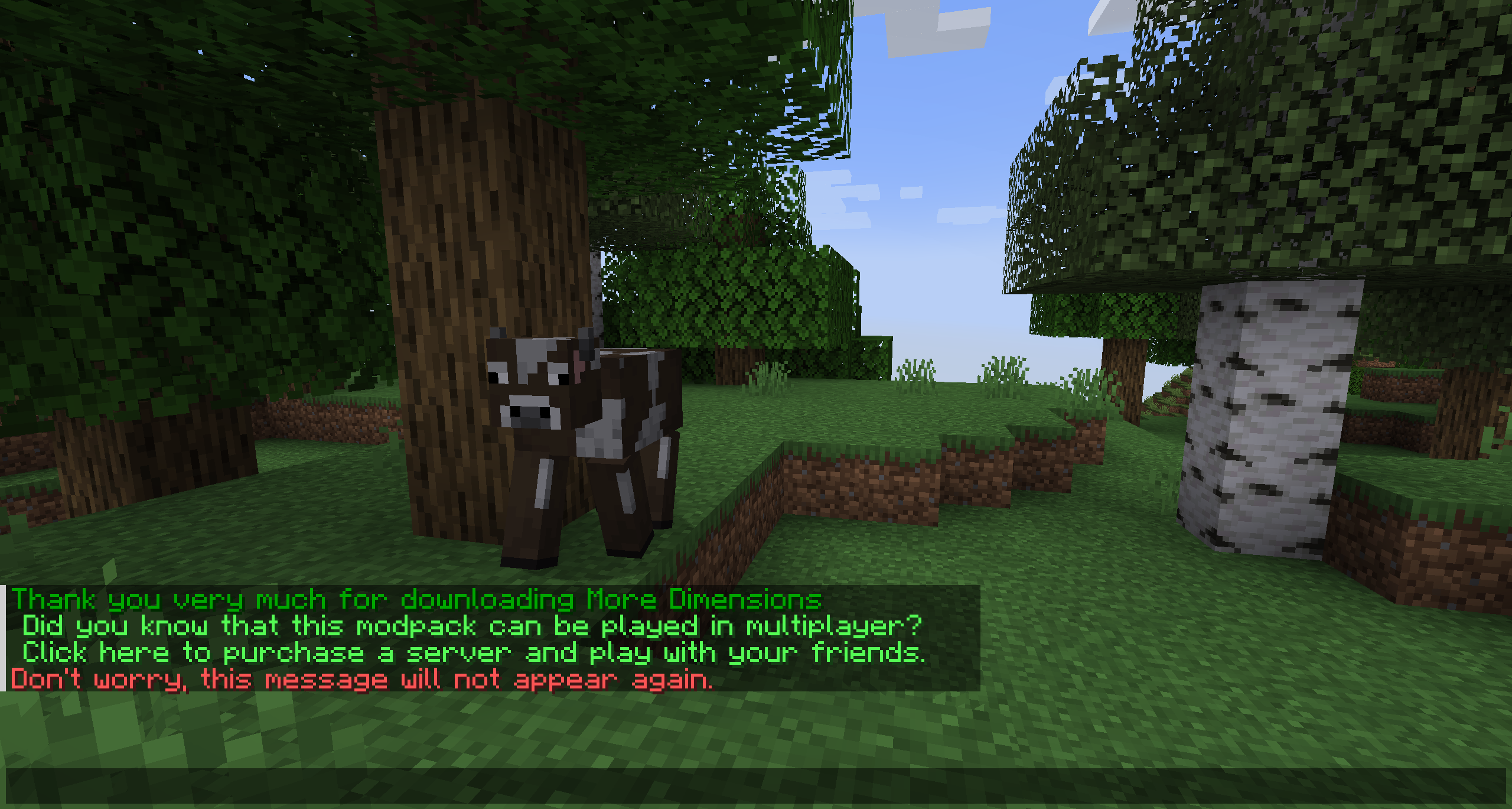
Basically, AutoMessage is responsible for adding an option to create and send messages automatically in a fast and effective way. To do this, it adds a configuration file that can be modified from start to finish by the player, and that, for example, will allow them to promote their social networks when starting a game, or simply thank them for downloading.
### Do you need a server to play with your friends?

For exceptional server hosting services, look no further than **[BisectHosting](https://bisecthosting.com/lupin)**. Of course, you can install all the mods or modpacks you want, and their support team is always available to help you.
**[With the code “Lupin” you will get a 25% discount! Click here!](https://bisecthosting.com/lupin)**

This mod is intended for two types of people, either the creators of mod packs, or on the other hand, the creators of multiplayer servers, since it is in charge of facilitating the sending of automatic messages.
These messages are easily customizable, through the new file that will be generated when running the mod for the first time. Among other things, you can choose the text, the color or even the links.

### How do you configure this mod?
An example would be the following:
[“AutoMessage Configuration”]
– MESSAGES = [“§2Thank you very much for downloading AutoMessage§f”, “§cDon’t worry, this message will not appear again.§f”]
– INTERVALS = [5, 5]
– LIMITS = [1, 1]
– LINKS = [“https://www.curseforge.com/members/lupiiin_/projects”, “https://www.curseforge.com/members/lupiiin_/projects”]
– HARD LIMITS = [1, 1]
### A more detailed explanation…
– The message is obviously the text that will appear on the screen, several texts can be put on different lines, separated by commas, and opening and closing with quotation marks. Color codes and guide: https://www.codewizardshq.com/minecraft-color-codes/
– The interval is the time that will pass until the message is displayed on the screen.
– The soft limit is the number of times the message will be sent in a single session.
– The hard limit is the number of times the message will be sent for the lifetime of the player.
– In links, a link should be placed if necessary.
### An Important Note…
The values you place in your Soft Limit and Hard Limit configuration are tracked individually for separate worlds. For Modpack Developers, this means your message will be repeated if the player creates a new world. For Server Owners, this means that resetting your world will cause the messages to be repeated as well.
### Does it work on servers?
###
Sure! Remember that the best way to play with mods and friends is with BisectHosting, and by **[clicking on this link you can get a 25% discount](https://bisecthosting.com/lupin).**
### Can this mod be used in modpacks?
###
Of course! As long as it is published only on Modrinth or CurseForge. Uploading it to any other platform would be violating our rights and is not allowed at all.
However, we are really grateful if you consider adding it to your Modrinth or CurseForge modpack. If you need any small changes or have any questions, contact us!

[](https://discord.gg/X8VY5WMbe4)
.
auto lucky block
# [ALB]自动幸运方块 (auto lucky block)
**The English description is below.**
– 这个数据包可以(默认)每 30 秒为所有玩家激活一个幸运方块。
– 使用 `/scoreboard players set countdown alb.settings <每次激活前等待的 tick 数>` 可以修改激活时间,默认 tick 数为 600(即 30 秒)。
– 新的世界初次加载数据包后不会立即激活,而是等待设定的激活时间到来。
– 此数据包依赖于 Lucky Block([CurseForge](https://www.curseforge.com/minecraft/mc-mods/lucky-block) | [MCMOD](https://www.mcmod.cn/class/294.html) | [GitHub](https://github.com/alexsocha/luckyblock))。
—
– This data pack can activate a lucky block for all players every 30 seconds (by default).
– Use `/scoreboard players set countdown alb.settings ` to modify the activation time. The default tick is 600 (i.e. 30 seconds).
– The data pack will not be activated immediately after being loaded in a new world, but will wait for the set activation time to arrive.
– This data pack depends on Lucky Block ([CurseForge](https://www.curseforge.com/minecraft/mc-mods/lucky-block) | [MCMOD](https://www.mcmod.cn/class/294.html) | [GitHub](https://github.com/alexsocha/luckyblock)).
Auto keep inventory
A super-small and super-simple datapack to automatically enable the keepInventory gamerule when a world is loaded for the first time. Once it enables keepInventory, it will use a hidden scoreboard value to stop itself from enabled keepInventory again on the same world.
Auto Hide HUD
Have you even wanted the HUD elements to go away so you can enjoy the beauty of the world? I sure did. Welcome to Auto Hide HUD.
As the name implies, this mod will auto hide the HUD after a period of inactivity. DON’T panic. It’s not gone forever. It will return when your health changes. Or your hunger goes down. Don’t want it to do that? There are plenty of options to make this function exactly how you want. Want the HUD to disappear after 2.5 seconds and only comeback when your air levels are below 30%? There’s a setting for that!
Using this mod makes your Minecraft experience so much more immersive. It really feels like the first time I used shaders again. Just beautiful.
Let me know if you have any issues or feature suggestions.
Companion App
I’ve added a little player-info data server that broadcasts things like your position, health, food, air, status effects, and hotbar items to a companion app running on the same machine. Disabled by default — enable it in the in-game config, then launch the mod jar directly (java -jar path/to/mod.jar, or double-click if on Windows).
The companion is very configurable: pick which info to show, choose a background color, even make the window transparent when unfocused (great for Wallpaper Engine users). I built it because I have a small monitor under my main one and I wanted to glance at position and health while keeping the in-game HUD hidden for a clean look.
Note: the companion’s port must match the mod’s playerDataServerPort config (default 25922).
I hope you enjoy
Auto Harvest
### What is harvested?
* Wheat
* Beetroots
* Potatoes
* Carrots
* Pumpkins
* Melons
* Torchflowers
* Sweet Berries
* Nether Warts
### How to build one?
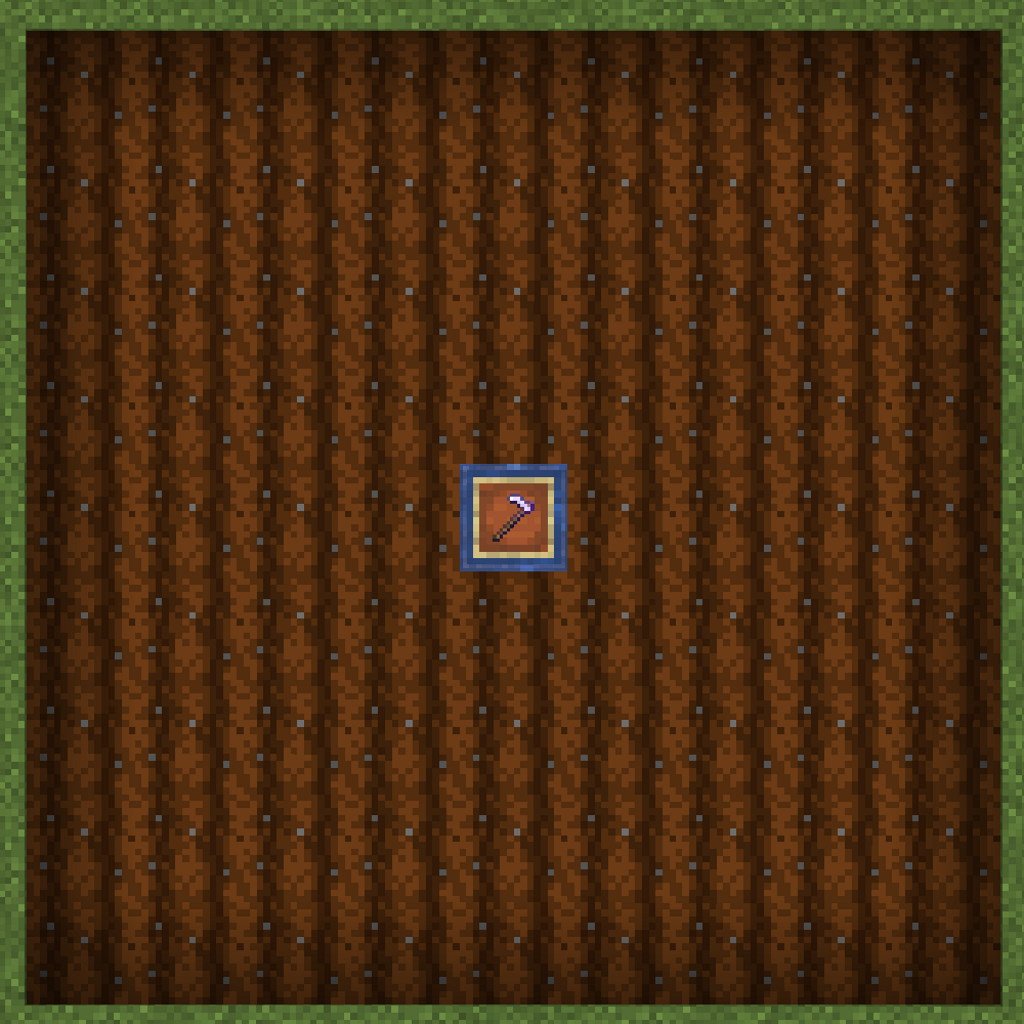
The mod looks for a chest with an item frame on top of it holding a hoe of your choice. It then looks outwards of 4 blocks in each direction forming a square area for crops to harvest that will automatically be put into the chest, if there is a free slot.
Chests can be waterlogged to fertilize the surrounding farmland. The harvester’s range is the same range as water’s reach to farmland.
The hoe takes damage as it harvests. The hoe will never be destroyed. The farm just deactivates harvesting when on its last use left. If the hoe is spinning in the frame, then the farm is active. If it’s not spinning, then the hoe needs to be replaced. You can use mending to prevent durability loss.
You can use both fortune and unbreaking up to 3 and 10 respectively.
See [my other mods](https://modrinth.com/user/Pepsied)
Auto Graves Lite
# 🪦 Graves Lite: The Vanilla+ Death Solution
Graves Lite is a high-performance, minimalist datapack designed to protect your loot while keeping the “hardcore” spirit of Minecraft alive.
## ✨ Key Features
* **📍 Private Death Waypoints**: The moment you perish, your exact coordinates are sent directly to your chat. No more guessing where that mountain was.
* **⏳ Despawn Protection**: Your items won’t vanish. The pack “freezes” the despawn timer for any items within a 4-block radius of your death. Take your time to gear up—your loot will be waiting.
* **✨ Soul Beacon**: A subtle particle beam marks your remains. It’s visible through walls and terrain, guiding you back to the exact spot without being an eyesore.
* **⚡ Zero-Lag Architecture**: Designed for servers. It uses optimized **Interaction Markers** rather than heavy armor stands or entities, ensuring your TPS stays at a perfect 20.
* **🧼 Self-Cleaning**: Once you get within 1.5 blocks of your death site, the marker and particles vanish instantly. No “leftover” graves cluttering your world.
## 🛠️ How It Works
Unlike traditional grave mods that store items in a block or entity (which can occasionally “swallow” items or glitch), Graves Lite manages the **Item Entities** themselves:
1. **On Death:** A marker is summoned at your location.
2. **The Freeze:** Every tick, the marker resets the `Age` tag of nearby items to 0, preventing them from ever despawning.
3. **The Recovery:** When you return, the marker detects your presence, stops the freeze, and deletes itself. Your items are picked up naturally.
## 🚀 Installation & Compatibility
* **Multiplayer Ready:** Works perfectly on dedicated servers and LAN.
**To Install Datapack:**
1. Download the `.zip` file.
2. Drop it into your world’s `datapacks` folder.
3. Type `/reload` in-game.
**To Install Mod:**
1. Download the ‘.jar’ file
2. Move it to mods folder in minecraft
3. Restart Your game
> **Note:** Because this pack uses marker logic, it is incredibly lightweight and won’t conflict with other world-gen or utility datapacks.