Artificial Enchantments API
# Artificial Enchantments
A shared plugin library for Paper 1.21+ servers that lets other plugins create **real, client-visible custom enchantments** — no lore hacks, no packet trickery.
## What It Does
Artificial Enchantments is a **server-side library** that multiple plugins can depend on simultaneously. Instead of every enchantment plugin shipping its own (conflicting) enchantment system, they all hook into this one shared registry.
**For players:** Enchantments show up natively in the client — you see them in item tooltips, anvil interfaces, and the enchantment table. They look and feel like vanilla enchantments because they *are* registered in the native Paper registry.
**For server owners:** Install this once, and any plugin that depends on it Just Works™. No conflicts, no duplicate listeners, no “why does my sword have 3 different lore-based sharpness enchantments” headaches.
## Requirements
– **Paper 1.21+** (Purpur and Folia supported)
– **Java 21+**
## Installation
1. Download the latest release from the **Files** tab on this page.
2. Drop `artificial-enchantments-x.x.x.jar` into your server’s `plugins/` folder.
3. Start (or restart) your server.
4. Install any plugin that depends on Artificial Enchantments.
That’s it. There is no configuration file — this is a library, not a plugin with commands or settings.
## Why This Exists
Most custom enchantment plugins before 1.21 used one of two approaches:
– **Lore-based:** Fake enchantments stored in item lore. Looks janky, breaks constantly, incompatible with other plugins.
– **Shaded registries:** Each plugin ships its own copy of an enchantment library. They conflict with each other, duplicate event listeners, and corrupt each other’s state.
Artificial Enchantments solves this by sitting **between** the server and enchantment plugins as a single, shared authority. Every plugin that uses it talks to the same registry, the same event dispatch spine, and the same native Paper enchantment system.
## Compatibility
| Platform | Status |
|—|—|
| Paper | ✅ Supported |
| Purpur | ✅ Supported |
| Folia | ✅ Supported |
| Spigot | ❌ Not supported (requires Paper 1.21+ API) |
## For Plugin Developers
If you’re building a plugin that uses Artificial Enchantments, check out the [GitHub repository](https://github.com/modpotato-plugins/artificial-enchantments) for:
– API documentation
– Gradle/Maven setup instructions
– Code examples
– Javadoc reference
**Do not shade this library into your plugin.** It must remain a separate plugin JAR in the `plugins/` folder. Every dependent plugin references it via `compileOnly`.
## Support
– **Bug reports & feature requests:** [GitHub Issues](https://github.com/modpotato-plugins/artificial-enchantments/issues)
– **Source code:** [GitHub](https://github.com/modpotato-plugins/artificial-enchantments)
## License
MIT License
Artifacts Of The Ancients
## Artifacts Of The Ancients
This plugin adds several artifacts that, when obtained, grant players various abilities. These artifacts have unique methods of acquisition.
This comprehensive plugin includes three powerful artifacts, each of which bestows incredible abilities upon players:
##
### Time Artifact
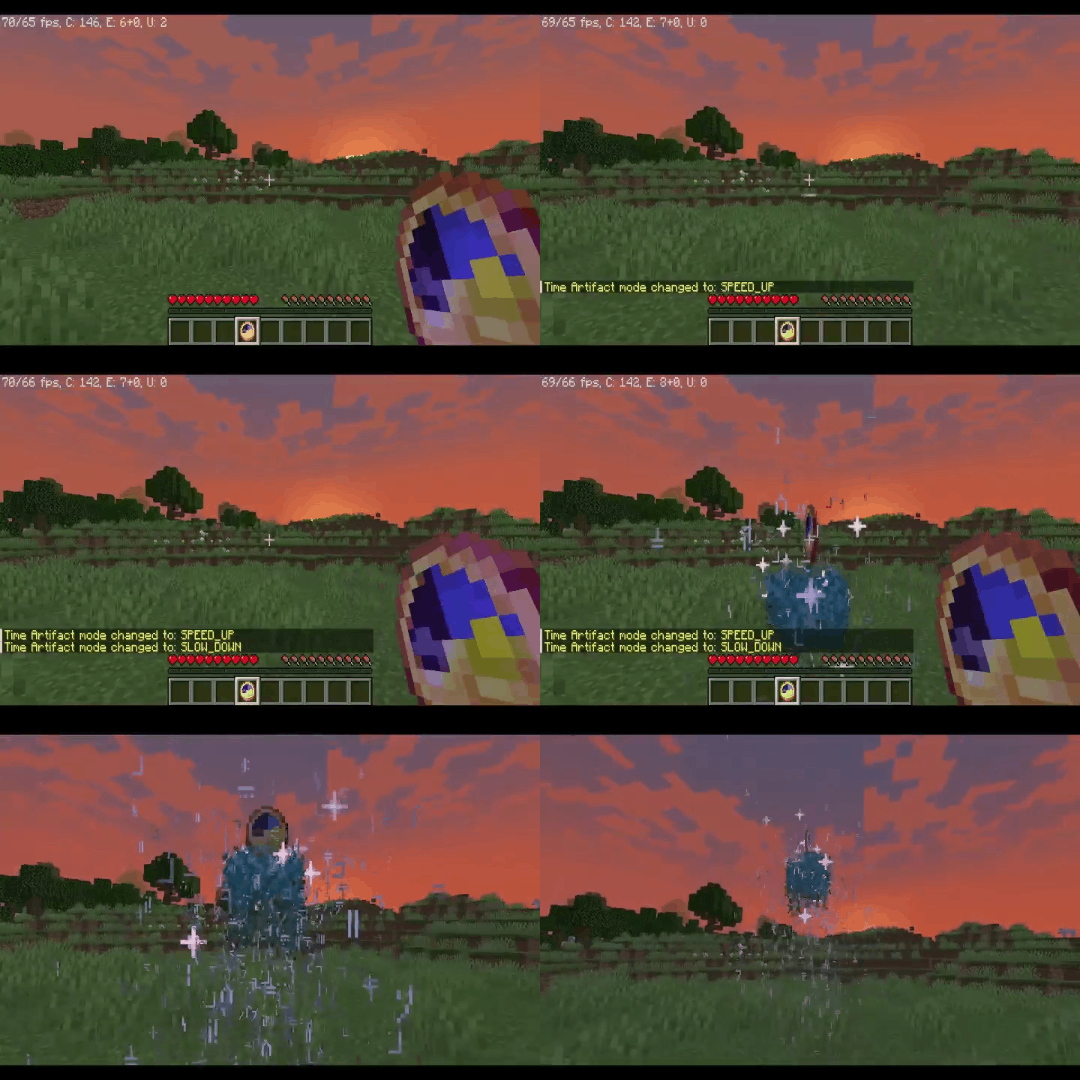
Allows the player to slow down, speed up, or even completely stop the flow of time for a certain period.
>
>
Obtaining
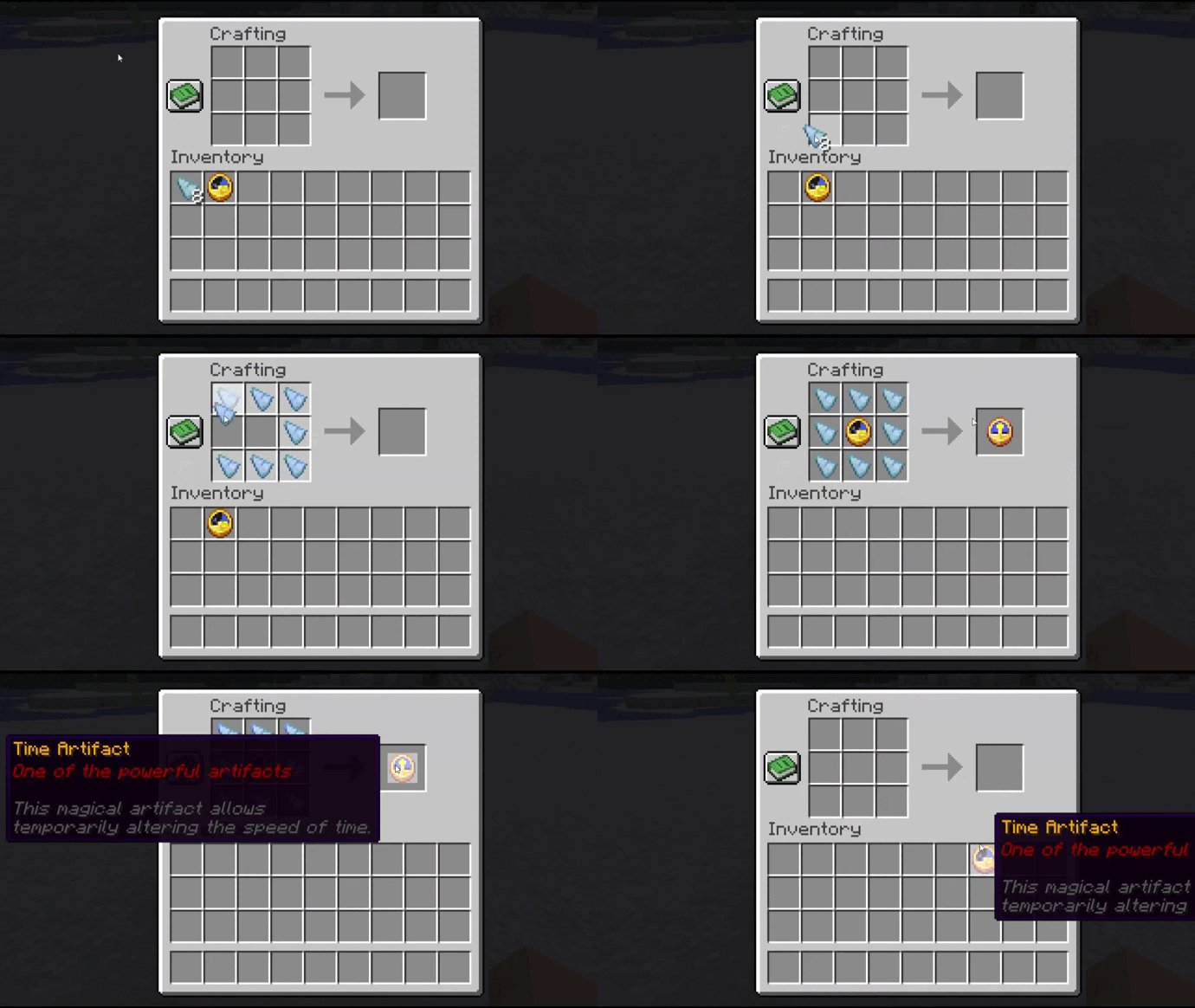
To craft the Time Artifact, you will need a regular clock, which must be placed on a crafting table and surrounded by “Temporal Paradox Shards”.
>
>
This rare shard can be obtained by passing through a temporal rift, which sporadically appears in the world.
>
##
### Seer’s Compass
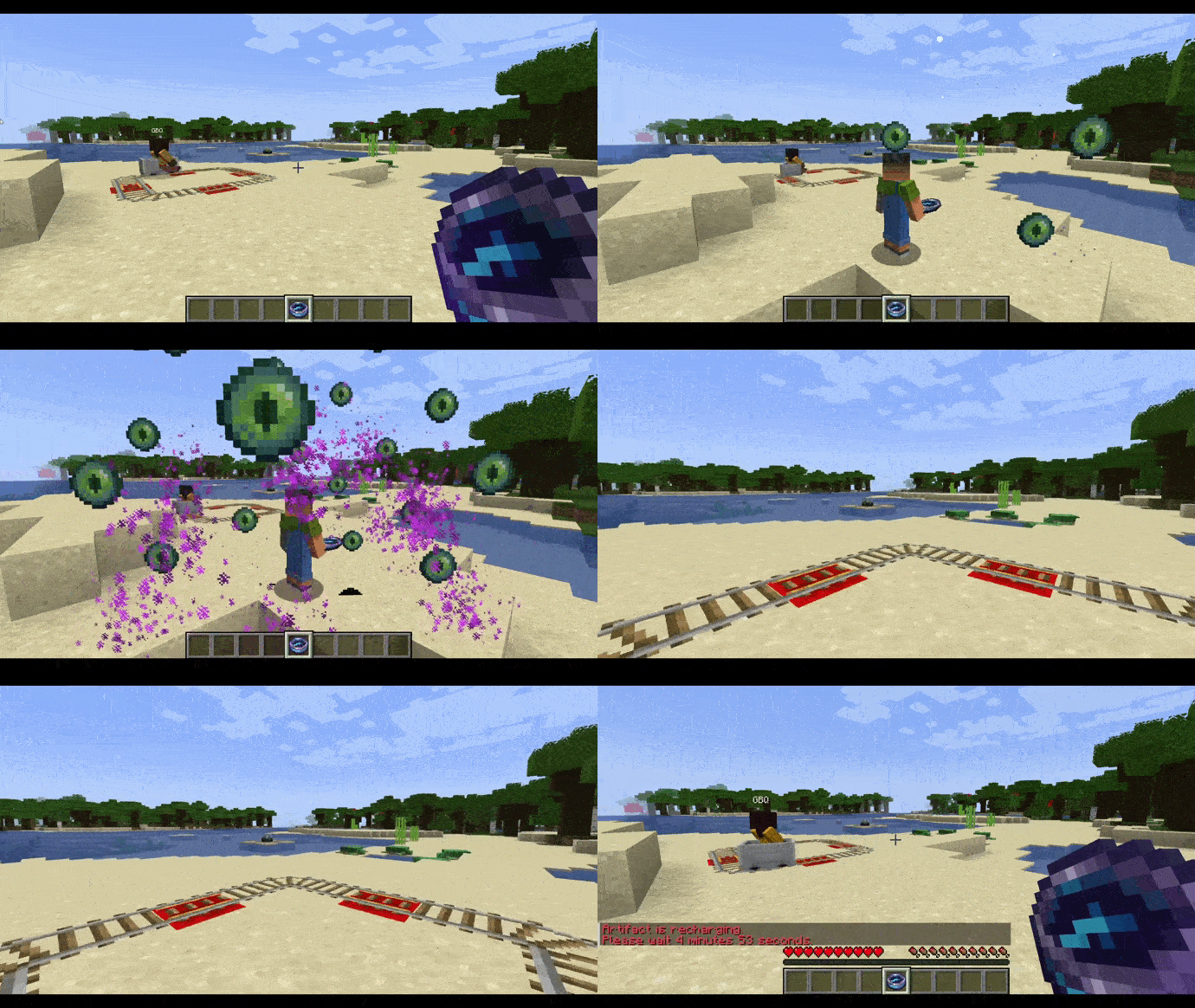
Grants the player the ability to see the world through the eyes of other players, allowing them to track their movements and actions.
>
Obtaining
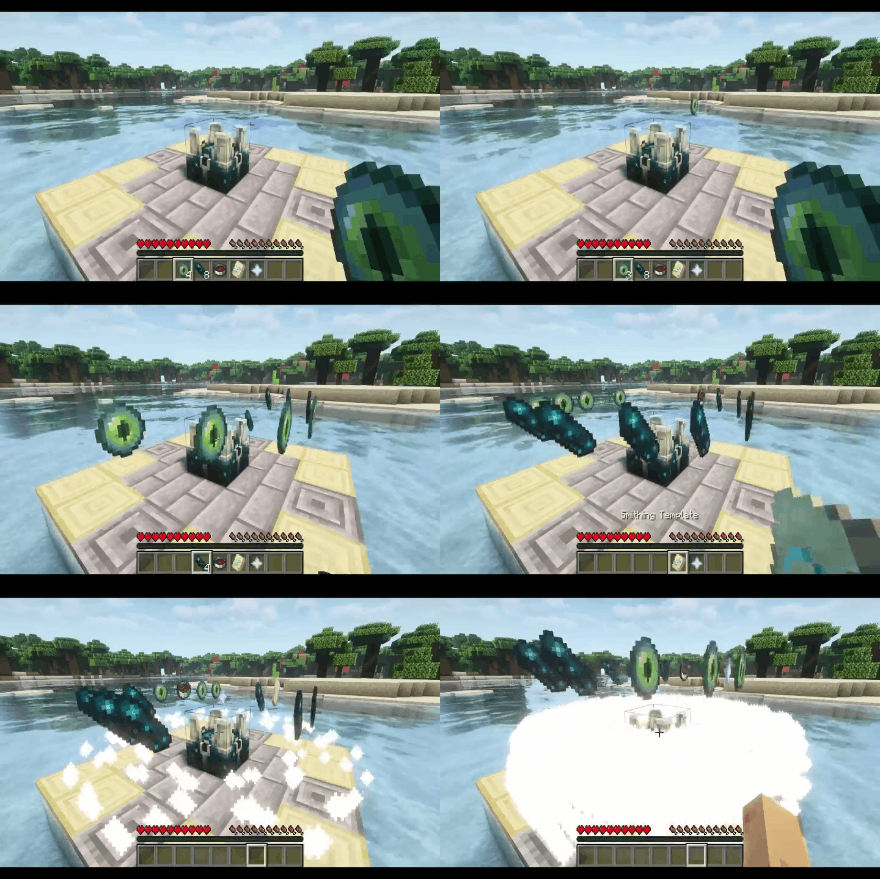
To create the Seer’s Compass, you will need to place the following ingredients on a special block called the “Scalkowing Crier”: 8 echo shards, 4 ender eyes, 1 compass, 1 nether star, and 1 “Eye” armor trim. This will initiate the artifact creation process, resulting in the Seer’s Compass.
>
>
##
### Guardian Amulet
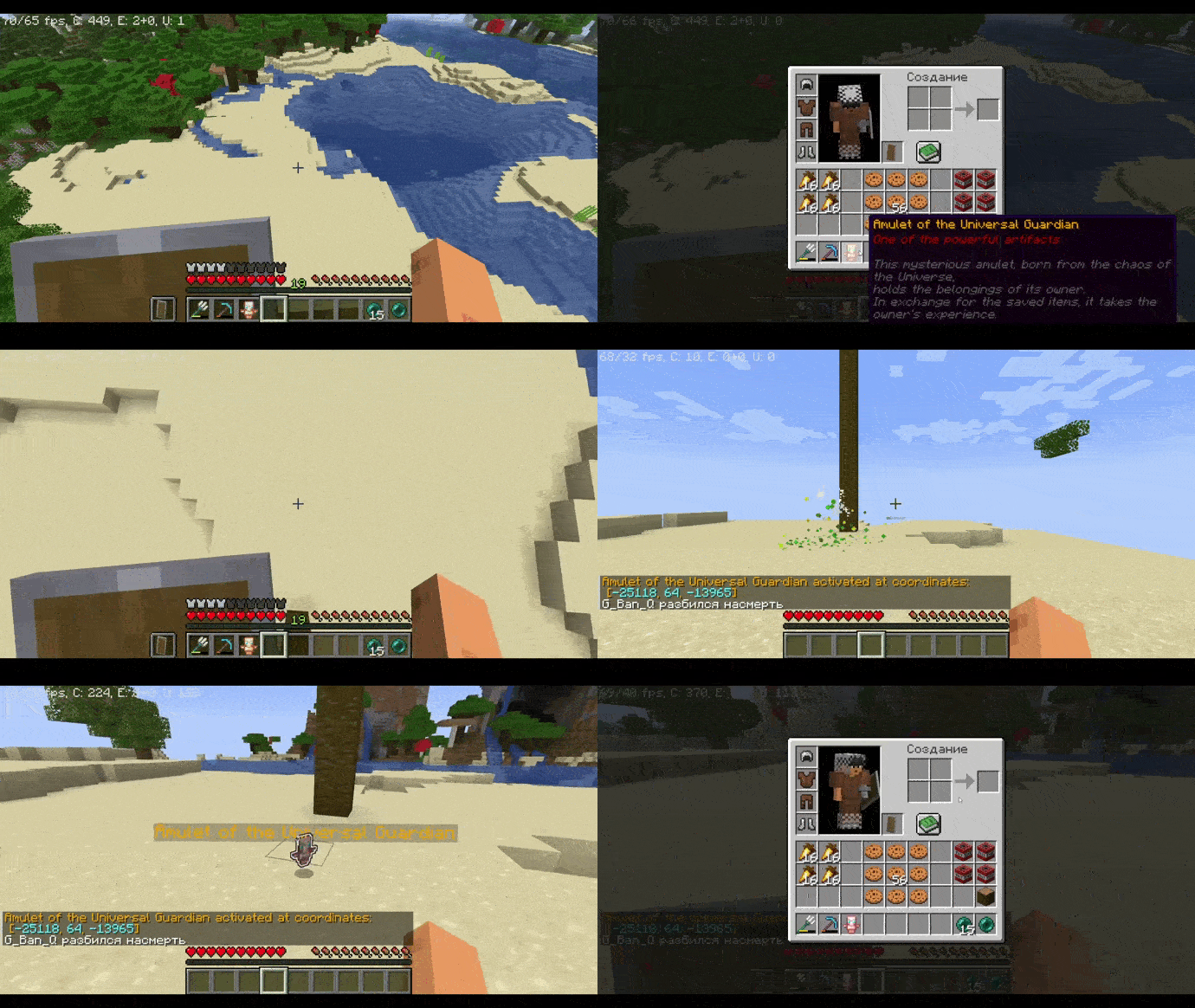
When the player dies, the amulet will save all of their items, holding them until the owner retrieves the artifact. Upon retrieving the amulet, the player’s items will be returned to them, but their experience will be taken. The amulet also displays the coordinates of the player’s death.
> 
>
Obtaining
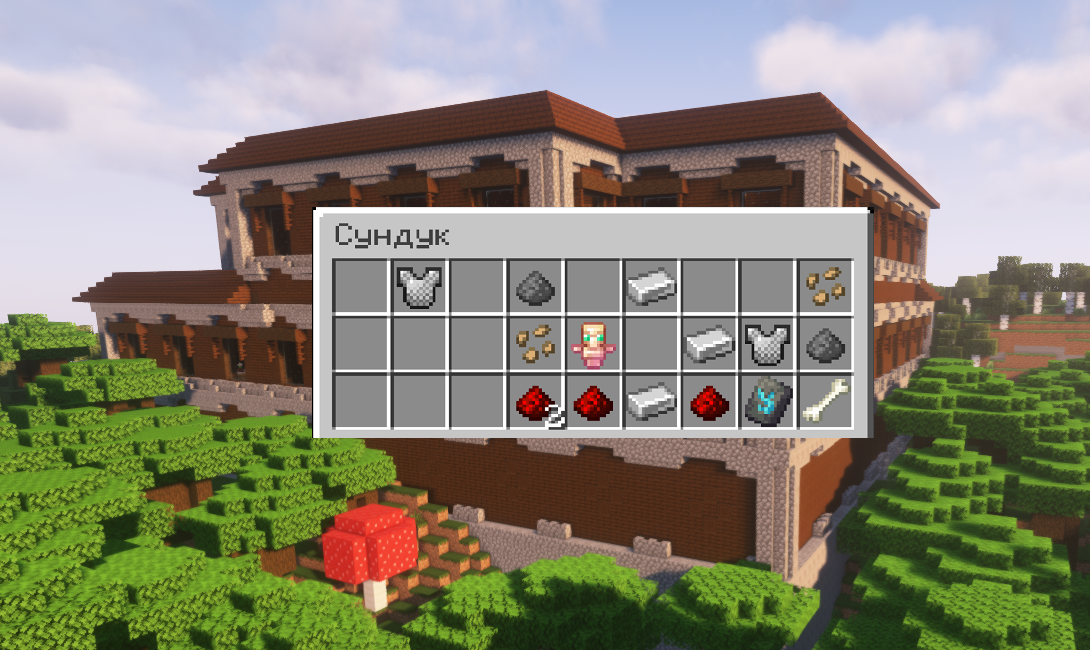
This amulet can be found in chests located in woodland mansions with a 30% probability.
> 
>
## Plugin Commands:
| Command | Permission | Description |
| — | — | — |
| /artefactinfo | AotA.usage | Obtain information about the artifacts |
| /magiccompass | AotA.usage | Grant the Seer’s Compass to the specified player |
| /giveguardianamulet | AotA.usage | Grant the Guardian Amulet to the specified player |
| /timeartifact | AotA.usage | Grant the Time Artifact to the specified player |
| /givetimeshard | AotA.usage | Grant a Temporal Paradox Shard to the specified player |
| /spawnrift | AotA.usage | Summon a temporal rift |
## Permissions:
– AotA.usage – Allows the use of all commands from the “Artifacts of the Ancients” plugin.
##
> **This plugin is currently in development and will be updated, so expect new items and features in the near future!**
> _The open-source code of the plugin will be available in its final versions._
>
Articulate
# Articulate
A Minecraft plugin to manage your player.
Supported Versions
**Spigot & Paper Supported**
– 1.21.5
– 1.21.6
– 1.21.7
– 1.21.8
– 1.21.9
– 1.21.10
## About
Articulate is made to simplify making changes to your player. Whether its attributes, god mode, or anything else, Articulate makes it easy!
## Features
* Flight
* Fly speed
* Walk speed
* Max health
* God mode
* Instakill
ArthCore
ArthCore is a plugin that provides 4 features:
> •Stops server at a configurable time every day and sends a warning message beforehand at a configurable time
>
> •/transfer (playername/@p) (port) (IP address) transfers bedrock players to an IP and port using the floodgate API
>
> •/sell command that works just like in EssentialsX, works with Vault & any economy plugin
>
> •/hub command sends you back to world “world”. This feature is incomplete and will be overriden by your proxy if you have one.
**Dependencies:**
Vault (needed for /sell)
An economy plugin (needed for /sell)
Floodgate & Geyser (needed for /transfer)
**Credit:**
Creator (Arionas03)
Maintainer and Owner (DiamonC)
Arte
> **NOTE: Arte works only on Minecraft 1.20.3+**
Table of Contents
-
About Arte
-
Getting Started
- Usage
- Contact
## About Arte
So, what does it do? Simple! Let’s say you have a BIG server resource pack.
Every time you make a little change, you will have to manually re-host it somewhere, and players will have to fully re-download it.
This can get annoying. Arte splits the resource pack into parts (by namespaces), hosts it directly on your server
and sends each one as a different server resource pack!
> Q: How is this possible? There can only be one server resource pack loaded at one time!
> A: In 1.20.3 Mojang added a new feature that allows servers to send multiple server resource packs at a time!
Players will only re-download the parts that actually need updating, and apply other server packs.
## Getting Started
To set up Arte on your server follow these steps.
### Prerequisites
Different mod-loader require different dependencies!
#### On Fabric:
[![Requires Fabric API][fabric-api-shield]][fabric-api-url]
#### On Spigot:
* Requires nothing!
#### On Paper:
* Requires [ProtocolLib][protocol-url].
### Installation
[![Hangar][hangar-shield]][hangar-url]
[![GitHub][github-shield]][github-url]
[![Polymart][polymart-shield]][polymart-url]
[![Spigot][spigot-shield]][spigot-url]
_Download and install the mod or plugin from [Modrinth][modrinth-versions-url], [Hangar][hangar-versions-url], [Polymart][polymart-updates-url], [Spigot][spigot-updates-url] or [GitHub Releases][github-releases-url]._
1. Start your server
2. Open Arte’s config file
3. Set `address` to your server’s public address
4. Open the port specified in config (`1864`) or put already opened port in the `port` field in config.
5. Restart your server
## Usage
Put your resource pack source (not zipped) in the `arte/resourcepack/` folder and run `/arte reload`.
> Note: Arte folder can be different depending on your server! If you use Fabric or Quilt, it’s folder will be in server’s folder.
> If you use Spigot, then Arte’s folder will be located in `plugins/arte/`.
_For more examples, please refer to the [Documentation](https://projects.shardmc.su/arte)._
## Contact
[![Discord][discord-shield]][discord-url]
[spigot-shield]: https://raw.githubusercontent.com/intergrav/devins-badges/v3/assets/cozy/supported/spigot_64h.png
[fabric-shield]: https://raw.githubusercontent.com/intergrav/devins-badges/v3/assets/cozy/supported/fabric_64h.png
[noforge-shield]: https://raw.githubusercontent.com/intergrav/devins-badges/v3/assets/cozy/unsupported/forge_64h.png
[rptweaks-url]: https://modrinth.com/mod/resource-pack-tweaks
[fabric-api-shield]: https://raw.githubusercontent.com/intergrav/devins-badges/v3/assets/cozy/requires/fabric-api_64h.png
[fabric-api-url]: https://modrinth.com/mod/fabric-api
[protocol-url]: https://ci.dmulloy2.net/job/ProtocolLib//lastBuild/
[spigot-url]: https://www.spigotmc.org/resources/arte.114150/
[github-shield]: https://raw.githubusercontent.com/intergrav/devins-badges/v3/assets/cozy/available/github_64h.png
[github-url]: https://github.com/ShardMC/arte
[hangar-shield]: https://raw.githubusercontent.com/intergrav/devins-badges/v3/assets/cozy/available/hangar_64h.png
[hangar-url]: https://hangar.papermc.io/shardmc/arte
[polymart-shield]: https://raw.githubusercontent.com/intergrav/devins-badges/v3/assets/cozy/available/polymart_64h.png
[polymart-url]: https://polymart.org/resource/plugin-arte.5242
[curseforge-shield]: https://raw.githubusercontent.com/intergrav/devins-badges/v3/assets/cozy/available/curseforge_64h.png
[curseforge-url]: https://curseforge.com/minecraft/bukkit-plugins/arte-for-spigot
[spigot-shield]: https://raw.githubusercontent.com/intergrav/devins-badges/v3/assets/cozy/supported/spigot_64h.png
[spigot-url]: https://www.spigotmc.org/resources/arte.114150/
[modrinth-versions-url]: https://modrinth.com/plugin/arte/versions
[hangar-versions-url]: https://hangar.papermc.io/shardmc/arte/versions
[polymart-updates-url]: https://polymart.org/resource/arte.5242/updates
[curseforge-updates-url]: https://curseforge.com/minecraft/bukkit-plugins/arte-for-spigot/files
[spigot-updates-url]: https://www.spigotmc.org/resources/arte.114150/updates
[github-releases-url]: https://github.com/ShardMC/arte/releases
[github-issues-url]: https://github.com/ShardMC/arte/issues
[discord-shield]: https://raw.githubusercontent.com/intergrav/devins-badges/v3/assets/cozy/social/discord-plural_64h.png
[discord-url]: https://discord.gg/CqVAzakrqx
ArtChanger
Paper plugin mapping internet images into item frames with auto aspect-based grids, high-quality dithering+sharpen, persistence across restarts, anti-dup drops, multi-source URLs, rotation, EN/RU locales, safe and fast by bdiev_.
# Key Features:
– Load images from URLs (Instagram, Discord CDN, Telegram, Imgur, ImgBB, any direct link)
– Auto grid sizing by aspect ratio (e.g., 1:1 → 3×3, 16:9 → 4×2, 4:3 → 4×3; manual 3×2 / 5×5 also supported)
– Rectangular grids with placement validation and chunk-load restoration (tile metadata stored)
– High-quality pipeline: multi-step downscale, sharpening, Floyd–Steinberg dithering, palette mapping to Minecraft maps
– Rotate with right-click; delete with left-click (clears group, keeps main frame)
– Anti-dup: auto-created frames do not drop; only one frame drops per grid
– Persistence across restarts (image ID + grid metadata stored in frames)
– Asynchronous downloads (non-blocking for the server)
# Commands:
– /artchanger set [size]
– size formats: 3 (square), 3×2 (rectangular). If omitted → auto-sized by aspect ratio.
– /artchanger help — show help
# Usage:
– Shift + Right click to paste item in the frame
– Run /artchanger set [size]
– Right-click an item frame to place the image
– Right-click again to rotate
– Left-click to remove the picture (main frame stays; grid auto-frames are removed without drops)
# Grid Sizing:
– Auto: aspect-ratio based (1:1→3×3, 16:9→4×2, 4:3→4×3, 3:2→3×2, 2:3→2×3, 9:16→2×4, panorama>2.5→5×2)
– Manual: /artchanger set 4×3 or /artchanger set 5
– Max recommended grid: 10×10
Please, text me if you found any bugs, Thanks!
Arson for Spigot
## The never beforeseen /arson for Minecraft
The plugin is all visual nothing is really being burnt and it’s fully customizable for server owners.
### Commands:
– /arson me | Burn yourself (permission: arson.me)
– /arson all | Burn an entire range of blocks (permission: arson.all)
ArrowPost
# ArrowPost
> **Send items to any player — via a homing arrow.**
ArrowPost is a Paper 1.21+ plugin that adds a craftable **Tracking Bow**. Load up to 9 items into it, set a target player, and fire. The arrow warps above them and homes in — dropping the payload at their feet on impact.
—
## How It Works
“`
1. Craft or receive a Tracking Bow
2. Sneak + Right-click → load items into the 9-slot payload GUI
3. /aptarget → lock on to a target
4. Shoot → arrow flies, warps above target, homes in
5. Impact → payload drops at their feet
“`
If the arrow is blocked before reaching the target it is removed and your payload is **preserved** — you can shoot again without reloading.
—
## Features
– **Craftable** — 4 Ender Pearls + Bow, no permissions required
– **9-Slot Payload GUI** — sneak + right-click to open; contents persist through restarts
– **One payload per player** — stored on the player, not the bow; multiple bows can’t be used as extra storage
– **Homing arrows** — configurable free-flight delay, then warp teleport above the target and per-tick steering
– **Cross-dimension tracking** — arrow follows the target into a new world
– **Payload only consumed on delivery** — blocked shots leave items intact
– **Cooldown system** — configurable per-player shot cooldown
– **Visual & sound effects** — PORTAL warp burst, CRIT/ENCHANT trail, smoke + hit on impact
– **bStats metrics** — anonymous usage statistics via [bStats](https://bstats.org)
—
## Crafting Recipe
“`
· E ·
E B E
· E ·
“`
`E` = Ender Pearl | `B` = Bow
—
## Commands
| Command | Description | Who |
|———|————-|—–|
| `/aptarget ` | Set your homing target | All players (`arrowpost.use`) |
| `/aptarget clear` | Clear your current target | All players (`arrowpost.use`) |
| `/arrowpost give [player]` | Give a Tracking Bow | Operators only |
**Alias:** `/ap give [player]`
—
## Permissions
| Node | Default | Description |
|——|———|————-|
| `arrowpost.use` | `true` (everyone) | Use the bow and `/aptarget` |
| `arrowpost.admin` | `op` | Run `/arrowpost give` |
—
## Installation
Drop the jar into your server’s `plugins/` folder and restart.
**Requirements:** Paper 1.21+ | Java 21+
—
## Configuration
`plugins/ArrowPost/config.yml`
“`yaml
delay-ticks: 40 # Free-flight ticks before homing activates (≥ 20)
teleport-height: 500 # Blocks above target the arrow warps to (≥ 5)
tracking-radius: 5.0 # Delivery radius in blocks (2.0 – 5.0)
arrow-speed: 1.5 # Homing speed in blocks/tick (1.0 – 10.0)
cooldown-seconds: 10 # Seconds between shots per player (0 = disabled)
effect-particles: true # PORTAL warp, CRIT trail, LARGE_SMOKE on impact
effect-sounds: true # Enderman warp, arrow shoot, arrow hit on impact
“`
Out-of-range values are automatically clamped on startup with a console warning.
—
## License
GNU GPLv3
ArrowHitMSG
**ArrowHitMSG – Instant Arrow Hit Feedback**
This lightweight plugin enhances archery combat on your Minecraft server by providing immediate feedback when players hit others with arrows. The plugin delivers a seamless experience for archers by showing critical information right when you need it.
Key Features
Instant Hit Confirmation: Get immediate visual feedback when your arrow finds its target
Damage Display: See exactly how much damage your shot dealt
Remaining Health Display: Know your target’s remaining health after your shot
Customizable Notifications: Choose between chat messages, action bar, or title notifications
Sound Effects: Optional sound confirmation for successful hits
Full Color Customization: Match the plugin’s appearance to your server’s theme
Performance Friendly: Minimal impact on server resources
Simple Configuration: Easy to set up with well-documented config file
Permission-Based: Admin reload command with appropriate permission checks
**
Why Choose This Plugin?**
This archery feedback tool fills an important gap in Minecraft’s combat system. In vanilla gameplay, you often can’t tell if your arrow hit or how effective it was, especially at longer ranges or in chaotic combat situations.
With this plugin, you’ll gain valuable tactical information that can help you improve your archery skills and make better decisions in PvP combat. The customizable notification system lets server owners decide exactly how this information is presented to players.
**Server Benefits**
For server administrators, this plugin enhances PvP gameplay without altering the core mechanics. It’s perfect for:
Combat-focused servers where archery skill matters
Survival servers with PvP elements
Minigame servers featuring bow combat
Any server looking to enhance player feedback during combat
The plugin is designed to be lightweight and efficient, using modern Bukkit/Spigot APIs for optimal performance. It works well alongside other combat enhancement plugins and won’t conflict with most server setups.
**Getting Started**
Simply place the plugin JAR in your plugins folder and restart your server. Default settings will work immediately, but you can customize the experience through the config.yml file to suit your server’s unique style.
The plugin integrates seamlessly with permission systems, allowing server owners to control who can reload the configuration.
Upgrade your server’s archery combat experience today with this essential feedback tool!
Armstrong

**Armstrong** is a simple plugin that utilizes [Lunar Client](https://lunarclient.com)’s [Apollo API](https://github.com/LunarClient/Apollo).
**Found a bug or have a feature idea?** Use the [issue tracker](https://github.com/Vaption/Armstrong/issues)!
[](https://modrinth.com/plugin/armstrong)
[](https://github.com/Vaption/Armstrong/releases/latest)
[](https://github.com/Vaption/Armstrong/blob/main/LICENSE)
## ⚖️ Armstrong vs. LunarUtility
Originally the goal was just to migrate the codebase to use Apollo rather than the old BukkitAPI.
During the migration, I noticed that Apollo (on its own) now does some of what this plugin once did.
So, the waypoints & disabled-mods module have been removed from this plugin (now configurable in Apollo).
The cooldown module implementation was also removed, but will come back to it at a later time!
## 🙌 Credits
Armstrong is based off of [LunarUtility](https://github.com/RefineDevelopment/LunarUtility). All credit to the original developers!
👨💻 **Contributors**
– 🏙️ [Dubai](https://github.com/GamerRealm) – Original Author
– 🛠️ [Komek](https://github.com/Komeek) – Maintainer
– 💡 [kayalust](https://github.com/kayalust) – Contributor
## 📥 Installing
1. Download the jar from [releases](https://github.com/Vaption/Armstrong/releases)
2. Download LunarClient’s Apollo API jar from [here](https://github.com/LunarClient/Apollo/releases)
3. Drop **both** jars into all your servers
4. Edit the configuration files to your liking
## 📜 Terms of Use
– No selling or claiming this project as your own
– Please respect & credit the developers
## ✨ Features
🏷️ Nametag
Enabled by default, configurable in `config.yml`.

🔒 Require Lunar Client
Disabled by default. Enable by setting `REQUIRE-LUNAR` to `true` in `config.yml`.

🛡️ Staff Mods
Requires `armstrong.staff` permission. Toggle with `/lsm `.

🌙 Player on Lunar Client
Requires `armstrong.players` permission. Check if someone is using Lunar Client with `/lc `.

📋 All Players on Lunar Client
Requires `armstrong.players` permission. Get a list of players on Lunar Client with `/lc players` (or `list` / `users`).