Auto Farm Regions
## Automatically manage crops in protected farming areas
A lightweight plugin that automates crop harvesting and regrowth inside WorldGuard regions. When a player breaks a mature crop, it’s instantly replanted and sent to their inventory. Crops can also regrow automatically after a set time. Immature crops can’t be broken, and harvesting can be limited to specific tools like hoes.
### Features:
– Instantly replants and adds crops to inventory on break
– Automatically grows crops after a configurable delay
– Blocks immature crops from being broken
– Tool restrictions (e.g. hoes only)
– Fully region-based via WorldGuard
– Lightweight and open source
_All features are restricted to defined WorldGuard regions, ideal for public farms or spawn zones._
### Why use this plugin?
I personally use RegionFarm on my EarthSMP server’s spawn, where there’s a public farm. It keeps the area clean by auto-replanting crops and speeds up growth in that specific region. It’s hands-off farming that fits well into shared spaces and public zones.
Click to expand configuration example
“`yaml
# AutoFarmRegions Configuration
# Version: 1.1
# Support: https://discord.primalmc.fun
#
# This plugin automates farming tasks within WorldGuard regions.
# For help and support, join our Discord server: https://discord.primalmc.fun
# List of WorldGuard region names where auto-farming is enabled
# Example: enabled-regions: [farm1, farm2, wheat-farm]
enabled-regions:
– farm
# Auto-replant settings
auto-replant:
# Enable or disable automatic replanting of crops
enabled: true
# If true, crop drops will be added directly to the player’s inventory
# If false, drops will be dropped on the ground
add-to-inventory: true
# If true and inventory is full, drops will be dropped on the ground
# If false and inventory is full, drops will be lost
drop-if-full: false
# Settings for inventory full notifications
inventory-full-notification:
# Show a title message when inventory is full
show-title: false
# Show an action bar message when inventory is full
show-action-bar: true
# Duration of the title message in ticks (20 ticks = 1 second)
title-duration: 40
# Automatic crop growth settings
growth:
# Enable or disable automatic crop growth
enabled: true
# Time in seconds for crops to grow to maturity
interval: 60
# Show particle effects when crops grow
show-particles: true
# Particle type to show when crops grow
# Available particles: https://hub.spigotmc.org/javadocs/spigot/org/bukkit/Particle.html
particle: VILLAGER_HAPPY
# Crop protection settings
protection:
# Prevent players from breaking immature crops
prevent-immature-break: true
# Show a message when players try to break immature crops
show-immature-message: false
# Require specific tools to break crops
require-tools: false
# List of tools that can be used to break crops
# Only used if require-tools is true
allowed-tools:
– WOODEN_HOE
– STONE_HOE
– IRON_HOE
– GOLDEN_HOE
– DIAMOND_HOE
– NETHERITE_HOE
“`
Servers Currently Using This Plugin
play.primalmc.fun
Contact us on our [Discord](https://dsc.gg/vorbullmc) server to add your server here.
### Support:
Join our [Discord](https://discord.primalmc.fun/) for faster help and plugin discussions. Questions get answered quicker there than on other platforms.
RegionFarm is open source, feel free to contribute! If your changes are valuable, we’ll consider merging them into the main release.
AutoFarm
Плагин добавляющий возможность создать автоферму на сервере. В конфиге плагина можно выставить цену за каждое растение. Также можно включить или выключить настройку отвечающую за то, чтобы растение появлялось сразу большим. Можно настроить задерку с которой растение будет засаживаться.
Команды:
/autofarm reload – перезагрузить плагин
/autofarm setpos1 – поставить первую точку
/autofarm setpos2 – поставить вторую точку
/autofarm addregion – создать регион фермы
/autofarm removeregion – удалить регион фермы
/autofarm editregion – редактировать регион фермы
/autofarm getsalary – получить зарплату (если в конфиге стоит manual)
/af = /autofarm
A plugin that adds the ability to create an autofarm on the server. In the plugin config, you can set the price for each plant. You can also enable or disable the setting that is responsible for the plant appearing immediately large. You can configure the delay with which the plant will be planted.
Commands:
/autofarm reload – reload the plugin
/autofarm setpos1 – set the first point
/autofarm setpos2 – set the second point
/autofarm addregion – create a farm region
/autofarm removeregion – delete a farm region
/autofarm editregion – edit a farm region
/autofarm getsalary – get salary (if manual is set in config)
/af = /autofarm
AutoDeOp
# RU
Простой и лёгкий плагин, который даст Вам не большую защиту от взлома сервера. Данный плагин не позволит постороннему игроку иметь на аккаунте права администратора (/op). Небольшой пример работы представлен на скринах. Команды доступны только для игроков, у которых имеется опка или же через консоль.
## Команды
– /ado {add/remove} ник – редактирование списка опки
– /ado list – отображение игроков в вайтлисте
– /ado help – отображение этой помощи
## Предупреждение
Чтобы до конца обновить список (если ВЫ его редактировали через конфиг), то пропишите 1-2 раза /ado list для обновления его в плагине
## Лень автора
Данный плагин поддерживает только 2 языка **Английский и Русский**, тк мне было очень лень делать конфиги для полноценно кастомных переводов
# EN
A simple and lightweight plugin that will provide you with some protection against server hacking. This plugin will prevent unauthorized players from gaining administrator (/op) rights on your account. A small example of its operation is shown in the screenshots. Commands are only available to players with an opka or through the console.
## Commands
– /ado {add/remove} nickname – edit the opka list
– /ado list – display players on the whitelist
– /ado help – display this help
## Warning
To fully refresh the list (if you edited it through the config), enter /ado list once or twice to refresh it in the plugin.
## Author’s laziness
This plugin only supports two languages: English and Russian, as I was too lazy to create configs for full custom translations.
AutoCrop
# **AutoCrop Plugin**
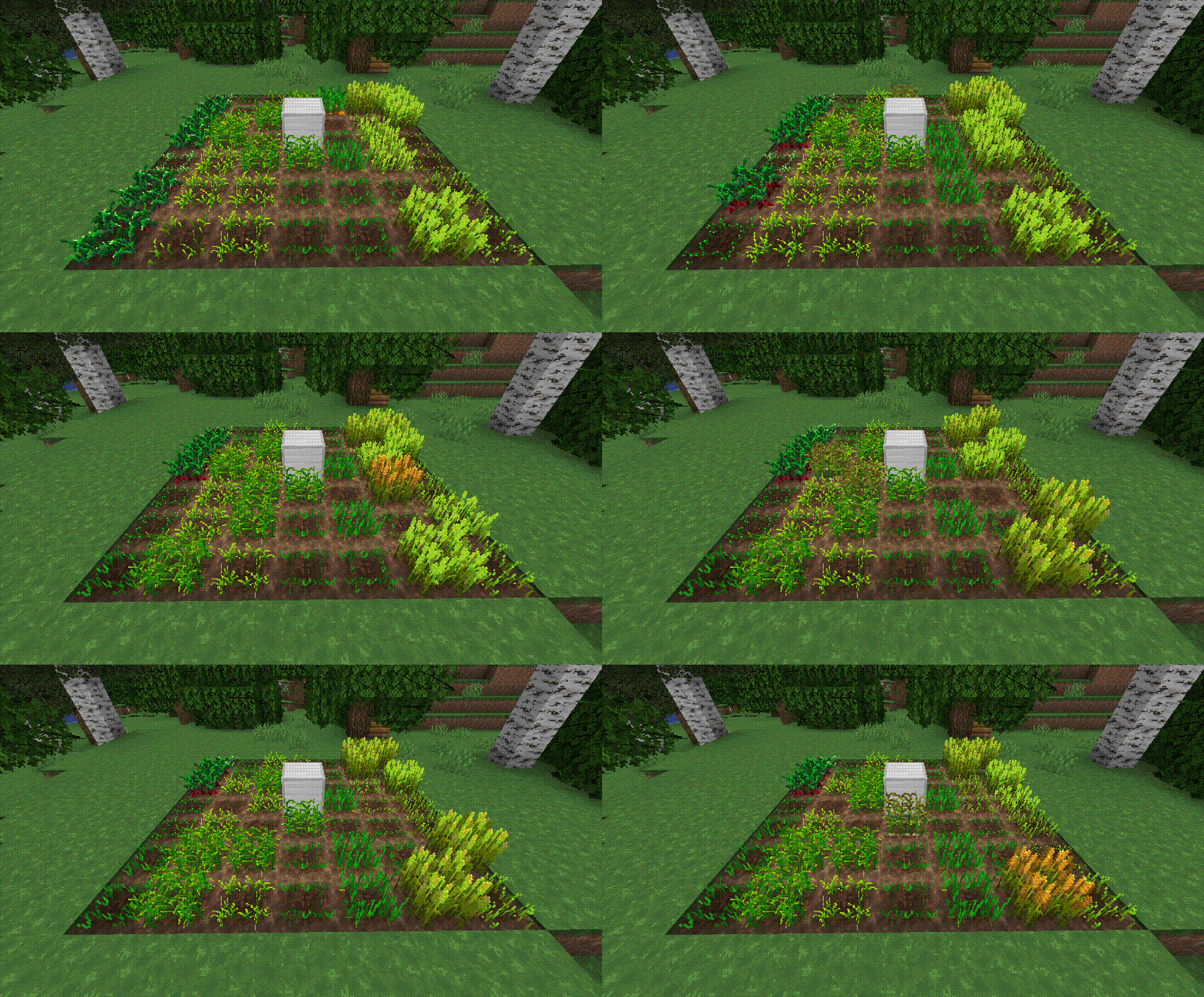
The **AutoCrop** plugin is a powerful and intuitive tool designed to automate the tedious process of sowing and harvesting crops. With this plugin, players can streamline their farming operations and focus on enjoying other aspects of gameplay. It automatically prepares the land, plants seeds, and harvests ripe crops, storing them neatly in the farm inventory.
***
## **Getting Started**
Follow these simple steps to set up and start using the **AutoCrop** plugin:
1. **Craft a Farm Block**
Gather the necessary materials and craft a farm block. The exact recipe may vary depending on your server’s configuration or modpack.
2. **Place the Farm Block**
Install the farm block on your chosen plot of land. Ensure the location is suitable for farming activities.
3. **Start the Farm**
Open the farm block menu and activate the **AutoCrop** feature. The farm block will automatically prepare the land for sowing if it’s placed on dirt. If placed on another block type, ensure you add dirt blocks to the farm’s inventory.
4. **Plant the Seeds**
Add the seeds you wish to grow into the farm block inventory. The plugin currently supports crops like wheat, potatoes, carrots, and beetroot, with more planned in future updates.
***
## **Modes**
The **AutoCrop** plugin includes two modes, each requiring specific materials for proper operation:
1. **Seed Mode**
* Requires: Dirt blocks, seeds (e.g., wheat, carrot, potato, beetroot).
This mode automates the planting and harvesting of standard crops.
2. **Cactus Mode**
* Requires: Sand blocks, cactus.
This mode automates the growth and harvesting of cactus plants.
***
## **Supported Crops**
1. Potatoes
2. Beetroot
3. Wheat
4. Carrots
5. Cactus
_More crops coming soon!_
***
## **Permissions**
* `autocrop.admin` – Allows access to administrator commands.
* `autocrop.use` (default: true) – Allows players to use the AutoCrop functionality.
***
## **Commands**
* `/autocrop admin getcropblock` – Obtain a farm block.
* `/autocrop admin reload` – Reload the plugin configuration.
***
## **Continuous Development**
**AutoCrop** is not just a plugin; it’s an evolving project! Regular updates are released to add new features, improve performance, and enhance the overall user experience. Stay tuned for exciting updates to make your farming more enjoyable!
Support the developers by [buying them a coffee](https://www.patreon.com/PluginDEV)! Your contributions help them continue delivering quality tools for the gaming community.

AutoCrafters
This plugin allows you to use Dispensers to craft items.
The crafting recipe: 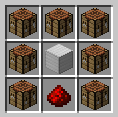
The output chest should be place on the side the dispenser is facing. The input chest should be opposite the output.
The item you want crafted should be placed inside the dispenser.(If more then one is supplied they are randomly picked from to craft.)
The final thing that must be done is a redstone pulse every time you want the item crafted. (Unless its enchanted with infinity.)
To enchant place the crafting in a crafting grid with one book at a time.
#### Making them faster!
The max speed can be set in the config. The MaxEff value is the max level allowed. Currently if its -1 it means there is no max level.
#### Make them work Automatically!
To make the crafters run anytime they have a redstone signal you just have to enchant them with Infinity.
You can config how fast they craft with the config value Auto. Setting it to 0 disables auto crafting.
#### Whats data.json??
data.json holds the efficiency and infinity level for all placed AutoCrafter so that you can break them and still retain the efficiency level.
#### Blacklists?
You can stop players from auto crafting some items by adding them to the black list in the config.
AutoCorrect
AutoCorrect is a powerful chat enhancement plugin that brings professional text correction to your Minecraft server. Tired of seeing “pc”, “tg”, or other abbreviations in your chat? This plugin automatically transforms them into proper, full words, making your server’s communication more professional and easier to read.
**What does it do?**
• Automatically replaces common abbreviations with their full forms (e.g., “pc” → “computer”, “tg” → “Telegram”)
• Filters and censors inappropriate content in real-time
• Standardizes technical terminology across your server
• Sends welcome messages to new players
• Works seamlessly with Paper 1.20.1+
**
Why should you use it?**
• Maintains a professional chat environment
• Reduces confusion from abbreviations and slang
• Protects your community from inappropriate content
• Easy to configure – just edit the YAML file
• Lightweight and efficient – no impact on server performance
**Perfect for:**
• Professional Minecraft servers
• Educational institutions
• Community servers
• Any server wanting to maintain high chat standards
AutoCompressor Pro
💎 AutoCompressor Pro
Version 1.0.4 – New Features!
Upgrade your server experience with **Auto Compressors!** This plugin allows players to automatically compress items while mining with a single item, all managed through an intuitive GUI system. **No need for any configeraition** just pure efficiency.
Creating an **Auto Compressor** example:
– Want to create a Diamond Auto Compressor?
1. Use /addtier, call it “Diamond”, and assign a group or create one (group choice only matters if you dont want the best Auto Compressor to comp all tiers below).
2. Use /settarget to set what item/block is needed for the comp.
3. Right-click the block/item to be the target.
4. use /setcomp and right click the item you want to be the compresser of the auto compressor, you can make it any item you want.
5. Use /comp to equip or remove from activity your Auto Compressor.
6. Use /opcomp to see all of your auto comps and get the tier you want players to receive as the Auto Compressor item.
AutoCompressor | Commands & Permissions
🛠 Administrative Commands
Setup and manage the compression system directly in-game.
### Commands:
– **`/comp`** → **Main Player Menu**. Opens the GUI for players to **insert or collect** their Auto Compressors to start mining. (Permission: **Default**)
– **`/opcomp`** → **Admin Tier List**. Opens a GUI of all available Auto Compressors to **obtain the activator items**. (Permission: **`autocompressor.opcomp`**)
– **`/settarget`** → **Define Input**. Sets the specific block or item that must be mined to trigger compression. (Permission: **`autocompressor.setcompsettarget`**)
– **`/setcomp`** → **Define Output**. Sets the reward item a player receives and the required ratio (e.g., 64). (Permission: **`autocompressor.setcompsettarget`**)
– **`/addtier`** → **Create New Tier**. Creates a named tier (like “Diamond”) and assigns it to a functional group. (Permission: **`autocompressor.addtier`**)
Upcoming Features:
– Better GUI
– cleaner auto compressors layout
Support:
– For questions or problems, contact me on Discord: veber #veberyotam, or use the comment section. Thank you!
AutoCompressor
## Features:
– Creating custom autocompressor recipes linked to an activator item
– All players can enable and disable AutoCompressors that they have unlocked for themself
– Admins can give activator items and revoke autocompresors from players
– **Easy setup with no writing in files required!**
##
### Commands:
– **/auc** (or /auc help) – Show all commands
– **/auc create ** – Create an autocompressor hold the item in your hand that you want to use as the activator item and set the custom autocompressor id for the autocompressor
– **/auc createrecipe [input item amount] [output item amount]** – Create a recipe that can be added to a autocompressor later hold the input item in your main hand and the output item in your offhand the input item amount is how many input items it takes to get the resulting output item amount (defaults to 64 -> 1)
– **/auc asignrecipe ** – Asign a created recipe to an autocompressor
– **/auc activator ** – Give yourself or another player an activator item
– **/auc type ** – Choose the type of AutoCompressor an AutoCompressor is, **Permenant** (default) – Right click activator item to claim it permenatly player’s can toggle it on and off with the /toggle command, **Inventory** – Works only when the activator item is in the players inventory cannot claim the activator item, **Offhand** – Works the same way as the inventory type except the activator item only works when its in the players inventory
– **/auc list** – Lists all the autocompressor id’s that you have add to the server
– **/auc listrecipes ** – Lists all the recipes for a specific autocompressor
– **/auc remove ** – Delete a specific autocompressor
– **/auc removerecipe ** – Delete a specific recipe from an autocompressor using the recipe id
– **/auc deleterecipe ** – Compltely delte a recipe id and remove it from all autocompressors
– **/auc revoke ** – Revoke an autocompressor from a player that has already unlocked an autocompressor
– **/auc toggle ** – Enable or disable an autocompressor that you have already unlocked admins can enable and disable other players unlocked autocompressors
– **/auc listtoggled** – List the autocompressors that you have unlocked and enabled or disabled
##
### Permissions:
– **autocompressor.*** – Get all permissions for the AutoCompressor plugin
– **autocompressor.create** – /auc create command
– **autocompressor.createrecipe** – /auc createrecipe command
– **autocompressor.removerecipe** – /auc removerecipe command
– **autocompressor.remove** – /auc remove command
– **autocompressor.activator** – /auc activator command
– **autocompressor.setactivator** – /auc setactivator command
– **autocompressor.listrecipes** – /auc listrecipes command
– **autocompressor.list** – /auc list command
– **autocompressor.revoke** – /auc revoke command
– **autocompressor.type** – /auc type command
– **autocompressor.deleterecipe** – /auc deleterecipe command
– **autocompressor.toggle** – /auc toggle command (enabled to all by default)
– **autocompressor.listtoggled** – /auc listtoggled command (enabled to all by default)
– **autocompressor.adminhelp** – See the admin help menu when you get sent the help menu
– **autocompressor.help** – /auc help command (enabled to all by default)
##
Heres a very laggy stitched together tutorial video I made if you are having any issues using the autocompressor plugin:
If anyone makes a better plugin video send it to me in the comments I geuss and ill put it here
##
AUTOCMD
# 🧩 AutoCommandPlugin
AutoCommandPlugin is a simple and powerful Minecraft plugin that lets you automatically run multiple server commands after specific delays. You can also manually run them using `/autocmd`, or add new ones using `/autocmd add`.
—
## ✅ Plugin Features
– ⏱️ Run multiple commands after server starts with custom delays
– 🔁 Commands auto-execute at specific times
– ➕ Add new commands with `/autocmd add `
– 🎮 Optional in-game usage (enabled/disabled via config)
– 🎨 Supports Minecraft color codes (like `&a`, `&c`)
– 🛡️ Blocks abuse by restricting in-game access with a toggle
– 🧾 Simple config file with easy setup
—
## 📥 How to Install
1. Download the `.jar` file
2. Place it in your `plugins/` folder
3. Start or restart your Minecraft server
4. The plugin creates a `config.yml` and auto-runs your first command in 30 seconds!
—
## ⚙️ Config File: `config.yml`
“`yaml
allow_in_game_command: false
# You can add more below or use /autocmd add
commands:
setup:
delay: 30
command: “&a[AutoCommandPlugin] &fThis plugin is now set up and running every 30 seconds!”
“`
### Explanation:
| Setting | Description |
|——–|————-|
| `allow_in_game_command` | `true` or `false` — if `false`, players can’t run `/autocmd` or add new commands |
| `commands` | A list of commands to run automatically |
| `delay` | Delay in **seconds** after server starts |
| `command` | The actual command to run (use `&` for colors) |
—
## 🧵 Commands
### 🔹 `/autocmd`
Runs all the commands listed in `config.yml` immediately.
– ✅ Works in-game **only if** `allow_in_game_command: true`
– ❌ Otherwise shows this message:
`In-game command usage is disabled. Enable it from config.yml.`
—
### 🔹 `/autocmd add `
Adds a new command to `config.yml` and runs it after **30 seconds**.
**Example:**
“`
/autocmd add broadcast &eCheck out our Discord at discord.gg/server
“`
This will save:
“`yaml
commands:
cmd_1:
delay: 30
command: “broadcast &eCheck out our Discord at discord.gg/server”
“`
—
## 📝 Example Config
“`yaml
allow_in_game_command: false
commands:
welcome:
delay: 5
command: “say &6Welcome to the server!”
auto_chunky:
delay: 20
command: “chunky start”
tip:
delay: 60
command: “broadcast &bTIP: &fDon’t forget to claim your daily reward!”
“`
—
## 🧪 Compatible Servers
| Server Type | Version |
|————-|————-|
| ✅ Paper | 1.13 – 1.21.5+ |
| ✅ Spigot | 1.13 – 1.21.5+ |
| ✅ Bukkit | 1.13 – 1.21.5+ |
Works on all latest Minecraft versions. No outdated code or version locks.
—
## 🔐 Security Option
To prevent OP abuse or unwanted use, the plugin lets you block in-game command usage.
If a player tries to use `/autocmd` or `/autocmd add` in-game and it’s disabled in config, they will see:
“`
In-game command usage is disabled. Enable it from config.yml.
“`
Commands can **always be used from console**.
—
## 👤 Plugin Info
– Made by: **JODVISHAL**
– Discord: `isthisvishal`
– Email: `jodvishalgg@gmail.com`
—
Enjoy using AutoCommandPlugin and automate your Minecraft tasks easily! 🎉
Auto Chunk Loader Advance
Useful for automated farms located over large distances.
—
**Features:**
– Loads chunks with **moving minecarts**.
– Loads chunks with **propagating redstone signal**.
– Loads chunks with **working hoppers** (when they move item to somewhere).
– Keeps chunks with **observers** loaded.
– Loads chunks with **observers moved by pistons** (flying machines).
– Controls **dropped items lifetime** on chunks affected by this plugin. (See in config: `droppedItemsLifetime`)
_All of features are configurable and can be disabled._
**Installation:**
– Download jar file
– Put this file into `/plugins` folder of your Spigot server
– Restart server
– Modify `/plugins/AutoChunkLoaderAdvance/config.yml` file for your needs
—
**Proposals:**
You can leave your ideas or proposals [here](https://github.com/dashedman/AutoChunkLoaderAdvance/discussions)
—
A simple plugin that loads chunks around long railways and redstone signals,
and keep chunks with observers and working hoppers (pipes and timers).
It can be used for transporting resources in chest minecarts through whole world,
making large redstone circuits, making auto-farms on a long distance.
**Keep in mind with incorrect use this plugin can negatively affect server performance!**
_Fork of [AutoChunkLoader](https://modrinth.com/plugin/autochunkloader) cause it has some bug,
and doesn’t support observers and hoppers._
—
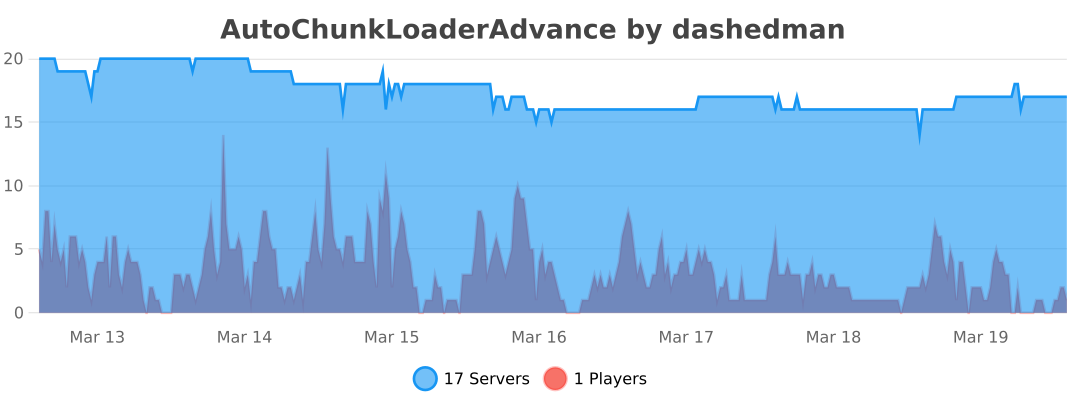
**Statistic:**
[](https://bstats.org/plugin/bukkit/AutoChunkLoaderAdvance/29121)