AutoCrafters
This plugin allows you to use Dispensers to craft items.
The crafting recipe: 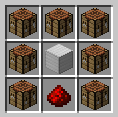
The output chest should be place on the side the dispenser is facing. The input chest should be opposite the output.
The item you want crafted should be placed inside the dispenser.(If more then one is supplied they are randomly picked from to craft.)
The final thing that must be done is a redstone pulse every time you want the item crafted. (Unless its enchanted with infinity.)
To enchant place the crafting in a crafting grid with one book at a time.
#### Making them faster!
The max speed can be set in the config. The MaxEff value is the max level allowed. Currently if its -1 it means there is no max level.
#### Make them work Automatically!
To make the crafters run anytime they have a redstone signal you just have to enchant them with Infinity.
You can config how fast they craft with the config value Auto. Setting it to 0 disables auto crafting.
#### Whats data.json??
data.json holds the efficiency and infinity level for all placed AutoCrafter so that you can break them and still retain the efficiency level.
#### Blacklists?
You can stop players from auto crafting some items by adding them to the black list in the config.
AutoCompressor Pro
💎 AutoCompressor Pro
Version 1.0.4 – New Features!
Upgrade your server experience with **Auto Compressors!** This plugin allows players to automatically compress items while mining with a single item, all managed through an intuitive GUI system. **No need for any configeraition** just pure efficiency.
Creating an **Auto Compressor** example:
– Want to create a Diamond Auto Compressor?
1. Use /addtier, call it “Diamond”, and assign a group or create one (group choice only matters if you dont want the best Auto Compressor to comp all tiers below).
2. Use /settarget to set what item/block is needed for the comp.
3. Right-click the block/item to be the target.
4. use /setcomp and right click the item you want to be the compresser of the auto compressor, you can make it any item you want.
5. Use /comp to equip or remove from activity your Auto Compressor.
6. Use /opcomp to see all of your auto comps and get the tier you want players to receive as the Auto Compressor item.
AutoCompressor | Commands & Permissions
🛠 Administrative Commands
Setup and manage the compression system directly in-game.
### Commands:
– **`/comp`** → **Main Player Menu**. Opens the GUI for players to **insert or collect** their Auto Compressors to start mining. (Permission: **Default**)
– **`/opcomp`** → **Admin Tier List**. Opens a GUI of all available Auto Compressors to **obtain the activator items**. (Permission: **`autocompressor.opcomp`**)
– **`/settarget`** → **Define Input**. Sets the specific block or item that must be mined to trigger compression. (Permission: **`autocompressor.setcompsettarget`**)
– **`/setcomp`** → **Define Output**. Sets the reward item a player receives and the required ratio (e.g., 64). (Permission: **`autocompressor.setcompsettarget`**)
– **`/addtier`** → **Create New Tier**. Creates a named tier (like “Diamond”) and assigns it to a functional group. (Permission: **`autocompressor.addtier`**)
Upcoming Features:
– Better GUI
– cleaner auto compressors layout
Support:
– For questions or problems, contact me on Discord: veber #veberyotam, or use the comment section. Thank you!
AUTOCMD
# 🧩 AutoCommandPlugin
AutoCommandPlugin is a simple and powerful Minecraft plugin that lets you automatically run multiple server commands after specific delays. You can also manually run them using `/autocmd`, or add new ones using `/autocmd add`.
—
## ✅ Plugin Features
– ⏱️ Run multiple commands after server starts with custom delays
– 🔁 Commands auto-execute at specific times
– ➕ Add new commands with `/autocmd add `
– 🎮 Optional in-game usage (enabled/disabled via config)
– 🎨 Supports Minecraft color codes (like `&a`, `&c`)
– 🛡️ Blocks abuse by restricting in-game access with a toggle
– 🧾 Simple config file with easy setup
—
## 📥 How to Install
1. Download the `.jar` file
2. Place it in your `plugins/` folder
3. Start or restart your Minecraft server
4. The plugin creates a `config.yml` and auto-runs your first command in 30 seconds!
—
## ⚙️ Config File: `config.yml`
“`yaml
allow_in_game_command: false
# You can add more below or use /autocmd add
commands:
setup:
delay: 30
command: “&a[AutoCommandPlugin] &fThis plugin is now set up and running every 30 seconds!”
“`
### Explanation:
| Setting | Description |
|——–|————-|
| `allow_in_game_command` | `true` or `false` — if `false`, players can’t run `/autocmd` or add new commands |
| `commands` | A list of commands to run automatically |
| `delay` | Delay in **seconds** after server starts |
| `command` | The actual command to run (use `&` for colors) |
—
## 🧵 Commands
### 🔹 `/autocmd`
Runs all the commands listed in `config.yml` immediately.
– ✅ Works in-game **only if** `allow_in_game_command: true`
– ❌ Otherwise shows this message:
`In-game command usage is disabled. Enable it from config.yml.`
—
### 🔹 `/autocmd add `
Adds a new command to `config.yml` and runs it after **30 seconds**.
**Example:**
“`
/autocmd add broadcast &eCheck out our Discord at discord.gg/server
“`
This will save:
“`yaml
commands:
cmd_1:
delay: 30
command: “broadcast &eCheck out our Discord at discord.gg/server”
“`
—
## 📝 Example Config
“`yaml
allow_in_game_command: false
commands:
welcome:
delay: 5
command: “say &6Welcome to the server!”
auto_chunky:
delay: 20
command: “chunky start”
tip:
delay: 60
command: “broadcast &bTIP: &fDon’t forget to claim your daily reward!”
“`
—
## 🧪 Compatible Servers
| Server Type | Version |
|————-|————-|
| ✅ Paper | 1.13 – 1.21.5+ |
| ✅ Spigot | 1.13 – 1.21.5+ |
| ✅ Bukkit | 1.13 – 1.21.5+ |
Works on all latest Minecraft versions. No outdated code or version locks.
—
## 🔐 Security Option
To prevent OP abuse or unwanted use, the plugin lets you block in-game command usage.
If a player tries to use `/autocmd` or `/autocmd add` in-game and it’s disabled in config, they will see:
“`
In-game command usage is disabled. Enable it from config.yml.
“`
Commands can **always be used from console**.
—
## 👤 Plugin Info
– Made by: **JODVISHAL**
– Discord: `isthisvishal`
– Email: `jodvishalgg@gmail.com`
—
Enjoy using AutoCommandPlugin and automate your Minecraft tasks easily! 🎉
Auto Chunk Loader Advance
Useful for automated farms located over large distances.
—
**Features:**
– Loads chunks with **moving minecarts**.
– Loads chunks with **propagating redstone signal**.
– Loads chunks with **working hoppers** (when they move item to somewhere).
– Keeps chunks with **observers** loaded.
– Loads chunks with **observers moved by pistons** (flying machines).
– Controls **dropped items lifetime** on chunks affected by this plugin. (See in config: `droppedItemsLifetime`)
_All of features are configurable and can be disabled._
**Installation:**
– Download jar file
– Put this file into `/plugins` folder of your Spigot server
– Restart server
– Modify `/plugins/AutoChunkLoaderAdvance/config.yml` file for your needs
—
**Proposals:**
You can leave your ideas or proposals [here](https://github.com/dashedman/AutoChunkLoaderAdvance/discussions)
—
A simple plugin that loads chunks around long railways and redstone signals,
and keep chunks with observers and working hoppers (pipes and timers).
It can be used for transporting resources in chest minecarts through whole world,
making large redstone circuits, making auto-farms on a long distance.
**Keep in mind with incorrect use this plugin can negatively affect server performance!**
_Fork of [AutoChunkLoader](https://modrinth.com/plugin/autochunkloader) cause it has some bug,
and doesn’t support observers and hoppers._
—
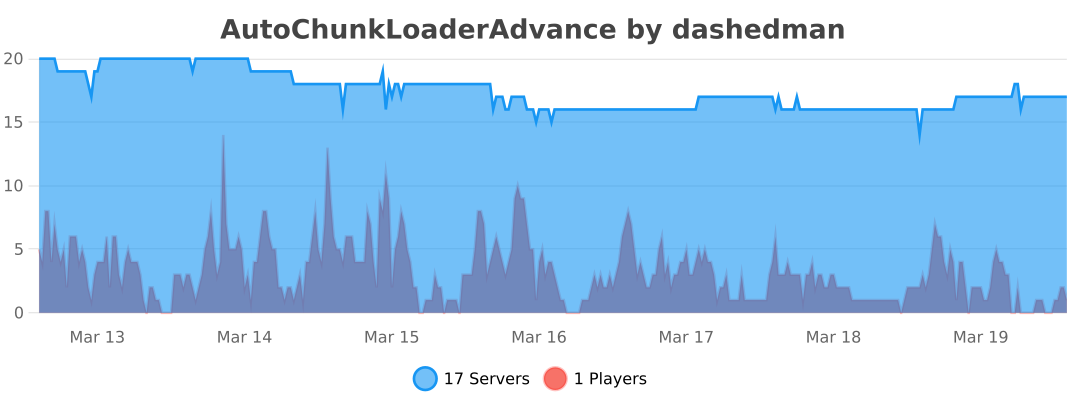
**Statistic:**
[](https://bstats.org/plugin/bukkit/AutoChunkLoaderAdvance/29121)
AutoChunkLoader
A simple plugin that loads chunks around long railways and redstone signals
It can be used for transporting resources in chest minecarts through whole world or making large redstone circuits.
### Keep in mind with incorrect use this plugin can negatively affect server performance!
Installation:
– Download jar file
– Put this file into `/plugins` folder of your Spigot server
– Restart server
– Modify `/plugins/AutoChunkLoader/config.yml` file for your needs
AutoBroadcast
# AutoBroadcast
This project was a fork of [ToggleIP/AutoBroadcast](https://github.com/ToggleIP/AutoBroadCast)
“`yaml
# config.yml (Template)
messages:
– “&bMessage 1”
– “&dMessage 2”
– “&5Message 3”
– “&9Message 4”
# Interval between Broadcasts In Seconds
interval: 120
# Play a sound when Broadcasting
sound: false
“`
Autoborder
# AutoBorder
AutoBorder is a Minecraft (Paper/Spigot) plugin that automatically grows the world border at configurable times and days. The plugin supports broadcasts, titles, sounds, logging, and advanced admin commands. All options are configurable via `config.yml`.
—
## Features
– Automatically grows the world border at set times and days
– Animated border growth
– Optional: chat message, title, and sound for all players when the border grows
– Optional: logs border changes to a file
– Admins can directly change the border, get info, or allow players to move outside the border
—
## Installation
1. Place the plugin JAR in your server’s `plugins` folder.
2. Start the server. The `config.yml` will be generated automatically.
—
## Commands
All commands start with `/border`:
| Command | Description |
|——————————–|—————————————————–|
| `/border reload` | Reload the config and immediately update the border |
| `/border set ` | Set the border to a specific size (diameter in blocks) |
| `/border add ` | Increase the border by a number of blocks |
| `/border remove ` | Decrease the border by a number of blocks |
| `/border center ` | Set the border center to coordinates (x, z) |
| `/border center here` | Set the border center to your current location |
| `/border info` | Show current border information |
| `/border log` | Show the last 10 lines of border.log |
| `/border bypass [player]` | Allow yourself or another player to move outside the border |
| `/border help` | Overview of all commands |
> Only players with the `border.admin` permission can use these commands.
—
## Configuration
All options are found in `config.yml`. Main options include:
– Times and days for border growth
– Animation settings
– Messages, titles, and sounds
– Logging
—
## PlaceholderAPI
Use `%autoborder_size%` to display the current border size.
—
## Questions or bugs?
Contact **JoeyNNL** or open an issue on GitHub.
—
AutoBackup
# AutoBackup
Schedule and perform automatic Minecraft server world backups.
**Feature list:**
– Automatic backup
– Dropbox support
– FTPS (Implicit TLS) support
– Configurable backup frequency
– Backup into specified directory
– Selective backups of certain worlds
– Automatically delete old local world backups
– Compress the data using the Deflate algorithm
**Example file structure:**

**Default config.yml:**
“`
# Backup Configuration
backup-frequency: 10800 # in seconds (e.g., 3600 seconds = 1 hour)
max-backups: 15 # maximum number of world backups to keep
backup-path: “backups” # relative path to the backup directory
worlds:
– world
– world_nether
– world_the_end
# FTP Backup Configuration
ftp:
enabled: false # Set to true to enable FTP backups
host: “ftp.example.com”
port: 990 # Implicit TLS Port
username: “your_username”
password: “your_password”
remote-path: “/backups”
use-implicit-tls: true
# Dropbox Backup Configuration
dropbox:
enabled: false # Set to true to enable Dropbox backups
access-token: “your-dropbox-access-token”
remote-path: “/backups”
“`
**Building:**
To build the plugin jar file, run:
“`powershell
.gradlew.bat shadowJar
“`
The compiled jar will be available in the `build/libs/` directory.
**Steps to install and set up:**
1. Download the .jar file and place it within the plugins/ directory of your Minecraft server
2. Restart the Minecraft server to generate the default configuration files
3. Edit the configuration file to reflect your needs
AutoAnnualRewards
[](https://www.ashcraft.cz/)
AutoAnnualRewards is a plugin that automates the process of rewarding loyal players each year. This plugin is perfect for server owners who want to provide annual rewards to players without requiring them to run any commands manually. It tracks each player’s reward status and handles everything automatically when they join the server. [More detailed description here.](https://ashsource.ashkiano.com/resource-detail/28)
Check out AshSource for more plugins and resources [ashsource.ashkiano.com](https://ashsource.ashkiano.com/)
Are you a developer?
Join AshSource to share your work with a growing community! Get started now at [ashsource.ashkiano.com](https://ashsource.ashkiano.com/)
AutoAdvertising
**AutoAdPlugin** is a powerful and flexible plugin for automatically sending advertising messages on your Minecraft server. With this plugin, you can create and customize advertisements that will be automatically sent to players on the server at specified intervals.
# Key features:
– Automatic sending of advertising messages at specified intervals.
– Flexible customization of headers, texts, and links for advertisements.
– Support for using color formatting and URL links in advertising messages.
– Easy management through in-game commands to reload the plugin configuration.

# Installation instructions:
1. Copy the AutoAdPlugin.jar plugin file to the “plugins” folder of your Minecraft server.
2. Restart the server or execute the /reload command to load the plugin.
3. Navigate to the plugin folder and configure the config.yml file according to your preferences.
4. Start the server and enjoy automatic advertising message sending!
# Commands:
/autoad reload – reloads the configuration (autoadvertising.reload)