Authentication
# Authentication
This plugin allows the authentication of Minecraft players in web applications via [Nginx auth_request](https://nginx.org/en/docs/http/ngx_http_auth_request_module.html). It is a single puzzle piece in this ecosystem to secure and lock down your Minecraft server related websites such as maps or analytics pages. You can use this plugin as a standalone and let the web application do the access control but only a few of such applications exists so you will probably want [the next piece](https://modrinth.com/plugin/authorization)
for Authorization
Due to the need of external software and multiple ports. You will most likely not be able to use this on any Minecraft hosting services and need to have a proper server such as a cloud vps or a dedicated server.
Keep in mind that authentication is an advanced topic and you are expected to have basic understanding of Nginx and networks to be able to succesfully use this plugin.
See [the GitHub repository readme](https://github.com/Chicken/Auth#readme) for more details and installation instructions.
Authentic Shadows
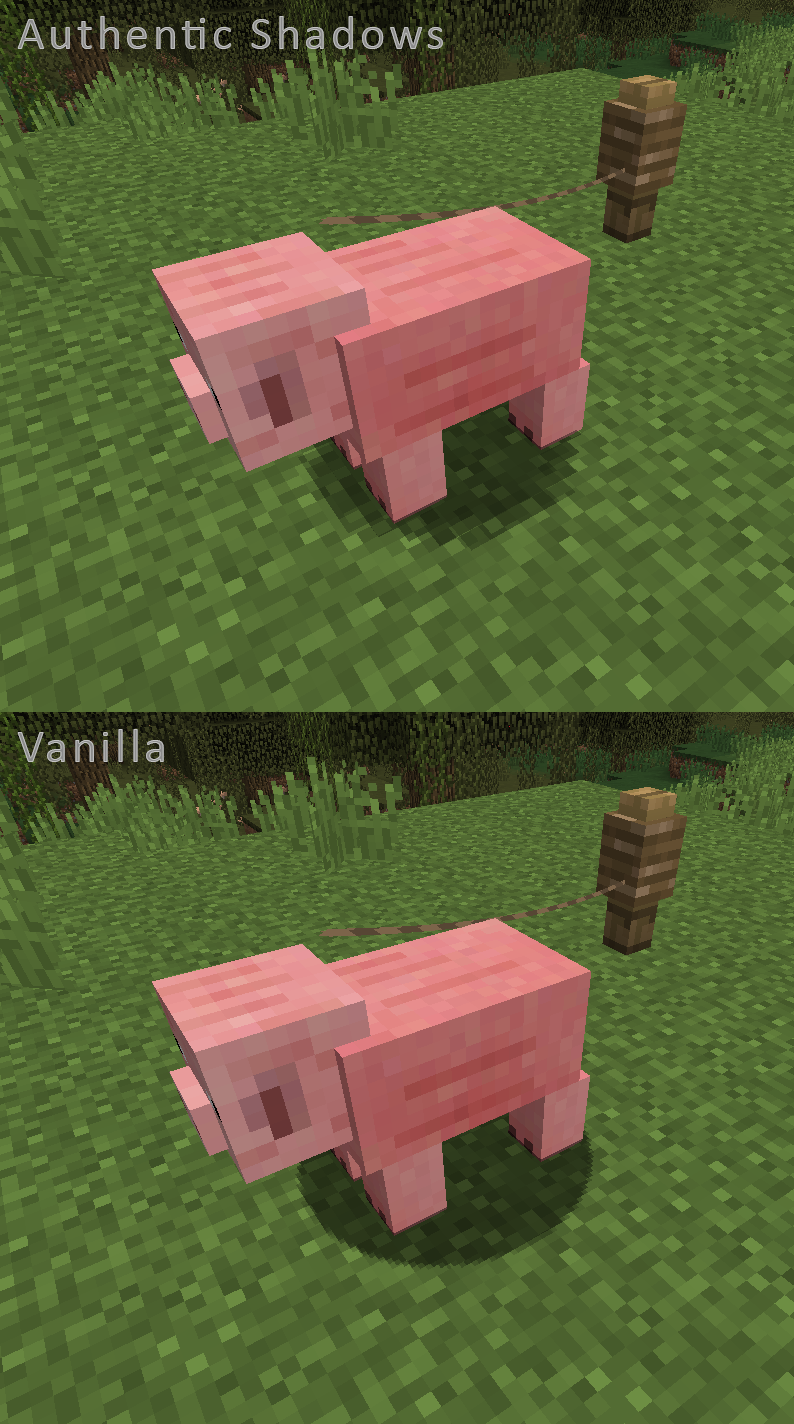
This super-lightweight texture pack is specially designed for aesthetes who value style and extend the pinky finger while drinking coffee.
The texture pack contains only one texture, but you can’t even imagine how much it changes the game world!
If these creepy round shadows cut your eyes like mine, this pack is for you!
Also try my new game: [26-PUZZLE](https://play.google.com/store/apps/details?id=com.liahim85.puzzle26) !!!
[](https://billing.sparkedhost.com/aff.php?aff=3128)
AusWeis
AusWeis — Cloudflare Turnstile Verification
AusWeis is a lightweight Bukkit/Paper plugin that integrates **Cloudflare Turnstile** to provide frictionless human verification before players enter your server. It effectively stops bot attacks while offering a smooth experience for real players.
*I am not a native English speaker, so corrections are welcome if there are any mistakes.*
## Features
– **Simple workflow** – Players are kicked once with a verification URL; after completing the Turnstile challenge on your website, they can rejoin normally.
– **Real‑time API check** – Every login queries your backend API for the player’s verification status (no local cache, always up‑to‑date).
– **Bypass permission** – Grant `ausweis.bypass` to trusted players (or yourself) to skip verification entirely.
– **Highly customisable** – Kick message, API URL, timeout and more can be changed in `config.yml`. Supports Minecraft colour codes and multi‑line messages.
– **Multi‑language ready** – Choose the language in config (`en`, `zh`, or add your own .yml files in the `lang` folder). Built‑in English and Chinese translations.
– **Command reload** – Use `/ausweis reload` to apply configuration changes without restarting the server.
– **Wide compatibility** – Works on Spigot/Paper from **1.8 to latest** (tested on 1.12.2, 1.16.5, 1.21+).
## Installation
1. Download the latest **AusWeis-*.jar** from the [Releases page](https://github.com/Nskawa/AusWeisPlugin/releases).
2. Place the JAR file into your server’s `plugins/` folder.
3. **Restart** your server (or use `/reload` – restart is recommended).
4. The plugin will generate a default `config.yml` and a `lang/` folder with language files.
5. Edit `plugins/AusWeis/config.yml` to set your own backend API URL and verification page URL.
6. Run `/ausweis reload` to apply the changes.
## Config
“`yaml
# Language file to use (e.g., en, zh). Must correspond to a messages_.yml file in the lang folder.
language: “en”
# API URL to check player verification status
api-url: “https://your-server.com/api/check?user={player}”
# Verification page URL to show in kick message
verify-url: “https://your-server.com/verify?user={player}”
# HTTP request timeout in milliseconds
timeout: 5000
# Debug mode, enables more detailed logs
debug: false
“`
## Commands
| Command | Description | Permission | Default |
|———|————-|————|———|
| `/ausweis reload` | Reload the plugin configuration | `ausweis.reload` | op |
| `/ausw reload` | Alias for the above | same | op |
| Permission | Description | Default |
|————|————-|———|
| `ausweis.reload` | Allows reloading config | op |
| `ausweis.bypass` | Bypass verification and always join | false |
## API Specification
Your website must provide two endpoints:
### 1. Verification Status Query
– **URL:** `GET {api-url}?user={player}`
– **Response format:** JSON
“`json
{
“verified”: true,
“user”: “Steve”,
“timestamp”: 1709123456.789
}
“`
– **Description:** Return `”verified”: true` if the player has already passed the Turnstile challenge, otherwise `false`.
### 2. Verification Page
– **URL:** `{verify-url}?user={player}`
– **Function:** Display the Cloudflare Turnstile widget. After successful verification, your backend should mark the player as verified (e.g., update a database) so that subsequent API calls return `true`.
> Reference implementation: The companion web backend is open‑sourced by [@ChineseLiyao](https://github.com/ChineseLiyao) – [ChineseLiyao/AusWeis](https://github.com/ChineseLiyao/AusWeis). You can deploy it directly or use it as an example.
## Languages
1. Create a new file `messages_.yml` in the `plugins/AusWeis/lang/` folder (e.g., `messages_fr.yml` for French).
2. Use the same keys as in the built‑in language files (`kick-title`, `kick-message`).
3. Set `language: ""` in `config.yml` and reload.
## Building
If you prefer to compile the plugin yourself:
```bash
git clone https://github.com/Nskawa/AusWeisPlugin.git
cd AusWeis
mvn clean package
```
The compiled JAR will be in the `target/` directory.
## License
This project is licensed under the MIT License – see the [LICENSE](https://github.com/Nskawa/AusWeisPlugin/blob/main/LICENSE) file for details.
## Support
- **GitHub Issues:** [Report bugs / suggest features](https://github.com/Nskawa/AusWeisPlugin/issues)
- **Discussion:** Feel free to open a discussion on GitHub or leave a comment below.
Happy Gaming!
```
AuryxDiscord
# 💬 AuryxDiscord – Lightweight Minecraft-Discord Integration




**AuryxDiscord** is a lightweight, high-performance Minecraft-Discord integration plugin built **without JDA**. Using modern HTTP clients (OkHttp + Jetty), it provides seamless two-way communication between your Minecraft server and Discord with minimal resource usage.
—
## ✨ **Key Features**
### 💬 **Two-Way Communication**
– **Minecraft → Discord** – Chat messages, events, notifications via webhooks
– **Discord → Minecraft** – Messages from Discord appear in-game via HTTP server
– **Real-time sync** – Instant message delivery with async processing
– **No JDA dependency** – Lightweight HTTP-only implementation
### 🎮 **Server Events Integration**
– **Join/Leave Messages** – Player connection notifications with custom formats
– **Death Messages** – Death notifications with cause and custom formatting
– **Chat Synchronization** – Full chat integration with AuryxChat support
– **Punishment Alerts** – Ban/mute/kick notifications for moderation teams
– **Server Status** – Startup/shutdown notifications
### 🎨 **Rich Formatting & Customization**
– **Discord Embeds** – Beautiful rich messages with colors and timestamps
– **Player Avatars** – Automatic player head integration via Minotar
– **Custom Formats** – Fully customizable message templates for each event type
– **Placeholder Support** – PlaceholderAPI and AuryxCore placeholder integration
– **Emoji Support** – 🟢 Join, 🔴 Leave, ☠️ Death, ⚠️ Punishments
### 🔧 **Advanced Configuration**
– **Multiple Webhooks** – Separate channels for chat, logs, deaths, punishments
– **Event Filtering** – Enable/disable specific event types
– **Message Queuing** – Anti-spam protection with configurable queue limits
– **HTTP Server** – Built-in Jetty server for Discord → MC communication
—
## 🎮 **Commands Overview**
| Command | Description | Permission |
|———|————-|————|
| `/auryxdiscord` | Main plugin command | `auryxdiscord.admin` |
| `/auryxdiscord reload` | Reload configuration | `auryxdiscord.reload` |
| `/auryxdiscord test [message]` | Send test message to Discord | `auryxdiscord.test` |
| `/auryxdiscord info` | View plugin status and integration info | `auryxdiscord.info` |
—
## 🔄 **How It Works**
### **Minecraft → Discord Flow**
1. **Event Detection** – Listeners capture chat, join/leave, death events
2. **Message Formatting** – Apply custom templates with placeholders
3. **Webhook Delivery** – Send via OkHttp to Discord webhook URLs
4. **Queue Management** – Async processing prevents server lag
### **Discord → Minecraft Flow**
1. **HTTP Server** – Built-in Jetty server receives Discord webhooks
2. **Message Processing** – Parse and validate incoming Discord messages
3. **Chat Integration** – Forward to AuryxChat or broadcast directly
4. **Security** – Webhook signature verification for safety
—
## 📋 **Message Examples**
### **Discord Notifications**
“`
🟢 **Sqrilizz** joined the server (Players: 5/20)
[MC] Sqrilizz: Hello everyone from Minecraft!
☠️ Sqrilizz was slain by Zombie
⚠️ **Admin** banned **Griefer**: Griefing spawn area
✅ **Server started** – Players can now join!
“`
### **Minecraft Chat**
“`
[Discord] DiscordUser: Hello from Discord!
[Discord] Moderator: Server restart in 5 minutes
“`
—
## ⚙️ **Configuration Highlights**
### **Webhook Setup** (`config.yml`)
“`yaml
webhooks:
chat: “https://discord.com/api/webhooks/YOUR_CHAT_WEBHOOK”
log: “https://discord.com/api/webhooks/YOUR_LOG_WEBHOOK”
death: “https://discord.com/api/webhooks/YOUR_DEATH_WEBHOOK”
punishment: “https://discord.com/api/webhooks/YOUR_MOD_WEBHOOK”
“`
### **Event Configuration**
“`yaml
events:
join-leave: true
deaths: true
punishments: true
console: false
startup-shutdown: true
“`
### **Message Formats**
“`yaml
formats:
join: “🟢 **{player}** joined the server (Players: {online}/{max})”
leave: “🔴 **{player}** left the server”
death: “☠️ {death_message}”
ban: “⚠️ **{staff}** banned **{player}**: {reason}”
“`
### **HTTP Server** (Discord → MC)
“`yaml
server:
enabled: true
port: 8080
path: “/discord-webhook”
secret: “your-webhook-secret”
“`
—
## 🌐 **Platform Compatibility**
| Platform | Status | Features |
|———-|——–|———-|
| **Paper** | ✅ Full Support | All features available |
| **Folia** | ✅ Full Support | Thread-safe implementation |
| **Spigot** | ✅ Compatible | Core features work |
| **Bukkit** | ✅ Compatible | Basic functionality |
| **Purpur** | ✅ Enhanced | Additional optimizations |
| **Velocity** | ✅ Supported | Cross-server integration |
—
## 🔗 **Integration & Dependencies**
### **Required Dependencies**
– **[AuryxCore](https://modrinth.com/plugin/auryxcore)** – Core functionality and API
### **Optional Integrations**
– **[AuryxChat](https://modrinth.com/plugin/auryxchat)** – Enhanced chat formatting and modes
– **[PlaceholderAPI](https://www.spigotmc.org/resources/placeholderapi.6245/)** – Extended placeholder support
– **[AuryxLink](https://modrinth.com/plugin/auryxlink)** – Discord account linking (planned)
### **Developer API**
“`java
// Get AuryxDiscord API
AuryxDiscordAPI api = AuryxDiscord.getAPI();
// Send messages to Discord
api.sendChatMessage(player, “Hello Discord!”);
api.sendLogMessage(“Server event occurred”);
api.sendEmbed(“Title”, “Description”, “#5865F2”);
// Check integration status
boolean enabled = api.isDiscordEnabled();
boolean chatSync = api.isChatEnabled();
“`
—
## 🚀 **Performance & Technical Details**
### **Lightweight Architecture**
– **No JDA** – Uses OkHttp for HTTP requests (much lighter)
– **Async Processing** – All Discord operations are non-blocking
– **Smart Queuing** – Message queue prevents spam and rate limiting
– **Memory Efficient** – Minimal RAM usage compared to bot-based solutions
### **HTTP Components**
– **OkHttp Client** – Modern, efficient HTTP requests to Discord
– **Jetty Server** – Embedded HTTP server for receiving Discord messages
– **Gson JSON** – Fast JSON processing for webhook payloads
– **Shaded Dependencies** – No conflicts with other plugins
### **Cross-Version Support**
– **Single JAR** – Works on Minecraft 1.8.8 through 1.21.10
– **API Compatibility** – Adapts to different Bukkit/Paper API versions
– **Legacy Support** – Maintains compatibility with older server versions
—
## 📊 **Setup Guide**
### **1. Installation**
1. Download **[AuryxCore](https://modrinth.com/plugin/auryxcore)** (required)
2. Download **AuryxDiscord** from Modrinth
3. Place both JARs in your `plugins/` folder
4. Restart your server
### **2. Discord Webhook Setup**
1. Go to your Discord server settings
2. Navigate to **Integrations → Webhooks**
3. Create webhooks for different channels:
– `#minecraft-chat` – For player chat messages
– `#server-logs` – For join/leave/death events
– `#moderation` – For punishment notifications
4. Copy webhook URLs to `config.yml`
### **3. Configuration**
“`yaml
# Basic setup – just add your webhook URLs
webhooks:
chat: “https://discord.com/api/webhooks/123456789/abcdefg”
log: “https://discord.com/api/webhooks/987654321/hijklmn”
# Enable desired events
events:
join-leave: true
deaths: true
punishments: true
# Optional: Enable Discord → Minecraft
server:
enabled: true # Allows Discord users to send messages to MC
port: 8080
secret: “change-this-secret”
“`
### **4. Testing**
“`bash
/auryxdiscord info # Check integration status
/auryxdiscord test # Send test message to Discord
“`
—
## 🎯 **Use Cases**
### **🏰 Roleplay Servers**
– Immersive Discord integration for RP communities
– Character death notifications
– Staff moderation alerts
### **🏃 Survival Servers**
– Player activity monitoring
– Community chat bridge
– Achievement sharing
### **🎮 Mini-game Networks**
– Cross-server announcements via Velocity
– Tournament notifications
– Player statistics sharing
### **🛡️ Moderated Communities**
– Real-time punishment notifications
– Staff communication bridge
– Server status monitoring
—
## 🔧 **Advanced Features**
### **Message Placeholders**
“`yaml
# Available placeholders in message formats:
{player} # Player name
{displayname} # Player display name
{message} # Chat message content
{server} # Server name
{online} # Current online players
{max} # Maximum players
{balance} # Player balance (AuryxCore)
{death_message} # Full death message
{staff} # Staff member name
{reason} # Punishment reason
# PlaceholderAPI support:
%player_name% # Player name
%server_online% # Online count
%auryxcore_balance% # Player balance
# + 1000+ other PAPI placeholders
“`
### **Webhook Security**
– **Signature Verification** – Validates incoming Discord webhooks
– **Secret Keys** – Configurable webhook secrets
– **IP Filtering** – Optional IP whitelist for HTTP server
– **Rate Limiting** – Built-in protection against spam
### **Multi-Channel Setup**
“`yaml
webhooks:
chat: “https://discord.com/api/webhooks/chat-webhook”
log: “https://discord.com/api/webhooks/log-webhook”
death: “https://discord.com/api/webhooks/death-webhook”
punishment: “https://discord.com/api/webhooks/mod-webhook”
# Events automatically route to appropriate channels
# Falls back to ‘log’ webhook if specific webhook not configured
“`
—
## 📞 **Support & Community**
– **🐛 Bug Reports**: [GitHub Issues](https://github.com/Auryx-Studio/AuryxDiscord/issues)
– **💬 Discord**: [Auryx Studio Community](https://discord.gg/auryx)
– **📖 Documentation**: [Wiki & Setup Guide](https://github.com/Auryx-Studio/AuryxDiscord/wiki)
– **🔧 Source Code**: [GitHub Repository](https://github.com/Auryx-Studio/AuryxDiscord)
—
## 🆚 **Why Choose AuryxDiscord?**
### **vs Traditional Discord Bots:**
– ✅ **No Bot Hosting** – Runs directly on your Minecraft server
– ✅ **Lower Resource Usage** – No JDA, just HTTP requests
– ✅ **Easier Setup** – No bot tokens or permissions needed
– ✅ **Better Integration** – Direct access to server events and data
### **vs Other Discord Plugins:**
– ✅ **Modern Architecture** – Built for Paper/Folia with async processing
– ✅ **Lightweight** – 6MB vs 20MB+ for JDA-based plugins
– ✅ **Two-Way Communication** – Most plugins only do MC → Discord
– ✅ **Rich Formatting** – Embeds, avatars, and advanced placeholders
### **vs EssentialsX Discord:**
– ✅ **Better Performance** – Async processing and message queuing
– ✅ **More Features** – HTTP server, multiple webhooks, embeds
– ✅ **Active Development** – Regular updates and new features
– ✅ **Modern Codebase** – Java 21, latest APIs, clean architecture
—
## 📄 **License**
AuryxDiscord is licensed under the **MIT License**. See [LICENSE](LICENSE) for details.
—
**Made with ❤️ by [Auryx Studio](https://github.com/Auryx-Studio)**
*Requires **[AuryxCore](https://modrinth.com/plugin/auryxcore)** for full functionality. Part of the complete Auryx server management suite!*
—
## 🚀 **Quick Start**
1. **Install**: Download AuryxCore + AuryxDiscord
2. **Configure**: Add Discord webhook URLs to config
3. **Test**: Use `/auryxdiscord test` command
4. **Enjoy**: Seamless Minecraft-Discord integration!
**Transform your server communication today!** 🎊💬
AuryxCore
# 🚀 AuryxCore – Modern EssentialsX Alternative




**AuryxCore** is a modern, high-performance alternative to EssentialsX, designed specifically for **Paper**, **Folia**, and other modern Minecraft server platforms. Built with cross-version compatibility and performance in mind.
—
## ✨ **Key Features**
### 🏠 **Teleportation System**
– **Homes** – Set multiple homes with configurable limits
– **Spawn** – Server spawn management with safety checks
– **Back** – Return to previous location after teleportation
– **Safe Teleportation** – Automatic safe location detection
### 💰 **Economy System**
– **Built-in Economy** – No external plugins required
– **VaultUnlocked Integration** – Full compatibility with Vault ecosystem
– **Balance Management** – `/balance`, `/pay`, `/baltop` commands
– **Admin Tools** – `/eco` command for server management
### 👤 **Player Utilities**
– **Fly Mode** – `/fly` command with permission checks
– **God Mode** – `/god` for invincibility
– **Heal & Feed** – Instant health and hunger restoration
– **Vanish** – `/vanish` for staff invisibility
### ⚙️ **Advanced Features**
– **Multi-Language Support** – English & Russian built-in
– **Cross-Version Compatibility** – Works on 1.8.8 to 1.21.10
– **Folia Support** – Full compatibility with Folia’s threading model
– **Performance Optimized** – Asynchronous operations where possible
– **PlaceholderAPI Integration** – Full placeholder support
—
## 🎮 **Commands Overview**
| Command | Description | Permission |
|———|————-|————|
| `/auryxcore` | Main plugin command | `auryxcore.admin` |
| `/spawn` | Teleport to spawn | `auryxcore.spawn` |
| `/setspawn` | Set server spawn | `auryxcore.setspawn` |
| `/home [name]` | Teleport to home | `auryxcore.home` |
| `/sethome [name]` | Set a home | `auryxcore.sethome` |
| `/delhome ` | Delete a home | `auryxcore.delhome` |
| `/homes` | List your homes | `auryxcore.homes` |
| `/back` | Return to previous location | `auryxcore.back` |
| `/balance [player]` | Check balance | `auryxcore.balance` |
| `/pay ` | Send money | `auryxcore.pay` |
| `/baltop` | Top balances | `auryxcore.baltop` |
| `/fly [player]` | Toggle fly mode | `auryxcore.fly` |
| `/god [player]` | Toggle god mode | `auryxcore.god` |
| `/heal [player]` | Heal player | `auryxcore.heal` |
| `/feed [player]` | Feed player | `auryxcore.feed` |
| `/vanish [player]` | Toggle vanish | `auryxcore.vanish` |
—
## 🔧 **Installation**
1. **Download** the latest version from Modrinth
2. **Place** the JAR file in your `plugins/` folder
3. **Restart** your server
4. **Configure** settings in `plugins/AuryxCore/config.yml`
### 📋 **Requirements**
– **Java 21+** (recommended)
– **Paper 1.8.8+** or compatible server
– **VaultUnlocked** (optional, for economy integration)
—
## 🌐 **Supported Platforms**
| Platform | Status | Notes |
|———-|——–|——-|
| **Paper** | ✅ Full Support | Recommended platform |
| **Folia** | ✅ Full Support | Threading-aware implementation |
| **Spigot** | ✅ Compatible | Limited async features |
| **Bukkit** | ✅ Compatible | Basic functionality |
| **Purpur** | ✅ Full Support | Enhanced features available |
| **Velocity** | ✅ Full Support | Cross-server features available |
| **BungeeCord** | 🔄 Planned | Cross-server features planned |
—
## 🎯 **Performance & Compatibility**
– **⚡ Async Operations** – Non-blocking database operations
– **🧵 Folia Ready** – Full support for Folia’s threading model
– **📊 Efficient Caching** – Smart data caching for performance
– **🔄 Hot Reload** – Configuration reload without restart
– **📱 Cross-Version** – Single JAR works on 1.8.8-1.21.10
—
## 🔗 **Integration & API**
### **Built-in Integrations**
– **VaultUnlocked** – Economy and permissions
– **PlaceholderAPI** – Custom placeholders
– **LuckPerms** – Permission group integration
### **Developer API**
“`java
// Get AuryxCore API
AuryxCoreAPI api = AuryxCore.getAPI();
// Economy operations
double balance = api.getBalance(playerUUID);
api.depositMoney(playerUUID, 100.0);
// Player data
String language = api.getLanguage(playerUUID);
Location home = api.getHome(playerUUID, “home”);
“`
—
AuryxChat
# 💬 AuryxChat – Advanced Chat Management System




**AuryxChat** is a powerful, feature-rich chat management plugin designed as a modern alternative to EssentialsX Chat. Built for **Paper**, **Folia**, and other modern Minecraft platforms with advanced formatting, moderation, and cross-version compatibility.
—
## ✨ **Key Features**
### 💬 **Advanced Chat System**
– **Local & Global Chat** – Radius-based local chat with global override
– **Chat Mode Toggle** – Easy switching between local/global modes
– **Visual Indicators** – `[L]` and `[G]` prefixes show current chat mode
– **Force Global** – Use `!` prefix to send global messages from local mode
### 🎨 **Rich Formatting**
– **Custom Chat Formats** – Per-group chat formatting (Admin, VIP, Default)
– **Color Support** – Full legacy color code support (`&c`, `&a`, etc.)
– **Placeholder Integration** – PlaceholderAPI and AuryxCore placeholders
– **Hover Text** – Rich hover information with player stats
### 🛡️ **Chat Moderation**
– **Word Filter** – Configurable word/phrase blocking with regex support
– **Anti-Spam** – Intelligent spam detection and prevention
– **Mute Integration** – Full integration with AuryxCore mute system
– **Action Logging** – Comprehensive moderation logging
### 🔔 **Player Mentions**
– **@Player Mentions** – Highlight and notify players when mentioned
– **Sound Notifications** – Configurable mention sounds
– **Visual Highlighting** – Mentioned players see highlighted messages
—
## 🎮 **Commands Overview**
| Command | Description | Permission |
|———|————-|————|
| `/auryxchat` | Main plugin command | `auryxchat.admin` |
| `/auryxchat reload` | Reload configuration | `auryxchat.reload` |
| `/auryxchat about` | Plugin information | `auryxchat.use` |
| `/auryxchat announce ` | Server announcement | `auryxchat.announce` |
| `/chat toggle` | Toggle chat mode | `auryxchat.toggle` |
| `/chat local` | Switch to local chat | `auryxchat.local` |
| `/chat global` | Switch to global chat | `auryxchat.global` |
| `/chat status` | Check current mode | `auryxchat.use` |
—
## 🎯 **Chat Modes Explained**
### 🏠 **Local Chat**
– **Radius-based** – Only players within configured range can see messages
– **Prefix**: `[L]` (Green, Bold)
– **Default Range**: 100 blocks (configurable)
– **Perfect for**: Roleplay servers, survival gameplay
### 🌍 **Global Chat**
– **Server-wide** – All online players receive messages
– **Prefix**: `[G]` (Red, Bold)
– **Always Available** – Use `!` prefix to force global from local mode
– **Perfect for**: Announcements, general discussion
### ⚡ **Quick Global Override**
“`
# In local mode:
Hello nearby players → [L] Player: Hello nearby players
! Hello everyone on server → [G] Player: Hello everyone on server
“`
—
## 🎨 **Chat Format Examples**
### **Default Player**
“`
[L] [Member] Sqrilizz: Hello world!
“`
### **VIP Player**
“`
[G] [VIP] ProPlayer: Check out my base!
“`
### **Admin**
“`
[G] [Admin] ServerOwner: Welcome to the server!
“`
—
## 🛡️ **Moderation Features**
### **Word Filter**
– **Regex Support** – Advanced pattern matching
– **Custom Actions** – Block, replace, or warn
– **Bypass Permission** – `auryxchat.filter.bypass`
– **Real-time Updates** – No restart required for filter changes
### **Anti-Spam Protection**
– **Message Similarity** – Detects repeated messages
– **Rate Limiting** – Configurable cooldown periods
– **Smart Detection** – Ignores case and spacing variations
– **Automatic Warnings** – Progressive punishment system
### **Mute Integration**
– **AuryxCore Sync** – Seamless integration with AuryxCore mutes
– **Command Blocking** – Prevents muted players from using chat commands
– **Bypass Permissions** – Staff can always communicate
—
## 🔧 **Installation & Setup**
### **Requirements**
– **AuryxCore** – Required for full functionality
– **Java 21+** – Recommended version
– **Paper 1.8.8+** – Or compatible server platform
### **Installation Steps**
1. **Install AuryxCore** first (dependency)
2. **Download AuryxChat** from Modrinth
3. **Place JAR** in your `plugins/` folder
4. **Restart server** to generate configuration
5. **Configure** settings in `plugins/AuryxChat/`
### **Optional Dependencies**
– **PlaceholderAPI** – Enhanced placeholder support
– **VaultUnlocked** – Permission group prefixes
– **LuckPerms** – Advanced permission integration
—
## ⚙️ **Configuration Highlights**
### **Chat Formats** (`config.yml`)
“`yaml
chat:
formats:
default: “&7[{chat_prefix}] &7[&f%luckperms_prefix%&7] &f: &f”
admin: “&7[{chat_prefix}] &c[Admin]&r : &e”
vip: “&7[{chat_prefix}] &a[VIP]&r : &b”
prefixes:
local: “&a&lL&r” # Green [L]
global: “&c&lG&r” # Red [G]
“`
### **Local Chat Settings**
“`yaml
local:
enabled: true
radius: 100.0
default-mode: “local”
“`
### **Filter Configuration** (`filters.yml`)
“`yaml
filters:
enabled: true
action: “block” # block, replace, warn
words:
– “badword”
– “spam.*pattern”
replacement: “***”
“`
—
## 🌐 **Platform Compatibility**
| Platform | Status | Features |
|———-|——–|———-|
| **Paper** | ✅ Full Support | All features available |
| **Folia** | ✅ Full Support | Thread-safe implementation |
| **Spigot** | ✅ Compatible | Core features work |
| **Bukkit** | ✅ Compatible | Basic functionality |
| **Purpur** | ✅ Enhanced | Additional optimizations |
—
## 🔗 **Integration & API**
### **AuryxCore Integration**
– **Player Data** – Balance, language, mute status
– **Economy Placeholders** – `%auryxcore_balance%`
– **Permission Sync** – Seamless permission handling
### **PlaceholderAPI Support**
– **Built-in Placeholders** – `%auryxchat_mode%`, `%auryxchat_local_players%`
– **External Placeholders** – Full PAPI placeholder support
– **Custom Formats** – Use any PAPI placeholder in chat formats
### **Developer API**
“`java
// Get AuryxChat API
AuryxChatAPI api = AuryxChat.getAPI();
// Chat mode management
api.setPlayerChatMode(player, ChatMode.LOCAL);
ChatMode mode = api.getPlayerChatMode(player);
// Send formatted messages
api.sendLocalMessage(player, “Hello local players!”);
api.broadcastAnnouncement(“Server announcement!”);
“`
—
## 📊 **Performance & Optimization**
– **⚡ Async Processing** – Non-blocking chat operations
– **🧵 Folia Compatible** – Thread-safe for modern servers
– **💾 Smart Caching** – Efficient format and data caching
– **🔄 Hot Reload** – Configuration changes without restart
– **📱 Cross-Version** – Single JAR for all supported versions
—
Attack on Titan Credit Music
# Custom End Credits Music: Attack on Titan (The Final Season Part 2 Ending)
This resource pack replaces the default Minecraft end credits music with the epic ending theme from **Attack on Titan: The Final Season Part 2**! Relive the intensity of the anime’s climax every time you defeat the Ender Dragon.
## Features
* **Replaces the default `credits.ogg` music** that plays after you exit the End through the portal.
* **Optional:** Includes a `credits.json` file that you can use to remove the scrolling credits text, so you can just enjoy the music.
* **Multiple versions available:** This pack has been meticulously generated to support a wide range of Minecraft versions, from 1.6.1 all the way to 1.21+! (See the “Installation” section for details).
## Installation
1. **Download the correct version** of the resource pack that matches your Minecraft version. The available versions are:
* `AOTEndMusic_1_6_1_to_1_8_9.zip`
* `AOTEndMusic_1_9_to_1_10_2.zip`
* `AOTEndMusic_1_11_to_1_12_2.zip`
* `AOTEndMusic_1_13_to_1_14_4.zip`
* `AOTEndMusic_1_15_to_1_16_1.zip`
* `AOTEndMusic_1_16_2_to_1_16_5.zip`
* `AOTEndMusic_1_17_to_1_17_1.zip`
* `AOTEndMusic_1_18_to_1_18_2.zip`
* `AOTEndMusic_1_19_to_1_19_2.zip`
* `AOTEndMusic_1_19_3.zip`
* `AOTEndMusic_1_19_4.zip`
* `AOTEndMusic_1_20_to_1_20_1.zip`
* `AOTEndMusic_1_20_2.zip`
* `AOTEndMusic_1_20_3_to_1_20_4.zip`
* `AOTEndMusic_1_20_5_to_1_20_6.zip`
* `AOTEndMusic_1_21_to_1_21_1.zip`
* `AOTEndMusic_1_21_2_to_1_21_3.zip`
* `AOTEndMusic_1_21_4.zip`
2. **Open Minecraft** and go to “Options” -> “Resource Packs”.
3. Click on “Open Pack Folder”.
4. **Drag and drop** the downloaded `.zip` file into the `resourcepacks` folder.
5. **Activate the resource pack** in-game by moving it from the “Available” list to the “Selected” list.
## Notes
* The music will start playing **after you exit the End** via the portal, not immediately after the Ender Dragon’s death.
* The music will stop when the song ends or if you skip the credits (by pressing Esc or leaving the game).
## Support
If you enjoy this resource pack and want to support my work, consider buying me a coffee on Ko-fi!
[](https://ko-fi.com/sourish25)
## Credits
* **Music:** “Attack on Titan The Final Season Part 2 Ending”
* **Resource pack creation:** Sourish25
Enjoy this epic Attack on Titan ending theme in your Minecraft adventures!
Attack indicator
# AttackIndicator
A modern, lightweight damage indicator plugin for Paper/Spigot servers. Display beautiful animated floating damage numbers when entities take damage.
## Version Support
The plugin automatically detects your server version and uses the best available method:
| Version | Method | Features |
|———|——–|———-|
| **1.19.4+** | Display Entities | Smooth animations, scalable, best performance |
| **1.16.5-1.19.3** | Armor Stands | MiniMessage support (hex colors, gradients) |
| **1.8-1.16.4** | Armor Stands | Legacy ChatColor (basic colors: &c, &6, &a, etc.) |
## Key Features
– **Smooth Animations** – Floating damage indicators with configurable speed and duration
– **Rich Text Formatting** – MiniMessage support on 1.16.5+ (hex colors, gradients, styles)
– **Highly Customizable** – Control appearance, size, position, speed, and behavior
– **Smart Filtering** – Show indicators based on damage source (all/player-only/no-self)
– **Player Damage Support** – Optional indicators on players
– **Entity Filtering** – Whitelist/blacklist specific entity types
– **Random Positioning** – Natural look with random offsets to prevent stacking
– **Auto-Update Checker** – Get notified when new versions are available
– **World Management** – Disable indicators in specific worlds
– **Performance Optimized** – Minimal server impact on all versions
## Commands
– `/ai reload` – Reload plugin configuration
– Aliases: `/attackindicator`
## Configuration
All settings are in `config.yml` with detailed comments explaining version compatibility.
### Quick Examples
“`yaml
# Works on all versions
indicator-format: “<#ffffff>-{damage}<#ff5555>♥” # Hex colors on 1.16.5+
indicator-format: “&f-{damage}&c♥” # Legacy format for 1.8-1.16.4
# Scale (1.19.4+ only)
indicator-scale: 1.5
# Display mode (all versions)
display-mode: PLAYER_ONLY
“`
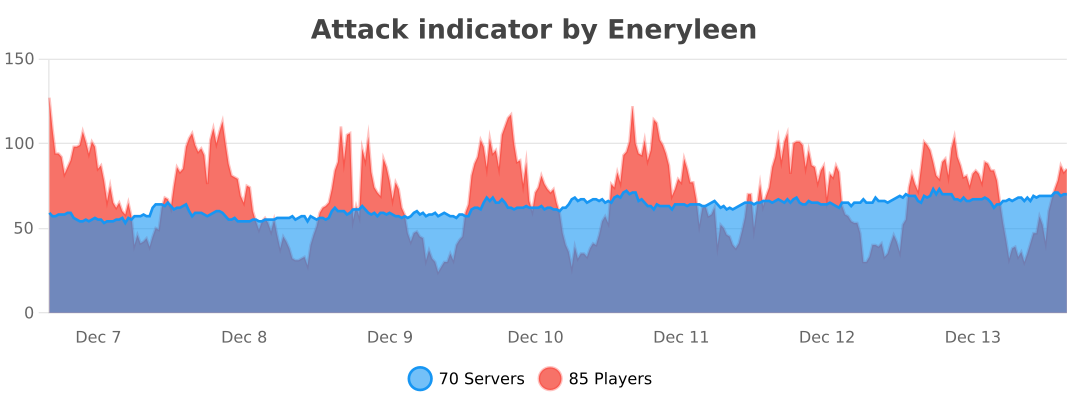
### Attack indicator >2.0 stats
Atomic Delight Vanilla
Minecraft as it was meant to be seen. The Atomic Vanilla Texture Pack is a comprehensive “Vanilla Plus” overhaul designed for players who refuse to compromise between high-performance FPS and breathtaking visuals. Originally released to celebrate the 1k subscriber milestone, this pack brings a professional-grade polish to your survival and PvP worlds.
## Key Features:
– Optimal Performance: Lightweight textures and baked-in optimizations to ensure smooth frame rates during intense PvP and Hunger Games matches.
– Dynamic Animation: Full support for Fresh Animations, bringing mobs to life with fluid, natural movements.
– Animated Textures: Custom-coded animated items and blocks provide a living, breathing environment.
– Shader Ready: Built-in compatibility for modern shaders, enhancing light transmission and surface reflections.
– Visual Enhancements: Subtle “Vanilla+” tweaks that sharpen the game’s aesthetic without losing its iconic charm.

**Other Texture Packs Used by ArZaN-MC**
– [Bushy Leaves Texture Pack](https://modrinth.com/resourcepack/leaves-plus)
– [Glowing Ores Texture Pack](https://modrinth.com/resourcepack/new-glowing-ores)
– [Frest Animations Texture Pack](https://modrinth.com/resourcepack/fresh-animations)
**Visual Mod Packs Used by ArZaN-MC**
– [Hold My Items Mod Pack](https://modrinth.com/mod/hold-my-items)
– [Falling Leaves Mod Pack](https://modrinth.com/mod/fallingleaves)
**Join our Discord for full list of ModPacks used by ArZaN-MC**
– https://discord.gg/EF6tPUDWJv
**If You Havent Subscribed ArZaN-MC Still**
– https://youtube.com/@ArZaN-MC
AtlasLang
[](https://discord.gg/cdT5g5xsVq)
[](https://discord.gg/cdT5g5xsVq)
Transcript
AtlasLang
Advanced multilingual system for Minecraft
AtlasLang is a modern and lightweight language management plugin designed to provide a true multilingual experience for Minecraft servers.
It allows servers to manage player languages, translations and localization in a clean, scalable and performance-friendly way, making it suitable for both small servers and large networks.
Features
– Player-based language system (persistent per player)
– Unlimited languages using folders and YML files
– Clean and flexible translation structure
– PlaceholderAPI integration
– Locale support (en_US, es_ES, fr_FR, pt_BR, etc.)
– Database support (H2 and MySQL)
– GitHub synchronization for language files
– Legacy colors, HEX colors and MiniMessage support
– Hot reload without server restart
– Safe fallback system to prevent errors
AtlasLang is built with performance, scalability and developer experience in mind.
One plugin. Unlimited languages.
AtlasAPI
“`java
package com.github.nautic.api;
import com.github.nautic.AtlasLang;
import com.github.nautic.database.DatabaseManager;
import com.github.nautic.handler.LangHandler;
import com.github.nautic.manager.LanguageManager;
import org.bukkit.entity.Player;
import java.util.Set;
import java.util.UUID;
/**
* AtlasAPI is the main public API for interacting with the AtlasLang language system.
*
* @author Senkex
* @powered Nautic Studios
*
* This class provides static utility methods to:
* – Retrieve translated messages
* – Manage player languages
* – Validate registered languages
* – Access internal language managers
*
* The API is designed to be simple, safe, and developer-friendly.
*/
public final class AtlasAPI {
/**
* Singleton instance of the AtlasAPI.
*/
private static AtlasAPI instance;
/**
* Handles language file access and message retrieval.
*/
private final LangHandler langHandler;
/**
* Manages registered languages and language resolution.
*/
private final LanguageManager languageManager;
/**
* Private constructor to enforce singleton pattern.
*
* @param langHandler The language handler instance
* @param languageManager The language manager instance
*/
private AtlasAPI(LangHandler langHandler, LanguageManager languageManager) {
this.langHandler = langHandler;
this.languageManager = languageManager;
}
/**
* Initializes the AtlasAPI.
* This method should be called once during plugin startup.
*
* @param plugin The main AtlasLang plugin instance
*/
public static void initialize(AtlasLang plugin) {
if (instance != null) return;
instance = new AtlasAPI(
plugin.getLangHandler(),
plugin.getLanguageManager()
);
}
/**
* Returns the AtlasAPI singleton instance.
*
* @return AtlasAPI instance
* @throws IllegalStateException if the API has not been initialized
*/
public static AtlasAPI get() {
if (instance == null) {
throw new IllegalStateException(“[AtlasAPI] Could not be started”);
}
return instance;
}
/**
* Retrieves a translated message for a player using their UUID.
*
* @param player The player
* @param path The language path
* @return The translated message
*/
public static String get(Player player, String path) {
return get(player.getUniqueId(), path);
}
/**
* Retrieves a translated message using a player’s UUID.
*
* @param uuid The player’s UUID
* @param path The language path
* @return The translated message
*/
public static String get(UUID uuid, String path) {
String lang = DatabaseManager.getDatabase().getLanguagePlayer(uuid);
if (lang == null) {
lang = getDefaultLanguage();
}
return get(lang, path);
}
/**
* Retrieves a translated message using a language identifier.
*
* @param langInput The language input (alias, locale, or key)
* @param path The language path
* @return The translated message
*/
public static String get(String langInput, String path) {
String resolved = get().languageManager.resolveLanguageStrict(langInput);
if (resolved == null) {
resolved = getDefaultLanguage();
}
return get().langHandler.get(resolved, “atlasaddon”, path);
}
/**
* Retrieves a translated message or returns a fallback value if not found.
*
* @param player The player
* @param path The language path
* @param fallback The fallback value
* @return The translated message or fallback
*/
public static String getOrDefault(Player player, String path, String fallback) {
String value = get(player, path);
return value != null ? value : fallback;
}
/**
* Checks whether a specific path exists for a given language.
*
* @param langInput The language input
* @param path The language path
* @return true if the path exists, false otherwise
*/
public static boolean has(String langInput, String path) {
String resolved = get().languageManager.resolveLanguageStrict(langInput);
if (resolved == null) return false;
return get().langHandler.get(resolved, resolved, path) != null;
}
/**
* Sets the language for a player.
*
* @param player The player
* @param langInput The language input
* @return true if the language was set successfully
*/
public static boolean setLanguage(Player player, String langInput) {
return setLanguage(player.getUniqueId(), langInput);
}
/**
* Sets the language for a player using UUID.
*
* @param uuid The player’s UUID
* @param langInput The language input
* @return true if the language was set successfully
*/
public static boolean setLanguage(UUID uuid, String langInput) {
String resolved = get().languageManager.resolveLanguageStrict(langInput);
if (resolved == null) return false;
DatabaseManager.getDatabase().setLanguagePlayer(uuid, resolved);
return true;
}
/**
* Returns the current language of a player.
*
* @param player The player
* @return The player’s language
*/
public static String getLanguage(Player player) {
return getLanguage(player.getUniqueId());
}
/**
* Returns the current language of a player using UUID.
*
* @param uuid The player’s UUID
* @return The player’s language or the default language
*/
public static String getLanguage(UUID uuid) {
String lang = DatabaseManager.getDatabase().getLanguagePlayer(uuid);
return lang != null ? lang : getDefaultLanguage();
}
/**
* Checks if a language is registered in the system.
*
* @param langInput The language input
* @return true if the language exists
*/
public static boolean isLanguageRegistered(String langInput) {
String resolved = get().languageManager.resolveLanguageStrict(langInput);
return resolved != null;
}
/**
* Returns all registered languages.
*
* @return A set of registered language identifiers
*/
public static Set getRegisteredLanguages() {
return get().languageManager.getRegisteredLanguages();
}
/**
* Returns the default language.
*
* @return Default language identifier
*/
public static String getDefaultLanguage() {
return get().languageManager.getDefaultLang();
}
/**
* Provides access to the LanguageManager.
*
* @return LanguageManager instance
*/
public static LanguageManager getLanguageManager() {
return get().languageManager;
}
/**
* Provides access to the LangHandler.
*
* @return LangHandler instance
*/
public static LangHandler getLangHandler() {
return get().langHandler;
}
/**
* Retrieves an addon-specific message for a player.
*
* @param player The player
* @param path The addon language path
* @return The translated addon message
*/
public static String getAddon(Player player, String path) {
return getAddon(player.getUniqueId(), path);
}
/**
* Retrieves an addon-specific message using UUID.
*
* @param uuid The player’s UUID
* @param path The addon language path
* @return The translated addon message
*/
public static String getAddon(UUID uuid, String path) {
String lang = DatabaseManager.getDatabase().getLanguagePlayer(uuid);
if (lang == null) lang = getDefaultLanguage();
return getAddon(lang, path);
}
/**
* Retrieves an addon-specific message using a language identifier.
*
* @param langInput The language input
* @param path The addon language path
* @return The translated addon message
*/
public static String getAddon(String langInput, String path) {
String resolved = get().languageManager.resolveLanguageStrict(langInput);
if (resolved == null) resolved = getDefaultLanguage();
return get().langHandler.get(resolved, “atlasaddon”, path);
}
}
“`
[](https://discord.gg/cdT5g5xsVq)