– [**Rewards**](https://wiki.aurelium.dev/auraskills/rewards) – Add fully custom rewards, like executing commands and giving items on level up.
– [**Menus**](https://wiki.aurelium.dev/auraskills/menus) – Intuitive and fully configurable menus show players everything they need to know about skills – accessed using /skills.
– [**Sources**](https://wiki.aurelium.dev/auraskills/sources) – Customize XP sources for each skill, with support for custom blocks and items.
– [**Loot**](https://wiki.aurelium.dev/auraskills/loot) – Customize loot from any specific block and mob XP source, with support for any item and commands.
– [**Stat Modifiers**](https://wiki.aurelium.dev/auraskills/stats/stat-modifiers) – Modify any stat value with commands or while using custom items or armor.
– [**XP Multipliers**](https://wiki.aurelium.dev/auraskills/skills/xp-multipliers) – Multiply skill XP with the power of permissions or link multipliers to items.
– [**Messages**](https://wiki.aurelium.dev/auraskills/messages) – Pre-translated messages for 15+ languages that are fully configurable and user-selectable.
– [**Item Requirements**](https://wiki.aurelium.dev/auraskills/skills/item-requirements) – Add skill level requirements to use a specific item or all items of a type.
– [**Placeholders**](https://wiki.aurelium.dev/auraskills/placeholders) – Numerous provided PlaceholderAPI placeholders, plus widespread placeholder support within the plugin.
– [**XP Requirements**](https://wiki.aurelium.dev/auraskills/skills/xp-requirements) – Configure XP required to level up for each skill with full equation support.
– [**Developer API**](https://wiki.aurelium.dev/auraskills/api) – A comprehensive developer API with support for adding custom skills, stats, and abilities.
– [**SQL**](https://wiki.aurelium.dev/auraskills/main-config/sql) – Support for database storage with MySQL for higher performance and cross-server syncing.
– Mana – A mana system used by mana abilities and interactable with commands and placeholders.
– Action/Boss Bar – Configurable action and boss bars for displaying health, mana, and when XP is gained.
– Leaderboards – Skill leaderboards and rankings, including power level and skill average.
– Backups – Automatic backups to protect your user data in case of an emergency.
## Supported plugins
– PlaceholderAPI – View the [list of placeholders](https://wiki.aurelium.dev/auraskills/placeholders), no e-cloud download needed
– Vault – Money level up rewards
– WorldGuard (1.13+) – Disable XP gain in certain regions, use the aureliumskills-xp– gain flag
– Holographic Displays and DecentHolograms – Damage indicators with critical hit colors
– LuckPerms – Permission rewards
– Eco series
## Dependencies
– AuraSkills has no required plugin dependencies, but Java 17 is required.
– ProtocolLib is an optional dependency.
## Incompatibilities
AuraSkills does not support or is not compatible with the following server software:
– CraftBukkit – Action bar will not work
– Modded hybrid servers (Mohist, Magma, CatServer) – Modded environments do not work well with Bukkit plugins in general
## Support Discord
Click [here](https://discord.gg/Bh2EZfB) to join the Discord server for support, suggestions, announcements, and to join the community!
## Wiki and Documentation
Click [here](https://wiki.aurelium.dev/auraskills) to view the Wiki and Documentation
You can find info about Configuration, Messages, Stats, Commands, Permissions, Rewards, and Placeholders on the Wiki.
## Messages and language
Change your personal language using /skills lang [language]. Change the default language using the default_language option in config.yml and restarting the server.
Help translate the plugin on [Crowdin](https://crowdin.com/project/aureliumskills), if you don’t see your language ask on the [Discord](https://discord.gg/Bh2EZfB) server for it to be added.
## Installation
How to install the plugin:
– Place the jar you downloaded into your plugins folder
– Restart the server (Do not reload)
Audiobook
This is Audiobook, the mod that reads books out loud so you can continue to go about your adventures while listening to them. It makes use of Minecraft’s Narrator feature to do this.
To use Audiobook, hold a book in your hand and press H (configurable). To stop an audiobook that is playing, press J (also configurable). You can also use these keys while the book is open, so it can be used with books that are on Lecterns. You do not have to continue holding the book once it’s playing.
This mod is client side only, so you can use it on servers that don’t have the mod installed.
This mod requires [Fabric API](https://modrinth.com/mod/fabric-api) (Fabric/Quilt only), and goes well with [Textbook](https://modrinth.com/mod/textbook).
To report issues or request new features, use the [issue tracker](https://github.com/The-Fireplace-Minecraft-Mods/Audiobook/issues). Do not ask me to port to different Minecraft versions. For questions and other discussion, feel free to join my [Discord](https://discord.gg/QXQYPj5).
Audio Engine Tweaks
# Audio Engine Tweaks
—
## News
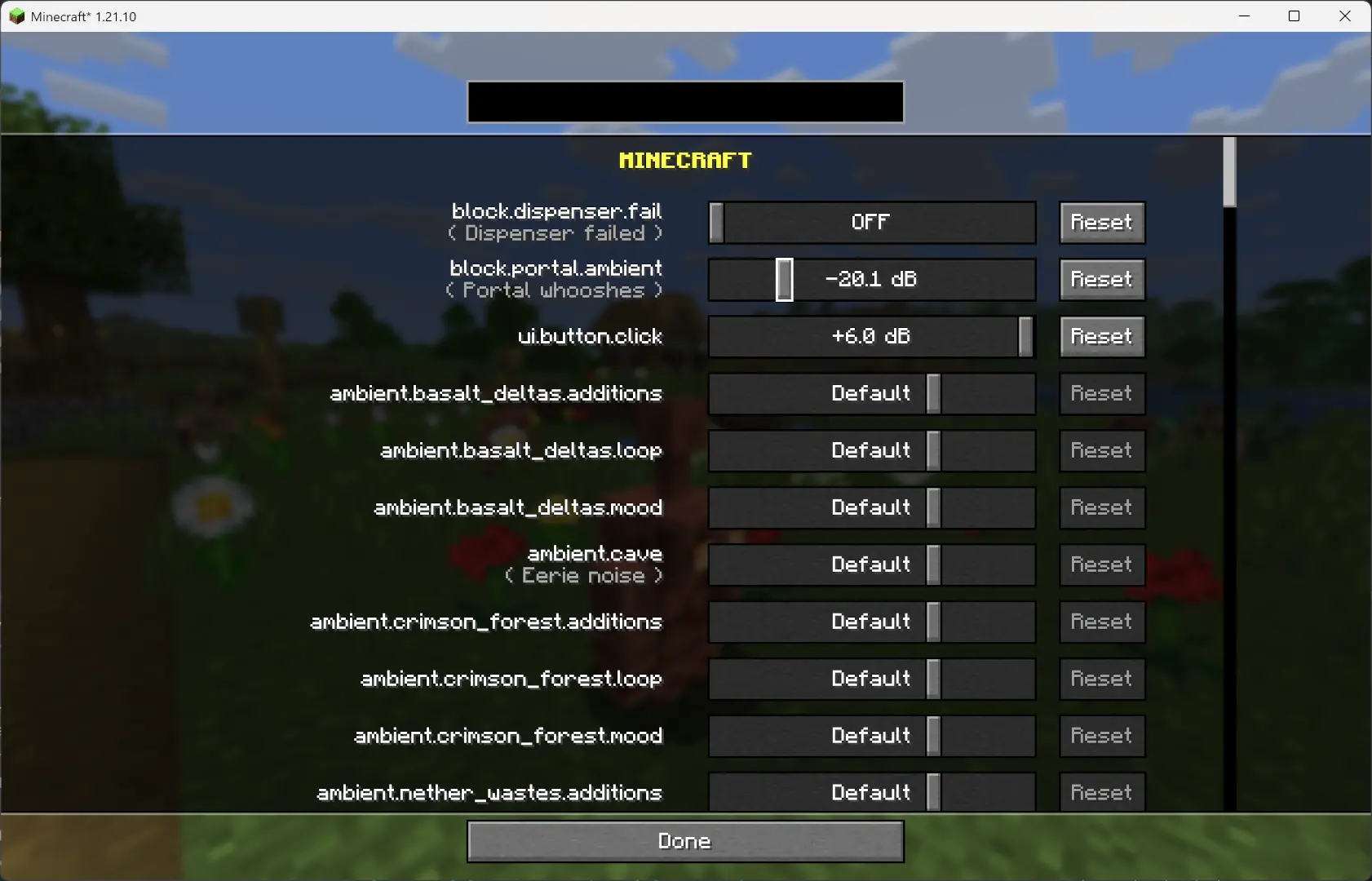
Since **v1.2.7**, you can now adjust the volume of each sound **independently** of the vanilla sliders.
—
## Overview
This mod changes how Minecraft schedules sounds to prevent the sound pool from filling up, or at least reduce the effects of a full sound pool.
### TL;DR
It fixes these common errors (and the related log spam):
“`
[Render thread/WARN]: Failed to create new sound handle
[Sound engine/WARN]: Maximum sound pool size 247 reached
“`
Without this mod, a full sound pool causes all in-game audio to stop until slots free up.
—
## How It Works
– Each tick, sounds are **collected and categorized** by type.
– **Lower category = higher priority**.
– Within categories, sounds are sorted by **distance from the player**.
– Depending on the **sound pool fill level**, only certain sound types are allowed to play. Others are skipped.
– If the pool somehow fills completely (shouldn’t happen with thresholds), new sounds are skipped entirely.
– **Duplication check**:
– Only a limited number of identical sounds can play from the same coordinate (1 block).
– Extra duplicates are skipped.
– **MASTER** and **MUSIC** sounds bypass the queue and duplication check (important for main menu or GUI events when the server is frozen).
– They still follow fill-level thresholds.
– Other categories, if requested to play instantly, are instead deferred to the next tick.
– All values are configurable through **ModMenu** or by editing the config file directly.
—
## Default Settings
“`yaml
MASTER : cat 0, always allowed
VOICE : cat 0, always allowed
PLAYERS : cat 1, up to 95%
HOSTILE : cat 2, up to 90%
BLOCKS : cat 3, up to 80%
MUSIC : cat 4, up to 70%
RECORDS : cat 4, up to 70%
NEUTRAL : cat 5, up to 60%
WEATHER : cat 6, up to 50%
AMBIENT : cat 6, up to 50%
5.0.0 fixes the redstone issues with non-rideable carts
BUT NOTE: You must install this mod client-sided as well now
Starting from v5.0.0 you can configure the max speed by using:
– /gamerule ace:speed_player
– If not 0, overrides speed only for player ridden carts
– default 20
– /gamerule ace:speed_other
– If not 0, overrides speed only for non-player ridden carts
– default 0
– /gamerule ace:speed_empty
– If not 0, overrides speed only for rideable carts that are empty
– default 0
## Video Showcase
Video: https://www.youtube.com/v/i9WxH_ehMRo
## New in Release 4.0
– Rebase mod on improved minecarts experiment
– The experimental code will be activated for all carts
– Rideable carts will be set to default 20 blocks per second
– All other carts will be set to 8 blocks per second speed
– Due to the new minecart experiment we now have the following features
– Full-Speed around corners
– Full-Speed around hills
– Consistent Jumps
– Perfect 1-tile brakes
– ROLLER COASTER MECHANICS
## New in Release 3.1
– Brakes now stop a ridden cart in exactly 1 brake tile
## New in Release 3.0
– 34m/s speed in *all* directions
– Now works full-speed on slopes & inclines
– Now works full-speed on diagonals
– Faster Direction Changes
## Other Features
– 100% glitch-free
– Redstone builds unaffected
– Hand-Designed & Play-Tested
– Designed for Vanilla Survival
– Fabric Only
## Foundation
Audaki Cart Engine offers well designed and properly balanced, competitive and viable cart-based passenger transportation.
This mod is a server-sided (and SSP) mod based on Fabric.
This mod was created since other mods I found which increased the speed of minecarts didn’t work with existing rail lines and they broke most redstone stuff when your cart moved with more than 10m/s.
I wanted a mod which works with existing rail lines and with redstone mechanisms!
## Quality Engineering
This mod is currently a huge overhaul of the vanilla minecart code to support higher speeds (up to 34m/s) while still supporting existing lines with curves, ascending and descending rail pieces are no problem.
Additionally redstone rails like detector and activator rail still work.
The Cart Engine was tested under a lot of different conditions but if you find an edge case it’ll be fixed
## Game Design / Balancing
The goal for this mod is not just to implement a new Cart Engine of course, but also to provide good game play!
To support this goal a whole lot of stuff was tweaked so the powered rail (i.e. Gold) required to reach certain speeds is well balanced, so creating a high-speed railway is actually a proper end-game goal.
Additionally the speed is balanced in a way that riding the railway is a lot of fun and it’s better than packed ice.
Due to the balanced acceleration curve railways can still be used early-game with lower speeds and less gold investment
* Raised maximum speed from 8m/s to 34m/s for carts with passengers
* Designed acceleration to require more powered rails for higher speeds
* Designed acceleration to feel good and somewhat train-y.
* Tweaked “kick-start” speed when starting from a standing block with a powered rail
* Carts temporarily slow down for direction changes, Detector & Activator Rails, but keep momentum and regain speed afterwards
* Fixed a long-standing vanilla bug that doubles the Cart Movement Speed when a block is skipped in a tick
* The mod can be added and removed at any time and everything will work. It’s 100% vanilla.
Enjoy!
Atum
# Atum (Random and set seed autoresetter)
[](https://ko-fi.com/voidxwalker)
Mod to automatically reset random and set seeds
## Usage
Press the golden boots button on the main menu to start the world resetting mode.
To reset, simply leave the world (either the normal save and quit or the fast reset button).
To exit the resetting mode, press the “Stop Resets & Quit” button at the bottom left of the options menu.
Adds a hotkey (by default F6) that when pressed will reset as soon as possible no matter what (even works outside a world and during chunk generation).
———-
To change the seed that gets reset, change the difficulty, change the generator type (like superflat), change generate structures or change bonus chest simply shift-click on the golden boots.
An empty seed will result in the mod resetting random seeds.
## Info and Compatibility
This mod is valid for speedruns on http://speedrun.com/mc and its category extensions.
Just replace Duncan’s autoresetter jar with the newest release of this one, attempts and difficulty files are compatible.
Closet Witch’s Fast Reset mod is compatible (https://github.com/jan-leila/FastReset/releases) and will make resetting with the hotkey more efficient.
My World Preview Mod is compatible (https://github.com/VoidXWalker/WorldPreview) and will make resetting with the hotkey more efficient.
Note for resource pack creators: the “Stop Resets & Quit” button can be changed by customizing menu.stop_resets in your language file if you like.
## Acknowledgements
– [@DuncanRuns](https://github.com/DuncanRuns) for creating the original autoreset mod
Attrition: death reduces max health
Attrition is a simple, vanillalike data pack that’s designed for players who want something harder than regular survival, but not quite as harsh as hardcore mode. Here’s how it works:
– You lose one heart of max health each time you die
– You can gain one heart of max health each time you eat an enchanted golden apple, up to a maximum of 20 hearts
– If you die with only one heart of max health left, you lose the game and are put into spectator mode
—
### What else does it do?
Attrition plays sounds and displays custom chat messages whenever any of these three events happen, but it has no effect on any other aspect of gameplay. This pack is meant to blend in well with vanilla Minecraft – almost as if it were simply an alternative gamemode. For **expanded features** like lifesteal and multiplayer revive, check out Attrition’s companion data pack, Contrition (https://modrinth.com/datapack/contrition/).
—
### Options menu
A custom options menu for Attrition is available via the `/function mp.attr:display_options` command. You can use this menu to test out the data pack, customize your experience with it, or uninstall it. Example screenshots are available in the gallery.
—
### Resource pack
Attrition includes an optional resource pack by AmyTheMudkip (https://twitter.com/AmyTheMudkip) that subtly retextures the player’s heads-up display, including the health bar, armor bar, and hunger bar. A side-by-side comparison is available in the gallery.
—
### Content creation
If you’d like to create content with my data pack on YouTube or some other platform, please include my **name**, the name of this **data pack**, and a **link** to this webpage somewhere in the description.
AttributeFix
Attribute Fixer
Minecraft uses an attribute system to handle important calculations. It covers everything from armor values, to attack damage, to the maximum health of a mob. This system also introduced attribute caps, which limit how high any value can be. While this usually goes unnoticed, many mods are unknowingly affected by it. This mod significantly increases these caps to allow those mods to work as they were intended.
**This project is sponsored by Nodecraft. Use code [DARKHAX](https://nodecraft.com/r/darkhax) for 30% off your first month of service!**
AttractItems
Make item drops behave like experience orbs. They glide toward or away from players depending on permissions! Speed increases as they get closer, and their motion is affected by water currents and cobwebs just like XP orbs.
Features Items float towards players if they have the “player.attracted” permission or float away if the player has the “player.repulsed” permission Items are slowed by cobwebs and water currents Configurable distance via /attractitems distance
Permissions player.attracted – Items are pulled toward player – true player.repulsed – Items are pushed away from player – false attractitems.admin – Use /attractitems command – op
Commands /attractitems on – Enable attraction /attractitems off – Disable attraction /attractitems distance – Set attraction range (1–20)
Attollo
# Attollo
## Description
Attollo is a simple and modern elevator plugin for paper.
## Motivation
Our freebuild server has a lot of buildings. To get faster up and down we needed an elevator plugin. We found a lot of plugins but they were either too complicated or not maintained anymore. So we decided to write our own plugin.
## Focus
Our focus lies within a basic implementation of Attollo, its core and reaching the goal of stable builds to use it in production later on.
## Permissions
– `attollo.use` – Allows the player to use the elevator
– `attollo.command.attollo` – Creates a debug paste for bug tickets
## Commands
– `attollo debugpaste` – Creates a debug paste for bug tickets
## Configuration
“`yaml
# Allows to change the elevator block
# Default is: DAYLIGHT_DETECTOR
elevatorBlock: ‘DAYLIGHT_DETECTOR’
“`
AttackCreeperGolem
# AttackCreeperGolem
Required Plugin: https://modrinth.com/plugin/kotlinplugins
– This plugin makes iron golems attack nearest creepers in range of 10 blocks from them.
– The purpose of this plugin is to improve iron golems by making more useful base defenders / guards.
– Check out other plugins: https://modrinth.com/user/Winlyps


