Auditor is a comprehensive economy monitoring plugin designed to help server administrators track, analyze, and manage their server’s economic health. With advanced transaction monitoring, player behavior analysis, and real-time alerts, Auditor provides the tools needed to maintain a balanced and fair economy.
## Real-Time Monitoring
– **Transaction Tracking** – Monitor all economy transactions in real time
– **Player Profiles** – Automatic profile creation for every player with economic activity
– **Risk Assessment** – Automatic risk scoring based on transaction patterns
– **Live Alerts** – Instant notifications for suspicious activities
## Advanced GUI System
– **Dashboard** – Comprehensive overview of server economy health
– **Player Analysis** – Detailed player profiles with transaction history
– **Alert Management** – Interactive alert system with resolution tracking
– **Settings GUI** – Full configuration through intuitive interfaces
– **No Chat Spam** – All features accessible through GUIs, keeping chat clean
## Security Features
– **Fraud Detection** – Automatic detection of suspicious transaction patterns
– **Flag System** – Mark players with customizable flags (SUSPICIOUS, BOT_SUSPECTED, TRUSTED, etc.)
– **Admin Notes** – Add private notes to player profiles for staff reference
– **Permission-Based Access** – Granular permission system for different staff levels
## Analytics & Reporting
– **Economy Health Metrics** – Track inflation, wealth distribution, and market trends
– **Player Rankings** – View top players by various metrics
– **Transaction Volume Analysis** – Monitor server-wide economic activity
– **Data Export** – Export data to CSV for external analysis
## Administration Tools
– **Monitoring Toggle** – Enable enhanced monitoring for specific players
– **Maintenance Mode** – Temporarily disable monitoring during maintenance
– **Database Management** – Built-in cleanup and optimization tools
– **Integration Support** – Works with Vault, DiscordSRV, PlaceholderAPI, and more
## Requirements
– **Minecraft:** 1.13.2 or higher
– **Vault:** Required for economy integration
– **Economy Plugin:** Any Vault-compatible economy plugin (EssentialsX, CMI, etc.)
– **Java:** 8 or higher
## Installation
1. Download `Auditor.jar`
2. Place it in your server’s `plugins` folder
3. Ensure **Vault** is installed
4. Restart your server
5. Configure using `/auditor settings` or edit `config.yml`
Click to view commands
“`bash
/auditor # Open the main dashboard
/audit # Alias for /auditor
/auditor player # Analyze specific player
/auditor alerts # View active alerts
/auditor settings # Open settings GUI
/auditor reload # Reload configuration
/auditor help # Show help message
“`
Click to view permissions
“`
auditor.admin # Full administrative access
auditor.moderator # Staff access for monitoring
auditor.dashboard # Access to main dashboard
auditor.player.view # View player analysis
auditor.player.others # Analyze other players
auditor.alerts.view # View alerts
auditor.alerts.manage # Manage and resolve alerts
auditor.export # Export data
auditor.monitor # Toggle player monitoring
auditor.flag # Manage player flags
auditor.note # Manage admin notes
auditor.settings # Access settings
auditor.reload # Reload configuration
auditor.bypass # Bypass transaction monitoring
“`
## Best For
– Economy-focused servers
– Servers with player shops/markets
– RPG servers with complex economies
– Any server wanting to prevent economy exploits
– Administrators who need detailed economic insights
## Highlights
– **100% GUI-Based** – No chat commands needed for daily use
– **Real Player Heads** – Shows actual Minecraft player skins in GUIs
– **Automatic Risk Assessment** – AI‑like pattern detection for suspicious behavior
– **Zero-Setup Detection** – Works immediately after installation
– **Performance Optimized** – Asynchronous database operations
Click to view monitored activities
– All economy transactions (pay, shop, auction, etc.)
– Balance changes
– Transaction frequency and patterns
– Large/unusual transactions
– Player wealth accumulation
– Cross-player transaction networks
– Command usage related to economy
– Time-based transaction patterns
Menus
Auditor Dashboard and Player Analyzer interfaces
Popups
Player Information, Risk Assessment, Current Status, Recent Transactions, and Alerts
## Why Choose Auditor?
Unlike simple economy loggers, Auditor provides intelligent analysis and actionable insights. It’s not just about recording transactions — it’s about understanding your server’s economic health and preventing problems before they impact gameplay.
### Key Advantages
– ✅ Real‑time fraud detection
– ✅ Beautiful GUI system
– ✅ Comprehensive player profiles
– ✅ Automatic risk assessment
– ✅ Professional‑grade analytics
– ✅ Active development & support
## Planned Features
View roadmap
– Web panel integration
– Machine learning fraud detection
– Custom alert triggers
– API for developers
– Multi-server support
– Advanced report generation
This is Audiobook, the mod that reads books out loud so you can continue to go about your adventures while listening to them. It makes use of Minecraft’s Narrator feature to do this.
To use Audiobook, hold a book in your hand and press H (configurable). To stop an audiobook that is playing, press J (also configurable). You can also use these keys while the book is open, so it can be used with books that are on Lecterns. You do not have to continue holding the book once it’s playing.
This mod is client side only, so you can use it on servers that don’t have the mod installed.
This mod requires [Fabric API](https://modrinth.com/mod/fabric-api) (Fabric/Quilt only), and goes well with [Textbook](https://modrinth.com/mod/textbook).
To report issues or request new features, use the [issue tracker](https://github.com/The-Fireplace-Minecraft-Mods/Audiobook/issues). Do not ask me to port to different Minecraft versions. For questions and other discussion, feel free to join my [Discord](https://discord.gg/QXQYPj5).
Audio Extension for FancyMenu v2
# THIS MOD IS ONLY FOR FANCYMENU V2! IT DOES NOT WORK IN V3!
### Fabric
– [Fabric API](https://modrinth.com/mod/fabric-api) (Only for Fabric)
## About
The audio extension for FancyMenu allows you to add audio elements to your layouts!
Audio elements are highly customizable and have some very nice features:
– Add multiple sounds per audio element, to let them play as playlist
– Use the index of sounds in an audio element to change their order or set the same index to multiple sounds to let them play in random order/shuffle mode
– Set the MC audio channel of audio elements (master, music, etc.)
– Set the base volume of sounds in audio elements, to adjust sound volumes individually
– Set audio elements to loop
– Let audio elements only play once per session
– Toggle-mute a specific audio element by using the ‘toggle_mute_audio’ button action
To use this extension, just install it along with FancyMenu and you’re ready to vibe!
## Bug Reports and Requests
You can report bugs and request features either on [GitHub](https://github.com/Keksuccino/FancyMenu-Audio-Extension) or via [Discord](https://discord.gg/UzmeWkD)!
You need a Minecraft server to play with your friends but it’s just too much work to setup one on your own?
No problem, just rent an ready-to-use server and start playing in a snap!
Just click on the image below and use the code **keksuccino** to get **25% off** your first month!
Audio Engine Tweaks
# Audio Engine Tweaks
—
## News
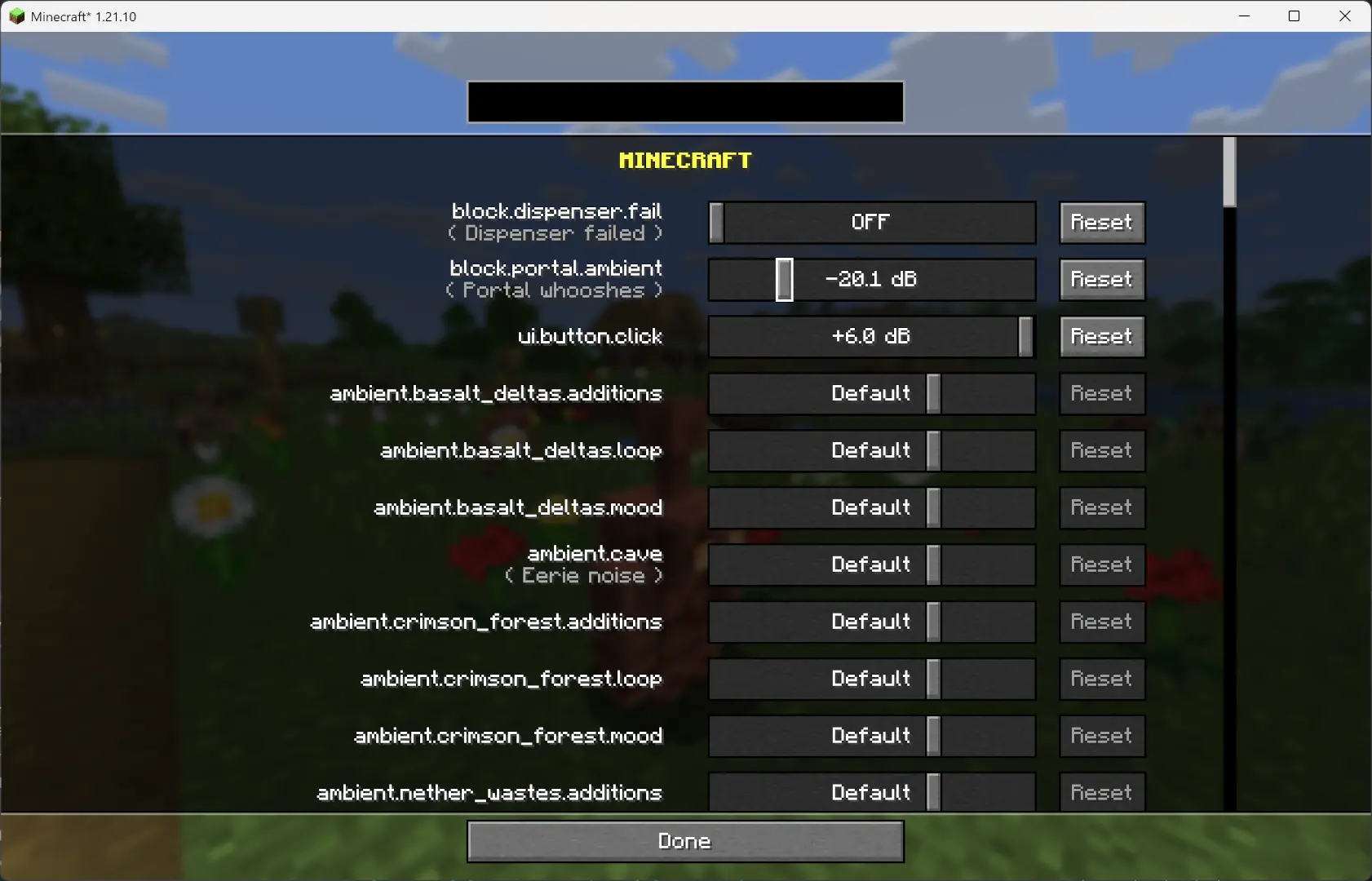
Since **v1.2.7**, you can now adjust the volume of each sound **independently** of the vanilla sliders.
—
## Overview
This mod changes how Minecraft schedules sounds to prevent the sound pool from filling up, or at least reduce the effects of a full sound pool.
### TL;DR
It fixes these common errors (and the related log spam):
“`
[Render thread/WARN]: Failed to create new sound handle
[Sound engine/WARN]: Maximum sound pool size 247 reached
“`
Without this mod, a full sound pool causes all in-game audio to stop until slots free up.
—
## How It Works
– Each tick, sounds are **collected and categorized** by type.
– **Lower category = higher priority**.
– Within categories, sounds are sorted by **distance from the player**.
– Depending on the **sound pool fill level**, only certain sound types are allowed to play. Others are skipped.
– If the pool somehow fills completely (shouldn’t happen with thresholds), new sounds are skipped entirely.
– **Duplication check**:
– Only a limited number of identical sounds can play from the same coordinate (1 block).
– Extra duplicates are skipped.
– **MASTER** and **MUSIC** sounds bypass the queue and duplication check (important for main menu or GUI events when the server is frozen).
– They still follow fill-level thresholds.
– Other categories, if requested to play instantly, are instead deferred to the next tick.
– All values are configurable through **ModMenu** or by editing the config file directly.
—
## Default Settings
“`yaml
MASTER : cat 0, always allowed
VOICE : cat 0, always allowed
PLAYERS : cat 1, up to 95%
HOSTILE : cat 2, up to 90%
BLOCKS : cat 3, up to 80%
MUSIC : cat 4, up to 70%
RECORDS : cat 4, up to 70%
NEUTRAL : cat 5, up to 60%
WEATHER : cat 6, up to 50%
AMBIENT : cat 6, up to 50%
5.0.0 fixes the redstone issues with non-rideable carts
BUT NOTE: You must install this mod client-sided as well now
Starting from v5.0.0 you can configure the max speed by using:
– /gamerule ace:speed_player
– If not 0, overrides speed only for player ridden carts
– default 20
– /gamerule ace:speed_other
– If not 0, overrides speed only for non-player ridden carts
– default 0
– /gamerule ace:speed_empty
– If not 0, overrides speed only for rideable carts that are empty
– default 0
## Video Showcase
Video: https://www.youtube.com/v/i9WxH_ehMRo
## New in Release 4.0
– Rebase mod on improved minecarts experiment
– The experimental code will be activated for all carts
– Rideable carts will be set to default 20 blocks per second
– All other carts will be set to 8 blocks per second speed
– Due to the new minecart experiment we now have the following features
– Full-Speed around corners
– Full-Speed around hills
– Consistent Jumps
– Perfect 1-tile brakes
– ROLLER COASTER MECHANICS
## New in Release 3.1
– Brakes now stop a ridden cart in exactly 1 brake tile
## New in Release 3.0
– 34m/s speed in *all* directions
– Now works full-speed on slopes & inclines
– Now works full-speed on diagonals
– Faster Direction Changes
## Other Features
– 100% glitch-free
– Redstone builds unaffected
– Hand-Designed & Play-Tested
– Designed for Vanilla Survival
– Fabric Only
## Foundation
Audaki Cart Engine offers well designed and properly balanced, competitive and viable cart-based passenger transportation.
This mod is a server-sided (and SSP) mod based on Fabric.
This mod was created since other mods I found which increased the speed of minecarts didn’t work with existing rail lines and they broke most redstone stuff when your cart moved with more than 10m/s.
I wanted a mod which works with existing rail lines and with redstone mechanisms!
## Quality Engineering
This mod is currently a huge overhaul of the vanilla minecart code to support higher speeds (up to 34m/s) while still supporting existing lines with curves, ascending and descending rail pieces are no problem.
Additionally redstone rails like detector and activator rail still work.
The Cart Engine was tested under a lot of different conditions but if you find an edge case it’ll be fixed
## Game Design / Balancing
The goal for this mod is not just to implement a new Cart Engine of course, but also to provide good game play!
To support this goal a whole lot of stuff was tweaked so the powered rail (i.e. Gold) required to reach certain speeds is well balanced, so creating a high-speed railway is actually a proper end-game goal.
Additionally the speed is balanced in a way that riding the railway is a lot of fun and it’s better than packed ice.
Due to the balanced acceleration curve railways can still be used early-game with lower speeds and less gold investment
* Raised maximum speed from 8m/s to 34m/s for carts with passengers
* Designed acceleration to require more powered rails for higher speeds
* Designed acceleration to feel good and somewhat train-y.
* Tweaked “kick-start” speed when starting from a standing block with a powered rail
* Carts temporarily slow down for direction changes, Detector & Activator Rails, but keep momentum and regain speed afterwards
* Fixed a long-standing vanilla bug that doubles the Cart Movement Speed when a block is skipped in a tick
* The mod can be added and removed at any time and everything will work. It’s 100% vanilla.
Enjoy!
AttributeFix
Attribute Fixer
Minecraft uses an attribute system to handle important calculations. It covers everything from armor values, to attack damage, to the maximum health of a mob. This system also introduced attribute caps, which limit how high any value can be. While this usually goes unnoticed, many mods are unknowingly affected by it. This mod significantly increases these caps to allow those mods to work as they were intended.
**This project is sponsored by Nodecraft. Use code [DARKHAX](https://nodecraft.com/r/darkhax) for 30% off your first month of service!**
AttractItems
Make item drops behave like experience orbs. They glide toward or away from players depending on permissions! Speed increases as they get closer, and their motion is affected by water currents and cobwebs just like XP orbs.
Features Items float towards players if they have the “player.attracted” permission or float away if the player has the “player.repulsed” permission Items are slowed by cobwebs and water currents Configurable distance via /attractitems distance
Permissions player.attracted – Items are pulled toward player – true player.repulsed – Items are pushed away from player – false attractitems.admin – Use /attractitems command – op
Commands /attractitems on – Enable attraction /attractitems off – Disable attraction /attractitems distance – Set attraction range (1–20)
Attract to Sound ([NEO]Forge/Fabric): Sound & Stealth.
 |
Attract to Sound: Telereceptors Mobs with working eyes, ears, and nose. Mobs react to gunshots, footsteps, explosions, voice chat. Mobs can trace your footsteps to follow you home. Mobs have realistic vision, making stealth and camouflage practical. [](https://modrinth.com/mod/attract-to-sound) [](https://www.curseforge.com/minecraft/mc-mods/attract-to-sound)
| 
– **Stealth & Visibility:** Player visibility affected by light, weather, stance, movement, invisibility
– **Camouflage System:**
– Truly invisible under invisibility potion effect, both armor and item are hidden (configurable on server side for anticheat)
– Armor-only camouflage with configurable items and bonuses
– Full “armor + nearby blocks” sets using color/ID matching
– Apply camo materials like mud, sand, dirt, etc., to blend in with the environment
– **Scent System:**
– Player movement creates a scent trail that mobs can track.
– Scent lasts about 5 minutes but varies by biome temperature and humidity.
– Dive into the water to cut off the trail.
– Can apply camo material to mask the scent.
– **Raid System:**
– Instead of a normal horde, mobs will schedule a RAID upon finding a player near the sound or scent position.
– Mobs will call for reinforcement upon scheduling a RAID.
– **Muffling & Materials:** Wool, solids, liquids, thin blocks alter sound propagation
– **Group AI:** Leaders, followers, edge scouts, spacing, and dynamic sector scanning
– **Swoosh:** A configurable list of projectiles, when thrown, will attract mobs to the thrown direction
– **Creek:** Walking on a configurable list of blocks will make the creek sound
– **Configurable Everything:** Human-readable TOML with guided comments
## 🔌 Integrations
– **TacZ (Forge/NeoForge/Fabric):** Realistic decibels, attachment reductions, muzzle-flash visibility
– **Point Blank (Forge/Fabric):** Per-weapon effective ranges, suppressors, flash tuning
– **Fungal Infection: Spore(Forge):** Proto develops to sound, senses sound to summon creatures
– **Simple Voice Chat (Forge/Neoforge/Fabric):** Dynamic radius based on live mic loudness
– **Plasmo Voice (Forge/Fabric):** Similar to Simple Voice Chat
– **Immersive Melodies (Forge/Fabric):** Blasting music will lure mobs
– **CSGrenade (Forge):** Mobs can’t see through smoke, flash, and run away from fire bomb
– **Relentless undead (Forge/Fabric):** Configurable mobs can climb on top to scale the wall to go to the sound
– **Enhanced AI (Forge/NeoForge/Fabric):** Block Breaking to Sound, Teleport to Sound, Throw to Sound, X-ray
– **Other Gun Mods:** Quick copy-paste examples for Scorched Guns, Ewewukek’s Musket Mod, and MrCrayfish’s Gun Mod (Unofficial) via `soundIdWhitelist` + `rawSoundDefaults`
## 🖼️ Gameplay Highlights
– Mobs swarm explosions, investigate doors, and close in on gunshots
– Sneak through rain and darkness with dyed camo and muffling blocks
– Groups coordinate: leaders engage while edge scouts sweep sectors
– Voice chat lets your teammates’ shouts give away your position
## 📣 For Modpack Authors
– You can use this mod in your modpack
– If you need support, find me on Discord
Attollo
# Attollo
## Description
Attollo is a simple and modern elevator plugin for paper.
## Motivation
Our freebuild server has a lot of buildings. To get faster up and down we needed an elevator plugin. We found a lot of plugins but they were either too complicated or not maintained anymore. So we decided to write our own plugin.
## Focus
Our focus lies within a basic implementation of Attollo, its core and reaching the goal of stable builds to use it in production later on.
## Permissions
– `attollo.use` – Allows the player to use the elevator
– `attollo.command.attollo` – Creates a debug paste for bug tickets
## Commands
– `attollo debugpaste` – Creates a debug paste for bug tickets
## Configuration
“`yaml
# Allows to change the elevator block
# Default is: DAYLIGHT_DETECTOR
elevatorBlock: ‘DAYLIGHT_DETECTOR’
“`
AttackCreeperGolem
# AttackCreeperGolem
Required Plugin: https://modrinth.com/plugin/kotlinplugins
– This plugin makes iron golems attack nearest creepers in range of 10 blocks from them.
– The purpose of this plugin is to improve iron golems by making more useful base defenders / guards.
– Check out other plugins: https://modrinth.com/user/Winlyps