AUTOCMD
# 🧩 AutoCommandPlugin
AutoCommandPlugin is a simple and powerful Minecraft plugin that lets you automatically run multiple server commands after specific delays. You can also manually run them using `/autocmd`, or add new ones using `/autocmd add`.
—
## ✅ Plugin Features
– ⏱️ Run multiple commands after server starts with custom delays
– 🔁 Commands auto-execute at specific times
– ➕ Add new commands with `/autocmd add `
– 🎮 Optional in-game usage (enabled/disabled via config)
– 🎨 Supports Minecraft color codes (like `&a`, `&c`)
– 🛡️ Blocks abuse by restricting in-game access with a toggle
– 🧾 Simple config file with easy setup
—
## 📥 How to Install
1. Download the `.jar` file
2. Place it in your `plugins/` folder
3. Start or restart your Minecraft server
4. The plugin creates a `config.yml` and auto-runs your first command in 30 seconds!
—
## ⚙️ Config File: `config.yml`
“`yaml
allow_in_game_command: false
# You can add more below or use /autocmd add
commands:
setup:
delay: 30
command: “&a[AutoCommandPlugin] &fThis plugin is now set up and running every 30 seconds!”
“`
### Explanation:
| Setting | Description |
|——–|————-|
| `allow_in_game_command` | `true` or `false` — if `false`, players can’t run `/autocmd` or add new commands |
| `commands` | A list of commands to run automatically |
| `delay` | Delay in **seconds** after server starts |
| `command` | The actual command to run (use `&` for colors) |
—
## 🧵 Commands
### 🔹 `/autocmd`
Runs all the commands listed in `config.yml` immediately.
– ✅ Works in-game **only if** `allow_in_game_command: true`
– ❌ Otherwise shows this message:
`In-game command usage is disabled. Enable it from config.yml.`
—
### 🔹 `/autocmd add `
Adds a new command to `config.yml` and runs it after **30 seconds**.
**Example:**
“`
/autocmd add broadcast &eCheck out our Discord at discord.gg/server
“`
This will save:
“`yaml
commands:
cmd_1:
delay: 30
command: “broadcast &eCheck out our Discord at discord.gg/server”
“`
—
## 📝 Example Config
“`yaml
allow_in_game_command: false
commands:
welcome:
delay: 5
command: “say &6Welcome to the server!”
auto_chunky:
delay: 20
command: “chunky start”
tip:
delay: 60
command: “broadcast &bTIP: &fDon’t forget to claim your daily reward!”
“`
—
## 🧪 Compatible Servers
| Server Type | Version |
|————-|————-|
| ✅ Paper | 1.13 – 1.21.5+ |
| ✅ Spigot | 1.13 – 1.21.5+ |
| ✅ Bukkit | 1.13 – 1.21.5+ |
Works on all latest Minecraft versions. No outdated code or version locks.
—
## 🔐 Security Option
To prevent OP abuse or unwanted use, the plugin lets you block in-game command usage.
If a player tries to use `/autocmd` or `/autocmd add` in-game and it’s disabled in config, they will see:
“`
In-game command usage is disabled. Enable it from config.yml.
“`
Commands can **always be used from console**.
—
## 👤 Plugin Info
– Made by: **JODVISHAL**
– Discord: `isthisvishal`
– Email: `jodvishalgg@gmail.com`
—
Enjoy using AutoCommandPlugin and automate your Minecraft tasks easily! 🎉
Auto Chunk Loader Advance
Useful for automated farms located over large distances.
—
**Features:**
– Loads chunks with **moving minecarts**.
– Loads chunks with **propagating redstone signal**.
– Loads chunks with **working hoppers** (when they move item to somewhere).
– Keeps chunks with **observers** loaded.
– Loads chunks with **observers moved by pistons** (flying machines).
– Controls **dropped items lifetime** on chunks affected by this plugin. (See in config: `droppedItemsLifetime`)
_All of features are configurable and can be disabled._
**Installation:**
– Download jar file
– Put this file into `/plugins` folder of your Spigot server
– Restart server
– Modify `/plugins/AutoChunkLoaderAdvance/config.yml` file for your needs
—
**Proposals:**
You can leave your ideas or proposals [here](https://github.com/dashedman/AutoChunkLoaderAdvance/discussions)
—
A simple plugin that loads chunks around long railways and redstone signals,
and keep chunks with observers and working hoppers (pipes and timers).
It can be used for transporting resources in chest minecarts through whole world,
making large redstone circuits, making auto-farms on a long distance.
**Keep in mind with incorrect use this plugin can negatively affect server performance!**
_Fork of [AutoChunkLoader](https://modrinth.com/plugin/autochunkloader) cause it has some bug,
and doesn’t support observers and hoppers._
—
**Statistic:**
[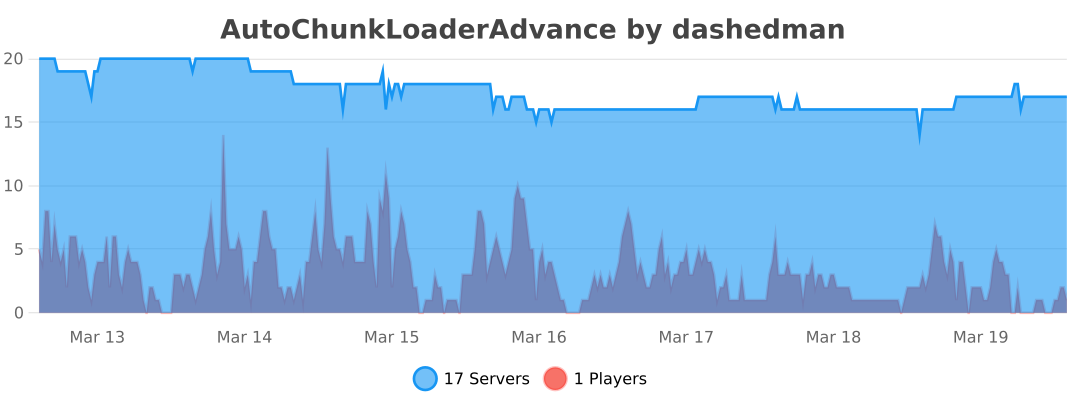](https://bstats.org/plugin/bukkit/AutoChunkLoaderAdvance/29121)
AutoChunkLoader
A simple plugin that loads chunks around long railways and redstone signals
It can be used for transporting resources in chest minecarts through whole world or making large redstone circuits.
### Keep in mind with incorrect use this plugin can negatively affect server performance!
Installation:
– Download jar file
– Put this file into `/plugins` folder of your Spigot server
– Restart server
– Modify `/plugins/AutoChunkLoader/config.yml` file for your needs
Autoborder
# AutoBorder
AutoBorder is a Minecraft (Paper/Spigot) plugin that automatically grows the world border at configurable times and days. The plugin supports broadcasts, titles, sounds, logging, and advanced admin commands. All options are configurable via `config.yml`.
—
## Features
– Automatically grows the world border at set times and days
– Animated border growth
– Optional: chat message, title, and sound for all players when the border grows
– Optional: logs border changes to a file
– Admins can directly change the border, get info, or allow players to move outside the border
—
## Installation
1. Place the plugin JAR in your server’s `plugins` folder.
2. Start the server. The `config.yml` will be generated automatically.
—
## Commands
All commands start with `/border`:
| Command | Description |
|——————————–|—————————————————–|
| `/border reload` | Reload the config and immediately update the border |
| `/border set ` | Set the border to a specific size (diameter in blocks) |
| `/border add ` | Increase the border by a number of blocks |
| `/border remove ` | Decrease the border by a number of blocks |
| `/border center ` | Set the border center to coordinates (x, z) |
| `/border center here` | Set the border center to your current location |
| `/border info` | Show current border information |
| `/border log` | Show the last 10 lines of border.log |
| `/border bypass [player]` | Allow yourself or another player to move outside the border |
| `/border help` | Overview of all commands |
> Only players with the `border.admin` permission can use these commands.
—
## Configuration
All options are found in `config.yml`. Main options include:
– Times and days for border growth
– Animation settings
– Messages, titles, and sounds
– Logging
—
## PlaceholderAPI
Use `%autoborder_size%` to display the current border size.
—
## Questions or bugs?
Contact **JoeyNNL** or open an issue on GitHub.
—
AutoAnnualRewards
[](https://www.ashcraft.cz/)
AutoAnnualRewards is a plugin that automates the process of rewarding loyal players each year. This plugin is perfect for server owners who want to provide annual rewards to players without requiring them to run any commands manually. It tracks each player’s reward status and handles everything automatically when they join the server. [More detailed description here.](https://ashsource.ashkiano.com/resource-detail/28)
Check out AshSource for more plugins and resources [ashsource.ashkiano.com](https://ashsource.ashkiano.com/)
Are you a developer?
Join AshSource to share your work with a growing community! Get started now at [ashsource.ashkiano.com](https://ashsource.ashkiano.com/)
AutoAFKFish
# AutoAFKFish
A fairly simple fabric mod for all versions of Minecraft that support fabric prior to 1.21.9 with v1.1.2, and 1.21.9+
with v1.1.3, making it so that when you press the F12 Key, it will start acting as if you are holding down the right
mouse button. It will keep acting like that even if you open your inventory, open chat, pause on a multiplayer server,
and any other action that does not stop the integrated server if you are on a client world, or any action regardless on
a server world. You can toggle it off by pressing the F12 Key again (there is a 1.5 second cooldown). Must be used in
conjunction with a afk fishing farm.
Thanks for the French Translation, Calvineries!
Thanks for the Simplified Chinese Translation, Wudji!
Also available on [CurseForge](https://www.curseforge.com/minecraft/mc-mods/autoafkfish “AutoAFKFish CurseForge”).
Auto Twerk
## Auto Twerk
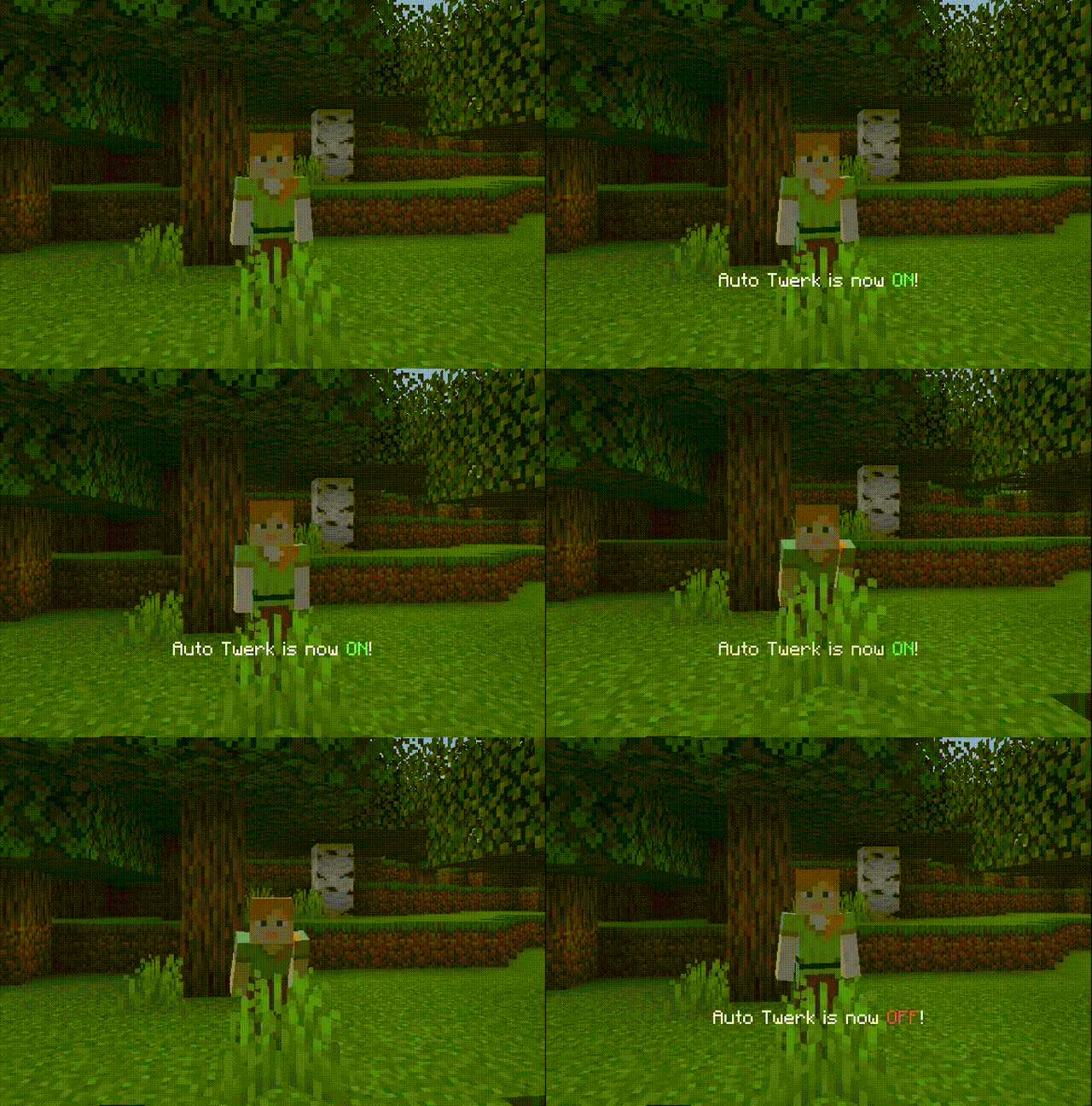
Makes you sneak and unsneak all the time!
You can toggle it by pressing the key you bound.
## Commands
– `/autotwerk on` Turn on the mod
– `/autotwerk off` Turn off the mod
– `/autotwerk interval {value}` Set interval between sneaks
One picture is worth a thousand words.
Auto Totem Nova
# Auto Totem Nova



**Automatically moves a Totem of Undying to your offhand the moment yours breaks — no manual refill ever again.**
—
## What it does
The instant a Totem of Undying in your offhand is consumed, Auto Totem Nova detects the break and moves the next available totem from your inventory into the offhand slot — seamlessly and instantly. No more dying because you forgot to refill.
—
## Features
| Feature | Description |
|—|—|
| **Auto-equip** | Totem is placed in offhand automatically after the previous one breaks |
| **ON/OFF toggle** | Enable or disable at any time via the config screen |
| **Cooldown** | Set a delay (0–9999 seconds) before the next totem is equipped |
| **Inventory simulation** | Opens and closes your inventory at the packet level (server-safe) |
| **Show inventory screen** | Optionally display the inventory GUI visually during the swap |
| **Inventory open duration** | Control how long the inventory stays open (0–5000 ms) |
| **No-totem warning** | Displays a configurable colored message when you have no totems left |
| **Warning color** | Choose any color with a hex color picker |
| **Mod Menu + Cloth Config** | Full in-game GUI — no config file editing required |
—
## Compatibility
| Minecraft Version | JAR |
|—|—|
| 1.16.5 | `auto-totem-nova-1.16.5-1.0.0+mc1.16.5.jar` |
| 1.17 – 1.17.1 | `auto-totem-nova-1.17.1-1.0.0+mc1.17.1.jar` |
| 1.18 – 1.18.2 | `auto-totem-nova-1.18.2-1.0.0+mc1.18.2.jar` |
| 1.19 – 1.19.4 | `auto-totem-nova-1.19.4-1.0.0+mc1.19.4.jar` |
| 1.20 – 1.20.3 | `auto-totem-nova-1.20.1-1.0.0+mc1.20.1.jar` |
| 1.20.4 – 1.20.6 | `auto-totem-nova-1.20.4-1.0.0+mc1.20.4.jar` |
| 1.21 – 1.21.1 | `auto-totem-nova-1.21.1-1.0.0+mc1.21.1.jar` |
| 1.21.4 | `auto-totem-nova-1.21.4-1.0.0+mc1.21.4.jar` |
| 1.21.11+ | `auto-totem-nova-1.21.11-1.0.0+mc1.21.11.jar` |
**Requires:** Fabric Loader · Fabric API · Cloth Config (bundled)
**Optional:** Mod Menu (for in-game config GUI)
—
## How to use
1. Install the correct JAR for your Minecraft version into your `mods` folder
2. Open **Mod Menu → Auto Totem Nova → Config** to adjust settings
3. Make sure the mod is **enabled** (ON by default)
4. Play — the mod handles everything automatically
—
## Links
**YouTube:** [MC clip](https://youtube.com/channel/UCGrw0wd3fF-l-m3wfCLbFKw)
Subscribe for updates and tutorials!
—
—
# Auto Totem Nova(日本語)
**オフハンドのトーテムが壊れた瞬間、インベントリから自動的に次のトーテムを補充します。手動での補充は不要です。**
—
## 概要
オフハンドのトーテム・オブ・アンダイングが消費されると、Auto Totem Novaが即座に検知し、インベントリから次のトーテムをオフハンドスロットに移動します。補充忘れによる死亡はもう起きません。
—
## 機能一覧
| 機能 | 説明 |
|—|—|
| **自動装備** | 前のトーテムが壊れた後、自動的に次のトーテムをオフハンドに装備 |
| **ON/OFFトグル** | 設定画面からいつでも有効化・無効化が可能 |
| **クールダウン** | 次のトーテムを装備するまでの遅延を0〜9999秒で設定可能 |
| **インベントリシミュレーション** | パケットレベルでインベントリを開閉(サーバー対応) |
| **インベントリ画面表示** | スワップ中にインベントリGUIを視覚的に表示するオプション |
| **インベントリ開放時間** | インベントリを開いておく時間を0〜5000ミリ秒で調整 |
| **トーテム不足の警告** | トーテムがなくなったときにカラー付きのメッセージを表示 |
| **警告カラー** | カラーピッカーで任意の色を指定可能 |
| **Mod Menu + Cloth Config** | ゲーム内GUIで全設定が可能(設定ファイルの編集不要) |
—
## 対応バージョン
| Minecraftバージョン | JAR |
|—|—|
| 1.16.5 | `auto-totem-nova-1.16.5-1.0.0+mc1.16.5.jar` |
| 1.17 〜 1.17.1 | `auto-totem-nova-1.17.1-1.0.0+mc1.17.1.jar` |
| 1.18 〜 1.18.2 | `auto-totem-nova-1.18.2-1.0.0+mc1.18.2.jar` |
| 1.19 〜 1.19.4 | `auto-totem-nova-1.19.4-1.0.0+mc1.19.4.jar` |
| 1.20 〜 1.20.3 | `auto-totem-nova-1.20.1-1.0.0+mc1.20.1.jar` |
| 1.20.4 〜 1.20.6 | `auto-totem-nova-1.20.4-1.0.0+mc1.20.4.jar` |
| 1.21 〜 1.21.1 | `auto-totem-nova-1.21.1-1.0.0+mc1.21.1.jar` |
| 1.21.4 | `auto-totem-nova-1.21.4-1.0.0+mc1.21.4.jar` |
| 1.21.11以降 | `auto-totem-nova-1.21.11-1.0.0+mc1.21.11.jar` |
**必須:** Fabric Loader · Fabric API · Cloth Config(同梱)
**任意:** Mod Menu(ゲーム内設定GUIを使用する場合)
—
## 使い方
1. 使用するMinecraftバージョンに対応したJARを `mods` フォルダに入れる
2. **Mod Menu → Auto Totem Nova → Config** から設定を調整
3. MODが**有効(ON)**になっていることを確認(デフォルトでON)
4. あとはプレイするだけ — 残りはMODが全て処理します
—
## YouTube
**チャンネル:** [MCクリップ](https://youtube.com/channel/UCGrw0wd3fF-l-m3wfCLbFKw)
チャンネル登録よろしく!
Auto Third Person
|version|loader availability|note|
|–:|:-:|:–|
|1.21.5|Fabric and Neoforge||
|1.21.1|Fabric and Neoforge||
|1.20.1|Fabric and Forge||
|1.20.0|Fabric and Forge|unmaintained|
|1.19.4|Fabric and Forge|unmaintained|
|1.19.2|Fabric and Forge||
|1.18.2|Fabric and Forge||
|1.17.1|Fabric and Forge|unmaintained|
|1.16.5|Fabric and Forge||
|1.12.2|Forge|New codebase compared to the very old 1.12 version|
|1.7.10|Forge|Voldeloom|
|1.4.7|Forge|Voldeloom|
—
Auto Third Person automatically puts you in third-person camera when you fly an elytra, ride an animal, boat, or minecart, or swim underwater. When you stop flying or leave your vehicle, your camera view will be restored to whatever it was before you started. Much of the mod is configurable through an extensive config file.
There’s a few other camera-related goodies – an option to disable the “first-person flipped” camera, an option for fixing the “weirdly rotated first-person hand” in 1.7.10-and-earlier versions that happens when you look at yourself in f5, and a backport for pressing Shift to exit vehicles for 1.4.7.
—
New things in version 2️⃣ of the mod:
* All ~~13~~ ~~15~~ ~~17~~ ~~19~~ 21 versions use the same codebase.
* New toggle key for temporarily disabling the mod. It is in the options screen under “Miscellaneous” and is unbound by default.
* Forge versions use a regular Forge config file, instead of the custom thingie the mod used to use.
—
Questions? Comments? Just lonely? Join me on Discord: https://quat1024.github.io/discord/
Auto Sprint : key toggle
Description
Tired of double tapping and then holding down buttons to run?
This adds a new keyboard shortcut (in controls menu) that toggles sprinting on and off.
Works in boats, horses, and elytra.
In 1.16 there is now a CONFIG FILE with some toggles and speed controls, Example here
Tap it once and you are sprinting, and again to turn off
No FOV change is applied during auto sprint, as opposed to regular sprint.
If you hit a wall, the auto-sprint keeps applying, so you can jump and instantly keep sprinting
Mod is intended to be Client-Side only, meaning it would not need to be installed serverside
[](https://www.curseforge.com/minecraft/mc-mods/auto-sprint)