Artisan Tools: Mastery System
### Support and Feedback 💬
If you have questions, suggestions, or have found a bug, please contact me:
[Discord](https://discord.gg/yf23xT9Z8j)
## ArtisanTools 🛠️
**ArtisanTools** — is a unique Minecraft plugin that adds a tool leveling system, tool specialization, and many other interesting features. Bring your tools to life, develop them, and gain unique bonuses!
### **Progress work on the basis of NBT tags, so the plugin does not require and do not use a database.**

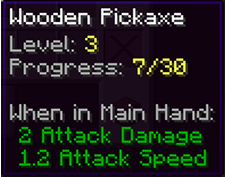
– **Tool Leveling**: Tools (pickaxes, axes, shovels, swords) gain experience through use and level up.
– **Tool Specialization**: After reaching level 5, you can choose a specialization for your tool, granting unique bonuses.
– **Customizable Messages**: All messages can be configured via the configuration file, and you can choose where they are displayed (chat, bossbar, actionbar).
– **Experience Setting**: Setting a certain amount of experience per block or creature for each item.
– **Lore**: Displays the progress in the lore of an item.
– **Placeholders**: Integration with PlaceholderAPI to display tool information in chat, signs, and other plugins.
– **Commands**: Convenient commands for managing tools and resetting them.


|Command | Description |
|:——————-:|———————-|
|/artisan info|Show information about the tool in hand (level, experience, specialization).|
|/artisan levelreset|Reset the tool’s level and experience.|
|/artisan specialize|Choose a specialization for the tool (available from level 5).|
|/artisan reload|Reload the plugin configuration.|
|Placeholder | Description |
|:——————-:|———————-|
|%artisan_level%|Tool’s level.|
|%artisan_experience%|Tool’s current experience.|
|%artisan_required_experience%|Experience required for the next level.|
|%artisan_specialization%|Tool’s specialization.|

**config.yml**
“`
messages:
level_up:
display: actionbar # Possible values: chat, bossbar, actionbar
text: “&aYour tool has leveled up! Current level: &e{level}”
specialize:
display: chat
text: “&aYou have chosen specialization: &e{specialization}”
tool_info:
display: bossbar
text: “&aLevel: &e{level}, Experience: &e{experience}/{required_experience}, Specialization: &e{specialization}”
“`
**blocks.yml**
“`
blocks:
pickaxe:
STONE: 1
COBBLESTONE: 1
IRON_ORE: 5
GOLD_ORE: 5
DIAMOND_ORE: 10
axe:
OAK_LOG: 2
SPRUCE_LOG: 2
BIRCH_LOG: 2
shovel:
DIRT: 1
GRASS_BLOCK: 1
“`
### Update Plans 🚀
– **Adding New Specializations**: Unique bonuses for each tool type.
– **Tool Quests**: Tasks to obtain rare upgrades.
– **Economy Integration**: Ability to purchase upgrades with in-game currency.
– **Support for Other Plugins**: Integration with Vault, McMMO, and other popular plugins.
– **Graphical User Interface (GUI)**: Convenient menu for selecting specializations and managing tools.
– **Unblocking leveling**: Initially, the tool progression is blocked and unavailable, but after a certain action on a certain item, it becomes available.
Artisanal Nether Bricks

[](https://twitter.com/2DWisp) [](https://ko-fi.com/jamiecubed) [](https://modrinth.com/user/JamieCubed)
## 🔥 Introduction:
Enhances textures of both types of Nether Brick by adding variants and a unique top texture to make the Nether Fortress a little more pleasing to look at. Also gives the Nether Brick Fence and Wall a custom texture that better fits the vanilla model.
No mods are required.
## 🎨 All of my Creations:
– [Wisp’s Reworked Vanilla](https://modrinth.com/resourcepack/artisanal-default)
– [Wisp’s Colourful Wildflowers](https://modrinth.com/resourcepack/wisps-colourful-wildflowers)
– [Simple Grass Flowers](https://modrinth.com/resourcepack/simple-grass-flowers)
– [Bare Bones Grass Flowers](https://modrinth.com/resourcepack/bare-bones-grass-flowers)
– [Simple Lower Grass Sides](https://modrinth.com/resourcepack/simple-lower-grass-sides)
– [Fancy Full Block Grass](https://modrinth.com/resourcepack/fancy-full-block-grass)
– [Artisanal Nether Bricks](https://modrinth.com/resourcepack/artisanal-nether-bricks)
– [Simple Rustic Glass](https://modrinth.com/resourcepack/simple-rustic-glass)
– [Raven Phantoms](https://modrinth.com/resourcepack/raven-phantoms)
– [Better Breeze Rods](https://modrinth.com/resourcepack/better-breeze-rod)
## 🤔 Frequently Asked Questions:
**Q: How do I install the pack?**
A: Follow [this guide](https://www.planetminecraft.com/blog/how-to-install-minecraft-texture-packs-4615399/).
**Q: Can you port this to Bedrock?**
A: I currently have no plans to port this to Bedrock.
**Q: Can someone else port this to Bedrock?**
A: No, I do not allow third-party ports of my packs.
**Q: Can you add this feature?**
A: Maybe! Comment any suggestions and we can see what happens.
**Q: I found a bug!**
A: Comment all bugs and I will fix them as soon as possible.
**Q: Does this pack work on X version?**
A: Probably. In theory, the pack should work on most modern versions. Though I do not support older versions of Minecraft.
**Q: Can I add this to my modpack?**
A: Of course! You must give credit and can not claim any of my work as your own.
[](https://bisecthosting.com/jamie)
Artisanal Default
### Soon to be replaced!
This pack has been archived in favour of my new pack, **’Wisp’s Reworked Vanilla’**, which makes slightly more drastic changes but still in tune with Vanilla.
You are still welcome to use this older version and I’m keeping it up for archival purposes, but for modern updates and more features use my new pack!
Old Descripton Here
## 🖼️ Introduction:
This is my pet project that combines a bunch of edits, fixes, and expansions I have made to the vanilla experience, all while sticking tightly to the vanilla style and not going overboard! The primary focus for now is on tweaking and expanding bits of the game that stand out to me!
No mods are required, though once I hit 1.0.0 I’ll start looking into features that take advantage of modded features like biome-specific mob variants.
## 📖 Feature List:
Click to reveal
### Blocks:
– Anvil has been remade
– Flower pot has been remade
– All fences and gates have a unique texture
– Most walls have a unique texture
– Cacti now rarely spawn with flowers
– Grass now occasionally has clovers
– Podzol now occasionally has clovers
– Mycelium now occasionally has clovers
– Grass path sides have been reshaded
– Lily pads have been remade and have variants, and also occasionally have flowers
– Melon has been reshaded slightly
– Water is slightly clearer
– All grass and foliage is slightly warmer
– Dandelions have been remade
– Beds have been remade to have a head and footboard
– All sandstone slabs have been remade
– All polished stone slabs have been remade
– All sandstone stairs have been remade to have their proper top textures
– Red and brown mushrooms have been remade and have variants
– Brown mushrooms now rarely appear on the sides of blocks they’re on
– Farmland has a custom side texture
– All buttons have unique textures
– All pressure plates have unique textures
– Smooth stone and chiseled stone brick have been tweaked
– Chests and trapped chests have been remade
### Items:
– Flower pot item has been remade
– Reshaded all tools
### Entities:
– Cow, red mushroom, and brown mushroom have been remade
– Squid and glow squid have been remade
– All humanoid mobs have ears
– Tuxedo cat has been reshaded
### Misc:
– Shadow is now lower resolution to better fit the art style
– HUD hearts and armour icons have been remade
– Leather armour has been remade
– Crosshair has been tweaked
(Not in any particular order)
## 🎨 All of my Creations:
– [Wisp’s Reworked Vanilla](https://modrinth.com/resourcepack/artisanal-default)
– [Wisp’s Colourful Wildflowers](https://modrinth.com/resourcepack/wisps-colourful-wildflowers)
– [Simple Grass Flowers](https://modrinth.com/resourcepack/simple-grass-flowers)
– [Bare Bones Grass Flowers](https://modrinth.com/resourcepack/bare-bones-grass-flowers)
– [Simple Lower Grass Sides](https://modrinth.com/resourcepack/simple-lower-grass-sides)
– [Fancy Full Block Grass](https://modrinth.com/resourcepack/fancy-full-block-grass)
– [Artisanal Nether Bricks](https://modrinth.com/resourcepack/artisanal-nether-bricks)
– [Simple Rustic Glass](https://modrinth.com/resourcepack/simple-rustic-glass)
– [Raven Phantoms](https://modrinth.com/resourcepack/raven-phantoms)
– [Better Breeze Rods](https://modrinth.com/resourcepack/better-breeze-rod)
## 🤔 Frequently Asked Questions:
**Q: How do I install the pack?**
A: Follow [this guide](https://www.planetminecraft.com/blog/how-to-install-minecraft-texture-packs-4615399/).
**Q: Can you port this to Bedrock?**
A: I currently have no plans to port this to Bedrock.
**Q: Can someone else port this to Bedrock?**
A: No, I do not allow third-party ports of my packs.
**Q: Can you add this feature?**
A: Maybe! Comment any suggestions and we can see what happens.
**Q: I found a bug!**
A: Comment all bugs and I will fix them as soon as possible.
**Q: Does this pack work on X version?**
A: Probably. In theory, the pack should work on most modern versions. Though I do not support older versions of Minecraft.
**Q: Can I add this to my modpack?**
A: Of course! You must give credit and can not claim any of my work as your own.
## ✨ Inspirations:
These creators inspire some features in this pack, please check out their amazing work!
– [Sixfootblue](https://www.planetminecraft.com/member/sixfootblue/)
– [Origin Realms](https://originrealms.com/)
– [Vanilla Tweaks](https://vanillatweaks.net/)
– [Sully](https://twitter.com/ModSully)
[](https://bisecthosting.com/jamie)
Artifacts Of The Ancients
## Artifacts Of The Ancients
This plugin adds several artifacts that, when obtained, grant players various abilities. These artifacts have unique methods of acquisition.
This comprehensive plugin includes three powerful artifacts, each of which bestows incredible abilities upon players:
##
### Time Artifact
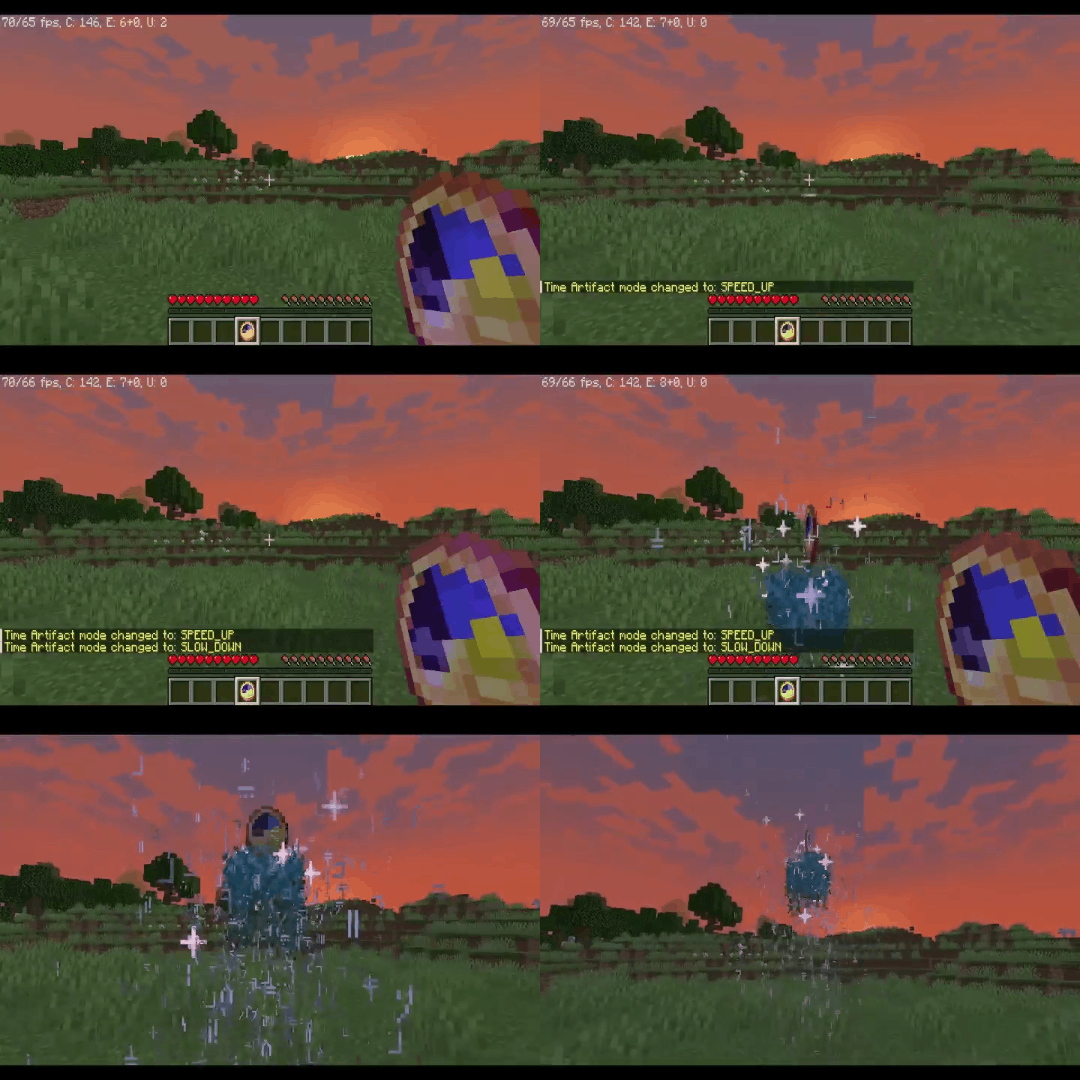
Allows the player to slow down, speed up, or even completely stop the flow of time for a certain period.
>
>
Obtaining
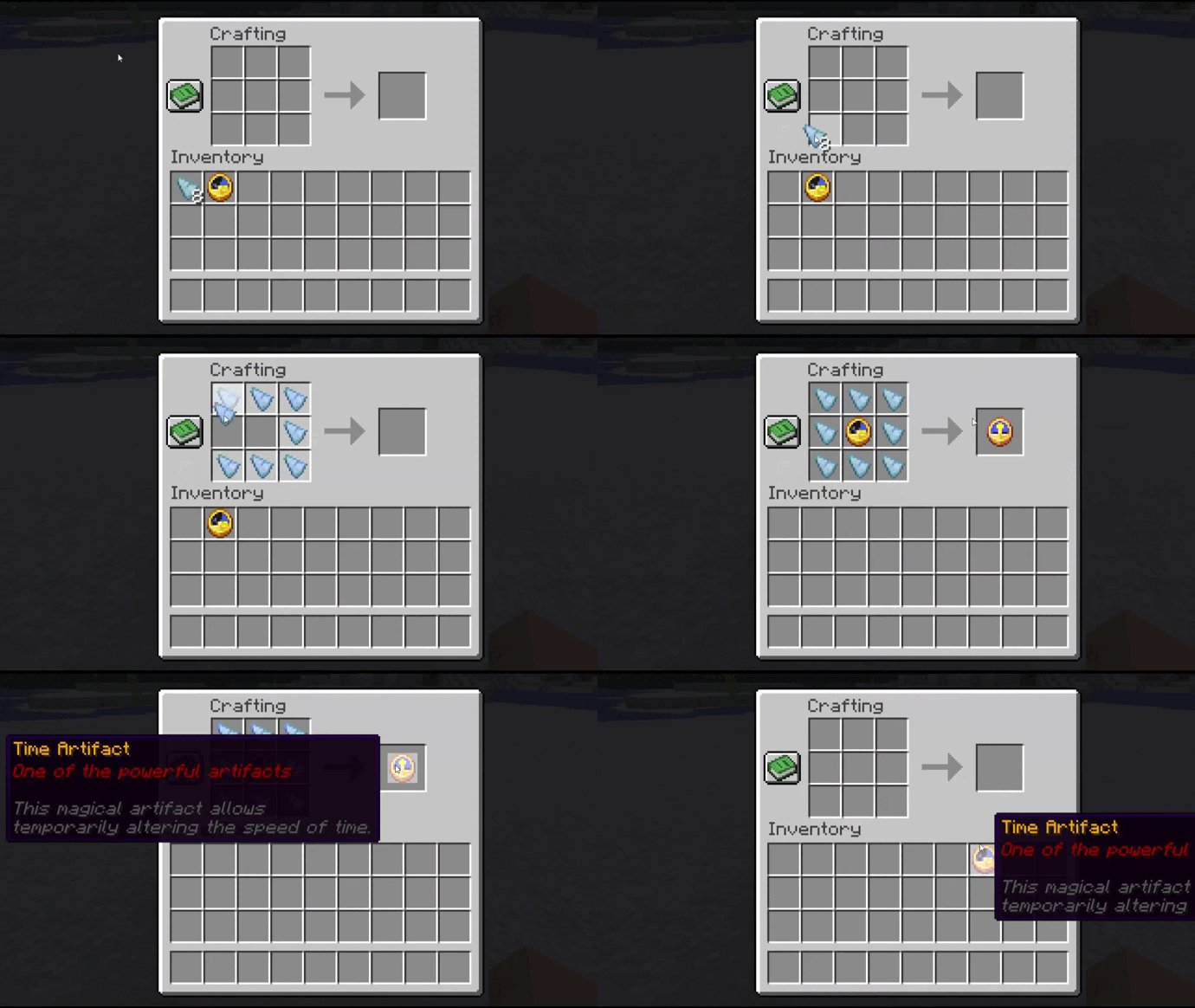
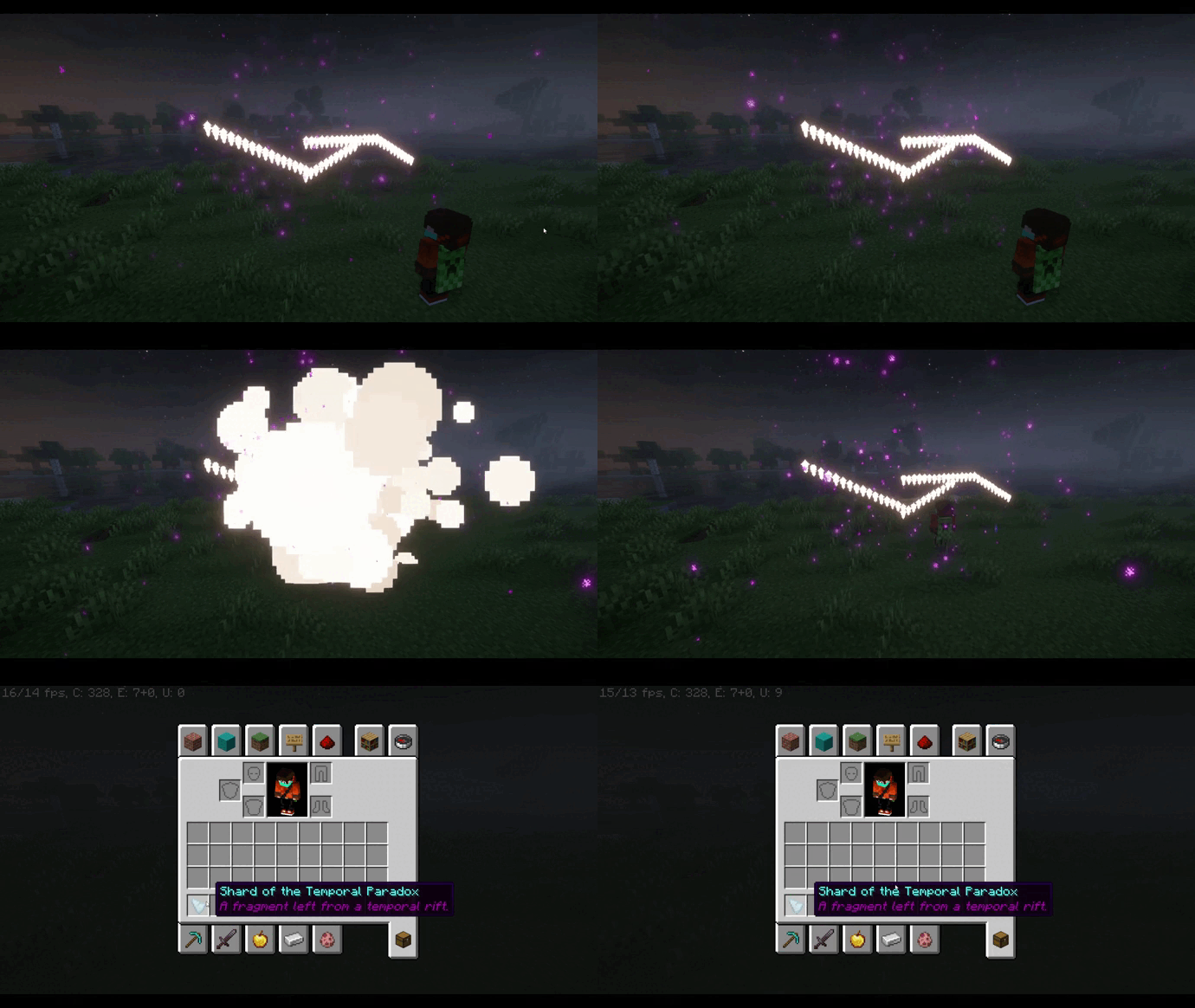
To craft the Time Artifact, you will need a regular clock, which must be placed on a crafting table and surrounded by “Temporal Paradox Shards”.
>
>
This rare shard can be obtained by passing through a temporal rift, which sporadically appears in the world.
>
##
### Seer’s Compass
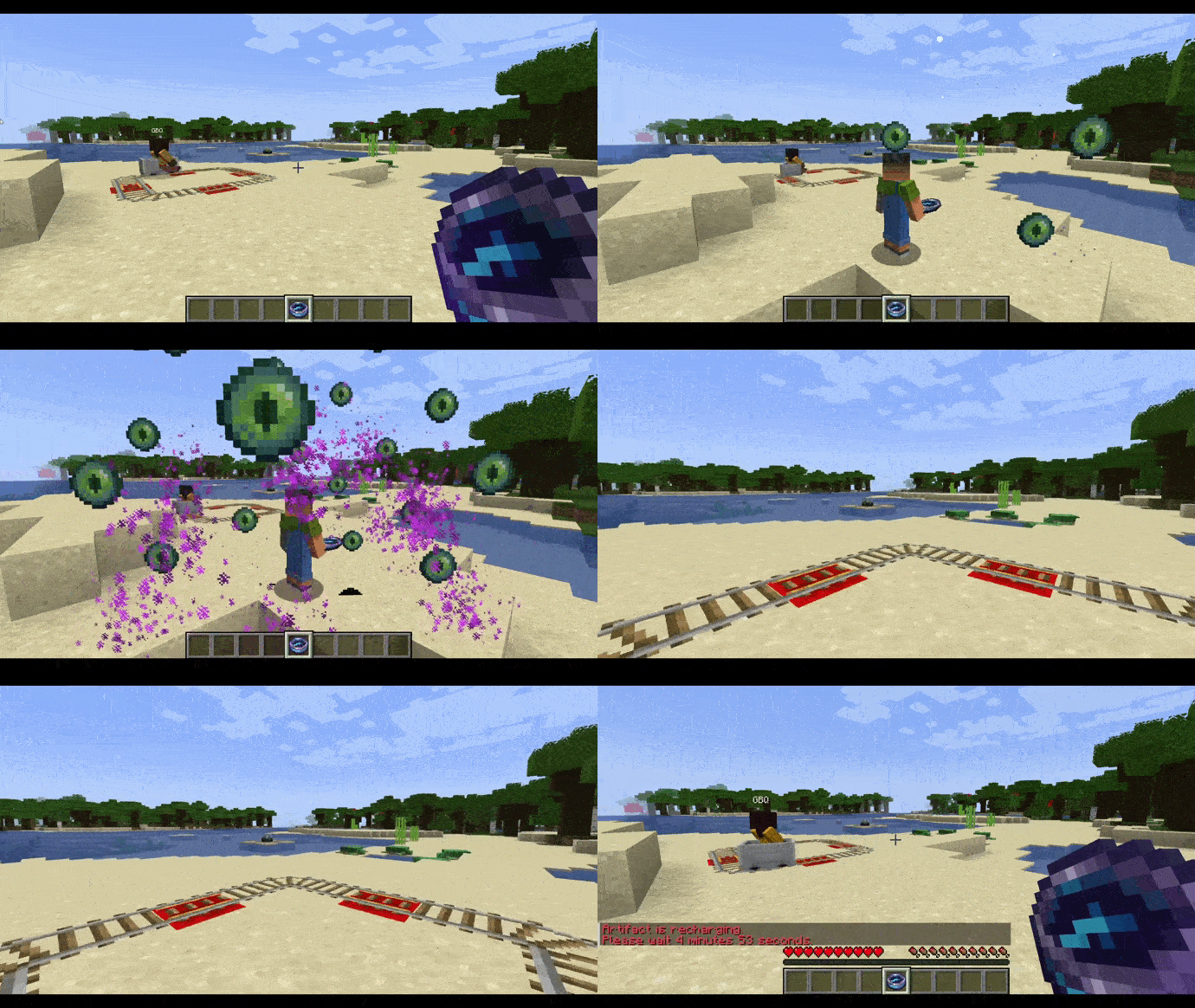
Grants the player the ability to see the world through the eyes of other players, allowing them to track their movements and actions.
>
Obtaining
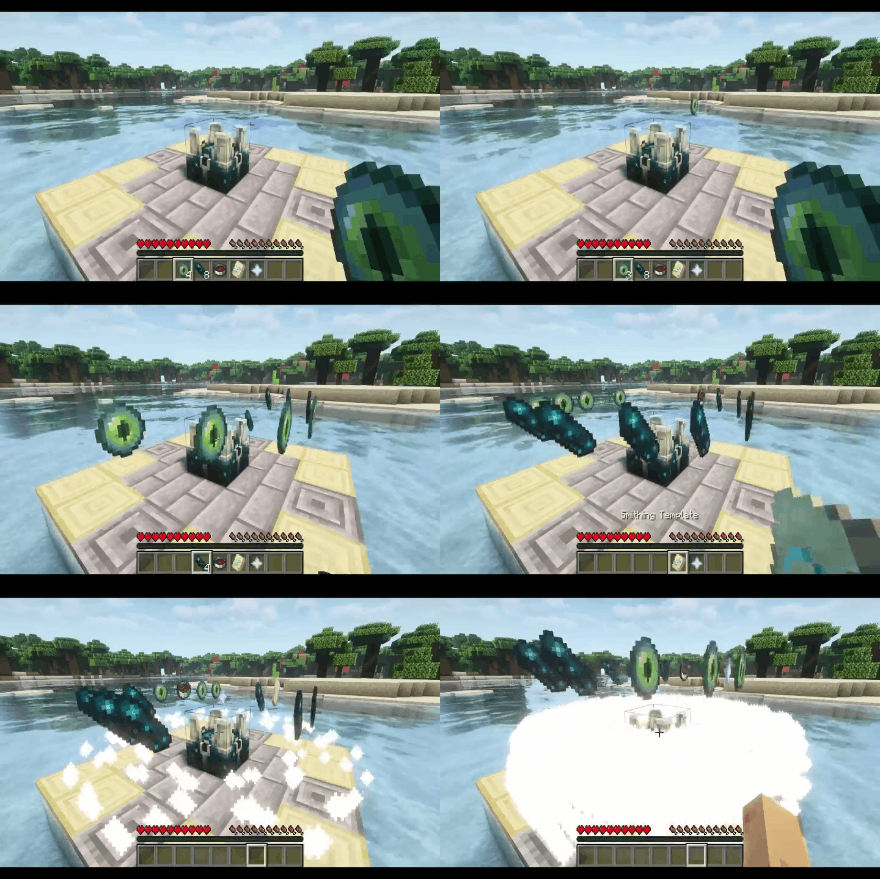
To create the Seer’s Compass, you will need to place the following ingredients on a special block called the “Scalkowing Crier”: 8 echo shards, 4 ender eyes, 1 compass, 1 nether star, and 1 “Eye” armor trim. This will initiate the artifact creation process, resulting in the Seer’s Compass.
>
>
##
### Guardian Amulet
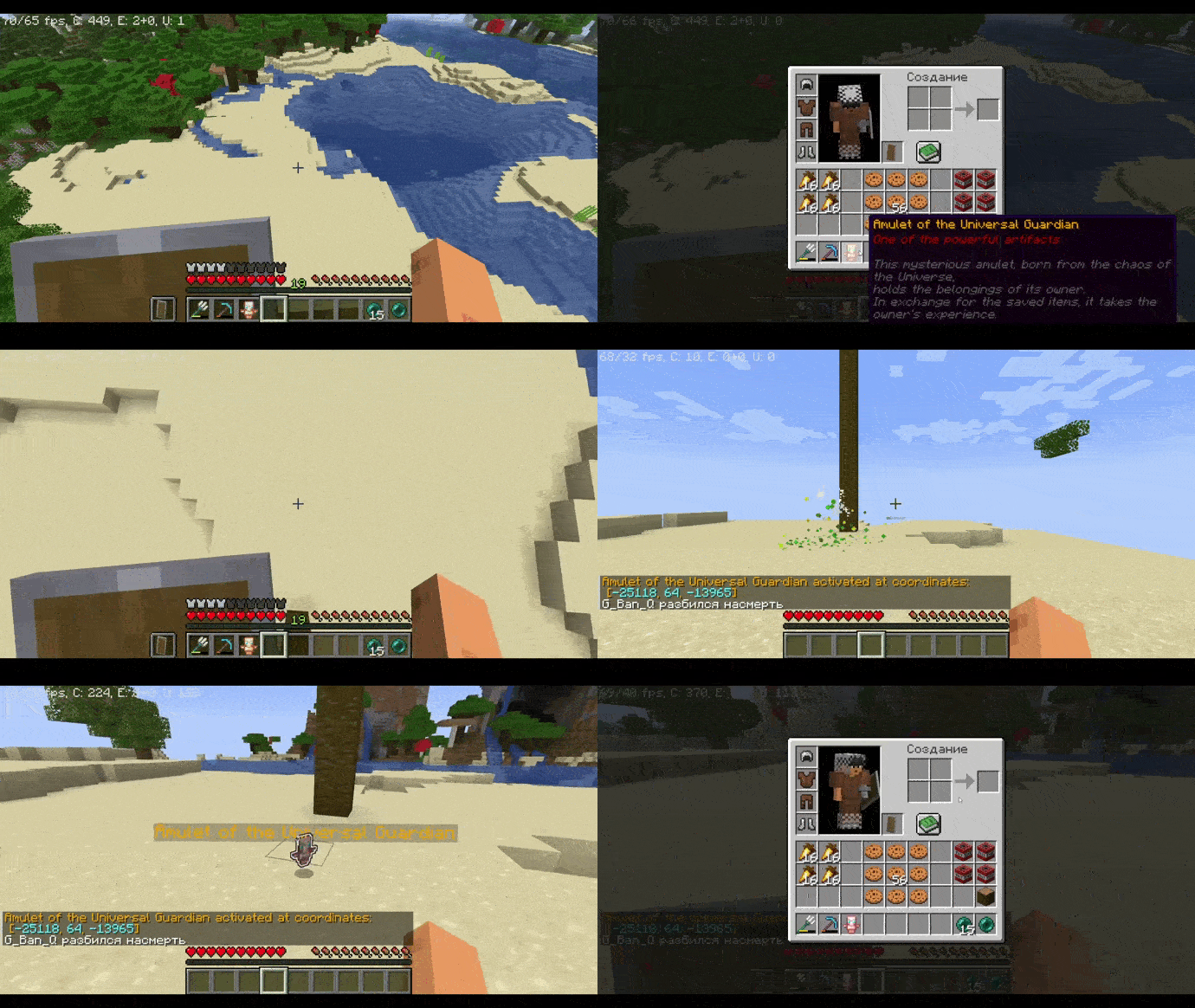
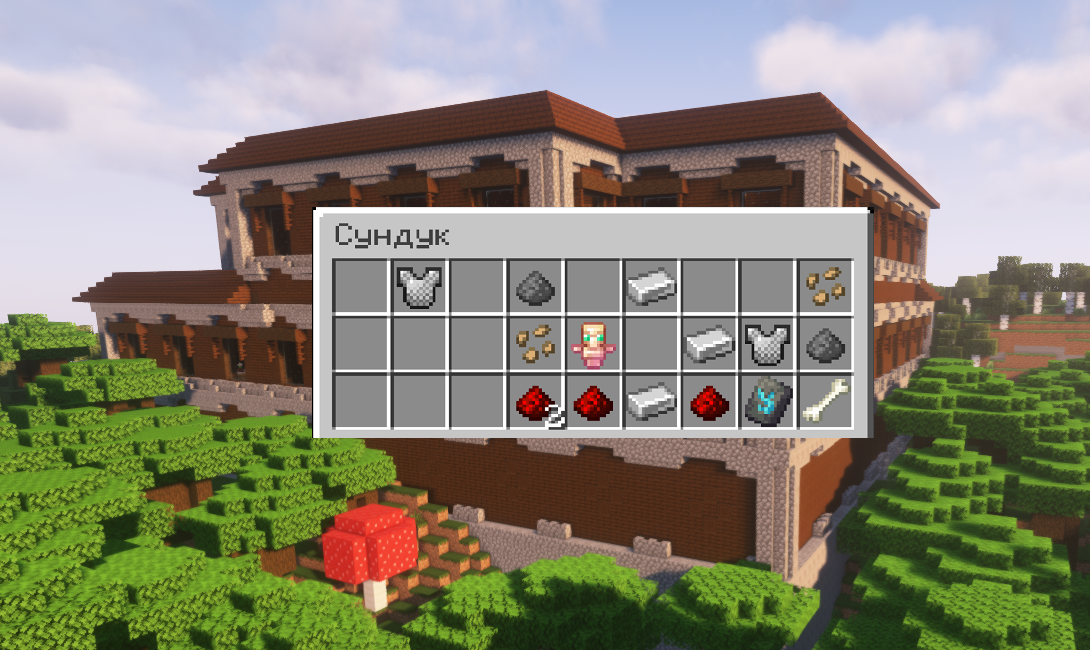
When the player dies, the amulet will save all of their items, holding them until the owner retrieves the artifact. Upon retrieving the amulet, the player’s items will be returned to them, but their experience will be taken. The amulet also displays the coordinates of the player’s death.
> 
>
Obtaining
This amulet can be found in chests located in woodland mansions with a 30% probability.
> 
>
## Plugin Commands:
| Command | Permission | Description |
| — | — | — |
| /artefactinfo | AotA.usage | Obtain information about the artifacts |
| /magiccompass | AotA.usage | Grant the Seer’s Compass to the specified player |
| /giveguardianamulet | AotA.usage | Grant the Guardian Amulet to the specified player |
| /timeartifact | AotA.usage | Grant the Time Artifact to the specified player |
| /givetimeshard | AotA.usage | Grant a Temporal Paradox Shard to the specified player |
| /spawnrift | AotA.usage | Summon a temporal rift |
## Permissions:
– AotA.usage – Allows the use of all commands from the “Artifacts of the Ancients” plugin.
##
> **This plugin is currently in development and will be updated, so expect new items and features in the near future!**
> _The open-source code of the plugin will be available in its final versions._
>
Arther Lewyien Anime Gui Pack
Arthur Leywin Anime GUI – Description
Step into a sleek and immersive interface inspired by the legendary Arthur Leywin. This GUI blends elegant fantasy aesthetics with a modern anime touch, featuring smooth layouts, glowing accents, and a powerful aura that reflects strength and control.
Every detail is crafted to feel magical yet clean — from the refined panel designs to the subtle energy effects that give it life. The interface captures the essence of a rising king: calm, strategic, and unstoppable.
Perfect for players who want a stylish and anime-inspired experience while keeping everything organized and easy to use. Whether you’re managing inventory or navigating menus, this GUI makes every moment feel epic.
Arte
> **NOTE: Arte works only on Minecraft 1.20.3+**
Table of Contents
-
About Arte
-
Getting Started
- Usage
- Contact
## About Arte
So, what does it do? Simple! Let’s say you have a BIG server resource pack.
Every time you make a little change, you will have to manually re-host it somewhere, and players will have to fully re-download it.
This can get annoying. Arte splits the resource pack into parts (by namespaces), hosts it directly on your server
and sends each one as a different server resource pack!
> Q: How is this possible? There can only be one server resource pack loaded at one time!
> A: In 1.20.3 Mojang added a new feature that allows servers to send multiple server resource packs at a time!
Players will only re-download the parts that actually need updating, and apply other server packs.
## Getting Started
To set up Arte on your server follow these steps.
### Prerequisites
Different mod-loader require different dependencies!
#### On Fabric:
[![Requires Fabric API][fabric-api-shield]][fabric-api-url]
#### On Spigot:
* Requires nothing!
#### On Paper:
* Requires [ProtocolLib][protocol-url].
### Installation
[![Hangar][hangar-shield]][hangar-url]
[![GitHub][github-shield]][github-url]
[![Polymart][polymart-shield]][polymart-url]
[![Spigot][spigot-shield]][spigot-url]
_Download and install the mod or plugin from [Modrinth][modrinth-versions-url], [Hangar][hangar-versions-url], [Polymart][polymart-updates-url], [Spigot][spigot-updates-url] or [GitHub Releases][github-releases-url]._
1. Start your server
2. Open Arte’s config file
3. Set `address` to your server’s public address
4. Open the port specified in config (`1864`) or put already opened port in the `port` field in config.
5. Restart your server
## Usage
Put your resource pack source (not zipped) in the `arte/resourcepack/` folder and run `/arte reload`.
> Note: Arte folder can be different depending on your server! If you use Fabric or Quilt, it’s folder will be in server’s folder.
> If you use Spigot, then Arte’s folder will be located in `plugins/arte/`.
_For more examples, please refer to the [Documentation](https://projects.shardmc.su/arte)._
## Contact
[![Discord][discord-shield]][discord-url]
[spigot-shield]: https://raw.githubusercontent.com/intergrav/devins-badges/v3/assets/cozy/supported/spigot_64h.png
[fabric-shield]: https://raw.githubusercontent.com/intergrav/devins-badges/v3/assets/cozy/supported/fabric_64h.png
[noforge-shield]: https://raw.githubusercontent.com/intergrav/devins-badges/v3/assets/cozy/unsupported/forge_64h.png
[rptweaks-url]: https://modrinth.com/mod/resource-pack-tweaks
[fabric-api-shield]: https://raw.githubusercontent.com/intergrav/devins-badges/v3/assets/cozy/requires/fabric-api_64h.png
[fabric-api-url]: https://modrinth.com/mod/fabric-api
[protocol-url]: https://ci.dmulloy2.net/job/ProtocolLib//lastBuild/
[spigot-url]: https://www.spigotmc.org/resources/arte.114150/
[github-shield]: https://raw.githubusercontent.com/intergrav/devins-badges/v3/assets/cozy/available/github_64h.png
[github-url]: https://github.com/ShardMC/arte
[hangar-shield]: https://raw.githubusercontent.com/intergrav/devins-badges/v3/assets/cozy/available/hangar_64h.png
[hangar-url]: https://hangar.papermc.io/shardmc/arte
[polymart-shield]: https://raw.githubusercontent.com/intergrav/devins-badges/v3/assets/cozy/available/polymart_64h.png
[polymart-url]: https://polymart.org/resource/plugin-arte.5242
[curseforge-shield]: https://raw.githubusercontent.com/intergrav/devins-badges/v3/assets/cozy/available/curseforge_64h.png
[curseforge-url]: https://curseforge.com/minecraft/bukkit-plugins/arte-for-spigot
[spigot-shield]: https://raw.githubusercontent.com/intergrav/devins-badges/v3/assets/cozy/supported/spigot_64h.png
[spigot-url]: https://www.spigotmc.org/resources/arte.114150/
[modrinth-versions-url]: https://modrinth.com/plugin/arte/versions
[hangar-versions-url]: https://hangar.papermc.io/shardmc/arte/versions
[polymart-updates-url]: https://polymart.org/resource/arte.5242/updates
[curseforge-updates-url]: https://curseforge.com/minecraft/bukkit-plugins/arte-for-spigot/files
[spigot-updates-url]: https://www.spigotmc.org/resources/arte.114150/updates
[github-releases-url]: https://github.com/ShardMC/arte/releases
[github-issues-url]: https://github.com/ShardMC/arte/issues
[discord-shield]: https://raw.githubusercontent.com/intergrav/devins-badges/v3/assets/cozy/social/discord-plural_64h.png
[discord-url]: https://discord.gg/CqVAzakrqx
Alternative Redstone Torch
## The Problem
1. When you look at the Redstone Torch from an angled position you will see that it’s red circles crosses, and this looks bad.
2. If you view it from the top it’s look exactly like the regular torch
## Solution
1. Made the red circle to be in an X shape, like grass and other plants.
2. Made the center of the torch a bit more reddish.
||||
|–|–|–|
| 
X shaped red circle
|| 
Reddish center
|
| |
| 
Configurable with Respackopts
|| 
Partnered with Bisecthosting
|
||
ArSi’s PVP Pack
# 🔴 ArSi’s PVP Pack
Welcome to **ArSi’s PVP Pack**! This resource pack blends the clean, minimalist aesthetic of the *Bare Bones* style with an aggressive, reddish twist to make your gameplay both smoother and more stylish.
—
## 🎨 The Aesthetic
ArSi’s PVP Pack reduces visual noise by utilizing flat colors and simple textures. The primary focus is a **vibrant red color palette** that flows through the entire game environment.
* **Bare Bones Style:** Simplified textures for maximum performance and a sleek “official trailer” look.
* **Red Tint:** Many textures have been overhauled with a reddish hue to create a competitive, high-energy vibe.
* **Performance Optimized:** Low-resolution simplicity ensures high FPS, making it perfect for Bedwars, Skywars, or PvP.
## 🛠️ Installation
1. Download the `.zip` file.
2. Launch Minecraft and navigate to `Options` > `Resource Packs`.
3. Open the resource pack folder and drop the file inside.
4. Activate the pack in the menu.
—
> **Note:** This pack is inspired by the Bare Bones style. All credits for the original art direction go to the respective creators.
AR’s Better Hotbar
# AR’s Better Hotbar
[](https://www.curseforge.com/members/amongstreality/projects)
[](https://modrinth.com/user/amongstreality)
[](https://www.patreon.com/c/AmongstReality)
[](https://buymeacoffee.com/amongstreality)
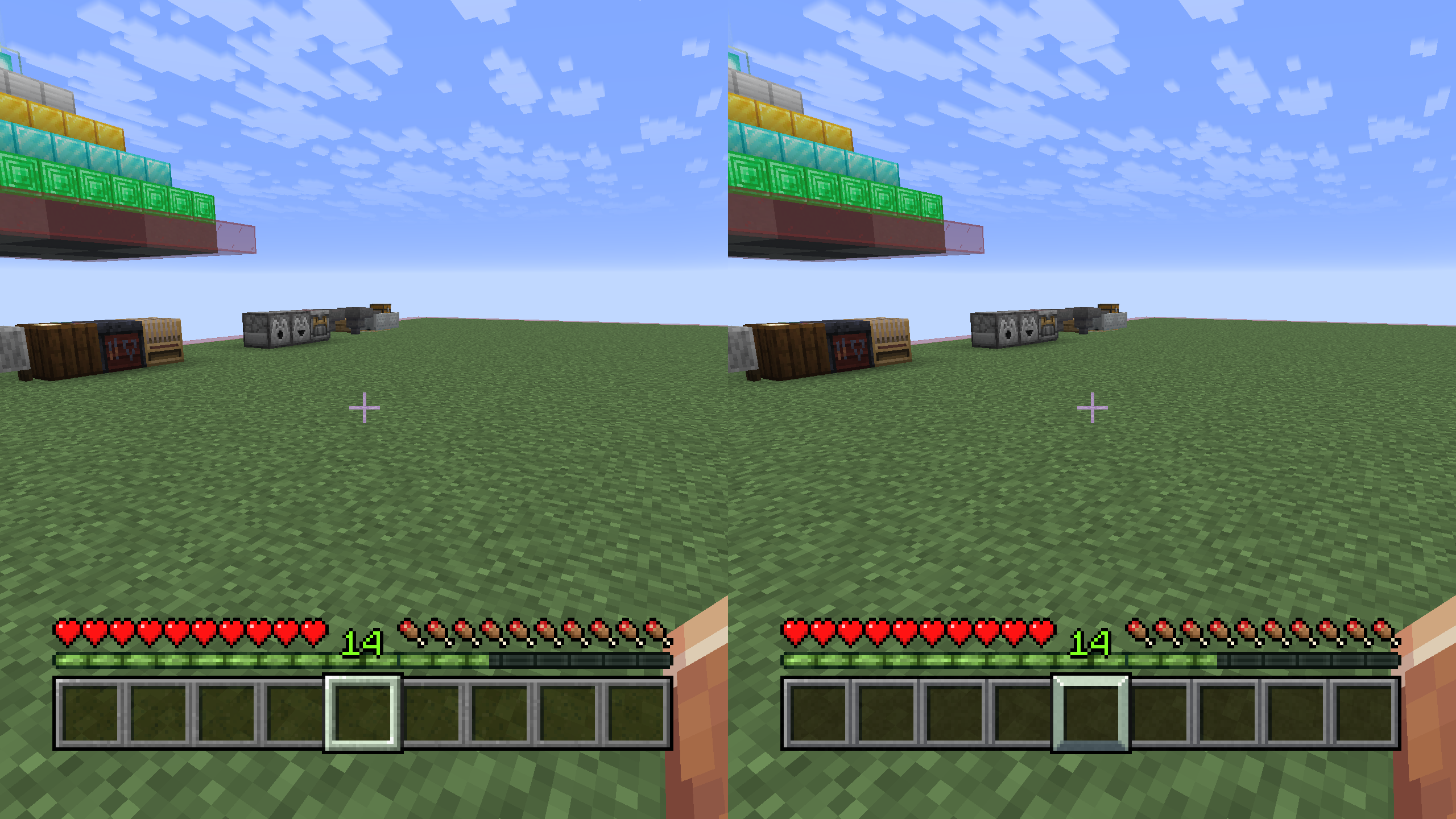
Simple resource pack that changes the hotbar texture to a better one, keeping the vanilla aesthetic.
AR’s OreUI
# AR’s OreUI(AmongstReality’s OreUI)
[](https://modrinth.com/resourcepack/ars-oreui)
[](https://www.curseforge.com/minecraft/texture-packs/ars-oreui)
[](https://www.patreon.com/c/AmongstReality)
[](https://buymeacoffee.com/amongstreality)
GUI resource pack based on early look of OreUI update. You can look it up here [Minecraft Wiki – OreUI](https://minecraft.wiki/w/Ore_UI).
> ❗ **Important:** the resource pack REQUIRES [OptiGUI](https://modrinth.com/mod/optigui). If you don’t use it, chest, trapped chest, ender chest and barrel, etc., will have the same generic texture.
> ⚠️ **Warning:** this resource pack is only available for download on [Modrinth](https://modrinth.com/resourcepack/ars-oreui) and [CurseForge](https://www.curseforge.com/minecraft/texture-packs/ars-oreui) and has its own page on [Planet Minecraft](https://www.planetminecraft.com/texture-pack/ar-s-ore-ui-1-21-2-v1-0-early-access/). If you find it on any other platform – **do not download it** from them, because they redistribute it unofficially and unauthorized. The download links may lead to malicious websites and the content you download may contain viruses.
## You can support me and my projects here:
[](https://www.patreon.com/c/AmongstReality)
[](https://buymeacoffee.com/amongstreality)
Terms of use
Copyright © AR’s OreUI
Author AmongstReality
Links to pages of the author on different platforms:
– [Patreon](https://www.patreon.com/c/AmongstReality)
– [BuyMeACoffee](https://www.buymeacoffee.com/amongstreality)
– [CurseForge](https://www.curseforge.com/members/amongstreality/projects)
– [Modrinth](https://modrinth.com/user/AmongstReality)
– [Planet Minecraft](https://www.planetminecraft.com/member/amongstreality/)
When you can use my assets:
– In public Modpacks on Modrinth/CurseForge.
– If you want to add mod support as an addon for the resource pack. If you do that, you have to add clear credit that
includes links to the original resource pack.
– Any private modifications of the original resource pack.
When you can **NOT** use my assets:
– Distribution on the Bedrock Marketplace.
– Locking behind a paywall (e.g. Patreon).
– Distribution of original/modified assets on any platforms.
Links to the resource pack’s pages on different platforms:
– [CurseForge](https://www.curseforge.com/minecraft/texture-packs/ars-oreui)
– [Modrinth](https://modrinth.com/resourcepack/ars-oreui)