## Tired of clicking the **maximize** button to play your favorite game ?
Say goodbye to that extra click with **AutoMaximize**.
AutoMaximize is a very simple mod to maximize the game automatically when in the title screen.
Spoiler
Don’t worry! It will maximize one time on every game launch.
—
All versions are pretty much supported, feel free to contribute.
Found an unsupported version ? Create an issue so I can test it and add it.
A bug or a feature ? Create an issue on [the Github](https://github.com/Mimexe/minecraft-automaximize/issues/new)
Automatic Sorter
## Why?
Hi, I created mod for easy sorting items in your storage. It is primarily personal mod. I wanted to create sorting system with redstone but that was too much work for me so I programmed something and here we are. If you wanna edit my mod, feel free to use it. I linked my github repository.
## What this mod does?
– Provides a simple, fully customizable item-sorting system without needing complex redstone contraptions.
– Automatically distributes items into connected storage chests based on filter rules (whitelist, inventory-based, rejects).
– Allows speed upgrades via Sorter Amplifiers or commands for faster item processing.
## How it’s working?
There are 4 new items and 4 new commands
You need Sorter Controller put under your chest, where you put not sorted items. Then you connect Sorter Controller and Filter by pipes. Filter must facing chest in your storage. Pipes MUST be visually connected to Sorter controller and to filter.
Filter has three modes:
– Whitelist
– Filtering by items in Filter block inventory
– In inventory
– Filtering by items in storage chest where Filter is facing
– Rejects
– Accepting items which were rejected by other Filters (more or less like trash bin)
– Also accepting items which have active filtering but not enough room in chest
You can change Filter mode by clicking on icon in Filter menu. You can open Filter menu by right clicking on Filter block.
Items are transported via air, pipes don’t have inventories or something like hoppers do. You can UPGRADE sorting speed by putting Sorter Amplifier item into Sorter Controller.
## How to craft new items?
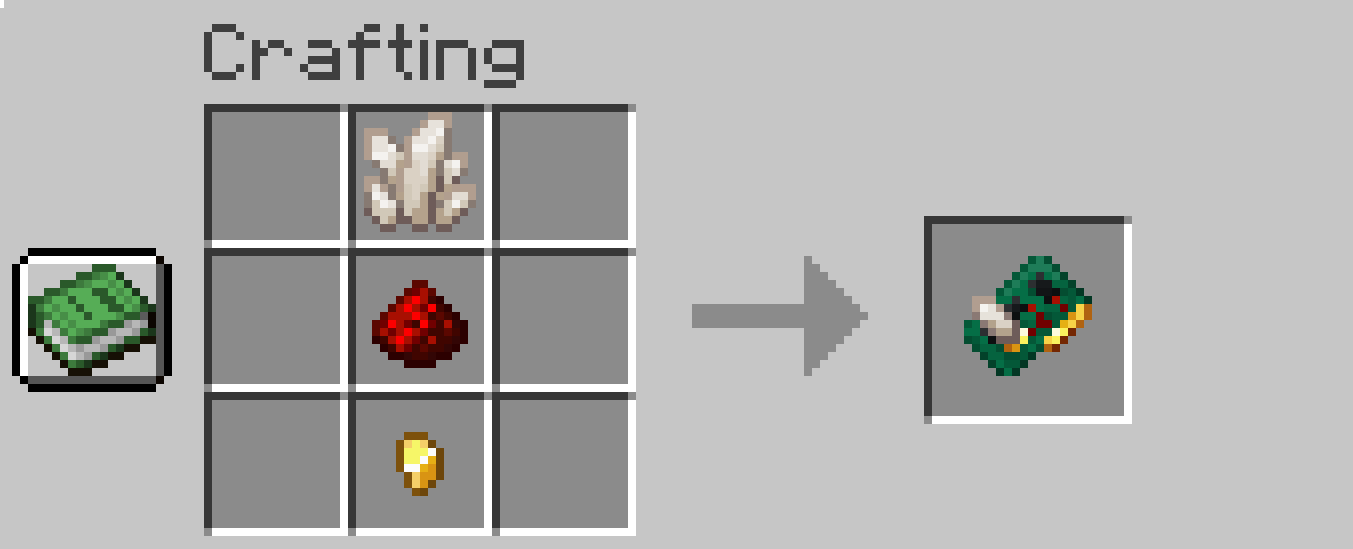
There are 4 new recepies:
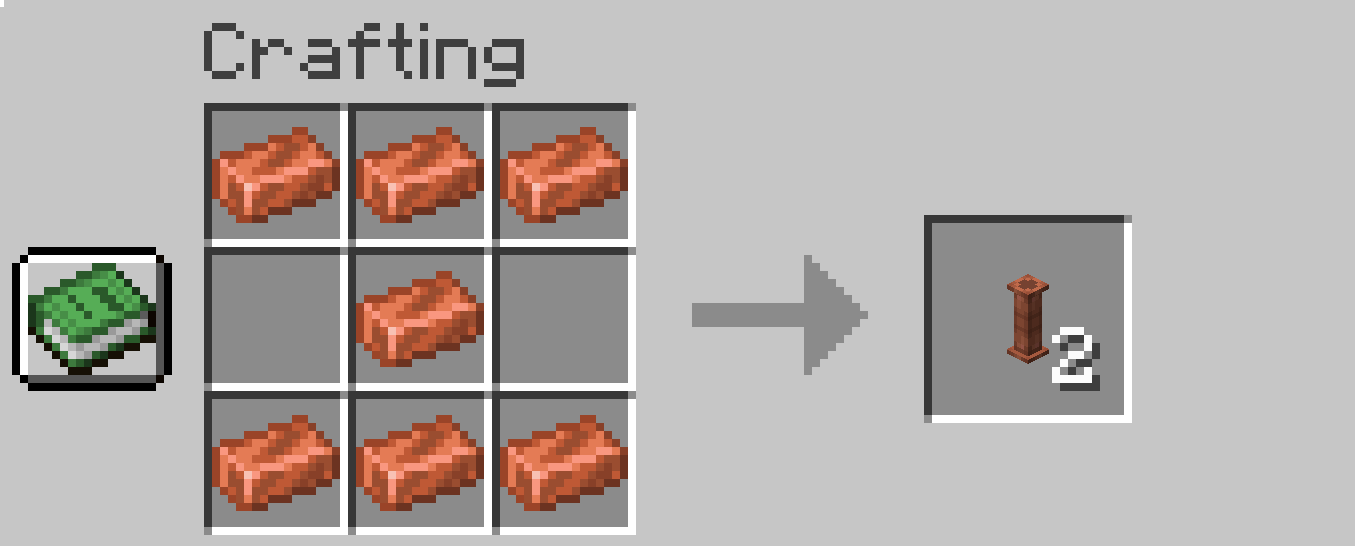
Pipe:
– 7x Copper Ingot
### Commands
Sorting is triggering 4 times per second (just hardcoded that way). All new commands are for admins only and starts with **as_**
– as_basespeed
– Changing base speed of sorting (default 4 = 4 items per second)
– For example: /as_basespeed 4
– as_basespeedboostperupgrade
– Changing upgrade speed boost from Sorter Amplifier (default 0.4)
– For example: /as_basespeedboostperupgrade 0.4
– as_instantsort
– If you don’t want to wait just set it to true (default false)
– For example: /as_instantsort false
– as_exportModBlocks
– Purely for debug only. This command saves all mod blocks (only from my mod) to the file sorter_controller_export.json in your minecraft folder in config folder. It saves position and properties of blocks and items in range of the player.
– For example this command saves all blocks in range of 118 from the player
– /as_exportModBlocks 118
– This will help me find the answer about your sorting setup and its much quicker solution than questions like “How your Filters are setup? Do you have screenshots of each one?”
## What to do when you encounter a bug?
I need information of your:
– Minecraft version
– Mod loader and it’s version (fabric/forge)
– Mod version
– automatic_sorter_export.json (from 1.4.0 – see Commands chapter)
## What is meaning behind version numbers?
The version consists of three numbers separated by a dot. For example, 1.3.4.
The first number (1) is the major version of the mod. This number changes when the mod undergoes significant changes. (This is unlikely to happen.)
The second number (3) indicates new features, such as support for new storage mods or general improvements to the mod (new blocks, new items, etc.).
The third number (4) indicates a hotfix. When releasing a version, I might miss a bug during development. When I release a fix, I only increase this number. It is purely a bug fix—no other improvements are included.
1.2 – Filter block upgrade (Rejects mod and quick move support)
1.1 – Added support for the Expanded Storage mod
1.0 – Mod release
## Final words
So there it is. Enjoy sorting your loot ^^
AutomaticMemories
# Automatic Memories
Automatic Memories periodically takes screenshots, capturing memories of your Minecraft experience.
This mod takes screenshots at set intervals, so when you return, you’ll find hundreds of unexpected snapshots capturing your time in the game.
There’s a few YouTube videos that compile years’ worth of accidentally taken screenhots, offering an unexpected glimpse into the players’ long-term experience in Minecraft.
Unfortunately, if you rarely mispress keys or have a keyboard without dedicated function keys, you might miss out on this unique perspective of your playtime.
This mod solves this by automatically taking a screenshot every 3 hours by default, over time giving you a catalog of random screenshots!
AutomaticMemories is a simple and lightweight mod, but it still offers plenty of configuration options, allowing you to tailor it to your exact preferences.
[Cloth Config API](https://modrinth.com/mod/cloth-config) and [ModMenu](https://modrinth.com/mod/modmenu) are required to configure the mod.
Using the configuration you can make the screenshots more or less frequent, save them in a different folder, or skip taking a screenshot when you aren’t in game.
By default, this mod will carry over the timer between sessions. For exmaple, if you set the interval to every four hours and play for three hours one day, the next time you play it will take a screenshot one hour in.
This is useful since you probably won’t often play for as long as your interval is, which would mean the mod wouldn’t ever take a screenshot. Leaving “Restart timer each session” disabled solves this.
## Support
– Open an issue on [GitHub](https://github.com/dinoslice/AutomaticMemories/issues)
– Ask for help on [Discord](https://discord.gg/2pn53HV)
## Dependencies
– [Fabric API](https://modrinth.com/mod/fabric-api)
– [ModMenu](https://modrinth.com/mod/modmenu) (Optional, for configuration)
– [Cloth Config API](https://modrinth.com/mod/cloth-config) (Optional, for configuration)
automatic-potato
This mod provides Forge-like mod version checker. Currently, just log the status to console.
Supports “homepage” and “promos”.”-latest” fields.
See [https://github.com/Kotori316/automatic-potato/blob/main/README.md](https://github.com/Kotori316/automatic-potato/blob/main/README.md) for implementation.
Automatic Lootdrops
# 🎁 LootDrop Plugin
Ein flexibles und performantes Lootdrop-System für deinen Server – mit anpassbaren Intervallen, Loot-Stufen und zufälligen Drops inklusive Effekten.
—
🇩🇪 Deutsch
## ✨ Features
– Zufällige Lootdrops im konfigurierbaren Radius
– Mehrere Loot-Stufen: **schlecht, mittel, gut, op, random**
– Partikel-Effekte beim Herunterfallen
– Automatische Chat-Ankündigung mit Koordinaten
– OP-Lootdrops mit besonders starkem Loot
– Vollständige **Tab-Completion** für alle Befehle
– Automatische Bereinigung fehlerhafter ArmorStands beim Serverstart
– Chunk bleibt während des Falls geladen (keine Bugs durch Entladen)
– Loot-Kisten verschwinden automatisch, wenn sie geleert wurden
## ⚙️ Befehle
“`
/lootdrop intervall set
→ Setzt das Intervall für normale Lootdrops
/lootdrop intervall set op
→ Aktiviert OP-Lootdrops mit eigenem Intervall
/lootdrop radius set
→ Setzt den Spawn-Radius
/lootdrop loot set
→ Setzt die Loot-Stufe
/lootdrop spawn
→ Spawnt sofort einen Lootdrop
/lootdrop info
→ Zeigt aktuelle Einstellungen
“`
## 🎮 Gameplay
– Lootdrops spawnen zufällig im festgelegten Bereich
– Die Koordinaten werden im Chat angekündigt
– Beim Fallen erscheinen Partikel
– Die Kiste landet am Boden und wird automatisch gefüllt
👉 Villager-Spawn-Eggs:
– Können in allen Stufen vorkommen
– Unterschiedliche Drop-Chancen je nach Stufe
## 🧠 Zusatzfunktionen
– Nur **OP-Drops zeigen ihre Stufe im Chat**, andere zeigen nur Koordinaten
– ArmorStands erhalten spezielle Tags und werden beim Neustart entfernt
– Chunk bleibt während des Falls geladen (keine unsichtbaren Drops)
– Leere Loot-Kisten verschwinden automatisch nach dem Schließen
—
🇬🇧 English
## ✨ Features
– Random loot drops within a configurable radius
– Multiple loot tiers: **bad, medium, good, op, random**
– Particle effects while falling
– Chat announcement with coordinates
– OP loot drops with powerful rewards
– Full **tab completion** for all commands
– Automatic cleanup of bugged ArmorStands on server start
– Chunk stays loaded during drop (prevents glitches)
– Loot chests disappear automatically when emptied
## ⚙️ Commands
“`
/lootdrop intervall set
/lootdrop intervall set op
/lootdrop radius set
→ Sets the spawn radius
/lootdrop loot set
→ Sets the loot tier
/lootdrop spawn
→ Spawns a loot drop instantly
/lootdrop info
→ Shows current settings
“`
## 🎮 Gameplay
– Loot drops spawn randomly within the configured area
– Coordinates are announced in chat
– Particles appear while the drop is falling
– The chest lands and gets filled automatically
👉 OP loot drops may include:
– 5 Golden Apples
– Strong enchantment books
– Villager spawn eggs
👉 Villager spawn eggs:
– Can appear in all tiers
– Different drop chances depending on tier
## 🧠 Additional Features
– Only **OP drops show their tier in chat**, others show coordinates only
– ArmorStands are tagged and cleaned up on restart
– Chunk stays loaded during falling (no invisible drops)
– Empty loot chests disappear automatically after closing
Automatic Doors
Requires the library mod Collective. This mod is part of The Vanilla Experience modpack and Serilum’s Quality of Life Bundle mod. Automatic Doors is a minimalistic configurable mod which automatically opens doors around the player and closes them with a delay. The doors will only be closed if the player isn’t near after opening. By default iron doors will also be opened, but you may change that in the config.
Configurable:( how do I configure? ) doorOpenTime (default = 2500, min 0, max 10000): The time in ms the door should stay open. shouldOpenIronDoors (default = true): When enabled, iron doors will also be opened automatically. preventOpeningOnSneak (default = true): When enabled, doors won’t be opened automatically when the player is sneaking.
The effect in action:
Show Spoiler
——————
You may freely use this mod in any modpack, as long as the download remains hosted within the Modrinth ecosystem.
Serilum.com contains an overview and more information on all mods available.
Comments are disabled as I’m unable to keep track of all the separate pages on each mod. For issues, ideas, suggestions or anything else there is the Github repo. Thanks!
Automatic-Crafting-Table
Automatic-Crafting-Table
You can now automatically craft items within a hopper system.
This plugin supports:
All minecraft versions from 1.14.1 to 1.19.4
Integration of a workbench in a hopper system to automatically craft items
Custom items
PlaceholderAPI
A configuration file
How to use it
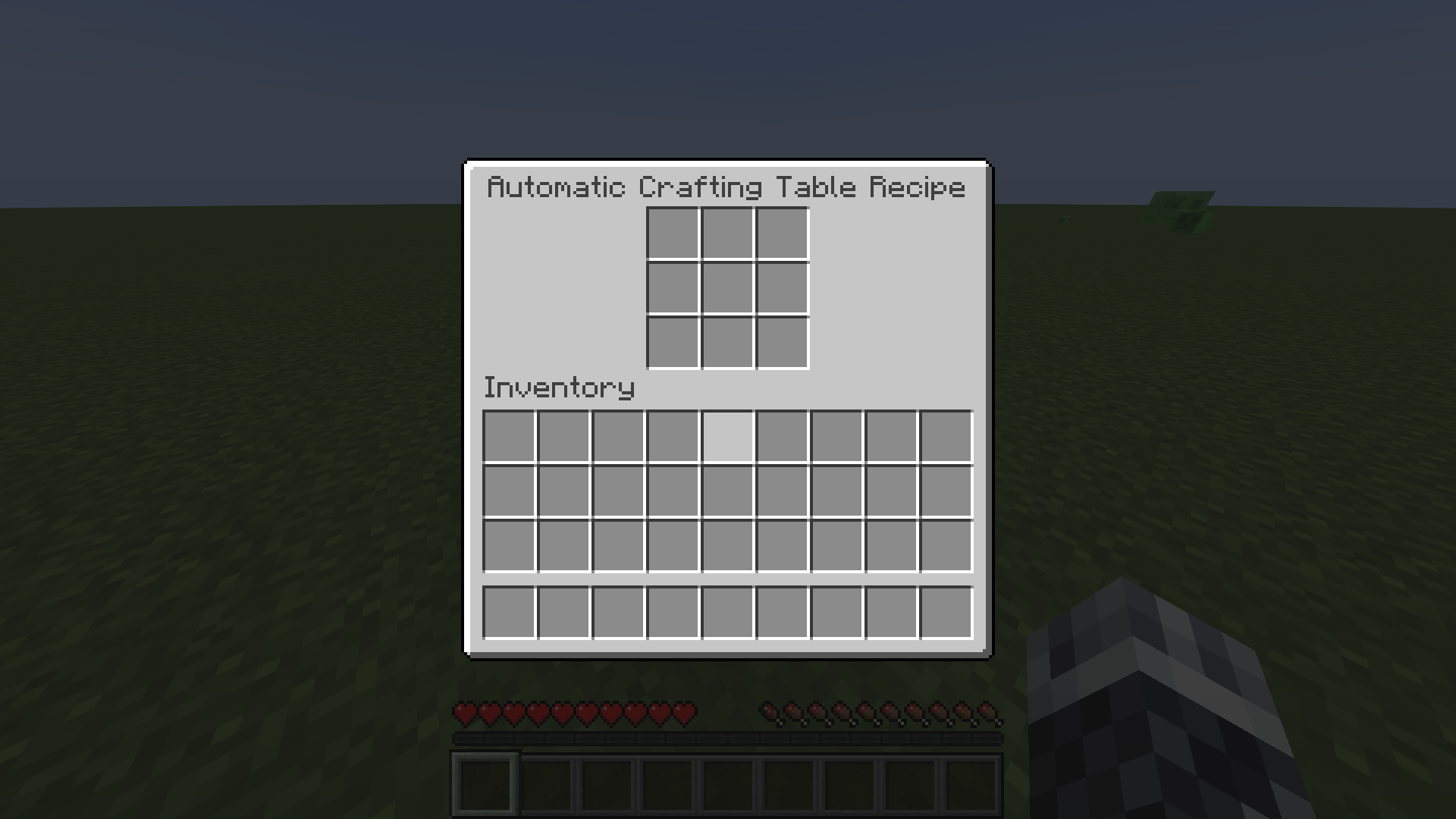
Simply shift and left-click on a crafting table and a new menu pops up:
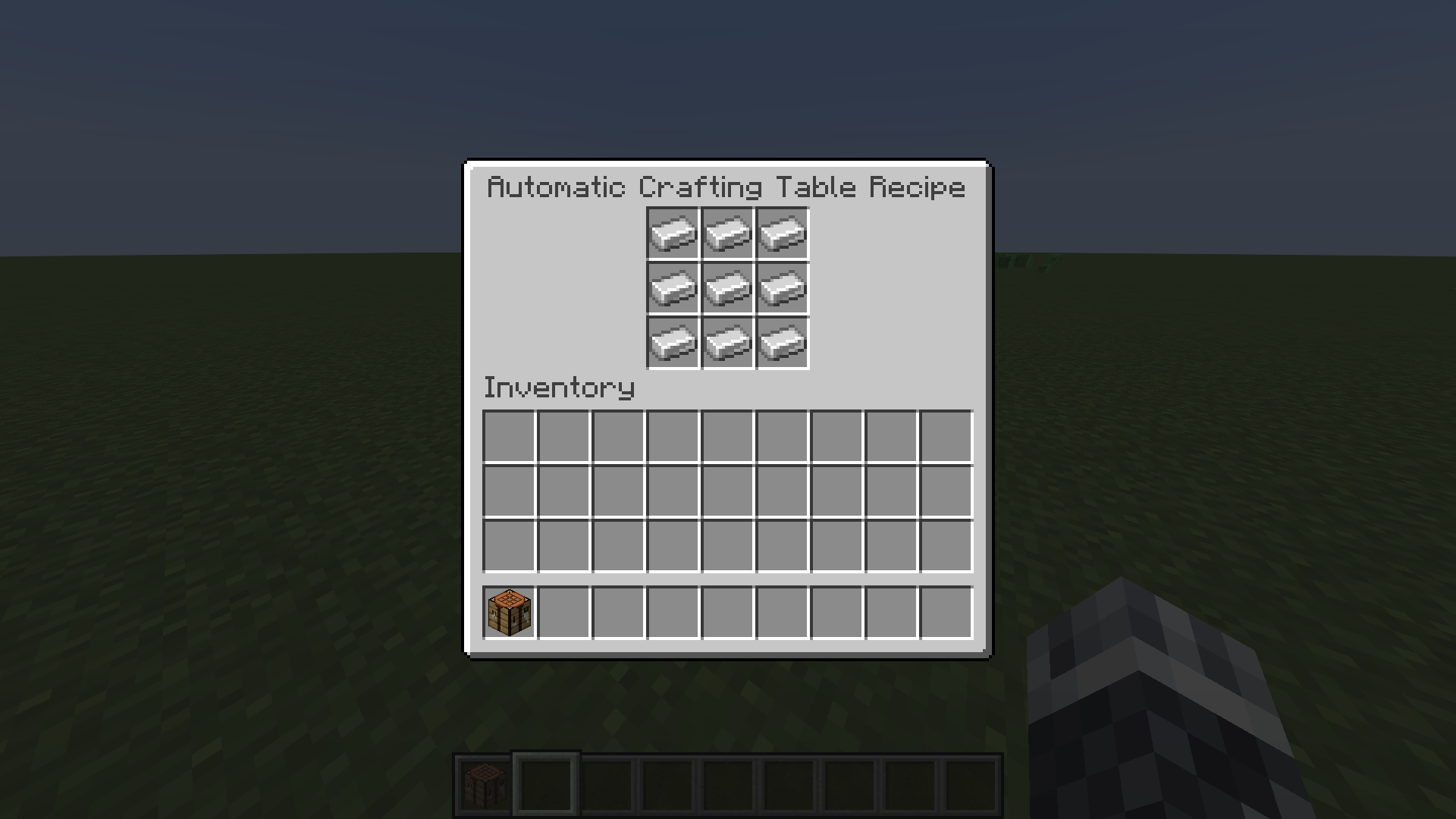
Now put items in this menu for any crafting recipe you want (custom recipes included). For instance, I use a block of iron:
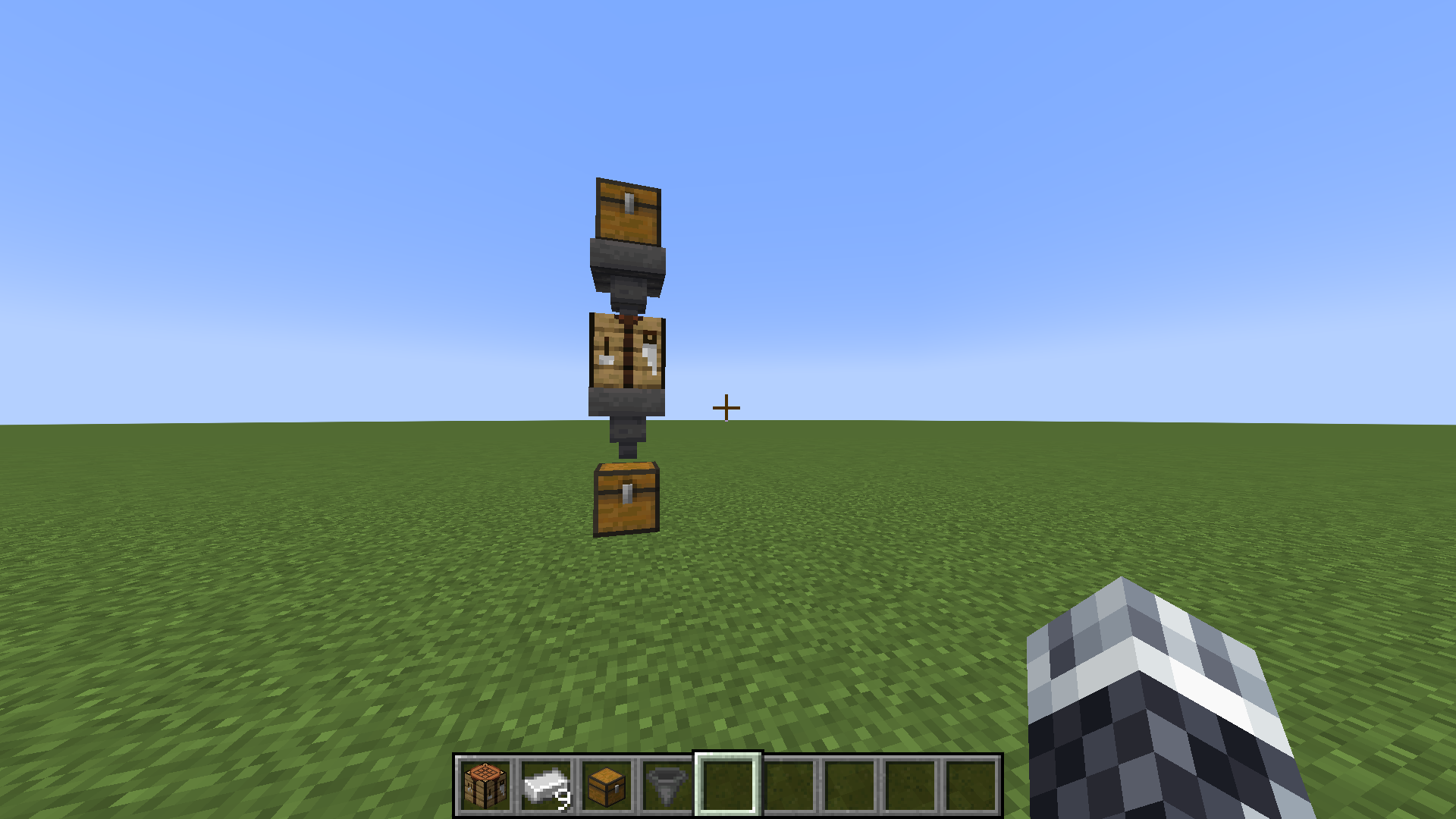
In the next step, connect your crafting table you just modified with a hopper system (the first hopper must go on the crafting table, the second hopper must go in any other direction except the where the crafting table is located). For example:
Finally, just put the items you need to craft the recipe in the hopper that goes into the crafting table and Voilà!
The item you want just dropped into the other hopper!
You can also make more than one hopper face into the crafting table. They will work
together with the ingredients to craft the item you want. For example, one hopper has 2 sticks
and the other has 3 diamonds for a diamond pickaxe and it would work!
The configuration file
enabled: true
crafting-table-ui-display: 'Automatic Crafting Table Recipe'
crafting-table-timer: 4
crafting-table-visual-feedback-enabled: true
crafting-table-sound-feedback-enabled: true
separate-from-other-crafting-tables: false
automatic-crafting-table-item-display: "&aAutomatic-Crafting-Table"
automatic-crafting-table-item-lore:
  - "&eUse this Crafting Table in a "
  - "&ehopper system to automatically "
  - "&ecraft items"
The field “enabled” can be set either to true or false to enable or disable the plugin.
The field “crafting-table-ui-display” is the menu name of the menu that opens when you shift and left-click on a crafting table. Color codes supported.
The field “crafting-table-timer” is a number of the time how long your crafting table needs to craft items. The number is in minecraft ticks. For instance: 20 minecraft ticks = 1 second.
The field “crafting-table-visual-feedback-enabled” enables/disables the particles that spawn when an item has been successfully automatically crafted.
The field “crafting-table-sound-feedback-enabled” enables/disables the sound that plays when an item has been successfully automatically crafted.
The field “separate-from-other-crafting-tables” makes, when it is set to true, the Automatic-Crafting-Table a different item as the normal crafting table. Do /getACT (player) (permission: act) to get one or give to other players.
The field “automatic-crafting-table-item-display” is the display of the Automatic-Crafting-Table-Item.
The field “automatic-crafting-table-item-lore” is the lore of the Automatic-Crafting-Table-Item.
You can also make more than one hopper face into the crafting table. They will work together with the ingredients to craft the item you want. For example, one hopper has 2 sticks and the other has 3 diamonds for a diamond pickaxe and it would work!
PlaceholderAPI
“automaticcraftingtableTables” returns an int of how many crafting tables are registered.
“automaticcraftingtableUsedRecipes” returns a String of all items that has been crafted automatically with the plugin.
### Adds a simple autocrafter block. Has a simple mode and a… not simple mode.
Must be installed on both client and server.
Adds a single block: the Automated Crafting Table.
—
### Automated Crafting is discontinued on Minecraft 1.21+ because of the vanilla Crafter
There’s a [converter](https://modrinth.com/mod/automated-crafting/version/1.0.0+MC1.21)
that can be used to turn Automated Crafting Tables into Crafters when updating a world to 1.21.
Converter details
Use the converter when updating a pre-1.21 world with Automated Crafting Tables to 1.21.
Contraptions that used the Automated Crafting Table are unlikely to work with the Crafter, but this will at least
minimize the loss of blocks and items.
Automated Crafting Tables’ input will be copied to its Crafter replacement, but its output will be lost because
Crafters’ output slots don’t hold items.
—
Any stripped wood or logs may be substituted for those shown in the recipe above.
Basically, you insert items (with hoppers and droppers) so that a recipe pattern is in its inventory, then give it a redstone signal and it crafts the recipe.
—
Configuration
Supports [Cloth Config](https://modrinth.com/mod/cloth-config/versions) and
[Mod Menu](https://modrinth.com/mod/modmenu/versions) for configuration, but neither is required.
Options will use their default values if [Cloth Config](https://modrinth.com/mod/cloth-config/versions) is absent.
If [Cloth Config](https://modrinth.com/mod/cloth-config/versions) is present, options can be configured either through
[Mod Menu](https://modrinth.com/mod/modmenu/versions) or by editing `config/automated_crafting.json` in your
instance folder (`.minecraft/` by default for the vanilla launcher).
– Enable Simple Mode; default: `true`
> In simple mode you can set a recipe template
– Enable Quasi-Connectivity; default: `false`
> If the block above an auto crafter would be powered, the auto crafter is powered (but not updated)
– Enable Redstone Dust Redirection; default: `false`
> Redstone dust next to auto an auto crafter will point into the auto crafter
– Craft Continuously While Powered; default: `false`
> When an auto crafter is powered and contains a valid recipe, that recipe will be crafted immediately
– Comparator reads 15 if output isn’t empty; default: `false`
> A comparator reading an auto crafter with anything in its output slot will read 15
– Download translation updates; default: `true`
> Download translations from Crowdin when the game launches
—
Translating
[](https://crwd.in/automated-crafting)
If you’d like to help translate Automated Crafting, you can do so on
[Crowdin](https://crwd.in/automated-crafting).
New translations will be added once approved without the mod needing an update thanks to
[CrowdinTranslate](https://github.com/gbl/CrowdinTranslate).
—
This mod is only for Fabric (works on Quilt, too!) and I won’t be porting it to Forge. The license is MIT, however, so anyone else is free to port it.
I’d appreciate links back to this page if you port or otherwise modify this project, but links aren’t required.
Create: Automate stones
## Create: Automate Stones is Create Mod addon that adds multiple stone recipes
**All blocks and items that can be crafted:**
*You can see recipes in gallery*

A simple plugin that allows you to leave autographs on items.
## Features
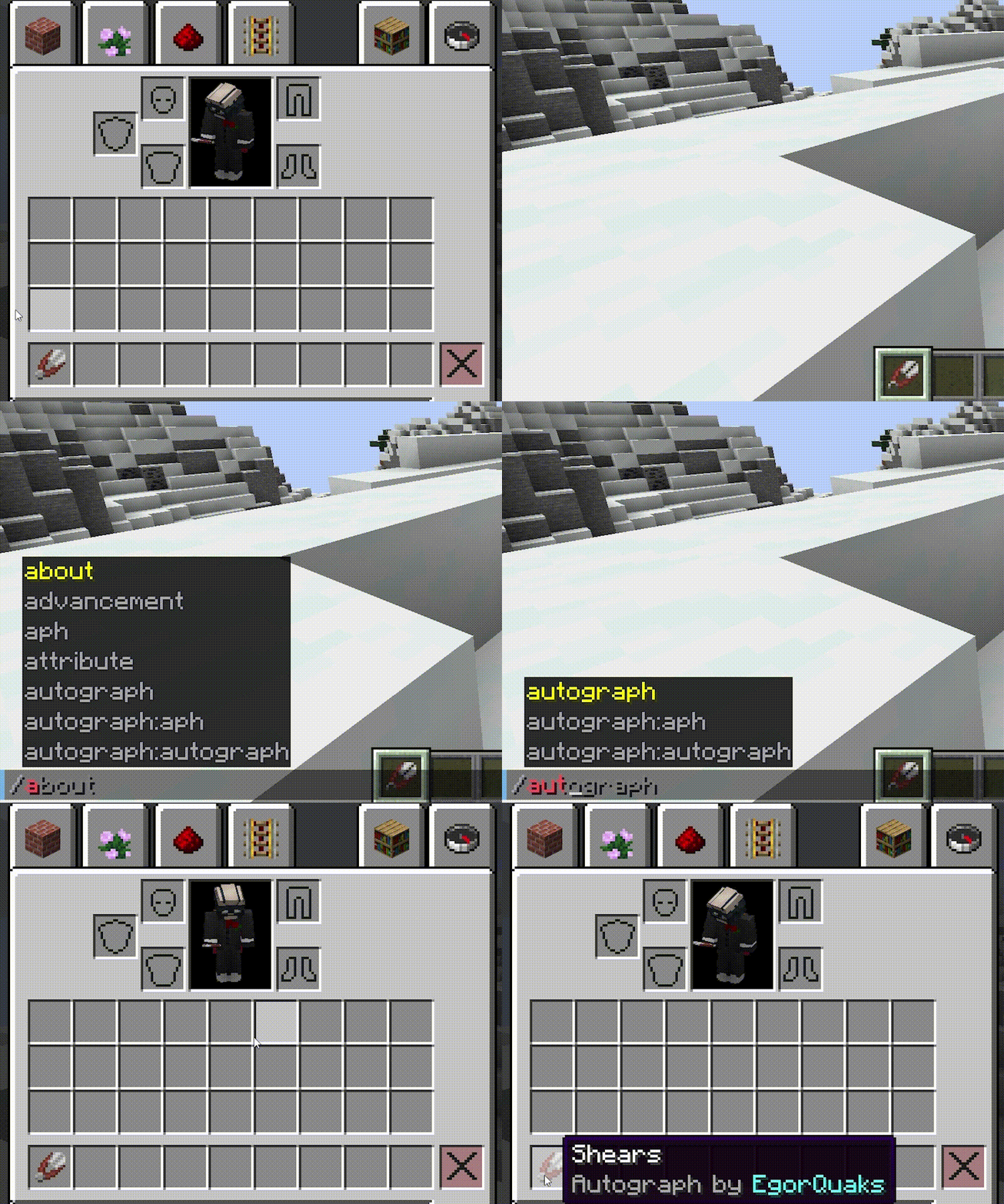
– Provides a simple command to leave an autograph (ie signature) on certain items.
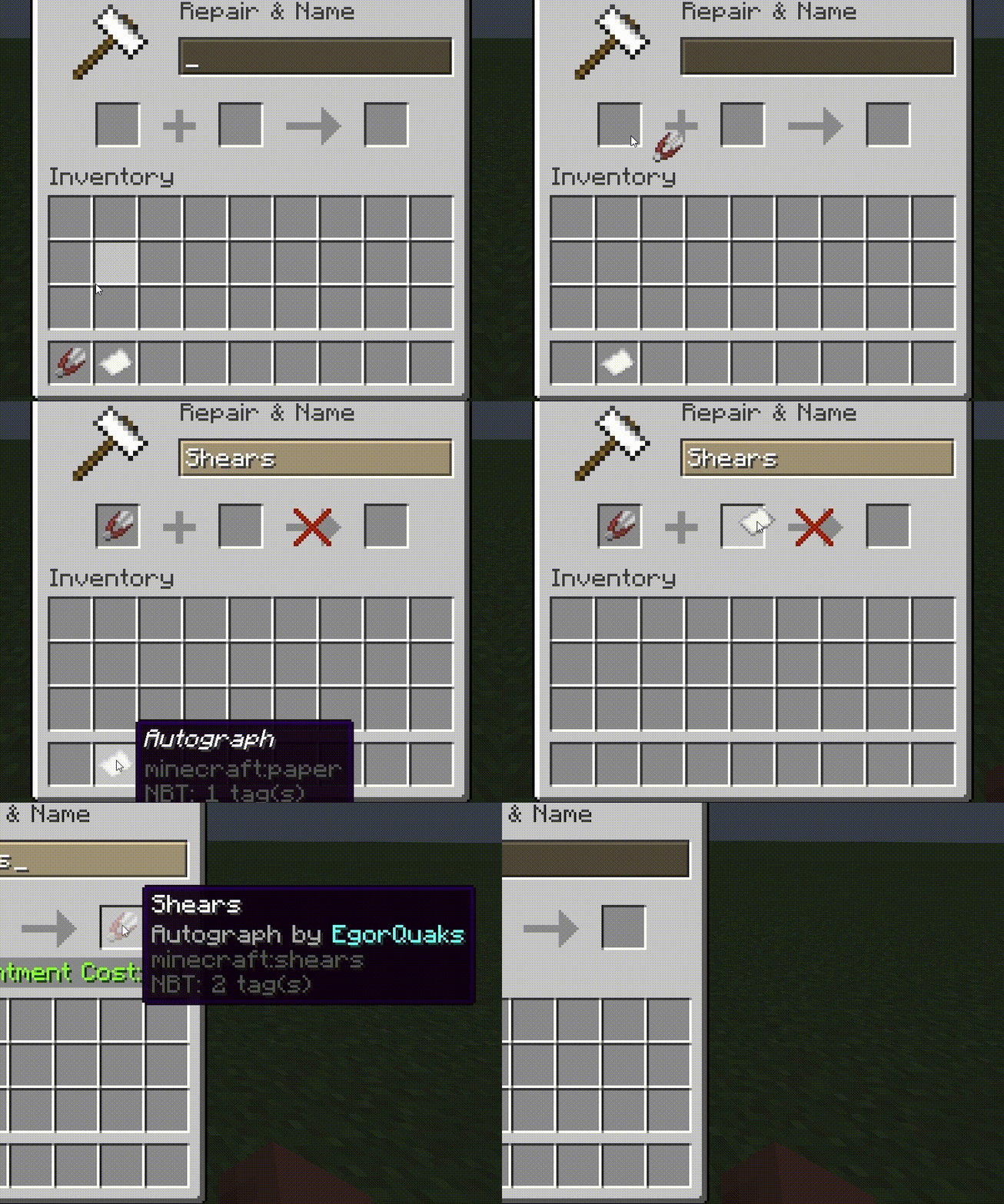
– Ability leave autographs through the anvil.
– Ability to remove autographs through the grindstone.
– Ability to set a list of possible items on which you can leave an autograph.
– Ability to customize the autograph form (and all messages output by the plugin, too) using [MiniMessage](https://docs.advntr.dev/minimessage/index.html).
– Ability to customize the item which used to leave autographs through the anvil.
## Installation
1. Download the latest release of the plugin from the Releases page on GitHub.
2. Copy the downloaded JAR file into your server’s `plugins` folder.
3. Restart the server.
## Usage
The plugin provides one command: `/autograph` which leaves an autograph on behalf of the player on the item.
And `/rma` to remove all autographs on item.
OR
Combine an item on the anvil with a special item (by default, paper renamed “Autograph”) to leave an autograph.
And remove autographs by grindstone.
## Configuration
Almost all fields in config.yml are signed with comments, so there should be no difficulties setting up the plugin