Arı Türkçe Yama
Alıntı sözcüklerden bütünüyle arındırılmış bir Türkçeyi Minecraft’a ekleyen kaynak paketi.
# Arı Türkçe nedir?
Arı Türkçe; alıntı sözcüklerden, kökeni yabancı sözlerden, uydurukça kelimelerden arındırılmış Türkçedir. Camiada ve tarihte Öz Türkçe olarak anılsa da Öz Türkçe adı çok kirlendiği için yamaya Öz Türkçe Yama adı değil Arı Türkçe Yama adı verilmiştir.
# Öz Türkçe adının kirlenmesi derken?
Öz Türkçe denince insanların aklına uydurukça sözcükler, kulağı tırmalayan sözler, TDK’nin yaptığı kötü ve kuralsız kelimeler geliyor. Bu da bu adın kirlendiğinin özetidir. Bu nedenle Arı Türkçe adı uygun görüldü.
# Uydurukça kelimenin tanımı ne, nasıl kelimeler uydurukçadır?
Uydurukça kelime, Türkçenin kurallarına bütünüyle aykırı üretilmiş kelimelere denir. Örnek olarak toplum verilebilir. Bunun uydurukça olma sebebi fiilden isim yapan **+Im** ekinin “toplu” isminin köküne eklenmesidir.
# Peki bu dil görüşünün tarihi nedir?
Arı Türkçe ilk olarak Öz Türkçe adıyla 1910’lardaki Türkçülük akımıyla birlikte ortaya çıkmıştır. Cumhuriyet Dönemi’nde 1932’de Türk Dil Kurumunun kurulmasıyla Dil Devrimi resmî olarak başlamış, Arapça ve Persçe kökenli sözlerin yerine halk ağızlarından derlenen sözcükler ya da Türkçe köklerden türetilen sözcükler bu sözlerin yerine piyasaya sürülmüştür. 1934’ten 1950’de Demokrat Parti’nin iktidar olmasına dek süren Dil Devrimi 1950’de CHP’nin iktidardan düşmesiyle kesilmiştir. 1960 darbesinin ardından ise Dil Devrimi 1970’lerde doruk noktasına çıkarak sürmüş, 1980 darbesinden sonra anayasanın değiştirilmesiyle darbeden önce özerk bir yapıda olan TDK 1982 anayasasıyla birlikte devlet çatısı altında kurulan Atatürk Kültür, Dil ve Tarih Yüksek Kurumuna bağlanmış ve özleştirmeci Dil Devrimi kâğıt üzerinde sona ermiştir.
# Türkçeye geçiş yapmam için kaynak paketini silmem gerekir mi?
Hayır gerekmez. Arı Türkçe, oyundaki diğer tüm dillerden ayrı görünür. Bu da kaynak paketini kaldırmadan istediğiniz dillere geçiş yapabilmenizi sağlar.
# Katkıları için teşekkürler:
– mahiyet
– ulughann
– GorkeyGunesBeg
Antumbra
Antumbra is a resource pack which applies a darker and rougher mood to the vanilla look while maintaining the vividness of many textures. In combination with the Photon shader it is possible to achieve a more realistic feel than vanilla. This pack is for everyone who loves the vanilla look, but prefers a more realistic color palette for most textures. Additionally, a person who prefers a more medival style might also like it.

Antumbra + Photon + Photonics
## Features
– An atmospheric dark vibe
– Keeping vividness of many textures
– Dark GUI
## Comparison

Vanilla / Antumbra / Antumbra + Photon + Photonics / Vanilla + Photon + Photonics
Check out the other comparison images in the gallery!
Anton Chigurh (Антон Чигур) Totem of Undying
– Anton Chigur is the main antagonist of Cormac McCarthy’s novel “No Country for Old Men” and its film adaptation. He is a hired assassin, a drug dealer’s mercenary, who ruthlessly eliminates almost everyone he encounters.
– Антон Чигур — главный антагонист романа Кормака Маккарти «Старикам тут не место» и его киноадаптации. Это наёмный убийца, наёмник наркоторговцев, который безжалостно расправляется почти со всеми, кого встречает на своём пути
[Check collection with all memes + streamers Totems ](https://modrinth.com/collection/sfDcDGAi)
AntiXray
# Anti Xray
Anti Xray is a lightweight fabric mod that allows server owners to combat xrayers.
## Config
“`toml
# Default values
enabled = false
# World specific values
[overworld]
enabled = true
engineMode = 3
maxBlockHeight = 256
updateRadius = 2
lavaObscures = false
hiddenBlocks = [“#c:ores”, “raw_copper_block”, “raw_iron_block”, “raw_gold_block”, “!#antixray:hidden_only_ores”]
replacementBlocks = [“#antixray:hidden_only_ores”, “stone”, “deepslate”, “andesite”, “calcite”, “diorite”, “dirt”, “granite”, “gravel”, “sand”, “tuff”, “mossy_cobblestone”, “obsidian”, “clay”, “infested_stone”, “amethyst_block”, “budding_amethyst”, “chest”]
[the_nether]
enabled = true
engineMode = 1
maxBlockHeight = 128
updateRadius = 2
lavaObscures = true
hiddenBlocks = [“ancient_debris”, “nether_quartz_ore”, “nether_gold_ore”, “gold_block”, “gilded_blackstone”]
“`
### Config option overview
`enabled` if set to true anti xray will be active in the specified world
`engineMode` can either be 1, 2 or 3 see [Engine Modes](#Engine Modes)
`maxBlockHeight` controls the max height at which blocks should get obfuscated
`updateRadius` controls how many blocks away from shown blocks obfuscation should start (if your players see fake ores
it is recommended to increase this value)
`lavaObscures` if set to true blocks next to lava will get obscured
`hiddenBlocks` a list of blocks to hide *(Engine mode 1)* or a list of blocks to use for obfuscation *(Engine mode 2/3)*
`replacementBlocks` is a list of blocks that will be obfuscated, but not used as fake blocks *(Engine mode 2/3 only)*
*Blocks / block tags can be prefixed `!` to remove them from the block list.
The rules are applied from left to right, removals should be specified after additions. **(since 1.4.10)***
### Engine Modes
| Info | Image |
:————————-:|:————————-:
**Anti xray disabled:** This is just for reference | 
**EngineMode 1:** This mode will replace all fully obscured (no air around) blocks from `hiddenBlocks` with blocks from `replacementBlocks` | 
**EngineMode 2:** This mode will replace all blocks from `hiddenBlocks` and `replacementBlocks` with random blocks from `hiddenBlocks` | 
**EngineMode 3 (recommended):** Works very similar to engine mode 2, but works better with slow connections | 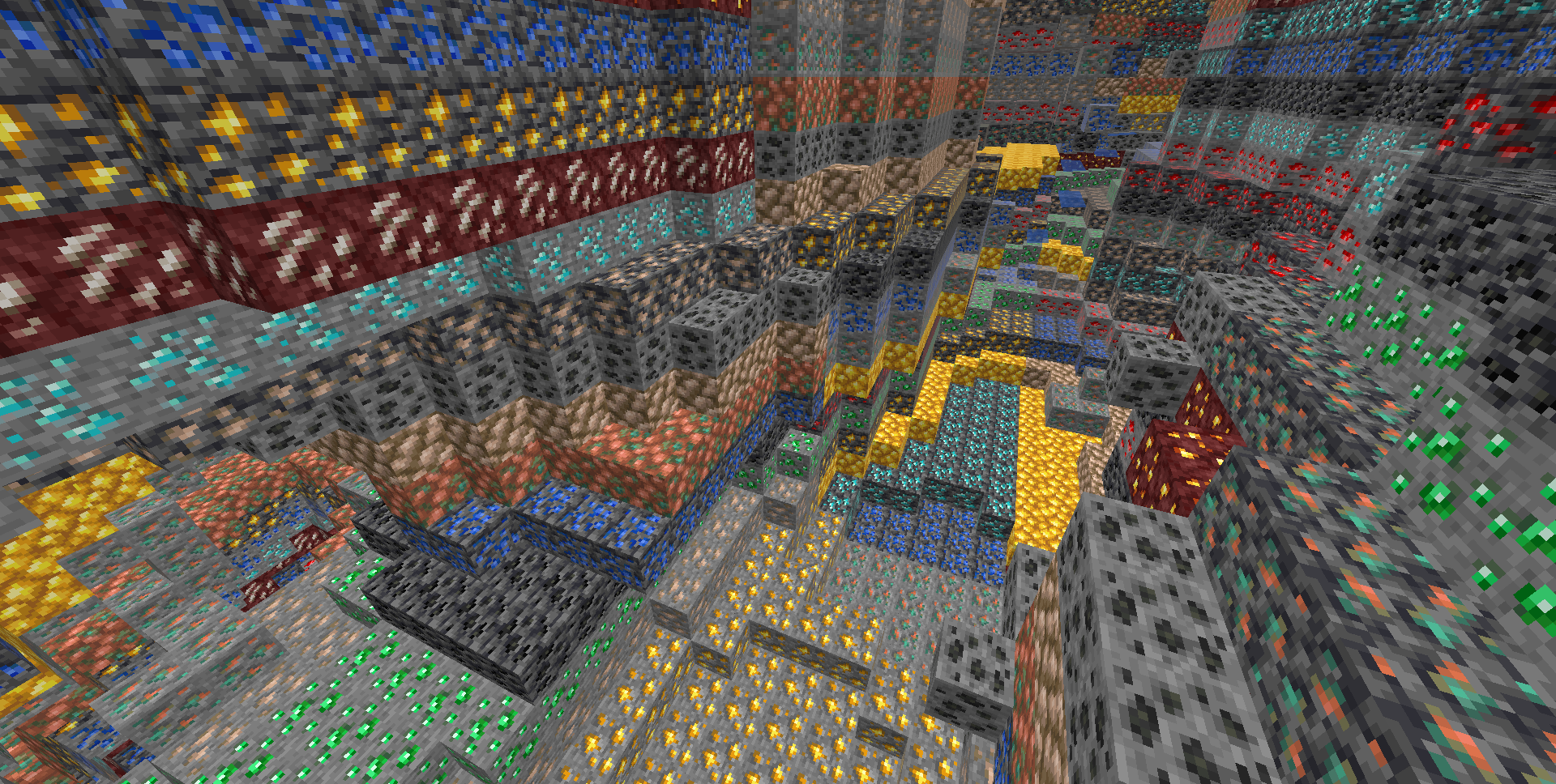
**Legit player view:** Legit players wont notice any changes when this mod is installed (unless they have high ping or modify a lot of blocks at once, eg: explosions)
### Custom Dimensions
To configure antixray in custom dimensions, specify the dimension id like this: `[“custom:cool_world”]`
## Mod Developers
Ore blocks added to the `#antixray:hidden_only_ores` block tag will be hidden from the world, but not used as fake ore.
This can be useful if your ore has effects, such as particles or sounds, that could cause problems. **(since 1.4.10)**
## About
This mod is a port of Papers [Async Anti Xray Patch](https://github.com/PaperMC/Paper/blob/7a64b85f9274f9a01103faafcfceb89a8b5777de/patches/server/0344-Anti-Xray.patch) from 1.17 and [it’s 1.14 patch](https://github.com/PaperMC/Paper/blob/ver/1.14/Spigot-Server-Patches/0397-Anti-Xray.patch#L1379) for networking code, to fabric and forge
Andrey Gaydulyan Totem of Undying
– EN: **Andrey Gaidulyan** is a Russian theater, film, television and dubbing actor.
He is best known for his role as Alexander (Sasha) Sergeyev in the TV series “Univer” and “SashaTanya”, as well as for his participation in the program “Stars in Africa” on the TNT channel
– RU: **Андрей Гайдулян** — российский актёр театра, кино, телевидения и дубляжа
Наиболее известен по роли Александра (Саши) Сергеева в телесериалах «Универ» и «СашаТаня», а также по участию в программе «Звёзды в Африке» на телеканале «ТНТ»
[ALL RESOURCEPACKS COLLECTION: MEMES + STREAMERS](https://modrinth.com/collection/sfDcDGAi)
Ancard Dindo
# Ancard Diono Resource Pack
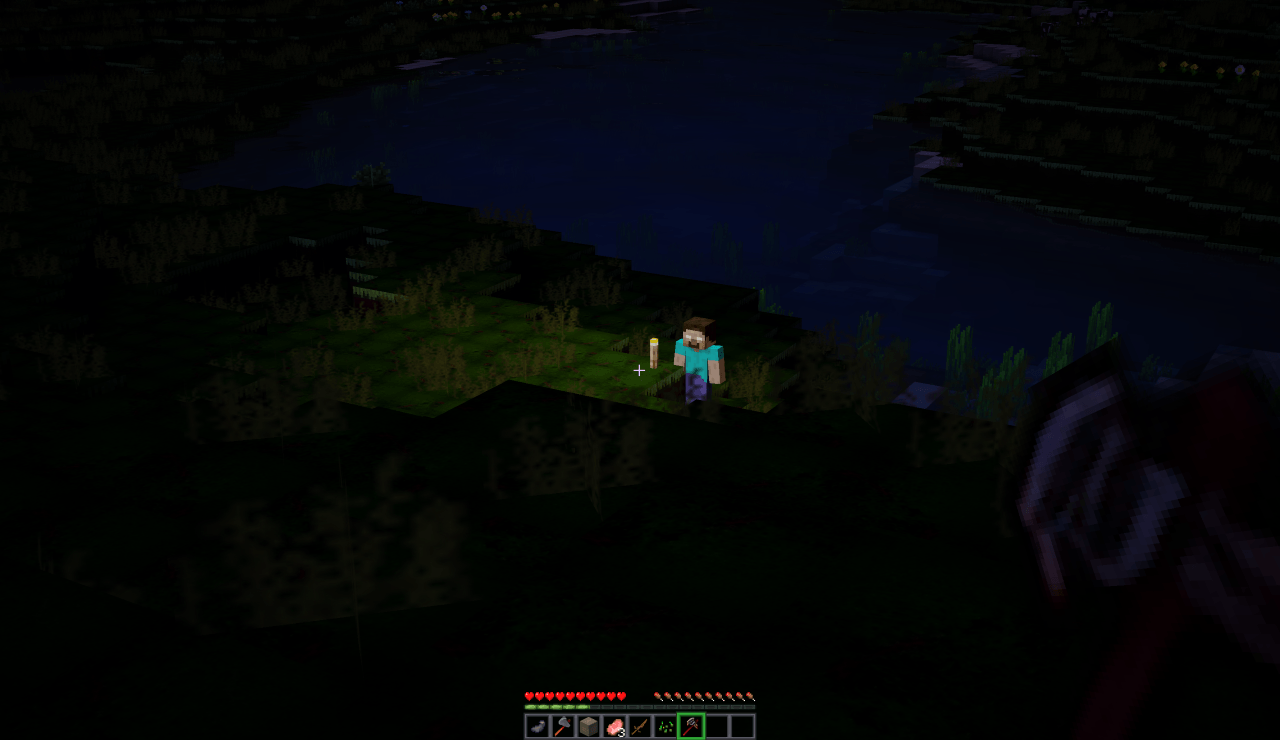 _Shot with Aeonis Mod installed_
Horror-themed Minecraft Java resource pack with generated textures for blocks, ores, items, tools, weapons, foliage, and GUI backgrounds.
———————————
FOR SHADERS – USE SULKAN!
———————————
## Folder Overview
* assets/minecraft/: vanilla texture overrides
* assets/ancard_diono/: custom namespace textures
* tools/: Python generators used to build textures
## Notes
* pack.mcmeta uses your existing values and fixed syntax.
* Generated files are deterministic for the same script and settings.
* Re-run scripts any time to refresh style variants after edits.
Among Us

But how to make **Among Uses**? 
All you need is an anvil and a carved pumpkin:
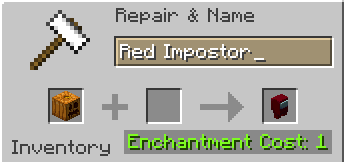
> Rename a carved pumpkin in the anvil to “Color” Impostor
* Example: Red Impostor
* Before snapshot 25w03a, using third-party mods, you could write things like “red impostor” instead of “Red Impostor”, or even “123 red impostor 123”
> After renaming, the item will automatically turn into its custom version
Make your impostors and have fun! 🎭
Alya pack
This is pvp project for alya lovers!
you can play pvp better because I added a lot of things
for pvp. for example: small totem small items no particles
waifu guis and custom items custom paints custom
music. Yes it is true I added phonk discs for you
You can listen phonks with jukebox and you can see
custom armor and tools and I added fullbright yes You
don’t need any resurcepack everything is here just
install and play 🙂
Always Updated
# 👑 Always Updated
Always Updated is a modpack that prioritizes updating quickly to the latest snapshots having the best optimization mods and configurations that are avaliable for the current Minecraft snapshot. There are very minimal quality of life (QoL) mods if you are expecting other ones you are going to need to add your own or use another modpack.
## Maintenance
When a new Minecraft snapshot or release comes out, I will stop supporting all earlier versions of the modpack. This pack is only updated and maintained for the most recent snapshot or official release. I will update the release channel for all older versions from Release to Beta. I try to update the modpack as fast as possible but I cannot update any faster as I tend to wait for the Sodium maintainer to update to the latest snapshot.
### Update Speed Tracker
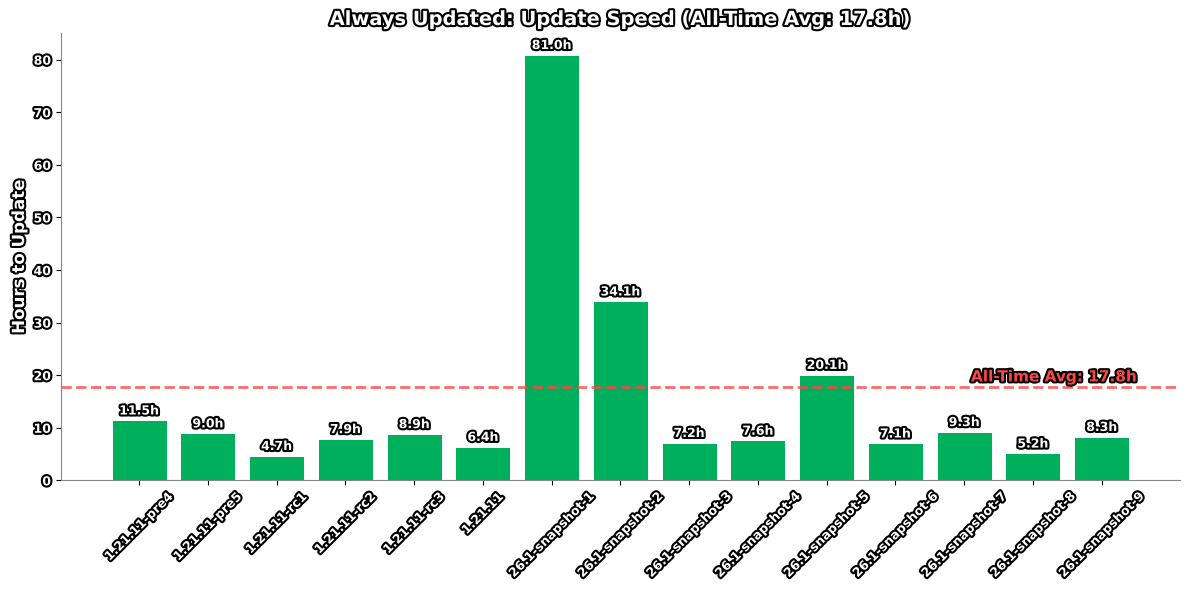
_This graph shows the delay in hours between a Minecraft snapshot release and this modpack’s update._
## Versioning
Always Updated uses a simplified versioning system as of January 22nd, 2026. Each release is identified by a single incremental number that increases by one with every update.
### Version History
**Current Format (January 22nd, 2026 – Present)**
Simple incremental numbering (1, 2, 3, etc.)
**Previous Format (December 1st, 2025 – January 21st, 2026)**
Format: `.–`
**Legacy Format (Prior to December 1st, 2025)**
[Semantic Versioning 2.0.0](https://semver.org/) specification
## FAQ
**Q:** Why is the “Game Version” on Modrinth showing as blank?
**A:** The “Game Version” may show as blank on Modrinth because their API isn’t always updated to the latest snapshot version.
**Q:** Will you backport or fix X version?
**A:** If an [issue request](https://github.com/Ironics-Side-Projects/Always-Updated/issues) is created I will.
_I made this because I play on the server [8bit.pt](https://www.youtube.com/@8bitpt) and most optimization modpacks dont update to snapshots._
[](https://pyro.host?ref=BZ8BMHHE)
Alpha Piscium
# Alpha Piscium
High-quality realistic Minecraft shaderpack featuring global illumination, volumetric clouds, atmospheric scattering, and stunning visual effects.
Official Website link: https://alphapiscium.org/
Discord server link: https://discord.gg/E2Uq2MmHgq

## Features
– **Real-time Global Illumination**
– [*Reservoir-based SpatioTemporal Importance Resampling*](https://arxiv.org/pdf/2301.11376) (ReSTIR) based Screen-Space Global Illumination
– [*ReBLUR*](https://doi.org/10.1007/978-1-4842-7185-8_49) based denoising
– Realistic, real-time, and fast **Atmospheric Scattering**
– [*Unreal Engine Sky Atmosphere Rendering Technique*](https://sebh.github.io/publications/egsr2020.pdf)
– [*Epipolar Sampling*](https://gdcvault.com/play/1018227/Practical-Implementation-of-Light-Scattering)
– Real-time **Volumetric Clouds**
– [*Nubis*](https://www.guerrilla-games.com/read/nubis-evolved)
– High-quality adaptive **Shadows**
– [*Rectilinear Texture Warping*](https://www.cspaul.com/publications/Rosen.2012.I3D.pdf) (RTWSM)
## Installation
1. Download the Alpha Piscium shaders for Minecraft from [Modrinth](https://modrinth.com/shader/alpha-piscium) or [GitHub Release](https://github.com/Luna5ama/Alpha-Piscium/releases).
2. Install [Iris](https://www.irisshaders.dev/download) shader loader.
3. Open the Minecraft launcher and choose the Iris profile you just created with the version you’re playing.
4. Launch Minecraft.
5. Go to **Options** → **Video Settings** → **Shader Packs**, then click **Open Shader Pack Folder**.
6. Move the downloaded ZIP file into this folder (`.minecraft/shaderpacks`).
7. In-game, select the newly installed pack from the shaders list. (If you select a shader pack using Iris, its filename will turn yellow.)
8. Click **Done** or **Apply** and the shader will be loaded.
## FAQ
– **No lighting at night**: Please use PBR resource packs. For vanilla style, SPBR is recommended. Otherwise, try Patrix.
– **Can’t load shaderpack**: Please use Iris with version 1.7 or higher.
– **Everything goes dark when turning back**: This is due to the limitations of screenspace techniques. There isn’t a perfect way to fix this.
– **Intel GPU**: Alpha Piscium uses cutting-edge graphics technology. Unfortunately, Intel doesn’t maintain their OpenGL driver well, so Intel GPUs are not supported.
– **AMD GPU**: Check if your GPU driver is newer than 22.7.1. If older, please update your driver.
– **Other loading errors**: Press Ctrl+D in Iris’s shaderpack selection screen, then reload the shaderpack. Make an [issue](https://github.com/Luna5ama/Alpha-Piscium/issues) with the error message and the relevant files in `.minecraft/patched_shaders` as shown in the error message.
## Roadmap
### 1.8 Diffuse GI
– Diffuse GI improvement
– Denoiser overhaul
– ReSTIR Diffuse “GI”
– Shadow/SSS blur fix
– Optimize PCSS for both quality and performance
### 1.9 Specular GI
– Add specular GI
### 1.10 Voxy support
– Add voxy support
– Epipolar sampling screen space shadow
– Address shadow map light leaks
### 1.11 More Volumetrics
– Clouds in sky lighting
– Fog
– Cloud shadows
### 1.12 Parallax Mapping
– Add steep/smooth parallax mapping
– Add parallax mapping shadow
### 1.13 More Cloud?
– Improve cirrus cloud modeling
– Mid altitude clouds (altocumulus)
## License
Files under the `scripts` directory are licensed under the MIT License. All other files are licensed under the GNU General Public License v3.0.