Armor Indicator
# Armor Indicator
## Info
This client-side mod adds a simple armor indicator onto the screen so you do not have to access your inventory to view your armor durability.
To use this mod, download the mod it and move it to your “`.minecraft/mods“` folder. Additionally, you will need to install the Fabric API jar for this mod to work.
This mod requires ShadowHunter22’s Config Library to be installed. This menu can be accessed through Mod Menu (optional) or opened by pressing “`RSHIFT“`, or reassigned to your liking through the game’s keybind menu.
## Features
– Without messing with any configurations, this mod gives you a basic armor and item indicator overlay on the bottom right side of your screen.
– With my config library, ShadowHunter22’s Config Library, you are provided a number of options to customize this mod to your liking.
## Dependencies
– [Optional] ShadowHunter22’s Config Library
– [Optional] Mod Menu
## Versions
This mod is **Fabric** ONLY. There is no plan to support Forge.
This mod is available for the following Minecraft versions:
`1.19.2`
`1.19.3`
`1.19.4`
> Cloth Config API is an optional dependency for 1.19 versions.
>
> As of April 16th, 2024, this mod will no longer be updated for 1.19 versions
`1.20`
`1.20.1`
`1.20.2`
`1.20.3`
`1.20.4`
`1.20.5`
`1.20.6`
`1.21`
`1.21.1`
`1.21.2`
`1.21.3`
`1.21.4`
`1.21.5`
## Client and Server Support
This mod only needs to be on the client and will not work on the server.
Antumbra
Antumbra is a resource pack which applies a darker and rougher mood to the vanilla look while maintaining the vividness of many textures. In combination with the Photon shader it is possible to achieve a more realistic feel than vanilla. This pack is for everyone who loves the vanilla look, but prefers a more realistic color palette for most textures. Additionally, a person who prefers a more medival style might also like it.

Antumbra + Photon + Photonics
## Features
– An atmospheric dark vibe
– Keeping vividness of many textures
– Dark GUI
## Comparison

Vanilla / Antumbra / Antumbra + Photon + Photonics / Vanilla + Photon + Photonics
Check out the other comparison images in the gallery!
Anton Chigurh (Антон Чигур) Totem of Undying
– Anton Chigur is the main antagonist of Cormac McCarthy’s novel “No Country for Old Men” and its film adaptation. He is a hired assassin, a drug dealer’s mercenary, who ruthlessly eliminates almost everyone he encounters.
– Антон Чигур — главный антагонист романа Кормака Маккарти «Старикам тут не место» и его киноадаптации. Это наёмный убийца, наёмник наркоторговцев, который безжалостно расправляется почти со всеми, кого встречает на своём пути
[Check collection with all memes + streamers Totems ](https://modrinth.com/collection/sfDcDGAi)
anit CHAT
# Chat anit 一个自动屏蔽《Minecraft》中文脏话,和增加IP属地的开源项目。
本插件需要装在Velocity上。前置为SignedVelocity-Proxy需要在velocity和所以1.19.1+的子服上增加
IP属地api为*xiaotuo*提供,脏话屏蔽由*Uapi提供*
使用方法
1.下载本插件,放入velocity的pluging文件夹,启动客户端
>tip
>如果你有子服的Minecraft版本在1.19.1以上需要增加[signed velocity](https://modrinth.com/plugin/signedvelocity/version/1.3.0) 插件到velocity和每个1.19.1+的子服务器。
2.将velocity配置文件“`velocity.toml“` 中“`force-key-authentication“`改为false
3.将所有子服务的配置文件“`server.properties“`中的“`enforce-secure-profile“`改为false
4.启动服务端
**更新日志**: https://github.com/cdpyx/Chatanit/commits/release
English:
# Chat Anit is an open-source project that automatically blocks Chinese profanity in Minecraft and increases IP ownership.
This plugin needs to be installed on Velocity. SignedVelocity Proxy needs to be added on velocity and all 1.19.1+sub servers
The IP locality API is provided by * xiaotuo *, and the profanity blocking is provided by * UAPI*
Usage
1. Download this plugin, place it in the velocity plugin folder, and start the client
> tip
> If you have a sub server version of Minecraft above 1.19.1, you need to add [signed velocity]( https://modrinth.com/plugin/signedvelocity/version/1.3.0 )Plug in to velocity and every 1.19.1+sub server.
2. Change the ‘force key authentication’ in the velocity configuration file ‘velocity. toml’ to false
3. Change the ‘enforce secure profile’ in the ‘server. properties’ configuration file for all sub services to false
4. Start the server
**Update log**: https://github.com/cdpyx/Chatanit/commits/release
Andrey Gaydulyan Totem of Undying
– EN: **Andrey Gaidulyan** is a Russian theater, film, television and dubbing actor.
He is best known for his role as Alexander (Sasha) Sergeyev in the TV series “Univer” and “SashaTanya”, as well as for his participation in the program “Stars in Africa” on the TNT channel
– RU: **Андрей Гайдулян** — российский актёр театра, кино, телевидения и дубляжа
Наиболее известен по роли Александра (Саши) Сергеева в телесериалах «Универ» и «СашаТаня», а также по участию в программе «Звёзды в Африке» на телеканале «ТНТ»
[ALL RESOURCEPACKS COLLECTION: MEMES + STREAMERS](https://modrinth.com/collection/sfDcDGAi)
Among Us

But how to make **Among Uses**? 
All you need is an anvil and a carved pumpkin:
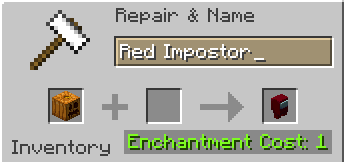
> Rename a carved pumpkin in the anvil to “Color” Impostor
* Example: Red Impostor
* Before snapshot 25w03a, using third-party mods, you could write things like “red impostor” instead of “Red Impostor”, or even “123 red impostor 123”
> After renaming, the item will automatically turn into its custom version
Make your impostors and have fun! 🎭
Among Us Totems
# ** RGB Among us Totem
This Texture Pack Changes ur Totem into a RGB Amongus Character Upon Renaming it
## **Notice Only Works For The Version 25w03a & above Only!**
**
### ** Instructions **
– **_ 1, After Downloading , Put the Texture Pack File in .minecraft folder’s Resource Pack Folder
–
– 2. After Puting in the File in the Folder go to minecraft and Turn on the Resource Pack
–
– 3. To turn your normal totem in to the Special Totem Rename it to “Amongus”_**
Amethyst Corruption
Give an Allay an Amethyst Shard. If the Allay holding the amethyst is hit by a Warden’s sonic boom, the Amethyst Shard will be converted into an Echo Shard.
Alpha Piscium
# Alpha Piscium
High-quality realistic Minecraft shaderpack featuring global illumination, volumetric clouds, atmospheric scattering, and stunning visual effects.
Official Website link: https://alphapiscium.org/
Discord server link: https://discord.gg/E2Uq2MmHgq

## Features
– **Real-time Global Illumination**
– [*Reservoir-based SpatioTemporal Importance Resampling*](https://arxiv.org/pdf/2301.11376) (ReSTIR) based Screen-Space Global Illumination
– [*ReBLUR*](https://doi.org/10.1007/978-1-4842-7185-8_49) based denoising
– Realistic, real-time, and fast **Atmospheric Scattering**
– [*Unreal Engine Sky Atmosphere Rendering Technique*](https://sebh.github.io/publications/egsr2020.pdf)
– [*Epipolar Sampling*](https://gdcvault.com/play/1018227/Practical-Implementation-of-Light-Scattering)
– Real-time **Volumetric Clouds**
– [*Nubis*](https://www.guerrilla-games.com/read/nubis-evolved)
– High-quality adaptive **Shadows**
– [*Rectilinear Texture Warping*](https://www.cspaul.com/publications/Rosen.2012.I3D.pdf) (RTWSM)
## Installation
1. Download the Alpha Piscium shaders for Minecraft from [Modrinth](https://modrinth.com/shader/alpha-piscium) or [GitHub Release](https://github.com/Luna5ama/Alpha-Piscium/releases).
2. Install [Iris](https://www.irisshaders.dev/download) shader loader.
3. Open the Minecraft launcher and choose the Iris profile you just created with the version you’re playing.
4. Launch Minecraft.
5. Go to **Options** → **Video Settings** → **Shader Packs**, then click **Open Shader Pack Folder**.
6. Move the downloaded ZIP file into this folder (`.minecraft/shaderpacks`).
7. In-game, select the newly installed pack from the shaders list. (If you select a shader pack using Iris, its filename will turn yellow.)
8. Click **Done** or **Apply** and the shader will be loaded.
## FAQ
– **No lighting at night**: Please use PBR resource packs. For vanilla style, SPBR is recommended. Otherwise, try Patrix.
– **Can’t load shaderpack**: Please use Iris with version 1.7 or higher.
– **Everything goes dark when turning back**: This is due to the limitations of screenspace techniques. There isn’t a perfect way to fix this.
– **Intel GPU**: Alpha Piscium uses cutting-edge graphics technology. Unfortunately, Intel doesn’t maintain their OpenGL driver well, so Intel GPUs are not supported.
– **AMD GPU**: Check if your GPU driver is newer than 22.7.1. If older, please update your driver.
– **Other loading errors**: Press Ctrl+D in Iris’s shaderpack selection screen, then reload the shaderpack. Make an [issue](https://github.com/Luna5ama/Alpha-Piscium/issues) with the error message and the relevant files in `.minecraft/patched_shaders` as shown in the error message.
## Roadmap
### 1.8 Diffuse GI
– Diffuse GI improvement
– Denoiser overhaul
– ReSTIR Diffuse “GI”
– Shadow/SSS blur fix
– Optimize PCSS for both quality and performance
### 1.9 Specular GI
– Add specular GI
### 1.10 Voxy support
– Add voxy support
– Epipolar sampling screen space shadow
– Address shadow map light leaks
### 1.11 More Volumetrics
– Clouds in sky lighting
– Fog
– Cloud shadows
### 1.12 Parallax Mapping
– Add steep/smooth parallax mapping
– Add parallax mapping shadow
### 1.13 More Cloud?
– Improve cirrus cloud modeling
– Mid altitude clouds (altocumulus)
## License
Files under the `scripts` directory are licensed under the MIT License. All other files are licensed under the GNU General Public License v3.0.
Almanac
Almanac is a library used by my mods with mostly loader independent shared code between multiple mods to avoid duplication of code.
Almanac by itself does not add much other than a fix to empty tags leading to non stackable items.
