—
—
Adds some weaponry to the game!
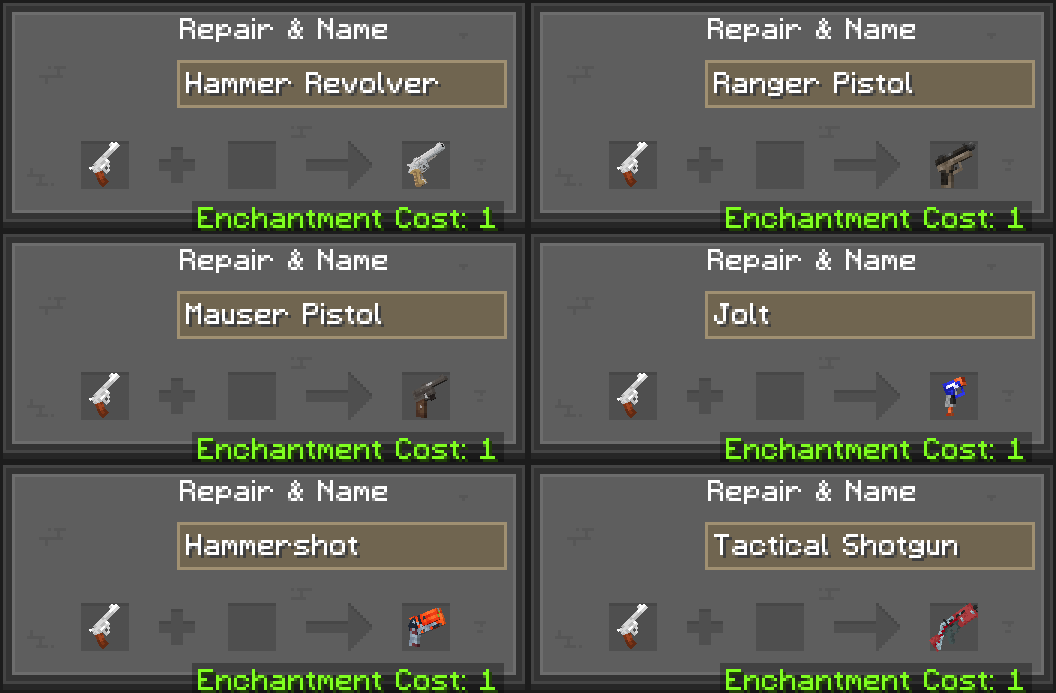
This resource pack turns the bow into a revolver. Renaming it allows you to turn it into a list of different guns!
—
—
## Frequently Asked Questions
What guns are available right now?
Including the basic revolver, there are 7 guns available. Rename the revolver to one of these names to change it’s model;
– “Hammer Revolver” (old model)
– “Ranger Pistol” (Ranger Pistol from Fortnite Ballistic (o7))
– “Mauser Pistol” (Mauser C96)
– “Jolt” (Nerf Jolt blaster)
– “Hammershot” (Nerf Hammershot)
– “Tactical Shotgun” (Fortnite Tactical Shotgun)
Do I need any mods for it to work?
The entire pack works in vanilla, so no mods are required!!
How do I install this pack?
I’d recommend following [this](https://www.planetminecraft.com/blog/how-to-install-minecraft-texture-packs-4615399/) guide on PlanetMinecraft. Enjoy!
I’ve found a bug or got a suggestion!
Hi! Thank you for your contribution, join my Discord server [here](https://discord.gg/fV9aby4XGG) and feel free to show it in #general.
Terms Of Service
You’re allowed to alter and edit any of the textures as long as you don’t distribute it. Keep it to yourself.
—
Artificial Unintelligence
This datapack adds Merl, the ai chatbot from the Minecraft website, to the game! Merl will spawn in when you first join the world. She is invinsible, and quite… weird, to put it nicely. Upon interation, you can ask her a question, which she will answer… horribly, to but another thing nicely.
As of 1.1, it also adds Minwi, the ai chatbot from the minecraft wiki used during April fools. They will replace Merl half the time when creating a world.
If you find any bugs, please report them to my discord.
Artificial Enchantments API
# Artificial Enchantments
A shared plugin library for Paper 1.21+ servers that lets other plugins create **real, client-visible custom enchantments** — no lore hacks, no packet trickery.
## What It Does
Artificial Enchantments is a **server-side library** that multiple plugins can depend on simultaneously. Instead of every enchantment plugin shipping its own (conflicting) enchantment system, they all hook into this one shared registry.
**For players:** Enchantments show up natively in the client — you see them in item tooltips, anvil interfaces, and the enchantment table. They look and feel like vanilla enchantments because they *are* registered in the native Paper registry.
**For server owners:** Install this once, and any plugin that depends on it Just Works™. No conflicts, no duplicate listeners, no “why does my sword have 3 different lore-based sharpness enchantments” headaches.
## Requirements
– **Paper 1.21+** (Purpur and Folia supported)
– **Java 21+**
## Installation
1. Download the latest release from the **Files** tab on this page.
2. Drop `artificial-enchantments-x.x.x.jar` into your server’s `plugins/` folder.
3. Start (or restart) your server.
4. Install any plugin that depends on Artificial Enchantments.
That’s it. There is no configuration file — this is a library, not a plugin with commands or settings.
## Why This Exists
Most custom enchantment plugins before 1.21 used one of two approaches:
– **Lore-based:** Fake enchantments stored in item lore. Looks janky, breaks constantly, incompatible with other plugins.
– **Shaded registries:** Each plugin ships its own copy of an enchantment library. They conflict with each other, duplicate event listeners, and corrupt each other’s state.
Artificial Enchantments solves this by sitting **between** the server and enchantment plugins as a single, shared authority. Every plugin that uses it talks to the same registry, the same event dispatch spine, and the same native Paper enchantment system.
## Compatibility
| Platform | Status |
|—|—|
| Paper | ✅ Supported |
| Purpur | ✅ Supported |
| Folia | ✅ Supported |
| Spigot | ❌ Not supported (requires Paper 1.21+ API) |
## For Plugin Developers
If you’re building a plugin that uses Artificial Enchantments, check out the [GitHub repository](https://github.com/modpotato-plugins/artificial-enchantments) for:
– API documentation
– Gradle/Maven setup instructions
– Code examples
– Javadoc reference
**Do not shade this library into your plugin.** It must remain a separate plugin JAR in the `plugins/` folder. Every dependent plugin references it via `compileOnly`.
## Support
– **Bug reports & feature requests:** [GitHub Issues](https://github.com/modpotato-plugins/artificial-enchantments/issues)
– **Source code:** [GitHub](https://github.com/modpotato-plugins/artificial-enchantments)
## License
MIT License
Articulate
# Articulate
A Minecraft plugin to manage your player.
Supported Versions
**Spigot & Paper Supported**
– 1.21.5
– 1.21.6
– 1.21.7
– 1.21.8
– 1.21.9
– 1.21.10
## About
Articulate is made to simplify making changes to your player. Whether its attributes, god mode, or anything else, Articulate makes it easy!
## Features
* Flight
* Fly speed
* Walk speed
* Max health
* God mode
* Instakill
Arther Lewyien Anime Gui Pack
Arthur Leywin Anime GUI – Description
Step into a sleek and immersive interface inspired by the legendary Arthur Leywin. This GUI blends elegant fantasy aesthetics with a modern anime touch, featuring smooth layouts, glowing accents, and a powerful aura that reflects strength and control.
Every detail is crafted to feel magical yet clean — from the refined panel designs to the subtle energy effects that give it life. The interface captures the essence of a rising king: calm, strategic, and unstoppable.
Perfect for players who want a stylish and anime-inspired experience while keeping everything organized and easy to use. Whether you’re managing inventory or navigating menus, this GUI makes every moment feel epic.
Artefacts CIT
This pack contains custom 2D and 3D models used by the Tetrago RP server.
This resourcespack works without Optifine.
Models
– Khepesh Royal
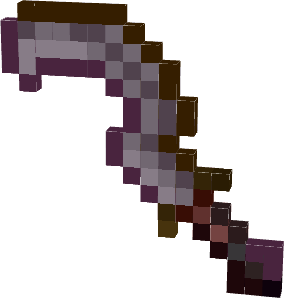
– Arpegene Crown

– Mitre Papale

——————
Version “Plus” of this datapack contains models coming from other CIT resourcespacks.
These included packs have been modified to work without Optifine.
– [Dee’s Extended Equipment | CIT Pack](https://www.curseforge.com/minecraft/texture-packs/dees-extended-equipment)
– [maeflowers’ CIT Pack](https://maeflowersmc.wixsite.com/minecraft/catalog)
——————
On 5.1 version only
_Models using stonecutter via Artefacts datapack companion._
_Link to [Artefacts CIT datapack](https://modrinth.com/datapack/artefacts-dp)_
ArtChanger
Paper plugin mapping internet images into item frames with auto aspect-based grids, high-quality dithering+sharpen, persistence across restarts, anti-dup drops, multi-source URLs, rotation, EN/RU locales, safe and fast by bdiev_.
# Key Features:
– Load images from URLs (Instagram, Discord CDN, Telegram, Imgur, ImgBB, any direct link)
– Auto grid sizing by aspect ratio (e.g., 1:1 → 3×3, 16:9 → 4×2, 4:3 → 4×3; manual 3×2 / 5×5 also supported)
– Rectangular grids with placement validation and chunk-load restoration (tile metadata stored)
– High-quality pipeline: multi-step downscale, sharpening, Floyd–Steinberg dithering, palette mapping to Minecraft maps
– Rotate with right-click; delete with left-click (clears group, keeps main frame)
– Anti-dup: auto-created frames do not drop; only one frame drops per grid
– Persistence across restarts (image ID + grid metadata stored in frames)
– Asynchronous downloads (non-blocking for the server)
# Commands:
– /artchanger set [size]
– size formats: 3 (square), 3×2 (rectangular). If omitted → auto-sized by aspect ratio.
– /artchanger help — show help
# Usage:
– Shift + Right click to paste item in the frame
– Run /artchanger set [size]
– Right-click an item frame to place the image
– Right-click again to rotate
– Left-click to remove the picture (main frame stays; grid auto-frames are removed without drops)
# Grid Sizing:
– Auto: aspect-ratio based (1:1→3×3, 16:9→4×2, 4:3→4×3, 3:2→3×2, 2:3→2×3, 9:16→2×4, panorama>2.5→5×2)
– Manual: /artchanger set 4×3 or /artchanger set 5
– Max recommended grid: 10×10
Please, text me if you found any bugs, Thanks!
ArSi’s PVP Pack
# 🔴 ArSi’s PVP Pack
Welcome to **ArSi’s PVP Pack**! This resource pack blends the clean, minimalist aesthetic of the *Bare Bones* style with an aggressive, reddish twist to make your gameplay both smoother and more stylish.
—
## 🎨 The Aesthetic
ArSi’s PVP Pack reduces visual noise by utilizing flat colors and simple textures. The primary focus is a **vibrant red color palette** that flows through the entire game environment.
* **Bare Bones Style:** Simplified textures for maximum performance and a sleek “official trailer” look.
* **Red Tint:** Many textures have been overhauled with a reddish hue to create a competitive, high-energy vibe.
* **Performance Optimized:** Low-resolution simplicity ensures high FPS, making it perfect for Bedwars, Skywars, or PvP.
## 🛠️ Installation
1. Download the `.zip` file.
2. Launch Minecraft and navigate to `Options` > `Resource Packs`.
3. Open the resource pack folder and drop the file inside.
4. Activate the pack in the menu.
—
> **Note:** This pack is inspired by the Bare Bones style. All credits for the original art direction go to the respective creators.