Armor Stand Editor
# Armor Stand Editor

Armor Stand Editor a simple to use mod, allowing you to pose/modify Armor Stand in game,
without need to use commands or external websites.
It was designed with survival usage in mind, so you can use it on your survival world/server without having
to worry about it breaking the experience.
It is compatible with Fabric and Quilt and can work purely server side, allowing vanilla
players to use all capabilities of it, while still being fully functional in singleplayer.
## Usage
First you need to get flint (or other configured item). Then you just click with it Armor Stand
you want to modify. Your hotbar will get replaced with setting selector (only visually, your inventory is untouched).
By using right mouse button (use/place action), you can enter/activate action bound to it (which is described
in its name). To change angle/value of movement/pose related options, sneak while having it selected and use scroll
to change value up or down.

To go back you can click the barrier/icon on right side.
To close it completely, press Q (drop item).

## Showcase
– Showcase by Patbox: https://www.youtube.com/watch?v=E7eCwKVZeqY
– Polish showcase by Patbox: https://www.youtube.com/watch?v=6aqd5d9NkeU
## Config
“`json5
{
“CONFIG_VERSION_DONT_TOUCH_THIS”: 2,
“armorStandTool”: “minecraft:flint”, // Item that acts as editor, can be from a mod
“requireIsArmorStandEditorTag”: false, // Makes item require nbt tag isArmorStandEditor of item
“holdingToolSpawnsParticles”: true, // If true, player will see particles around armor stand while holding tool
“useLegacyUiByDefault”: false, // Forces usage of legacy ui, not recommended
“blackListedBuildInPresets”: [], // Removes default presets
“allowedByDefault”: [/*…*/] // Actions allowed by default
}
“`
## Permissions
Additionally, command /armorstandeditor uses `armorstandeditor.commands.`.
Format of editors permissions looks like `armorstandeditor.edit.`, [look at this file](https://github.com/Patbox/ArmorStandEditor/blob/master/src/main/java/eu/pb4/armorstandeditor/EditorActions.java)
For Armor Stand Editing you can give players `armorstandeditor.use` permission and for Item Flames `armorstandeditor.useItemFrame`
If you want to allow others to modify entities disguised as Armor Stands, give them `armorstandeditor.useDisguised` permission,
By default, players can edit them as they want.
Any Hat🎩
🧢 [HATS] Datapack

Transform your accessories into stylish hats!
**Hats** by *Ancar*, is a datapack which allows you to wear any item as a hat. It is by far the best hat datapack for the following reasons.
The **BEST** Hat datapack :
– frequent updates
– light
– vanilla
– no cheats
– all vanilla hats
– dupe safe
—
### ▶ Youtube
### 👒 Wearable Items
Wear any accessory you find! Here are a few ideas:
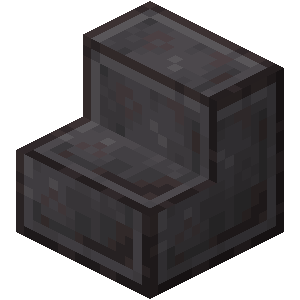
| 🌸 Flowers | 📐 Stairs | 🧱 Blocks | ⚔️ Items |
|:———:|:——–:|:——–:|:——–:|
|  |
|  |
|  |
|  |
|
—
### 🎩 Special Hat Positions
Some items have custom positions!
—
### 💻 Commands
To wear an item as a hat, use:
`/trigger hat` (hold the item first)
—
### 🌍 Features
– **Vanilla-Friendly** ✔️
– **Multiplayer Compatible** ✔️
– **Easy to Set Up** ✔️
—
### 🛠️ Setup Instructions
1. Move the datapack to the `datapacks` folder in your world directory.
2. Ignore the red error message.
3. Enable the datapack, click **Done**, and start your world!
—
### 📝 Changelog
– Ported to minecraft 1.21.10 and used overlays
– Bugfix: `/trigger hat` command not working.
Anvil Too Expensive
This is a simple mod that removes the `Too Expensive` text from an anvil. Do note this only removes the text and will not let you take out the item unless the server you are playing on allows it
Antumbra
Antumbra is a resource pack which applies a darker and rougher mood to the vanilla look while maintaining the vividness of many textures. In combination with the Photon shader it is possible to achieve a more realistic feel than vanilla. This pack is for everyone who loves the vanilla look, but prefers a more realistic color palette for most textures. Additionally, a person who prefers a more medival style might also like it.

Antumbra + Photon + Photonics
## Features
– An atmospheric dark vibe
– Keeping vividness of many textures
– Dark GUI
## Comparison

Vanilla / Antumbra / Antumbra + Photon + Photonics / Vanilla + Photon + Photonics
Check out the other comparison images in the gallery!
Anton Chigurh (Антон Чигур) Totem of Undying
– Anton Chigur is the main antagonist of Cormac McCarthy’s novel “No Country for Old Men” and its film adaptation. He is a hired assassin, a drug dealer’s mercenary, who ruthlessly eliminates almost everyone he encounters.
– Антон Чигур — главный антагонист романа Кормака Маккарти «Старикам тут не место» и его киноадаптации. Это наёмный убийца, наёмник наркоторговцев, который безжалостно расправляется почти со всеми, кого встречает на своём пути
[Check collection with all memes + streamers Totems ](https://modrinth.com/collection/sfDcDGAi)
anit CHAT
# Chat anit 一个自动屏蔽《Minecraft》中文脏话,和增加IP属地的开源项目。
本插件需要装在Velocity上。前置为SignedVelocity-Proxy需要在velocity和所以1.19.1+的子服上增加
IP属地api为*xiaotuo*提供,脏话屏蔽由*Uapi提供*
使用方法
1.下载本插件,放入velocity的pluging文件夹,启动客户端
>tip
>如果你有子服的Minecraft版本在1.19.1以上需要增加[signed velocity](https://modrinth.com/plugin/signedvelocity/version/1.3.0) 插件到velocity和每个1.19.1+的子服务器。
2.将velocity配置文件“`velocity.toml“` 中“`force-key-authentication“`改为false
3.将所有子服务的配置文件“`server.properties“`中的“`enforce-secure-profile“`改为false
4.启动服务端
**更新日志**: https://github.com/cdpyx/Chatanit/commits/release
English:
# Chat Anit is an open-source project that automatically blocks Chinese profanity in Minecraft and increases IP ownership.
This plugin needs to be installed on Velocity. SignedVelocity Proxy needs to be added on velocity and all 1.19.1+sub servers
The IP locality API is provided by * xiaotuo *, and the profanity blocking is provided by * UAPI*
Usage
1. Download this plugin, place it in the velocity plugin folder, and start the client
> tip
> If you have a sub server version of Minecraft above 1.19.1, you need to add [signed velocity]( https://modrinth.com/plugin/signedvelocity/version/1.3.0 )Plug in to velocity and every 1.19.1+sub server.
2. Change the ‘force key authentication’ in the velocity configuration file ‘velocity. toml’ to false
3. Change the ‘enforce secure profile’ in the ‘server. properties’ configuration file for all sub services to false
4. Start the server
**Update log**: https://github.com/cdpyx/Chatanit/commits/release
Ani’s fakemon cobblemon
### This datapack currently adds in 3 new fakemon
Current pokemon added:
– Glasmol (water/poison)
– Glacidrake (water/dragon)
– Dratlantic (water/dragon)
The latter 2 can be used as a submarine type mount.
They all spawn on beach biomes in the uncommon, rare and ultra rare buckets respectively; I intend on expand this addon overtime whenever I get new ideas for fakemon so expect more in the future, I aim to prioritize quality over quantity.
Server use is okay if I’m given credits somewhere and the Pokémon are not put behind paywalls (subscriptions, donations, season passes, etc.)
### HOW TO INSTALL
Copy and paste the addon’s .zip file into your resourcepack and datapack folders (if using something like Global Packs)
If the prior method doesn’t work copy and paste the addon’s zip file into your resource pack folder, then enter the game, make a new world, go to the datapack tab and paste it into the world’s datapack folder too.
AnimatedWorldClock
# Animated World Clock+
**Animated World Clock+** is a configurable Minecraft datapack that displays the current world time in a stylish animated format.
It supports multiple display modes, different visual styles, optional sounds, and simple in-game controls, making it useful for both survival and multiplayer servers.
## Features
– Animated world time display
– Multiple display modes
– Classic and compact styles
– Toggleable HUD options
– Optional sounds and announcements
– Simple configuration through functions / triggers
## Included functionality
– Display mode switching
– Style switching
– Animation toggle
– Sound toggle
– HUD toggle
– Help and status functions
– Uninstall function
## Notes
This datapack is designed as a lightweight utility for players and servers that want a more informative and dynamic in-game clock display.
Andrey Gaydulyan Totem of Undying
– EN: **Andrey Gaidulyan** is a Russian theater, film, television and dubbing actor.
He is best known for his role as Alexander (Sasha) Sergeyev in the TV series “Univer” and “SashaTanya”, as well as for his participation in the program “Stars in Africa” on the TNT channel
– RU: **Андрей Гайдулян** — российский актёр театра, кино, телевидения и дубляжа
Наиболее известен по роли Александра (Саши) Сергеева в телесериалах «Универ» и «СашаТаня», а также по участию в программе «Звёзды в Африке» на телеканале «ТНТ»
[ALL RESOURCEPACKS COLLECTION: MEMES + STREAMERS](https://modrinth.com/collection/sfDcDGAi)
Among Us

But how to make **Among Uses**? 
All you need is an anvil and a carved pumpkin:
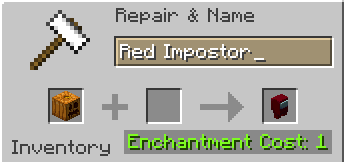
> Rename a carved pumpkin in the anvil to “Color” Impostor
* Example: Red Impostor
* Before snapshot 25w03a, using third-party mods, you could write things like “red impostor” instead of “Red Impostor”, or even “123 red impostor 123”
> After renaming, the item will automatically turn into its custom version
Make your impostors and have fun! 🎭