anit CHAT
# Chat anit 一个自动屏蔽《Minecraft》中文脏话,和增加IP属地的开源项目。
本插件需要装在Velocity上。前置为SignedVelocity-Proxy需要在velocity和所以1.19.1+的子服上增加
IP属地api为*xiaotuo*提供,脏话屏蔽由*Uapi提供*
使用方法
1.下载本插件,放入velocity的pluging文件夹,启动客户端
>tip
>如果你有子服的Minecraft版本在1.19.1以上需要增加[signed velocity](https://modrinth.com/plugin/signedvelocity/version/1.3.0) 插件到velocity和每个1.19.1+的子服务器。
2.将velocity配置文件“`velocity.toml“` 中“`force-key-authentication“`改为false
3.将所有子服务的配置文件“`server.properties“`中的“`enforce-secure-profile“`改为false
4.启动服务端
**更新日志**: https://github.com/cdpyx/Chatanit/commits/release
English:
# Chat Anit is an open-source project that automatically blocks Chinese profanity in Minecraft and increases IP ownership.
This plugin needs to be installed on Velocity. SignedVelocity Proxy needs to be added on velocity and all 1.19.1+sub servers
The IP locality API is provided by * xiaotuo *, and the profanity blocking is provided by * UAPI*
Usage
1. Download this plugin, place it in the velocity plugin folder, and start the client
> tip
> If you have a sub server version of Minecraft above 1.19.1, you need to add [signed velocity]( https://modrinth.com/plugin/signedvelocity/version/1.3.0 )Plug in to velocity and every 1.19.1+sub server.
2. Change the ‘force key authentication’ in the velocity configuration file ‘velocity. toml’ to false
3. Change the ‘enforce secure profile’ in the ‘server. properties’ configuration file for all sub services to false
4. Start the server
**Update log**: https://github.com/cdpyx/Chatanit/commits/release
Among Us

But how to make **Among Uses**? 
All you need is an anvil and a carved pumpkin:
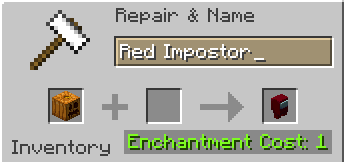
> Rename a carved pumpkin in the anvil to “Color” Impostor
* Example: Red Impostor
* Before snapshot 25w03a, using third-party mods, you could write things like “red impostor” instead of “Red Impostor”, or even “123 red impostor 123”
> After renaming, the item will automatically turn into its custom version
Make your impostors and have fun! 🎭
Alternate Current
Alternate Current is an efficient and non-locational redstone dust implementation. Its main focus lies in reducing the lag caused by redstone dust, by optimizing the power calculations and reducing the number of shape and block updates emitted. As a side effect of these changes the block update order of redstone dust networks is predictable and intuitive rather than locational and chaotic.
### Performance
MSPT contributions of redstone dust are up to 30 times lower with Alternate Current, all the while maintaining a high level of Vanilla parity. Its low number of code modifications make it minimally invasive, so it’s an easy drop-in replacement for Vanilla redstone dust.
Check out the [GitHub page](https://github.com/SpaceWalkerRS/alternate-current/blob/main/README.md) for a detailed explanation of Alternate Current’s improvements.
## Why is redstone dust so laggy?
There are two main reasons why redstone dust is laggy: unnecessary updates and unnecessary calculations, both of which are caused by the fact that redstone dust updates recursively. A redstone wire can update its power level over half a dozen times before settling on the final value, doing expensive calculations and emitting copious amounts of shape and block updates each time. On top of that, many shape and block updates are completely redundant.
## How does Alternate Current fix that?
Alternate Current fixes these issues by doing power calculations of the entire network before updating the power levels. Each wire will check power from non-wire components just once and power from other wires just twice. Power sources within the network are identified, and the power is spread from there. This makes the calculations more efficient and the update order more intuitive. Shape and block updates are only emitted when the final power level is reached, and each wire emits no redundant updates.
AltDefault – Legacy
**The goal of this texture pack is to complete old golden age vanilla textures and improve cohesiveness without changing everything too much. That’s It.**
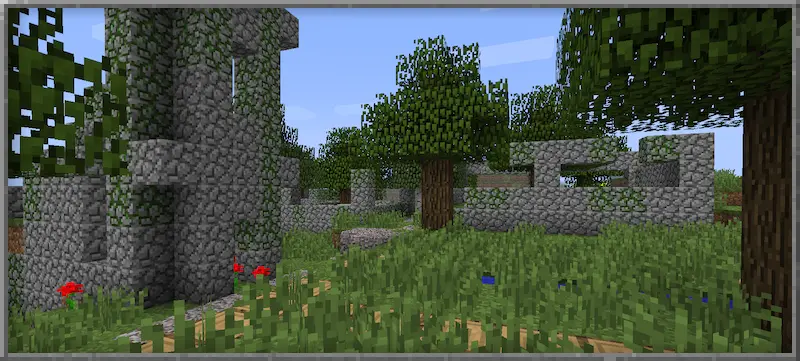
You are allowed to redraw, embed and redistribute this work. Don’t even ask. I’d appreciate it if you credit me in your work, but it’s not required.
(HARD) All-White Textures! (Joel’s 2022 Challenge)
Have you ever played Minecraft® and thought “hey, this is too many colors”?
No? Well… just _pretend_ like you did?
Because here and now, I present…
# THE ALL-WHITE CHALLENGE PACK!
I created this pack originally back in 2022 for 1.19 for a friend of mine to ~~suffer~~ **_enjoy his gameplay_** in!
But, you may say, “1.19? Who still plays in 1.19 when 1.21.5 is available and 1.21.6 is already announced!?”, well, I have a treat for you..
# **THIS PACK IS AVAILABLE FOR *EVERY* MINECRAFT® VERSION!**
_[Available in Easy (no GUI changes)](https://modrinth.com/resourcepack/all-white-2022-joel-challenge-pack-easy) and Hard (all textures changed)_
*Every single major version…*
– 1.21.5? You can use this pack!
– Beta 1.4? Still works!
– Alpha v1.2.2? I don’t know why, BUT IT WORKS!

*Even EVERY SINGLE DEV VERSION IS SUPPORTED*
– 22w44a? Yup, got it.
– 11w50a? Sure.
– Beta 1.6 Test Build 3? You’re crazy, but the pack works!

*Want to play your favorite “special” version? You can do it!*
– Combat Test 7b? This pack supports it!
– 2020’s 20w14infinite? Of course!
– 2013’s 2.0? Yup! (the Pink Wither looks better than ever)

*It even supports versions that don’t support Texture Packs, such as Infdev!*
*(Note: To play with this pack in versions before Alpha v1.2.2, you’ll need to manually modify your .jar file.)*
# So what are you waiting for?
Dive into the exciting, mind-boggling, seen-on-TV (not really), incredibly playable **world of**_… white._ Can you beat Minecraft® with no colors?
## Limitations
This pack isn’t perfect. In vanilla Minecraft®, you cannot change the water texture, and some foliage colors are hardcoded. In older versions, even less can be changed, therefore, this pack technically isn’t ***all*** white, but—especially in more modern versions—it is *mostly* white, as much as the game allows.
Additionally, the Modrinth API (as of writing this on 25.04.25), does not contain all versions of Minecraft®. This has resulted in me having to use some workarounds and marking a few versions wrongly. For example, v0.18 is marked as supporting *c0.30_01c*, when it actually supports *0.28_01*, *0.29*, *0.29_01*, *0.29_02*, *0.30 (Creative, 1900 Re-upload)*, *0.30 (Creative, Launcher Renew)*, and *0.30 (Survival, 1858 Re-upload)*.
If Modrinth adds these missing versions to their API, this notice shall disappear and the wrongly marked versions will be fixed.
For the time being, **the supported Minecraft® versions can be found in the description/changelog of every pack version, as well as its README.TXT**.
## License & Credits
_Concept and implementation of this texture pack © 2022–2026 PetByte. Minecraft® and all associated assets are © 2009–2026 Mojang Studios and Microsoft. This pack is not affiliated with or endorsed by Mojang Studios or Microsoft._
_Licensed under **CC-BY-ND 4.0**. You may use this pack for personal use, streaming, and content creation (monetized or not), but you **must credit PetByte**. Redistribution and modification are **not allowed**._
_For business inquiries, collaborations, or similar matters, please contact contact@petbyte.dev. For issues related to this pack, please contact issues@petbyte.dev. For anything else, feel free to leave a comment._
(EASY) All-White Textures! (Joel’s 2022 Challenge)
Have you ever played Minecraft® and thought “hey, this is too many colors”?
No? Well… just _pretend_ like you did?
Because here and now, I present…
# THE ALL-WHITE CHALLENGE PACK!
I created this pack originally back in 2022 for 1.19 for a friend of mine to ~~suffer~~ **_enjoy his gameplay_** in!
But, you may say, “1.19? Who still plays in 1.19 when 1.21.5 is available and 1.21.6 is already announced!?”, well, I have a treat for you..
# **THIS PACK IS AVAILABLE FOR *EVERY* MINECRAFT® VERSION!**
_Available in Easy (no GUI changes) and [Hard (all textures changed)](https://modrinth.com/resourcepack/all-white-2022-joel-challenge-pack-hard)_
*Every single major version…*
– 1.21.5? You can use this pack!
– Beta 1.4? Still works!
– Alpha v1.2.2? I don’t know why, BUT IT WORKS!

*Even EVERY SINGLE DEV VERSION IS SUPPORTED*
– 22w44a? Yup, got it.
– 11w50a? Sure.
– Beta 1.6 Test Build 3? You’re crazy, but the pack works!

*Want to play your favorite “special” version? You can do it!*
– Combat Test 7b? This pack supports it!
– 2020’s 20w14infinite? Of course!
– 2013’s 2.0? Yup! (the Pink Wither looks better than ever)

*It even supports versions that don’t support Texture Packs, such as Infdev!*
*(Note: To play with this pack in versions before Alpha v1.2.2, you’ll need to manually modify your .jar file.)*
# So what are you waiting for?
Dive into the exciting, mind-boggling, seen-on-TV (not really), incredibly playable **world of**_… white._ Can you beat Minecraft® with no colors?
## Limitations
This pack isn’t perfect. In vanilla Minecraft®, you cannot change the water texture, and some foliage colors are hardcoded. In older versions, even less can be changed, therefore, this pack technically isn’t ***all*** white, but—especially in more modern versions—it is *mostly* white, as much as the game allows.
Additionally, the Modrinth API (as of writing this on 25.04.25), does not contain all versions of Minecraft®. This has resulted in me having to use some workarounds and marking a few versions wrongly. For example, v0.18 is marked as supporting *c0.30_01c*, when it actually supports *0.28_01*, *0.29*, *0.29_01*, *0.29_02*, *0.30 (Creative, 1900 Re-upload)*, *0.30 (Creative, Launcher Renew)*, and *0.30 (Survival, 1858 Re-upload)*.
If Modrinth adds these missing versions to their API, this notice shall disappear and the wrongly marked versions will be fixed.
For the time being, **the supported Minecraft® versions can be found in the description/changelog of every pack version, as well as its README.TXT**.
## License & Credits
_Concept and implementation of this texture pack © 2022–2026 PetByte. Minecraft® and all associated assets are © 2009–2026 Mojang Studios and Microsoft. This pack is not affiliated with or endorsed by Mojang Studios or Microsoft._
_Licensed under **CC-BY-ND 4.0**. You may use this pack for personal use, streaming, and content creation (monetized or not), but you **must credit PetByte**. Redistribution and modification are **not allowed**._
_For business inquiries, collaborations, or similar matters, please contact contact@petbyte.dev. For issues related to this pack, please contact issues@petbyte.dev. For anything else, feel free to leave a comment._
Agenta
# Agenta
A authserver and skin fix for legacy versions of minecraft.
# Compatibility
Requires Java 7. (In theory this can be built for Java 5, but I lack the build tools required for that.)
If running this on Java 12 and newer, please add the following JVM argument: `–add-exports java.base/sun.net.www.protocol.http=ALL-UNNAMED`
1. As a mod: The same Jar will run on forge, bukkit and Risugami’s modloader for Minecaft versions Alpha 1.0.4 to Minecraft release 1.7.10 (These are merely the versions I tested)
2. As a JavaAgent: Add the following JVM argument: `-javaagent:{path}/agent.jar` (replace path with the location of the agent.jar)
3. Inline/static: In this setup, Agenta is essentially taking over the role of Launching minecraft. Add the following JVM argument and change out `{mainClass}` as needed depending on which minecraft version you are launching: `-Dagenta.main.class={mainClass}`
4. As a Bukkit plugin (Tested with bukkit for Minecraft Beta 1.2_01)
# JVM/Congig settings
Non of these are needed to launch Agenta. The available contexts are
“*” => ALL
“static” => When Agenta is launched as the main class with the expectation of chainloading another class manually.
“config” => Only appears in the config file.
| Context |
property |
Argument |
description |
| * |
agenta.assets.fml |
-Dagenta.assets.fml={value} |
A link to an archive Agenta should forward legacy forge download requests to |
| * |
agenta.assets.index |
-Dagenta.assets.index={value} |
The URL for the asset index Agenta should use as a base |
| * |
agenta.assets.routing |
-Dagenta.assets.routing=true |
Should agenta reroute requests the mojang’s asset servers? (default: “true”) |
| * |
agenta.assets.url |
-Dagenta.assets.url={value} |
The URL for the resource server Agenta should pull assets from |
* |
agenta.prt.color |
-Dagenta.prt.color=false |
Pass the value ‘false’ to disable colour printing. |
| * |
agenta.prt.debug |
-Dagenta.prt.debug=false |
Should agenta show debug messages? |
| * |
agenta.save.file |
-Dagenta.save.file=saves.json |
When handling saving for certain versions of old Minecraft that relied on long dead mojang endpoints, what should agenta call the save file? (default: “saves.json”) |
| * |
agenta.skin.resize |
-Dagenta.skin.resize=true |
Should agenta try to resize skins from 64×64 to 64×32 for better compatibility? (default: “true”) |
| * |
agenta.skin.merge |
-Dagenta.skin.merge=true |
Should Agenta take multi layered skins and attempt to flatten the layers down? (default: “true”) |
| * |
agenta.skin.cache |
-Dagenta.skin.cache=true |
Should agenta cache skin lookups? (default: “true”) |
| config |
agenta.config.version |
|
The version of agenta that generated a set config file. Will be used to detect if agenta should upgrade a set config file |
| static |
agenta.main.class |
-Dagenta.main.class={value} |
The class Agenta should try to load next when running in static/inline mode |
# Fixes
– Skin support for pre 1.7.10 versions
– Cape support for pre 1.7.10 versions
– Sound for versions of the game that predate 1.6
– World savings for certain pre-alpha builds (experimental)
– Forge 1.5.2 being unable to fetch it’s library files (experimental)
# Note
– The same jar will work for almost every version of minecraft that predates Release 1.8
– Any miscellaneous fabric based modloader _should_ be supported.
– NilLoader can load Agenta. (Agenta doesn’t meet the criteria of a [NilLoader mod](https://git.sleeping.town/Nil/NilLoader#:~:text=A%20NilLoader%20mod%20includes%20a%20complete%20copy%20of%20NilLoader%20within%20itself))
– Some ancient versions of Forge/modloader may require you to load Agenta as a jar mod.
– LiteLoader inforces compatibility checks and so can never be fully supported
A Fresh Splash
This resorse pack adds more splash titles!
List of added splashes (commas seperate splashes)
No eating trashcans!
Big Bug!,
Just five minutes…,
May contain latex-infused polyunstaurated fats!,
Sticky stick!,
Why, there are cows!,
Mooo,
Thisisaverylongstringoftextthatyoumayormaynotbeabletoread!,
Mustard,
Minceraft, Not Minecraft!,
“New World”,
Hmmm, what does that button that says “Singleplayer” do?,
:),
Hurry up! What are you staring at me for?,
Mojangsoft!,
Insert text here,
Does not use bistatic radar!,
Me have socks!,
Tnt can explode!,
lllllllllllllllooooooooooooooonnnnnnnnnnnnnnnggggggggggggggg mmmmmeeeeessssssssssaaaaagggggeeeee,
Also try food!,
egg, gge, geg!,
Take eye breaks!,
Are you on a desktop or a laptop?,
java.lang.nullpointerexeption,
Yellow bobbing text!,
Creepier creeper!,
I spent five whole seconds writing this!,
Grrrrr Grrrrr,
Tntntnt!,
3d printer!,
If you type the number keys backwards while holding shift you get “)(*&^%$#@!”!,
Works on Mac, Linux and Windows!,
Use Modrinth for mods and more!,
Rubber Ball!,
PvP and PvE!,
Having fun?,
Minecraft is (usually) fun!,
Pixals!,
Water bucket!