autodrop
# autodrop
This mod provides a function to automatically drop items from the
inventory.
## Managing items
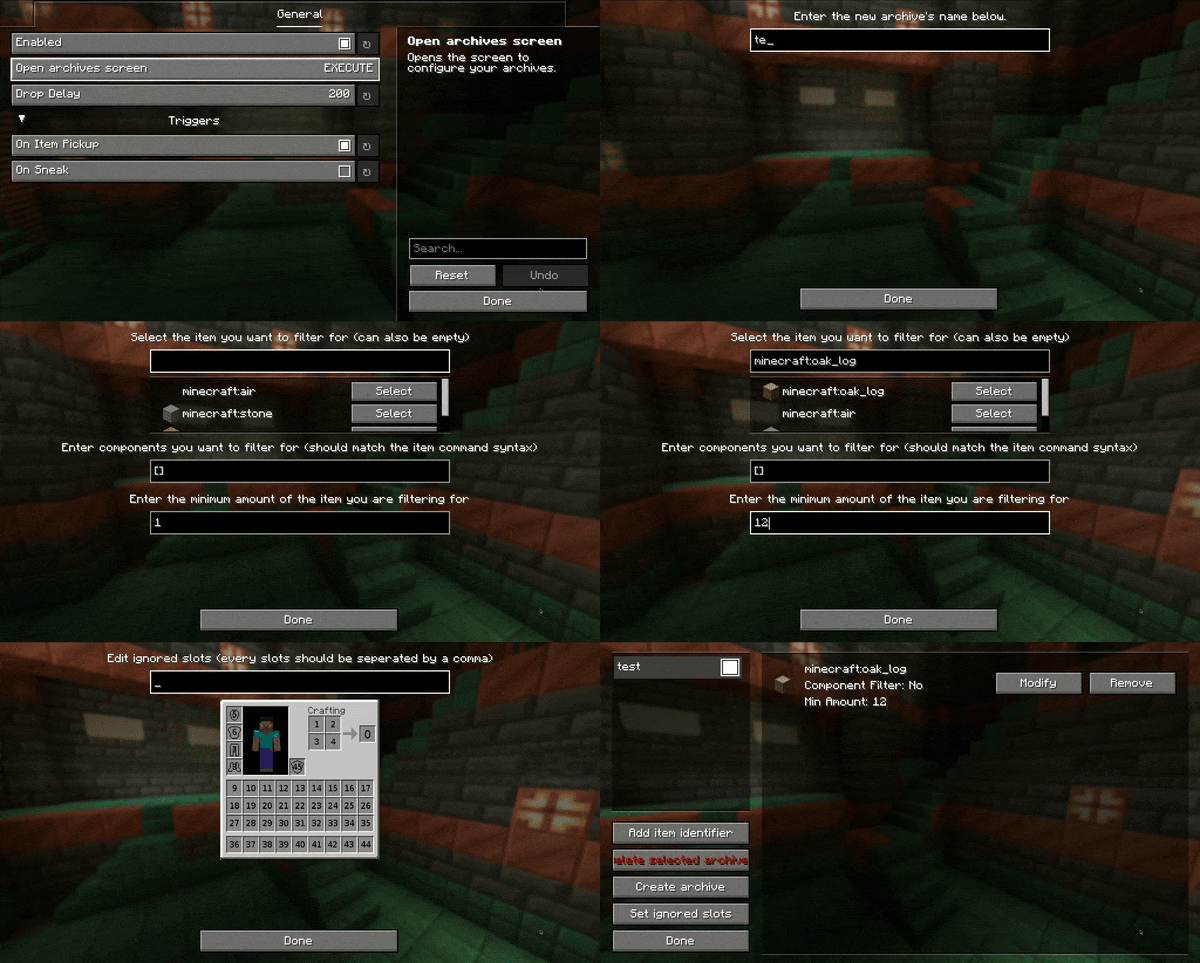
– press the keybinding for the config GUI (`default: o`)
– use the configuration section of the modmenu integration
– archives can be toggled by double-clicking the archive in the GUI
### Component/Nbt filtering
*You have to be careful: Setting the item to air and leaving an empty component will cause the mod to drop every item.*
The format of the components/nbt is always the item predicate syntax of the version of Minecraft you’re playing on.
Unless you know the syntax by heart, you can use
a [give command generator](https://www.gamergeeks.net/apps/minecraft/give-command-generator)
and copy the component part (enclosed by `{}` or `[]`).
The syntax is also described on
this [wiki post](https://minecraft.wiki/w/Argument_types#item_predicate).
**How to drop everything except a specific item?**
A string like this: `[!minecraft:stored_enchantments={mending:1}]` will do the trick. It will drop every item that does not have Mending enchanted. If you want to only drop enchanted books that do not have Mending enchanted you have to add an item identifier for it as well.
### Other
If you need help with any of my mods, join my [discord server](https://nyon.dev/discord).
AutoAFKFish
# AutoAFKFish
A fairly simple fabric mod for all versions of Minecraft that support fabric prior to 1.21.9 with v1.1.2, and 1.21.9+
with v1.1.3, making it so that when you press the F12 Key, it will start acting as if you are holding down the right
mouse button. It will keep acting like that even if you open your inventory, open chat, pause on a multiplayer server,
and any other action that does not stop the integrated server if you are on a client world, or any action regardless on
a server world. You can toggle it off by pressing the F12 Key again (there is a 1.5 second cooldown). Must be used in
conjunction with a afk fishing farm.
Thanks for the French Translation, Calvineries!
Thanks for the Simplified Chinese Translation, Wudji!
Also available on [CurseForge](https://www.curseforge.com/minecraft/mc-mods/autoafkfish “AutoAFKFish CurseForge”).
Aussie Parrots
## About
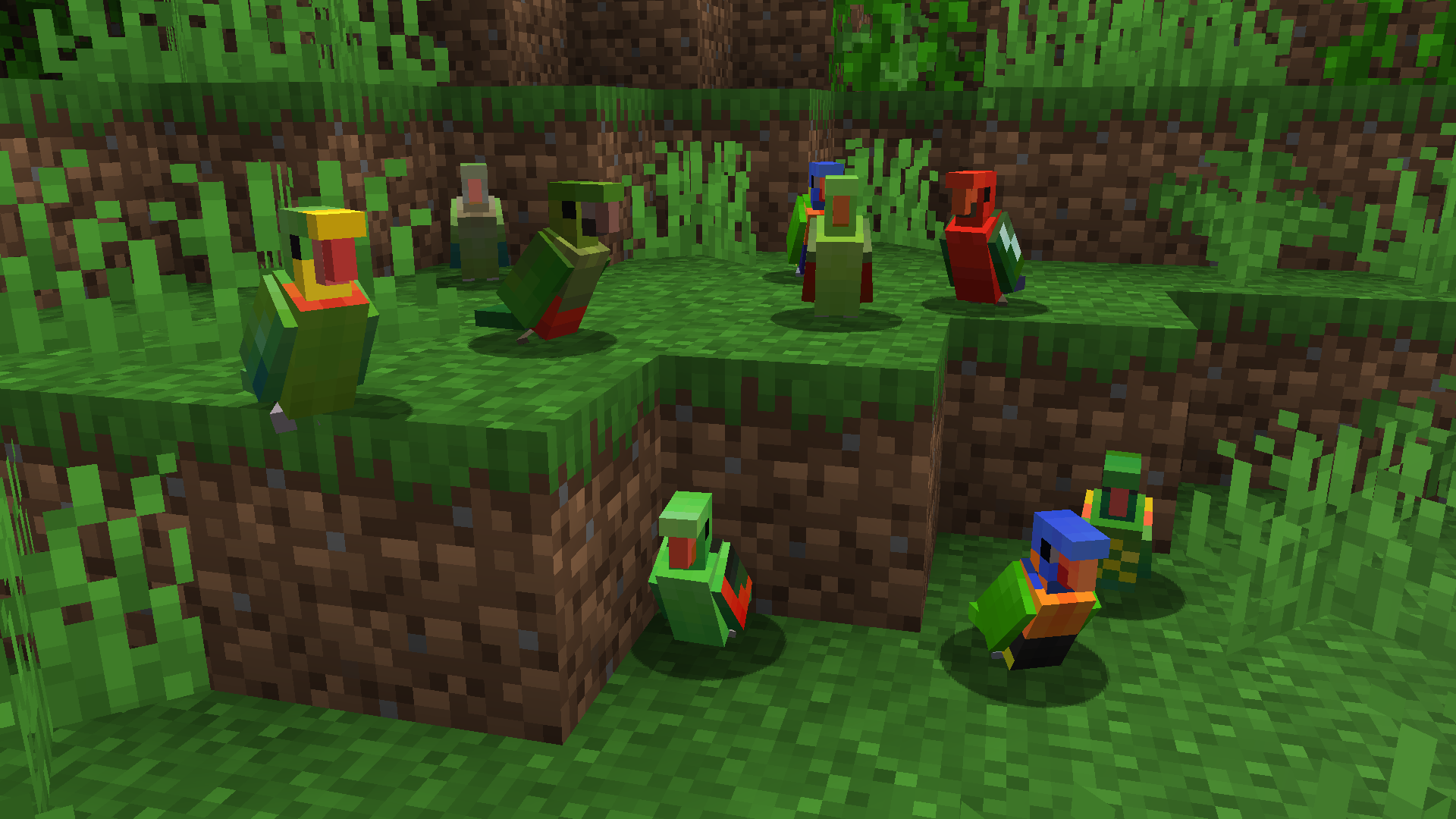
Aussie Parrots brings the diversity of Australia’s parrots into the world of Minecraft.
All the Aussie parrots spawn alongside the vanilla ones, resulting in the jungles bustling with a plethora of unique parrot types to encounter!
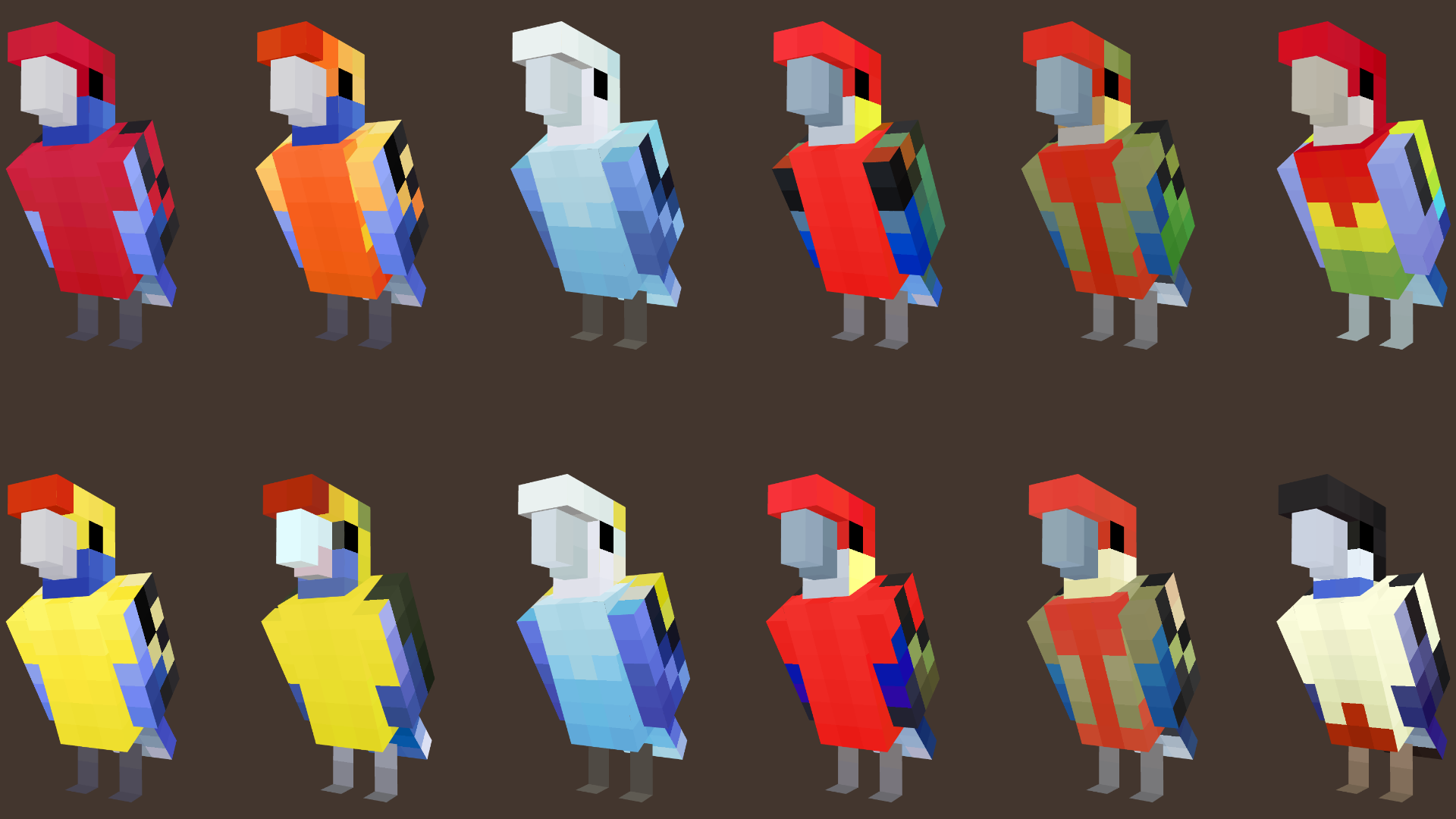
The pack adds 52 variants across 33 of Australia’s parrot species, specifically members of the Psittacidae Family (or True Parrots) and the Cacatuidae Family (known as Cockatoos).
### **Aussie Parrots is feature complete and doesn’t have any major planned updates going forward**
### **V1.5 – Parrots of Australia Update, includes the following species:**
Parrot Species
– Eclectus Parrot (M+F Variants)
– Greater Blue Bonnet (Yellow Vented and Red Vented)
– Budgerigar (or Budgie) – Wild Version
– Australian Ringneck – Port Lincoln
– Australian Ringneck – Cloncurry
– Princess Parrot
– Palm Cockatoo

### **V1.4 – The Cockatoos 2 Update, includes the following species:**
Parrot Species
– Cockatiel (M+F Variants)
– Glossy Black Cockatoo (M+F Variants)
– Little Corella

### **V1.3 – The Parrots in Red Update, includes the following species:**
Parrot Species
– Red-Cheeked Parrot (M+F Variants)
– Scarlet Chested Parrot (M+F Variants)
– Red-Rumped Parrot (M+F Variants)
– Red-Capped Parrot (M+F Variants)

### **V1.2 – The Cockatoo Pt 1 Update, includes the following species:**
Parrot Species
– Sulfur Crested Cockatoo
– Pink Cockatoo
– Galah
– Gang Gang Cockatoo (M+F Variants)
– Red-Tailed Black Cockatoo (M+F Variants)
– Yellow-Tailed Black Cockatoo

### **V1.1 – The Rosella Update, includes the following species:**
Parrot Species
– Crimson Rosella (Crimson, Yellow and Orange Adelaide Variants)
– Eastern Rosella
– Coastal Western Rosella (M+F Variants)
– Inland Western Rosella (M+F Variants)
– Northern Rosella
– Pale Headed Rosella (M+F Variants)
– Green Rosella
### **V1.0 includes the following species:**
Parrot Species
– Rainbow Lorikeet
– King Parrot (M+F Variants)
– Scaly Breasted Lorikeet
– Red Collared Lorikeet
– Superb Parrot (M+F Variants)
– Red Winged Parrot (M+F Variants)
## Requirements
– This requires either **[ETF](https://modrinth.com/mod/entitytexturefeatures)/[EMF](https://modrinth.com/mod/entity-model-features)** or **Optifine** to display the texture variants and adjusted models correctly.
### Compatibility
This should work on any version that supports custom entity models and entity variant features in resource packs.
The pack format has been changed to accomodate for 1.21.9 which should work for versions beyond that.
Due to the nature of the parrot’s underwing textures, all the vanilla parrots were modified to have their textures align with the modified UV. I have not tested to see if this causes conflicts with other resource packs that modifies parrots, but if it does, please let me know.
### Future Plans – Feature Complete
Aussie Parrots covers only the Australian parrots only. Currently, the resource pack is considered feature complete, with no other plans to add more parrot species in the future. Including parrot sounds is still a possibility but it won’t be a priority. A potential Bedrock version may be considered down the future.
Current Plans
– ~~Additional Australian parrot species and variants~~ [Complete]
– ~~Australian Cockatoos and their variants~~ [Complete]
– Custom parrot sounds for the new variants (possibly)
Feel free to use this in videos, screenshots, animations or modpacks! Just leave a credit and link to the page please. 🙂
I hope you enjoy it! Feedback and suggestions are welcome!
Astral Sky Overlay
This resource pack contains a space-like atmosphere which, I have dubbed “Astral,” with stars and a mistful cloud in the sky.
**This resource pack requires either Skyboxify, Optifine, Nuit, or fabricskyboxes. Without it you will not be able to see it.**
If you want to see more like this join my discord: [https://discord.gg/YrSWPbWDUF](https://discord.gg/YrSWPbWDUF)

Ashen + More Armor Trims Compatibility
This addon provides modified item textures to ensure compatibility with the More Armor Trims mod while preserving the Ashen resourcepack style.
—
If you encounter any issues, please contact me (sof_izh) on the [Ashen Discord server](https://discord.gg/k5pDjKbhdh). Do not report these issues to Aim_Boot, as this is just a fan-made addon and is not officially affiliated with the main Ashen resourcepack.
—
Credits:
– Aim_Boot – [Ashen](https://modrinth.com/resourcepack/ashen) resourcepack
– masik16u – [More Armor Trims](https://modrinth.com/mod/more-armor-trims) mod
Arrow For Fluid | 流体流向箭头
# Arrow For Fluid
~~Do you also need some arrow for the water and lava fluid like I do?~~
## Features
Add arrow for water and lava.Like gallery.
## Installation
1. Download the resource pack file (.zip).
2. Open Minecraft, go to “Options” > “Resource Packs” > “Open Resource Pack Folder”.
3. Place the downloaded file into the folder.
4. Enable the resource pack in-game.
# 流体流向箭头
~~你是否也跟我一样需要简易查看流体的流向?~~
## 概述
对水和岩浆流体添加了指向箭头。
## 安装方法
1. 下载资源包文件 (.zip)。
2. 打开 Minecraft,进入“选项” > “资源包” > “打开资源包文件夹”。
3. 将下载的文件放入文件夹中。
4. 在游戏中启用该资源包即可。
Araxy Crystals

#
💎 Araxy – Modern End Crystals
Araxy is a custom Minecraft texture pack that reimagines the End Crystal with a sleek, minimalist, and modern design. Instead of the chaotic and flashy vanilla crystal, Araxy gives you a refined, geometric look that feels futuristic yet perfectly fits the End’s mysterious vibe.
# ✨ Features
– 💎 A fully redesigned End Crystal with a modern, clean and simple style
– 🎨 Minimalist geometry that keeps the design sharp and readable
– 🧩 Perfectly balanced between stylish and functional
– ⚔️ Optimized for crystal PvP – easily spot crystals in fast-paced fights
– 🌐 Ideal for Crystal PvP and all environments.
– 🚫 Removes unnecessary clutter for a smooth, polished look
– ⚙️ No mods neeeded


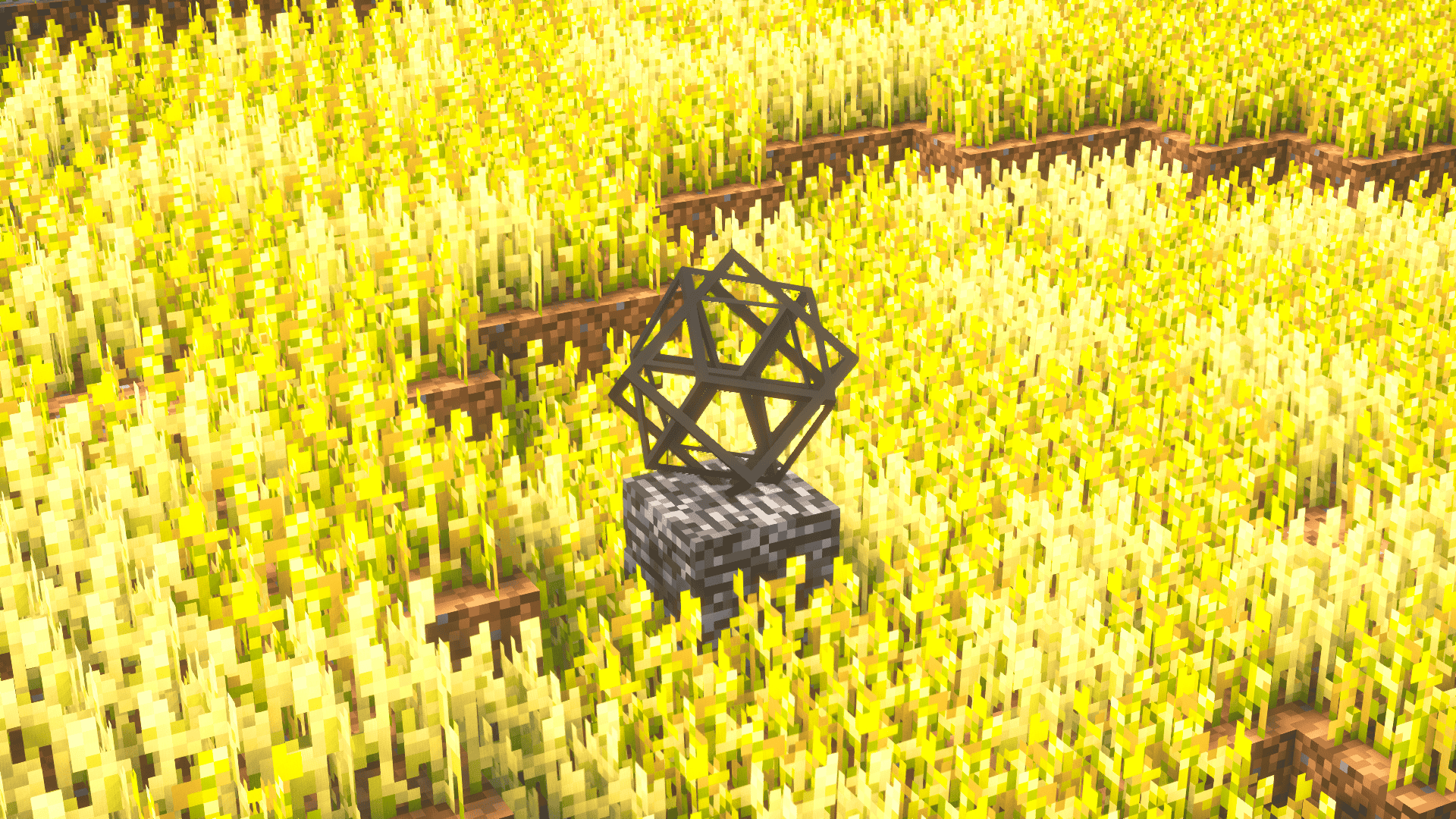
Whether you’re fighting the Ender Dragon, building futuristic bases, or dominating in crystal PvP, Araxy makes End Crystals look clean and elegant, turning them into a visual centerpiece rather than a noisy distraction.
Perfect for players who love a clean, modern Minecraft aesthetic, Araxy transforms End Crystals into something that feels elegant, futuristic, and visually satisfying – all while staying lightweight and distraction-free.
_For further questions, contact polar882 on Discord._
AquaHUD
# AquaHUD
A simplistic, modern UI resource pack designed to complement Sodium’s UI.
## About
Upon installing sodium, I immediately found it rather annoying that it’s user interface was completely different from the rest of Minecraft’s. So, I took it upon myself to create a resource pack that attempts to complement Sodium’s user interface in a way that makes every screen feel consistent and like it was meant to look that way. This has been in development for quite a while, so there may be some inconsistencies with some UIs.
## Want something more faithful to sodium’s style?
[AquaHUD Flat](https://modrinth.com/resourcepack/aquahud-flat) is AquaHUD but with:
* no grids
* no hard exterior outlines
* more seperation between elements
## Permissions
do whatever, i dont care
## Requirements
The only requirement is my [TranslucencyFix](https://modrinth.com/mod/translucencyfix) mod.
## Recommendations
Ready for the cool stuff? Me too.
* Sodium: https://modrinth.com/mod/sodium
* Sodium Extra: https://modrinth.com/mod/sodium-extra
* Blur: https://modrinth.com/mod/blur-fabric
* ‘Slight’ Gui Modifications: https://modrinth.com/mod/slight-gui-modifications
* OneBar: https://modrinth.com/mod/onebar
* Using Optifabric? Custom Background Color instead of Blur: https://modrinth.com/mod/r1ifqLkv/version/XQhFC2Zk
Special instructions:
* Blur
* set Fade Time to 0
* set Blur Radius to 32
* set Gradient Start Color to 75999999
* set Gradient End Color to 75555555
* ‘Slight Gui Modifications
* Enable Tooltip Modifications
* set Background color to A0000000
* set Outline Top Color to 00000000
* set Outline Bottom Color to 00000000
* LibGUI (Open Mods menu -> Filter -> Libraries -> Shown)
* Enable Dark mode.
* Why? Because LibGUI hardcodes damn near half of it’s GUIs and I can’t do anything about it.
* OneBar
* Set background color to A0000000
* Custom Background Color
* Alpha on both start and end: 117
* Red, Green, and Blue on start: 153
* Red, Green, and Blue on end: 85
April Fools’ Cobble (1 in 169)
When the pack is active, random cobblestone blocks appear to be blocks of diamond.
[‘Random’ works like lillypad orientation with a specific x,y,z block always showing the same.]
This variation of the pack has 1 in 169 blocks affected
Two other options exist should a different degree of replacement be wanted:
[April Fools’ Cobble (1 in 13)](https://modrinth.com/resourcepack/april-fools-cobble_common/)
[April Fools’ Cobble (1 in 1014)](https://modrinth.com/resourcepack/april-fools-cobble_rare)
As usual, for versions 1.14 through 1-20.1, activating the pack will produce a warning that it was made for an earlier version…
this can be safely ignored.

April Fools’ Cobble (1 in 1014)
When the pack is active, random cobblestone blocks appear to be blocks of diamond.
[‘Random’ works like lillypad orientation with a specific x,y,z block always showing the same.]
This variation of the pack has 1 in 1014 blocks affected
Two other options exist should a different degree of replacement be wanted:
[April Fools’ Cobble (1 in 13)](https://modrinth.com/resourcepack/april-fools-cobble_common/)
[April Fools’ Cobble (1 in 169)](https://modrinth.com/resourcepack/april-fools-cobble_uncommon)
As usual, for versions 1.14 through 1-20.1, activating the pack will produce a warning that it was made for an earlier version…
this can be safely ignored.
