autodrop
# autodrop
This mod provides a function to automatically drop items from the
inventory.
## Managing items
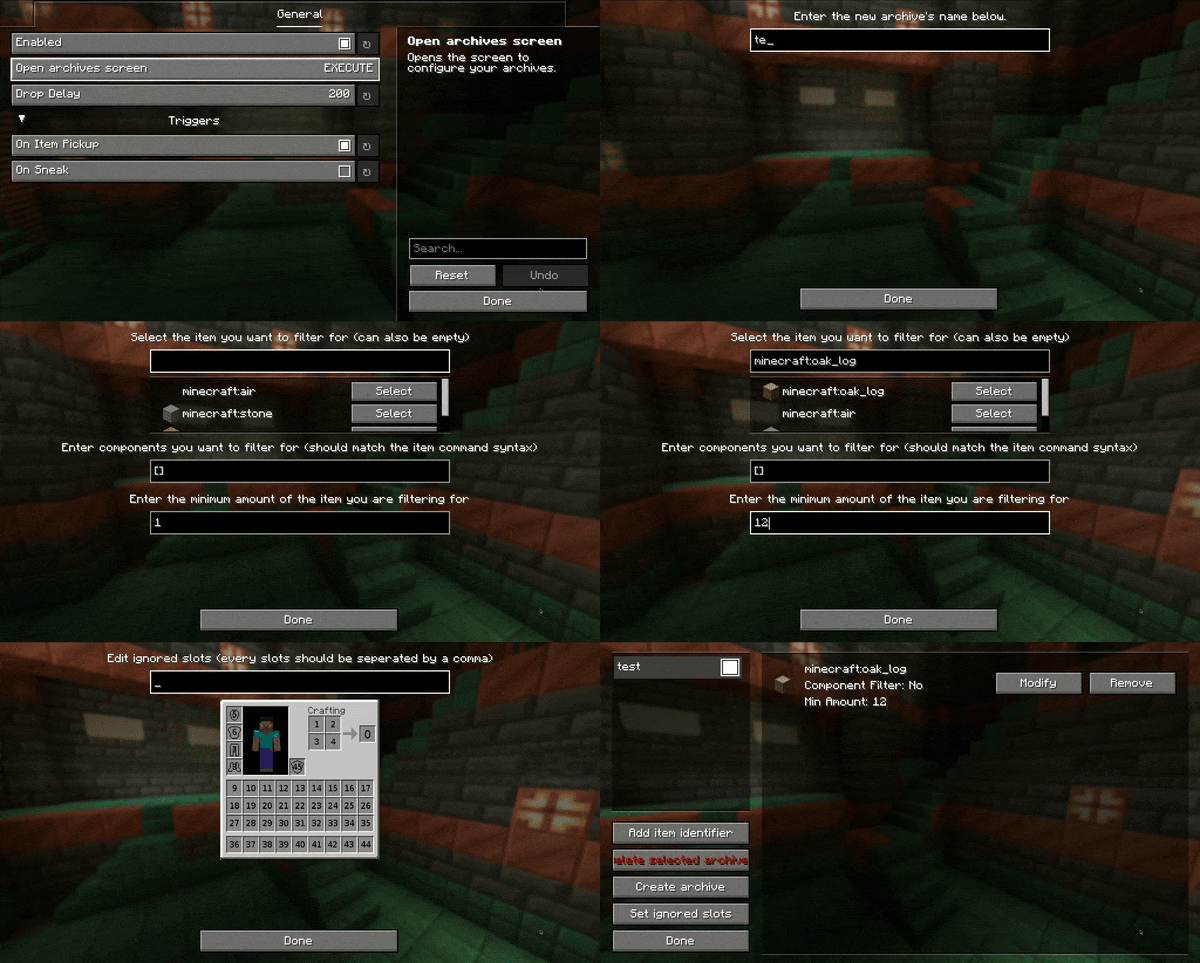
– press the keybinding for the config GUI (`default: o`)
– use the configuration section of the modmenu integration
– archives can be toggled by double-clicking the archive in the GUI
### Component/Nbt filtering
*You have to be careful: Setting the item to air and leaving an empty component will cause the mod to drop every item.*
The format of the components/nbt is always the item predicate syntax of the version of Minecraft you’re playing on.
Unless you know the syntax by heart, you can use
a [give command generator](https://www.gamergeeks.net/apps/minecraft/give-command-generator)
and copy the component part (enclosed by `{}` or `[]`).
The syntax is also described on
this [wiki post](https://minecraft.wiki/w/Argument_types#item_predicate).
**How to drop everything except a specific item?**
A string like this: `[!minecraft:stored_enchantments={mending:1}]` will do the trick. It will drop every item that does not have Mending enchanted. If you want to only drop enchanted books that do not have Mending enchanted you have to add an item identifier for it as well.
### Other
If you need help with any of my mods, join my [discord server](https://nyon.dev/discord).
AutoAFKFish
# AutoAFKFish
A fairly simple fabric mod for all versions of Minecraft that support fabric prior to 1.21.9 with v1.1.2, and 1.21.9+
with v1.1.3, making it so that when you press the F12 Key, it will start acting as if you are holding down the right
mouse button. It will keep acting like that even if you open your inventory, open chat, pause on a multiplayer server,
and any other action that does not stop the integrated server if you are on a client world, or any action regardless on
a server world. You can toggle it off by pressing the F12 Key again (there is a 1.5 second cooldown). Must be used in
conjunction with a afk fishing farm.
Thanks for the French Translation, Calvineries!
Thanks for the Simplified Chinese Translation, Wudji!
Also available on [CurseForge](https://www.curseforge.com/minecraft/mc-mods/autoafkfish “AutoAFKFish CurseForge”).
Auto Graves Lite
# 🪦 Graves Lite: The Vanilla+ Death Solution
Graves Lite is a high-performance, minimalist datapack designed to protect your loot while keeping the “hardcore” spirit of Minecraft alive.
## ✨ Key Features
* **📍 Private Death Waypoints**: The moment you perish, your exact coordinates are sent directly to your chat. No more guessing where that mountain was.
* **⏳ Despawn Protection**: Your items won’t vanish. The pack “freezes” the despawn timer for any items within a 4-block radius of your death. Take your time to gear up—your loot will be waiting.
* **✨ Soul Beacon**: A subtle particle beam marks your remains. It’s visible through walls and terrain, guiding you back to the exact spot without being an eyesore.
* **⚡ Zero-Lag Architecture**: Designed for servers. It uses optimized **Interaction Markers** rather than heavy armor stands or entities, ensuring your TPS stays at a perfect 20.
* **🧼 Self-Cleaning**: Once you get within 1.5 blocks of your death site, the marker and particles vanish instantly. No “leftover” graves cluttering your world.
## 🛠️ How It Works
Unlike traditional grave mods that store items in a block or entity (which can occasionally “swallow” items or glitch), Graves Lite manages the **Item Entities** themselves:
1. **On Death:** A marker is summoned at your location.
2. **The Freeze:** Every tick, the marker resets the `Age` tag of nearby items to 0, preventing them from ever despawning.
3. **The Recovery:** When you return, the marker detects your presence, stops the freeze, and deletes itself. Your items are picked up naturally.
## 🚀 Installation & Compatibility
* **Multiplayer Ready:** Works perfectly on dedicated servers and LAN.
**To Install Datapack:**
1. Download the `.zip` file.
2. Drop it into your world’s `datapacks` folder.
3. Type `/reload` in-game.
**To Install Mod:**
1. Download the ‘.jar’ file
2. Move it to mods folder in minecraft
3. Restart Your game
> **Note:** Because this pack uses marker logic, it is incredibly lightweight and won’t conflict with other world-gen or utility datapacks.
Aussie Parrots
## About
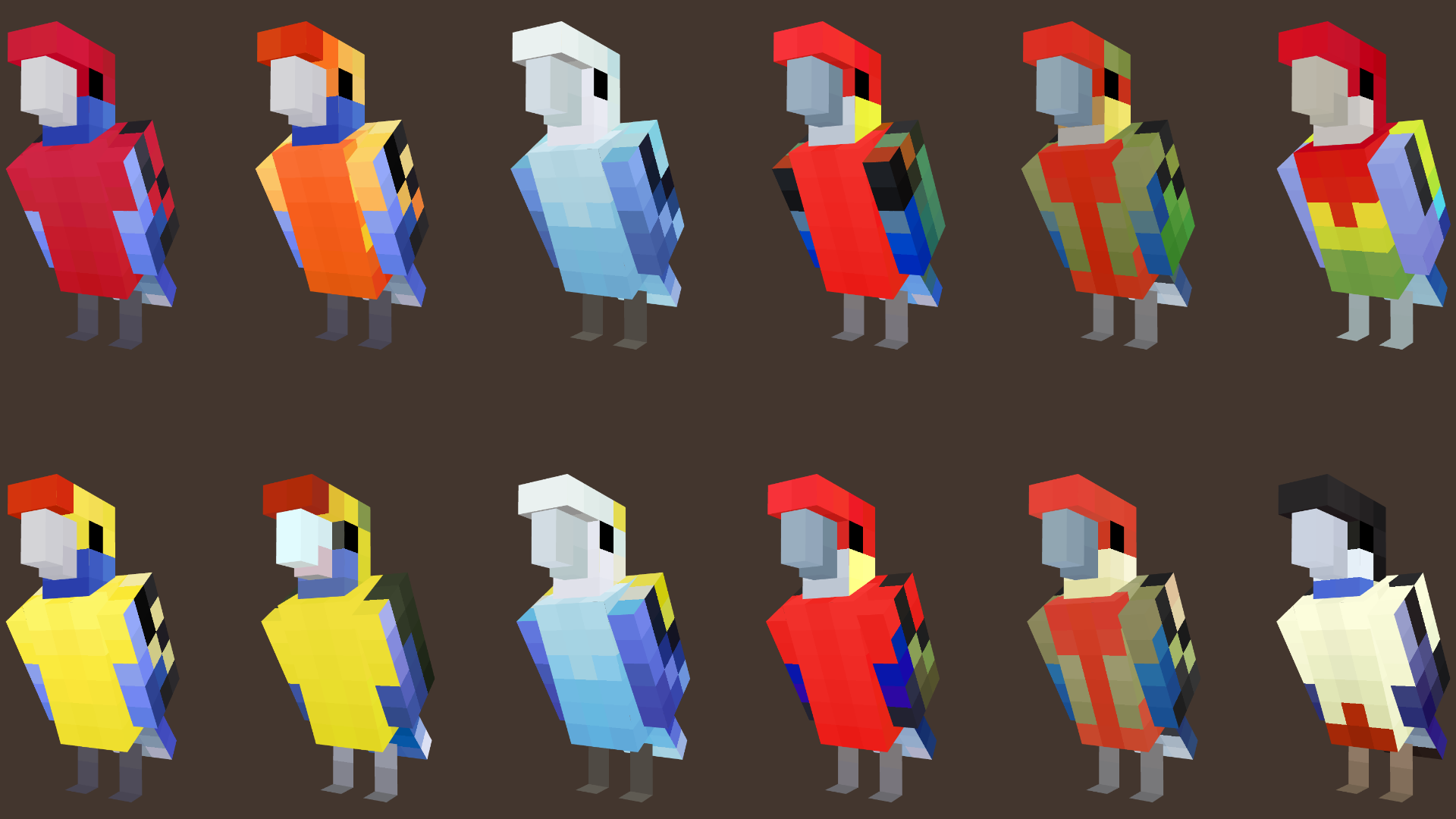
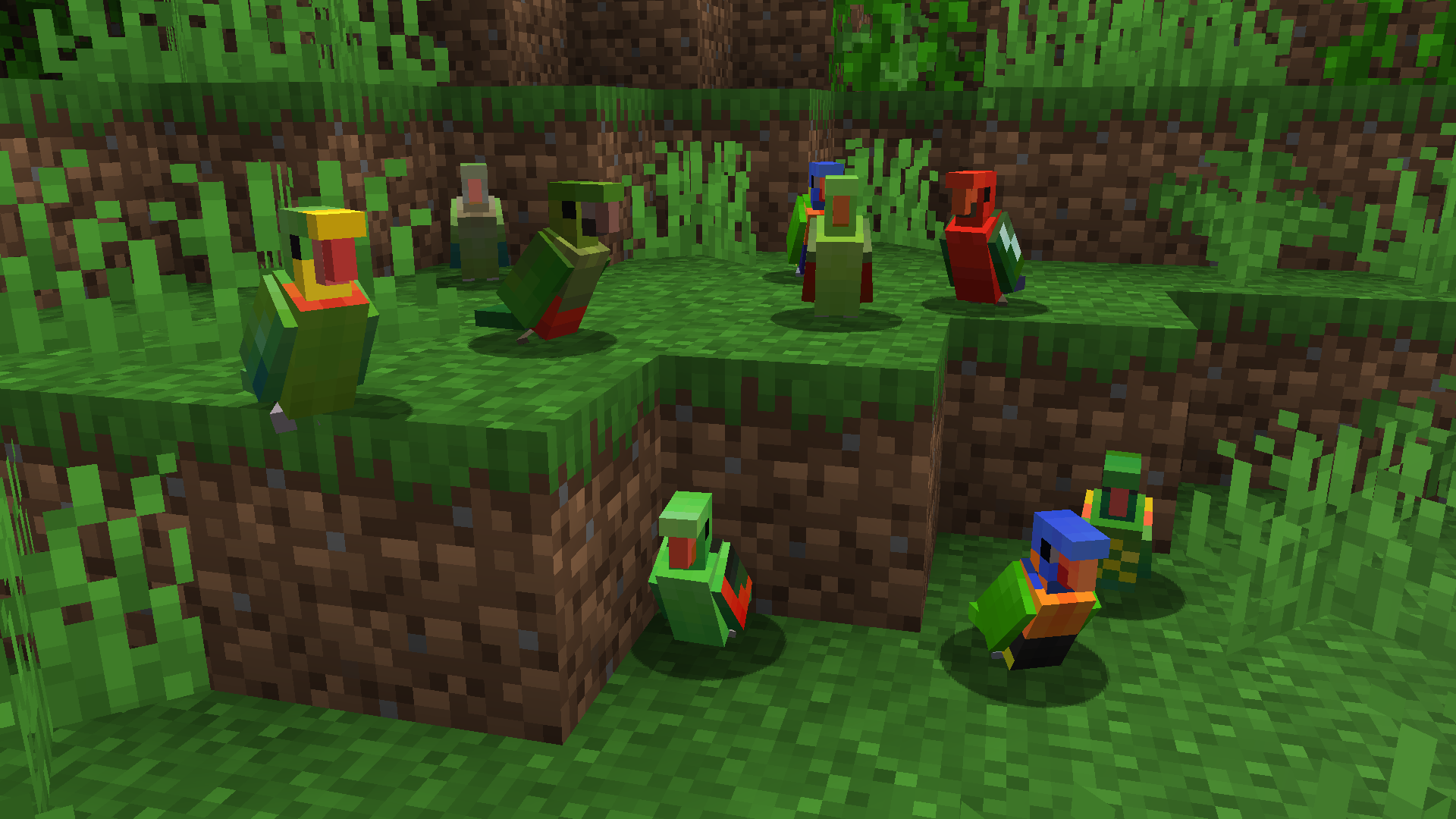
Aussie Parrots brings the diversity of Australia’s parrots into the world of Minecraft.
All the Aussie parrots spawn alongside the vanilla ones, resulting in the jungles bustling with a plethora of unique parrot types to encounter!
The pack adds 52 variants across 33 of Australia’s parrot species, specifically members of the Psittacidae Family (or True Parrots) and the Cacatuidae Family (known as Cockatoos).
### **Aussie Parrots is feature complete and doesn’t have any major planned updates going forward**
### **V1.5 – Parrots of Australia Update, includes the following species:**
Parrot Species
– Eclectus Parrot (M+F Variants)
– Greater Blue Bonnet (Yellow Vented and Red Vented)
– Budgerigar (or Budgie) – Wild Version
– Australian Ringneck – Port Lincoln
– Australian Ringneck – Cloncurry
– Princess Parrot
– Palm Cockatoo

### **V1.4 – The Cockatoos 2 Update, includes the following species:**
Parrot Species
– Cockatiel (M+F Variants)
– Glossy Black Cockatoo (M+F Variants)
– Little Corella

### **V1.3 – The Parrots in Red Update, includes the following species:**
Parrot Species
– Red-Cheeked Parrot (M+F Variants)
– Scarlet Chested Parrot (M+F Variants)
– Red-Rumped Parrot (M+F Variants)
– Red-Capped Parrot (M+F Variants)

### **V1.2 – The Cockatoo Pt 1 Update, includes the following species:**
Parrot Species
– Sulfur Crested Cockatoo
– Pink Cockatoo
– Galah
– Gang Gang Cockatoo (M+F Variants)
– Red-Tailed Black Cockatoo (M+F Variants)
– Yellow-Tailed Black Cockatoo

### **V1.1 – The Rosella Update, includes the following species:**
Parrot Species
– Crimson Rosella (Crimson, Yellow and Orange Adelaide Variants)
– Eastern Rosella
– Coastal Western Rosella (M+F Variants)
– Inland Western Rosella (M+F Variants)
– Northern Rosella
– Pale Headed Rosella (M+F Variants)
– Green Rosella
### **V1.0 includes the following species:**
Parrot Species
– Rainbow Lorikeet
– King Parrot (M+F Variants)
– Scaly Breasted Lorikeet
– Red Collared Lorikeet
– Superb Parrot (M+F Variants)
– Red Winged Parrot (M+F Variants)
## Requirements
– This requires either **[ETF](https://modrinth.com/mod/entitytexturefeatures)/[EMF](https://modrinth.com/mod/entity-model-features)** or **Optifine** to display the texture variants and adjusted models correctly.
### Compatibility
This should work on any version that supports custom entity models and entity variant features in resource packs.
The pack format has been changed to accomodate for 1.21.9 which should work for versions beyond that.
Due to the nature of the parrot’s underwing textures, all the vanilla parrots were modified to have their textures align with the modified UV. I have not tested to see if this causes conflicts with other resource packs that modifies parrots, but if it does, please let me know.
### Future Plans – Feature Complete
Aussie Parrots covers only the Australian parrots only. Currently, the resource pack is considered feature complete, with no other plans to add more parrot species in the future. Including parrot sounds is still a possibility but it won’t be a priority. A potential Bedrock version may be considered down the future.
Current Plans
– ~~Additional Australian parrot species and variants~~ [Complete]
– ~~Australian Cockatoos and their variants~~ [Complete]
– Custom parrot sounds for the new variants (possibly)
Feel free to use this in videos, screenshots, animations or modpacks! Just leave a credit and link to the page please. 🙂
I hope you enjoy it! Feedback and suggestions are welcome!
Aurum’s ReTextures

A simple, vanilla-like resource pack for modern versions of Minecraft.
—
The pack contains my interpretations of ingame items with how I think items should look like, while still keeping the vanilla feel.
Currently, the pack changes the font, title (the _Minecraft_ title in the main menu, typo included!), the main menu panorama and item’s textures; blocks and armors will be tweaked later on in the future, along with GUI and HUD elements and miscellaneous stuffs.
—
Atmospheric Skies & Fog
Atmospheric Skies & Fog adds a new layer of immersion to Minecraft with dynamic skies and adaptive fog effects.
Sky colors shift naturally based on time of day and weather.
Fog density and color adjust depending on biome, making each area feel unique.
This pack takes inspiration from the atmospheric style of Action and Stuff, adapting the idea of biome-based sky and fog changes into a customized version.
All assets have been adjusted or reworked to fit this pack’s own presentation and compatibility.
“This is a modified version of the [Fogulous](https://modrinth.com/resourcepack/fogulous) resource pack.”
✨For an even better experience, try combining it with your favorite resource pack, [Visual Effect+](https://modrinth.com/resourcepack/visual-effects-plus), [Cloud Tweaks](https://modrinth.com/mod/cloud_tweaks), or [Better Clouds](https://modrinth.com/mod/better-clouds) to achieve more stunning visuals!
(this resourcepack not include the sun texture!)
## Screenshot



[polytone](https://modrinth.com/mod/polytone)
Astroid
# 🚀 Astroid
I made this mod because I wanted Minecraft to feel a bit more alive without completely changing what makes it fun in the first place.
**Astroid is simple** — it improves the experience, adds some fresh mechanics, and keeps everything smooth and playable. Nothing overcomplicated, nothing game-breaking… just a better version of Minecraft.
## ✨ What it does
1. Makes gameplay feel smoother and more responsive
2. Adds small but noticeable improvements that actually matter
3. Removes Crystal animation
4. Makes totem smaller
5. Adds different helpful GUI’s
6. Doesn’t destroy your FPS
## 🤔 Why I made this
**Most mods I tried either:** add too much random stuff, or tank performance
So I decided to make something that sits in the middle — clean, useful, and stable.
## 📦 How to Install
**Just the usual:**
Drop the resource pack into your “resourcepacks” folder
Launch the game
### ⚠️ Quick note
– If something breaks or feels off, let me know. I actually read feedback and try to fix things fast.
### ❤️ If you like it please join our discord
It genuinely helps if you:
**⭐ Favorite the resource pack
💬 Leave a comment
📢 Share it**
Astral Sky Overlay
This resource pack contains a space-like atmosphere which, I have dubbed “Astral,” with stars and a mistful cloud in the sky.
**This resource pack requires either Skyboxify, Optifine, Nuit, or fabricskyboxes. Without it you will not be able to see it.**
If you want to see more like this join my discord: [https://discord.gg/YrSWPbWDUF](https://discord.gg/YrSWPbWDUF)

Ashen + More Armor Trims Compatibility
This addon provides modified item textures to ensure compatibility with the More Armor Trims mod while preserving the Ashen resourcepack style.
—
If you encounter any issues, please contact me (sof_izh) on the [Ashen Discord server](https://discord.gg/k5pDjKbhdh). Do not report these issues to Aim_Boot, as this is just a fan-made addon and is not officially affiliated with the main Ashen resourcepack.
—
Credits:
– Aim_Boot – [Ashen](https://modrinth.com/resourcepack/ashen) resourcepack
– masik16u – [More Armor Trims](https://modrinth.com/mod/more-armor-trims) mod
Arrow For Fluid | 流体流向箭头
# Arrow For Fluid
~~Do you also need some arrow for the water and lava fluid like I do?~~
## Features
Add arrow for water and lava.Like gallery.
## Installation
1. Download the resource pack file (.zip).
2. Open Minecraft, go to “Options” > “Resource Packs” > “Open Resource Pack Folder”.
3. Place the downloaded file into the folder.
4. Enable the resource pack in-game.
# 流体流向箭头
~~你是否也跟我一样需要简易查看流体的流向?~~
## 概述
对水和岩浆流体添加了指向箭头。
## 安装方法
1. 下载资源包文件 (.zip)。
2. 打开 Minecraft,进入“选项” > “资源包” > “打开资源包文件夹”。
3. 将下载的文件放入文件夹中。
4. 在游戏中启用该资源包即可。