AutoAFKFish
# AutoAFKFish
A fairly simple fabric mod for all versions of Minecraft that support fabric prior to 1.21.9 with v1.1.2, and 1.21.9+
with v1.1.3, making it so that when you press the F12 Key, it will start acting as if you are holding down the right
mouse button. It will keep acting like that even if you open your inventory, open chat, pause on a multiplayer server,
and any other action that does not stop the integrated server if you are on a client world, or any action regardless on
a server world. You can toggle it off by pressing the F12 Key again (there is a 1.5 second cooldown). Must be used in
conjunction with a afk fishing farm.
Thanks for the French Translation, Calvineries!
Thanks for the Simplified Chinese Translation, Wudji!
Also available on [CurseForge](https://www.curseforge.com/minecraft/mc-mods/autoafkfish “AutoAFKFish CurseForge”).
Antumbra
Antumbra is a resource pack which applies a darker and rougher mood to the vanilla look while maintaining the vividness of many textures. In combination with the Photon shader it is possible to achieve a more realistic feel than vanilla. This pack is for everyone who loves the vanilla look, but prefers a more realistic color palette for most textures. Additionally, a person who prefers a more medival style might also like it.

Antumbra + Photon + Photonics
## Features
– An atmospheric dark vibe
– Keeping vividness of many textures
– Dark GUI
## Comparison

Vanilla / Antumbra / Antumbra + Photon + Photonics / Vanilla + Photon + Photonics
Check out the other comparison images in the gallery!
Anton Chigurh (Антон Чигур) Totem of Undying
– Anton Chigur is the main antagonist of Cormac McCarthy’s novel “No Country for Old Men” and its film adaptation. He is a hired assassin, a drug dealer’s mercenary, who ruthlessly eliminates almost everyone he encounters.
– Антон Чигур — главный антагонист романа Кормака Маккарти «Старикам тут не место» и его киноадаптации. Это наёмный убийца, наёмник наркоторговцев, который безжалостно расправляется почти со всеми, кого встречает на своём пути
[Check collection with all memes + streamers Totems ](https://modrinth.com/collection/sfDcDGAi)
anit CHAT
# Chat anit 一个自动屏蔽《Minecraft》中文脏话,和增加IP属地的开源项目。
本插件需要装在Velocity上。前置为SignedVelocity-Proxy需要在velocity和所以1.19.1+的子服上增加
IP属地api为*xiaotuo*提供,脏话屏蔽由*Uapi提供*
使用方法
1.下载本插件,放入velocity的pluging文件夹,启动客户端
>tip
>如果你有子服的Minecraft版本在1.19.1以上需要增加[signed velocity](https://modrinth.com/plugin/signedvelocity/version/1.3.0) 插件到velocity和每个1.19.1+的子服务器。
2.将velocity配置文件“`velocity.toml“` 中“`force-key-authentication“`改为false
3.将所有子服务的配置文件“`server.properties“`中的“`enforce-secure-profile“`改为false
4.启动服务端
**更新日志**: https://github.com/cdpyx/Chatanit/commits/release
English:
# Chat Anit is an open-source project that automatically blocks Chinese profanity in Minecraft and increases IP ownership.
This plugin needs to be installed on Velocity. SignedVelocity Proxy needs to be added on velocity and all 1.19.1+sub servers
The IP locality API is provided by * xiaotuo *, and the profanity blocking is provided by * UAPI*
Usage
1. Download this plugin, place it in the velocity plugin folder, and start the client
> tip
> If you have a sub server version of Minecraft above 1.19.1, you need to add [signed velocity]( https://modrinth.com/plugin/signedvelocity/version/1.3.0 )Plug in to velocity and every 1.19.1+sub server.
2. Change the ‘force key authentication’ in the velocity configuration file ‘velocity. toml’ to false
3. Change the ‘enforce secure profile’ in the ‘server. properties’ configuration file for all sub services to false
4. Start the server
**Update log**: https://github.com/cdpyx/Chatanit/commits/release
Angel’s Weather
> ⭐ Upcoming Update: v1.9.2 will introduce settings and customization, new snow tech, new cloud tech, improved performance, enhanced visuals for existing elements, color reworks, and more.
> ✨ **NOTICE:** Ongoing refurbishing of design appearance…




> ### Selya’s Gratitude to You
>
> *With sincere gratitude for choosing Angel’s Weather, we are honored by Her Majesty Selya’s blessing ~ one of her divine mirror stigmata creations, bestowed upon us.*
>
> ### What is a Stigmata Mirror?
>
> *A Stigmata Mirror is a creation of Selya, the Divine Seamstress of Realities. This mirror represents a fragment of reality itself. The more pieces you assemble, the larger the image becomes. What the full image reveals is a reflection of time, beauty, and your own place within it ~ a living, evolving part of the world.*
>
> **SELYA is the embodiment of light, the CREATION serves as the mirror, and YOU are its reflection.**
## This Stigmata Mirror Features
**Core Features**
* **Rain** – pleasing to behold, bringing ease and calm to your vision
* **Snow** – delicate and pleasant, with refined detail
* **Realistic Rain Sounds** – authentic recordings that create a dynamic, immersive atmosphere
* **Realistic Thunder Sounds** – genuine thunder, balanced to be gentle on the ears
* **Rain Splash Sounds** – adds depth and presence to your surroundings
* **Ambience Sounds** – enriches and elevates the overall experience
* **Animated Rain Splashes** – stylized effects that feel vivid and alive
* **Handcrafted Cloud Design** – each cloud unique, as if carrying its own story
**+Features — [Using Polytone Mod](https://modrinth.com/mod/polytone)**
* **[NEW] Reworked Biome Vegetation Color Palettes** – a revitalized, reimagined look for your world
* **[NEW] Biome Fog Colors** – unique fog hues for overworld biomes and caves
* **[NEW] Biome Sky Colors** – designed in harmony with fog for a seamless atmosphere
* **Cloud Shading** – gentle shading that adds subtle depth to the clouds
* **[NEW] Water Colors** – deeper shades in vast waters, lighter tones in shallow areas
* **[NEW] Rain Particle System** – refined visuals with distinct states for rain and thunderstorms
* **[NEW] Wind System** – influences rain and fog, adding subtle yet noticeable movement
* **[NEW] Space-Aware Fog** – fog adapts to your position, interacting dynamically with the weather
🎙️ Background & Recording Journey
All the sounds you’ll hear were captured during a 3-day journey deep in Mount Olympus National Park, where nature revealed its magic in the purest form. Armed with my Blue Ember XLR mic and Presonus Studio 26c, I spent hours recording rain, wind, splashes and soft breezes.
I traversed some harsh terrain and shifting weather to reach the right spots, recording nature’s voice from every angle.
What you’ll hear is just a glimpse of what I experienced out there.
Hope it brings you even a fraction of the wonder it gave me.
🤝 Want to use the resourcepack?
If you’d like to include this project in a modpack, adventure map, or server, just make sure to credit it by linking to the original source on **Modrinth** or **CurseForge**. ❤️
Andrey Gaydulyan Totem of Undying
– EN: **Andrey Gaidulyan** is a Russian theater, film, television and dubbing actor.
He is best known for his role as Alexander (Sasha) Sergeyev in the TV series “Univer” and “SashaTanya”, as well as for his participation in the program “Stars in Africa” on the TNT channel
– RU: **Андрей Гайдулян** — российский актёр театра, кино, телевидения и дубляжа
Наиболее известен по роли Александра (Саши) Сергеева в телесериалах «Универ» и «СашаТаня», а также по участию в программе «Звёзды в Африке» на телеканале «ТНТ»
[ALL RESOURCEPACKS COLLECTION: MEMES + STREAMERS](https://modrinth.com/collection/sfDcDGAi)
Among Us

But how to make **Among Uses**? 
All you need is an anvil and a carved pumpkin:
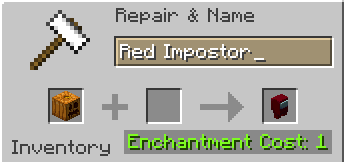
> Rename a carved pumpkin in the anvil to “Color” Impostor
* Example: Red Impostor
* Before snapshot 25w03a, using third-party mods, you could write things like “red impostor” instead of “Red Impostor”, or even “123 red impostor 123”
> After renaming, the item will automatically turn into its custom version
Make your impostors and have fun! 🎭
Among Us Totems
# ** RGB Among us Totem
This Texture Pack Changes ur Totem into a RGB Amongus Character Upon Renaming it
## **Notice Only Works For The Version 25w03a & above Only!**
**
### ** Instructions **
– **_ 1, After Downloading , Put the Texture Pack File in .minecraft folder’s Resource Pack Folder
–
– 2. After Puting in the File in the Folder go to minecraft and Turn on the Resource Pack
–
– 3. To turn your normal totem in to the Special Totem Rename it to “Amongus”_**
AllyCraft
# ✅ 26.1.2
Updated on Friday May 15 2026
Join our discord to get notified on updates!
#
AllyCraft is a bespoke Minecraft mod pack, uniquely designed for the ASUS ROG Ally and Steam Deck. The mod brings a finely tuned version of Minecraft to handheld gaming enthusiasts. This mod pack runs the game much more smoothly and offers seamless controller support, making it the perfect option for portable gaming on high-performance handhelds. Can also be used on desktops!
# Now with shader support!!
Experience Minecraft with shaders on your ASUS ROG Ally & Valve Steam Deck!
> **_Please set your device to maximum power mode for best performance with shaders!_**
Unless you are using a very light shader 🙂
I deeply recommend [Complementary Reimagined](https://modrinth.com/shader/complementary-reimagined). Not sponsored or anything, just really like the shader! (Set it to medium setting in the shader options menu!)
# First launch setup:
1. Set to game pad mode.
2. Download library (it will prompt you).
3. Relaunch!
# The pack has two versions: Midnight Controls & Controlify.
Download RC for Controlify, or RMC for Midnight!
# Previews of the pack:
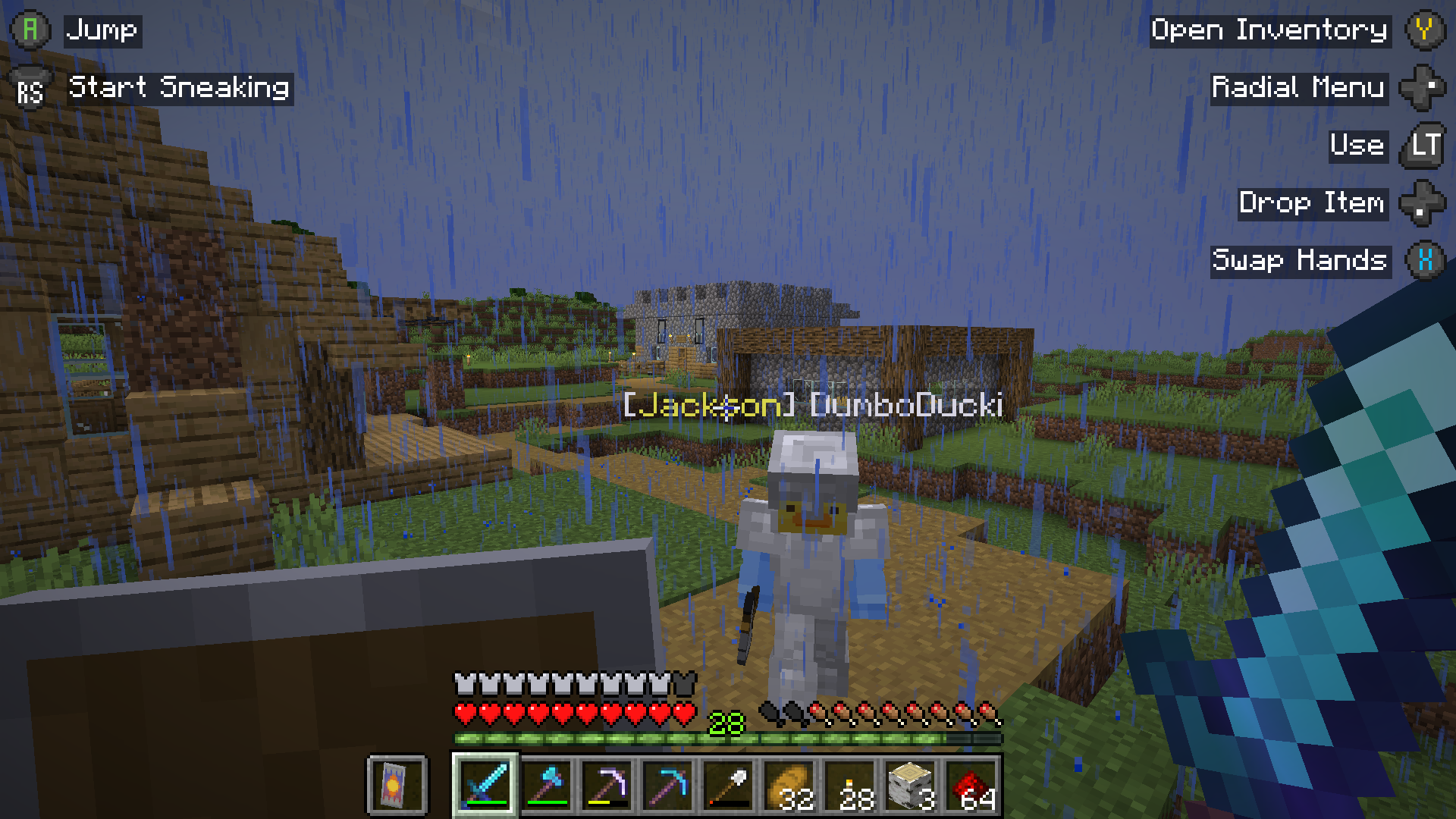
Control hint Layout
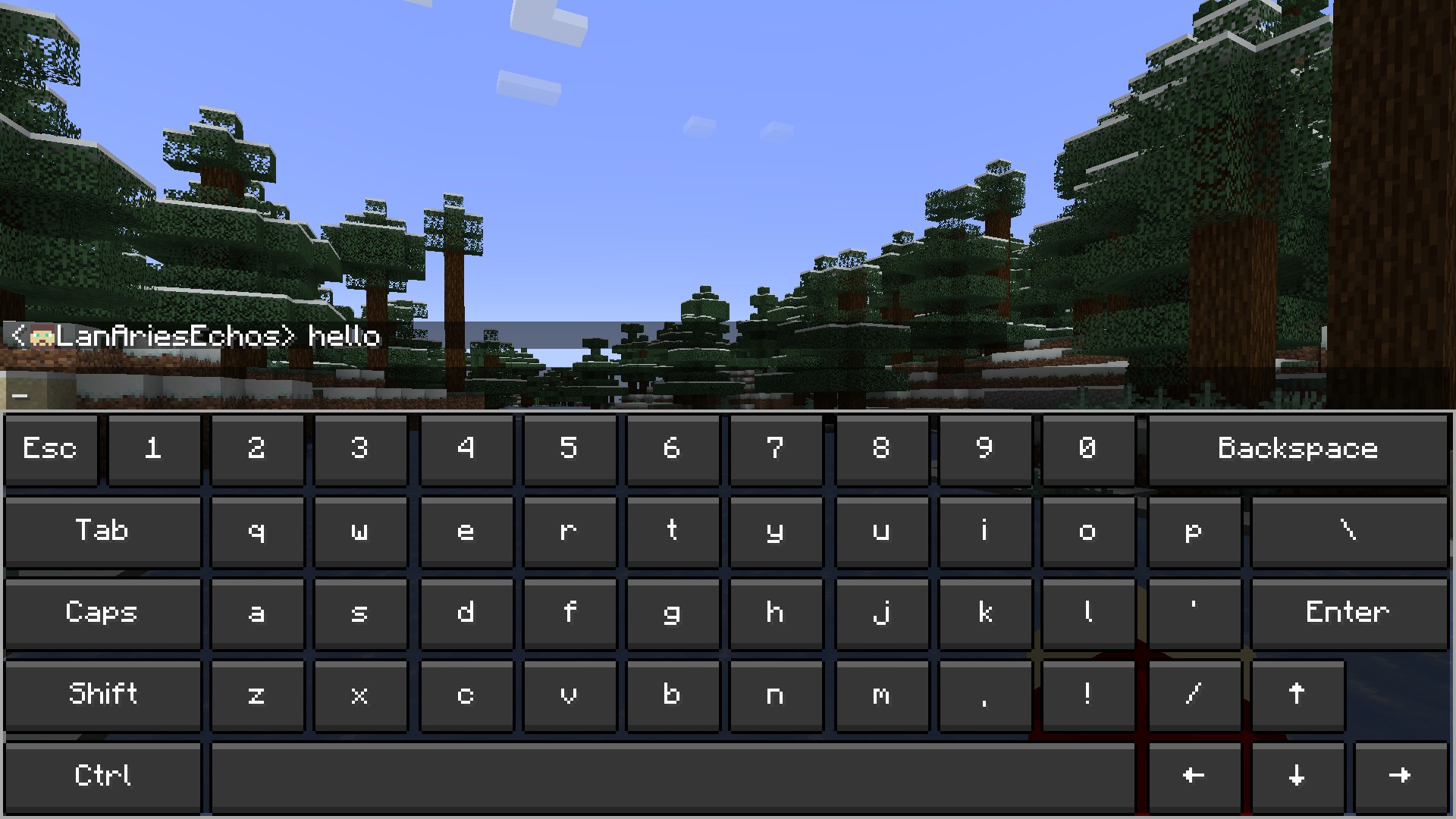
Chat Layout:
(HARD) All-White Textures! (Joel’s 2022 Challenge)
Have you ever played Minecraft® and thought “hey, this is too many colors”?
No? Well… just _pretend_ like you did?
Because here and now, I present…
# THE ALL-WHITE CHALLENGE PACK!
I created this pack originally back in 2022 for 1.19 for a friend of mine to ~~suffer~~ **_enjoy his gameplay_** in!
But, you may say, “1.19? Who still plays in 1.19 when 1.21.5 is available and 1.21.6 is already announced!?”, well, I have a treat for you..
# **THIS PACK IS AVAILABLE FOR *EVERY* MINECRAFT® VERSION!**
_[Available in Easy (no GUI changes)](https://modrinth.com/resourcepack/all-white-2022-joel-challenge-pack-easy) and Hard (all textures changed)_
*Every single major version…*
– 1.21.5? You can use this pack!
– Beta 1.4? Still works!
– Alpha v1.2.2? I don’t know why, BUT IT WORKS!

*Even EVERY SINGLE DEV VERSION IS SUPPORTED*
– 22w44a? Yup, got it.
– 11w50a? Sure.
– Beta 1.6 Test Build 3? You’re crazy, but the pack works!

*Want to play your favorite “special” version? You can do it!*
– Combat Test 7b? This pack supports it!
– 2020’s 20w14infinite? Of course!
– 2013’s 2.0? Yup! (the Pink Wither looks better than ever)

*It even supports versions that don’t support Texture Packs, such as Infdev!*
*(Note: To play with this pack in versions before Alpha v1.2.2, you’ll need to manually modify your .jar file.)*
# So what are you waiting for?
Dive into the exciting, mind-boggling, seen-on-TV (not really), incredibly playable **world of**_… white._ Can you beat Minecraft® with no colors?
## Limitations
This pack isn’t perfect. In vanilla Minecraft®, you cannot change the water texture, and some foliage colors are hardcoded. In older versions, even less can be changed, therefore, this pack technically isn’t ***all*** white, but—especially in more modern versions—it is *mostly* white, as much as the game allows.
Additionally, the Modrinth API (as of writing this on 25.04.25), does not contain all versions of Minecraft®. This has resulted in me having to use some workarounds and marking a few versions wrongly. For example, v0.18 is marked as supporting *c0.30_01c*, when it actually supports *0.28_01*, *0.29*, *0.29_01*, *0.29_02*, *0.30 (Creative, 1900 Re-upload)*, *0.30 (Creative, Launcher Renew)*, and *0.30 (Survival, 1858 Re-upload)*.
If Modrinth adds these missing versions to their API, this notice shall disappear and the wrongly marked versions will be fixed.
For the time being, **the supported Minecraft® versions can be found in the description/changelog of every pack version, as well as its README.TXT**.
## License & Credits
_Concept and implementation of this texture pack © 2022–2026 PetByte. Minecraft® and all associated assets are © 2009–2026 Mojang Studios and Microsoft. This pack is not affiliated with or endorsed by Mojang Studios or Microsoft._
_Licensed under **CC-BY-ND 4.0**. You may use this pack for personal use, streaming, and content creation (monetized or not), but you **must credit PetByte**. Redistribution and modification are **not allowed**._
_For business inquiries, collaborations, or similar matters, please contact contact@petbyte.dev. For issues related to this pack, please contact issues@petbyte.dev. For anything else, feel free to leave a comment._