AutoAFKFish
# AutoAFKFish
A fairly simple fabric mod for all versions of Minecraft that support fabric prior to 1.21.9 with v1.1.2, and 1.21.9+
with v1.1.3, making it so that when you press the F12 Key, it will start acting as if you are holding down the right
mouse button. It will keep acting like that even if you open your inventory, open chat, pause on a multiplayer server,
and any other action that does not stop the integrated server if you are on a client world, or any action regardless on
a server world. You can toggle it off by pressing the F12 Key again (there is a 1.5 second cooldown). Must be used in
conjunction with a afk fishing farm.
Thanks for the French Translation, Calvineries!
Thanks for the Simplified Chinese Translation, Wudji!
Also available on [CurseForge](https://www.curseforge.com/minecraft/mc-mods/autoafkfish “AutoAFKFish CurseForge”).
Antumbra
Antumbra is a resource pack which applies a darker and rougher mood to the vanilla look while maintaining the vividness of many textures. In combination with the Photon shader it is possible to achieve a more realistic feel than vanilla. This pack is for everyone who loves the vanilla look, but prefers a more realistic color palette for most textures. Additionally, a person who prefers a more medival style might also like it.

Antumbra + Photon + Photonics
## Features
– An atmospheric dark vibe
– Keeping vividness of many textures
– Dark GUI
## Comparison

Vanilla / Antumbra / Antumbra + Photon + Photonics / Vanilla + Photon + Photonics
Check out the other comparison images in the gallery!
Anton Chigurh (Антон Чигур) Totem of Undying
– Anton Chigur is the main antagonist of Cormac McCarthy’s novel “No Country for Old Men” and its film adaptation. He is a hired assassin, a drug dealer’s mercenary, who ruthlessly eliminates almost everyone he encounters.
– Антон Чигур — главный антагонист романа Кормака Маккарти «Старикам тут не место» и его киноадаптации. Это наёмный убийца, наёмник наркоторговцев, который безжалостно расправляется почти со всеми, кого встречает на своём пути
[Check collection with all memes + streamers Totems ](https://modrinth.com/collection/sfDcDGAi)
anit CHAT
# Chat anit 一个自动屏蔽《Minecraft》中文脏话,和增加IP属地的开源项目。
本插件需要装在Velocity上。前置为SignedVelocity-Proxy需要在velocity和所以1.19.1+的子服上增加
IP属地api为*xiaotuo*提供,脏话屏蔽由*Uapi提供*
使用方法
1.下载本插件,放入velocity的pluging文件夹,启动客户端
>tip
>如果你有子服的Minecraft版本在1.19.1以上需要增加[signed velocity](https://modrinth.com/plugin/signedvelocity/version/1.3.0) 插件到velocity和每个1.19.1+的子服务器。
2.将velocity配置文件“`velocity.toml“` 中“`force-key-authentication“`改为false
3.将所有子服务的配置文件“`server.properties“`中的“`enforce-secure-profile“`改为false
4.启动服务端
**更新日志**: https://github.com/cdpyx/Chatanit/commits/release
English:
# Chat Anit is an open-source project that automatically blocks Chinese profanity in Minecraft and increases IP ownership.
This plugin needs to be installed on Velocity. SignedVelocity Proxy needs to be added on velocity and all 1.19.1+sub servers
The IP locality API is provided by * xiaotuo *, and the profanity blocking is provided by * UAPI*
Usage
1. Download this plugin, place it in the velocity plugin folder, and start the client
> tip
> If you have a sub server version of Minecraft above 1.19.1, you need to add [signed velocity]( https://modrinth.com/plugin/signedvelocity/version/1.3.0 )Plug in to velocity and every 1.19.1+sub server.
2. Change the ‘force key authentication’ in the velocity configuration file ‘velocity. toml’ to false
3. Change the ‘enforce secure profile’ in the ‘server. properties’ configuration file for all sub services to false
4. Start the server
**Update log**: https://github.com/cdpyx/Chatanit/commits/release
Andrey Gaydulyan Totem of Undying
– EN: **Andrey Gaidulyan** is a Russian theater, film, television and dubbing actor.
He is best known for his role as Alexander (Sasha) Sergeyev in the TV series “Univer” and “SashaTanya”, as well as for his participation in the program “Stars in Africa” on the TNT channel
– RU: **Андрей Гайдулян** — российский актёр театра, кино, телевидения и дубляжа
Наиболее известен по роли Александра (Саши) Сергеева в телесериалах «Универ» и «СашаТаня», а также по участию в программе «Звёзды в Африке» на телеканале «ТНТ»
[ALL RESOURCEPACKS COLLECTION: MEMES + STREAMERS](https://modrinth.com/collection/sfDcDGAi)
Andrew’s Datapack Utils
# Regarding support for various minecraft versions
Lots of changes have been happening recently that has made it difficult for me to support many versions with a single mod jar, so if you need support for a version, make an issue on github and I’ll make a branch that supports your version. Otherwise, I will only be otherwise officially supporting the latest version of Minecraft.
# About
Andrew’s Datapack Utils is a Fabric/NeoForge/Forge/Paper Mod aimed at creating useful utilities for datapacks (mainly for datapack functions). It adds a command which holds most of the utilities, and allows modification of player data using `/data` and `/execute store`, allowing for easy manipulation of players and allows for things that were previously impossible.
## Features
– Basic Math Calculation
– used by using the `/aputils calc ` command. Works great with `/execute store result` and function macroes.
– Distance Calculation
– `/aputils calc distance ` or `/aputils calc distance entities `
– Can calculate distance between 2 entities or 2 blocks, for entities use `/aputils calc distance entities`, for blocks use `/aputils calc distance` (notice the lack of `entities`)
– Editing Player Data
– Normally, you can’t use `/data` or `/execute store (result|success) entity` to change player entity data, it just throws an error, `Unable to modify player data`, and doesn’t change anything. With this mod, that restriction is removed, allowing for easy modification of player entity data. Note that not everything can be modified, attempting to change certain values such as Motion or Pos does nothing. Use other commands such as /aputils velocity or /tp to change these instead.
– Unavailable on paper.
– `/aputils velocity [add|set|multiply]`
– allows you to manipulate the velocity of entities in ways you can’t with normal methods, such as modifying the velocity of players (you can’t with a player data modification mod because it doesn’t send the velocity update packet to the client)
– requires permission level 2, meaning you nead cheats in a single player world or permission level 2 in a server
– `/aputils attack_cooldown `
– Outputs the attack cooldown progress of the provided player, as a percent if using `/execute store result`.
– `/aputils despawn [force]`
– Despawns one or more entities. Not the same as /kill, as this simply removes the entity/entities from your world without triggering any sort of death event, just silently removing the entity in the same manner as an entity despawning normally.
– If `force` isn’t applied and the target selecter includes one or more players **at the time of the command being run (not if the selector allows players)**, the command fails.
– Requires permission level 2, or permission level 4 if `force` is included
– `/aputils check_damage [type]`
– Returns true if the entity took damage on the tick the command was run, and type isn’t provided
– Returns true if the entity took damage of the provided type on that tick, if type is provided.
– Doesn’t work on older game versions, oldest tested and working version is 1.21.2
– This command always returns 0 if the required mixin doesn’t load
– `/aputils pathfind [speed: double]` or `/aputils pathfind entity [speed: double]`
– Makes a mob navigate to a certain position using vanilla mob pathfinding.
– Overrides the mob’s current path, if any.
– Has an optional ‘speed’ parameter that makes the mob move at this speed while travelling to the specified position. Note that for some mobs such as iron golems their default (1) speed is their running speed. This isn’t the case for every mob, but it is for some.
– If unspecified, defaults to 1.
– If the target specified is an entity, the mob will navigate to where the entity was when the command was run.
– Does not affect dolphins, but does affect other fish. Why this is I do not currently know, but the dolphin likely uses a different navigation method than other mobs.
– Currently does not produce command feedback, but it does work.
– Mobs sometimes stop navigating to the position early. This is due to normal mob AI behavior.
– `/aputils target `
– Forces a mob to change their target to the specified entity.
– Conditions such as distance, gamemode, or having an existing target/attacker are ignored.
– Only applies to mobs that can have a target, so passive mobs cannot be affected.
– Does not affect to the ender dragon due to the ender dragon not being a mob with normal behavior.
– Currently does not produce command feedback, but it does work.
Datapacks can detect if this mod is installed using `/aputils heartbeat`, which always outputs 1 to `/execute store result`.
Datapacks can detect if the NeoForge or Fabric version of the mod is being used with /aputils version. Returns 1 if NeoForge is being used and 0 if Fabric is being used.
## Known Issues
– Every time /aputils velocity is run, it prints “The new velocity is (x, y, z)” to the server console/game logs which can be annoying
– This was a debugging feature that was left on accidentally and will be disabled next update.
## Notes
This can be included in any modpack without my permission.
If you want to port this to Forge, go ahead.
## To Developers
Any contributions would be greatly appreciated!
### Fun Facts
This is the first *actual* mod I’ve made in my entire history of Minecraft development. Before this I’ve only ever made datapacks for minecraft.
## About the work-in-progress Paper port
It’s always bothered me that I can’t get the full features of some of my datapacks (like Old Combat Datapack) on a plugin-based server software like Paper due to ADPU not being a Plugin, so I decided to teach myself paper, and now ADPU for Paper is officially in the works! It’s important to note that stuff like player data modification and damage checking will not be available due to mixins not being a thing on paper, so be prepared for that. Workarounds will be available though with a work in progress “aputils manipulate” command that will be available on all loaders and will be able to do stuff like modify health-based and hunger-based values, among other things.
Among Us

But how to make **Among Uses**? 
All you need is an anvil and a carved pumpkin:
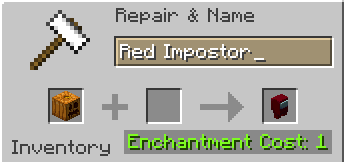
> Rename a carved pumpkin in the anvil to “Color” Impostor
* Example: Red Impostor
* Before snapshot 25w03a, using third-party mods, you could write things like “red impostor” instead of “Red Impostor”, or even “123 red impostor 123”
> After renaming, the item will automatically turn into its custom version
Make your impostors and have fun! 🎭
Almanac
Almanac is a library used by my mods with mostly loader independent shared code between multiple mods to avoid duplication of code.
Almanac by itself does not add much other than a fix to empty tags leading to non stackable items.

(HARD) All-White Textures! (Joel’s 2022 Challenge)
Have you ever played Minecraft® and thought “hey, this is too many colors”?
No? Well… just _pretend_ like you did?
Because here and now, I present…
# THE ALL-WHITE CHALLENGE PACK!
I created this pack originally back in 2022 for 1.19 for a friend of mine to ~~suffer~~ **_enjoy his gameplay_** in!
But, you may say, “1.19? Who still plays in 1.19 when 1.21.5 is available and 1.21.6 is already announced!?”, well, I have a treat for you..
# **THIS PACK IS AVAILABLE FOR *EVERY* MINECRAFT® VERSION!**
_[Available in Easy (no GUI changes)](https://modrinth.com/resourcepack/all-white-2022-joel-challenge-pack-easy) and Hard (all textures changed)_
*Every single major version…*
– 1.21.5? You can use this pack!
– Beta 1.4? Still works!
– Alpha v1.2.2? I don’t know why, BUT IT WORKS!

*Even EVERY SINGLE DEV VERSION IS SUPPORTED*
– 22w44a? Yup, got it.
– 11w50a? Sure.
– Beta 1.6 Test Build 3? You’re crazy, but the pack works!

*Want to play your favorite “special” version? You can do it!*
– Combat Test 7b? This pack supports it!
– 2020’s 20w14infinite? Of course!
– 2013’s 2.0? Yup! (the Pink Wither looks better than ever)

*It even supports versions that don’t support Texture Packs, such as Infdev!*
*(Note: To play with this pack in versions before Alpha v1.2.2, you’ll need to manually modify your .jar file.)*
# So what are you waiting for?
Dive into the exciting, mind-boggling, seen-on-TV (not really), incredibly playable **world of**_… white._ Can you beat Minecraft® with no colors?
## Limitations
This pack isn’t perfect. In vanilla Minecraft®, you cannot change the water texture, and some foliage colors are hardcoded. In older versions, even less can be changed, therefore, this pack technically isn’t ***all*** white, but—especially in more modern versions—it is *mostly* white, as much as the game allows.
Additionally, the Modrinth API (as of writing this on 25.04.25), does not contain all versions of Minecraft®. This has resulted in me having to use some workarounds and marking a few versions wrongly. For example, v0.18 is marked as supporting *c0.30_01c*, when it actually supports *0.28_01*, *0.29*, *0.29_01*, *0.29_02*, *0.30 (Creative, 1900 Re-upload)*, *0.30 (Creative, Launcher Renew)*, and *0.30 (Survival, 1858 Re-upload)*.
If Modrinth adds these missing versions to their API, this notice shall disappear and the wrongly marked versions will be fixed.
For the time being, **the supported Minecraft® versions can be found in the description/changelog of every pack version, as well as its README.TXT**.
## License & Credits
_Concept and implementation of this texture pack © 2022–2026 PetByte. Minecraft® and all associated assets are © 2009–2026 Mojang Studios and Microsoft. This pack is not affiliated with or endorsed by Mojang Studios or Microsoft._
_Licensed under **CC-BY-ND 4.0**. You may use this pack for personal use, streaming, and content creation (monetized or not), but you **must credit PetByte**. Redistribution and modification are **not allowed**._
_For business inquiries, collaborations, or similar matters, please contact contact@petbyte.dev. For issues related to this pack, please contact issues@petbyte.dev. For anything else, feel free to leave a comment._
(EASY) All-White Textures! (Joel’s 2022 Challenge)
Have you ever played Minecraft® and thought “hey, this is too many colors”?
No? Well… just _pretend_ like you did?
Because here and now, I present…
# THE ALL-WHITE CHALLENGE PACK!
I created this pack originally back in 2022 for 1.19 for a friend of mine to ~~suffer~~ **_enjoy his gameplay_** in!
But, you may say, “1.19? Who still plays in 1.19 when 1.21.5 is available and 1.21.6 is already announced!?”, well, I have a treat for you..
# **THIS PACK IS AVAILABLE FOR *EVERY* MINECRAFT® VERSION!**
_Available in Easy (no GUI changes) and [Hard (all textures changed)](https://modrinth.com/resourcepack/all-white-2022-joel-challenge-pack-hard)_
*Every single major version…*
– 1.21.5? You can use this pack!
– Beta 1.4? Still works!
– Alpha v1.2.2? I don’t know why, BUT IT WORKS!

*Even EVERY SINGLE DEV VERSION IS SUPPORTED*
– 22w44a? Yup, got it.
– 11w50a? Sure.
– Beta 1.6 Test Build 3? You’re crazy, but the pack works!

*Want to play your favorite “special” version? You can do it!*
– Combat Test 7b? This pack supports it!
– 2020’s 20w14infinite? Of course!
– 2013’s 2.0? Yup! (the Pink Wither looks better than ever)

*It even supports versions that don’t support Texture Packs, such as Infdev!*
*(Note: To play with this pack in versions before Alpha v1.2.2, you’ll need to manually modify your .jar file.)*
# So what are you waiting for?
Dive into the exciting, mind-boggling, seen-on-TV (not really), incredibly playable **world of**_… white._ Can you beat Minecraft® with no colors?
## Limitations
This pack isn’t perfect. In vanilla Minecraft®, you cannot change the water texture, and some foliage colors are hardcoded. In older versions, even less can be changed, therefore, this pack technically isn’t ***all*** white, but—especially in more modern versions—it is *mostly* white, as much as the game allows.
Additionally, the Modrinth API (as of writing this on 25.04.25), does not contain all versions of Minecraft®. This has resulted in me having to use some workarounds and marking a few versions wrongly. For example, v0.18 is marked as supporting *c0.30_01c*, when it actually supports *0.28_01*, *0.29*, *0.29_01*, *0.29_02*, *0.30 (Creative, 1900 Re-upload)*, *0.30 (Creative, Launcher Renew)*, and *0.30 (Survival, 1858 Re-upload)*.
If Modrinth adds these missing versions to their API, this notice shall disappear and the wrongly marked versions will be fixed.
For the time being, **the supported Minecraft® versions can be found in the description/changelog of every pack version, as well as its README.TXT**.
## License & Credits
_Concept and implementation of this texture pack © 2022–2026 PetByte. Minecraft® and all associated assets are © 2009–2026 Mojang Studios and Microsoft. This pack is not affiliated with or endorsed by Mojang Studios or Microsoft._
_Licensed under **CC-BY-ND 4.0**. You may use this pack for personal use, streaming, and content creation (monetized or not), but you **must credit PetByte**. Redistribution and modification are **not allowed**._
_For business inquiries, collaborations, or similar matters, please contact contact@petbyte.dev. For issues related to this pack, please contact issues@petbyte.dev. For anything else, feel free to leave a comment._