Arı Türkçe Yama
Alıntı sözcüklerden bütünüyle arındırılmış bir Türkçeyi Minecraft’a ekleyen kaynak paketi.
# Arı Türkçe nedir?
Arı Türkçe; alıntı sözcüklerden, kökeni yabancı sözlerden, uydurukça kelimelerden arındırılmış Türkçedir. Camiada ve tarihte Öz Türkçe olarak anılsa da Öz Türkçe adı çok kirlendiği için yamaya Öz Türkçe Yama adı değil Arı Türkçe Yama adı verilmiştir.
# Öz Türkçe adının kirlenmesi derken?
Öz Türkçe denince insanların aklına uydurukça sözcükler, kulağı tırmalayan sözler, TDK’nin yaptığı kötü ve kuralsız kelimeler geliyor. Bu da bu adın kirlendiğinin özetidir. Bu nedenle Arı Türkçe adı uygun görüldü.
# Uydurukça kelimenin tanımı ne, nasıl kelimeler uydurukçadır?
Uydurukça kelime, Türkçenin kurallarına bütünüyle aykırı üretilmiş kelimelere denir. Örnek olarak toplum verilebilir. Bunun uydurukça olma sebebi fiilden isim yapan **+Im** ekinin “toplu” isminin köküne eklenmesidir.
# Peki bu dil görüşünün tarihi nedir?
Arı Türkçe ilk olarak Öz Türkçe adıyla 1910’lardaki Türkçülük akımıyla birlikte ortaya çıkmıştır. Cumhuriyet Dönemi’nde 1932’de Türk Dil Kurumunun kurulmasıyla Dil Devrimi resmî olarak başlamış, Arapça ve Persçe kökenli sözlerin yerine halk ağızlarından derlenen sözcükler ya da Türkçe köklerden türetilen sözcükler bu sözlerin yerine piyasaya sürülmüştür. 1934’ten 1950’de Demokrat Parti’nin iktidar olmasına dek süren Dil Devrimi 1950’de CHP’nin iktidardan düşmesiyle kesilmiştir. 1960 darbesinin ardından ise Dil Devrimi 1970’lerde doruk noktasına çıkarak sürmüş, 1980 darbesinden sonra anayasanın değiştirilmesiyle darbeden önce özerk bir yapıda olan TDK 1982 anayasasıyla birlikte devlet çatısı altında kurulan Atatürk Kültür, Dil ve Tarih Yüksek Kurumuna bağlanmış ve özleştirmeci Dil Devrimi kâğıt üzerinde sona ermiştir.
# Türkçeye geçiş yapmam için kaynak paketini silmem gerekir mi?
Hayır gerekmez. Arı Türkçe, oyundaki diğer tüm dillerden ayrı görünür. Bu da kaynak paketini kaldırmadan istediğiniz dillere geçiş yapabilmenizi sağlar.
# Katkıları için teşekkürler:
– mahiyet
– ulughann
– GorkeyGunesBeg
Antumbra
Antumbra is a resource pack which applies a darker and rougher mood to the vanilla look while maintaining the vividness of many textures. In combination with the Photon shader it is possible to achieve a more realistic feel than vanilla. This pack is for everyone who loves the vanilla look, but prefers a more realistic color palette for most textures. Additionally, a person who prefers a more medival style might also like it.

Antumbra + Photon + Photonics
## Features
– An atmospheric dark vibe
– Keeping vividness of many textures
– Dark GUI
## Comparison

Vanilla / Antumbra / Antumbra + Photon + Photonics / Vanilla + Photon + Photonics
Check out the other comparison images in the gallery!
Anton Chigurh (Антон Чигур) Totem of Undying
– Anton Chigur is the main antagonist of Cormac McCarthy’s novel “No Country for Old Men” and its film adaptation. He is a hired assassin, a drug dealer’s mercenary, who ruthlessly eliminates almost everyone he encounters.
– Антон Чигур — главный антагонист романа Кормака Маккарти «Старикам тут не место» и его киноадаптации. Это наёмный убийца, наёмник наркоторговцев, который безжалостно расправляется почти со всеми, кого встречает на своём пути
[Check collection with all memes + streamers Totems ](https://modrinth.com/collection/sfDcDGAi)
Andrey Gaydulyan Totem of Undying
– EN: **Andrey Gaidulyan** is a Russian theater, film, television and dubbing actor.
He is best known for his role as Alexander (Sasha) Sergeyev in the TV series “Univer” and “SashaTanya”, as well as for his participation in the program “Stars in Africa” on the TNT channel
– RU: **Андрей Гайдулян** — российский актёр театра, кино, телевидения и дубляжа
Наиболее известен по роли Александра (Саши) Сергеева в телесериалах «Универ» и «СашаТаня», а также по участию в программе «Звёзды в Африке» на телеканале «ТНТ»
[ALL RESOURCEPACKS COLLECTION: MEMES + STREAMERS](https://modrinth.com/collection/sfDcDGAi)
Among Us

But how to make **Among Uses**? 
All you need is an anvil and a carved pumpkin:
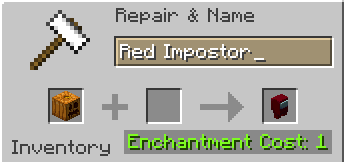
> Rename a carved pumpkin in the anvil to “Color” Impostor
* Example: Red Impostor
* Before snapshot 25w03a, using third-party mods, you could write things like “red impostor” instead of “Red Impostor”, or even “123 red impostor 123”
> After renaming, the item will automatically turn into its custom version
Make your impostors and have fun! 🎭
Almanac
Almanac is a library used by my mods with mostly loader independent shared code between multiple mods to avoid duplication of code.
Almanac by itself does not add much other than a fix to empty tags leading to non stackable items.

(HARD) All-White Textures! (Joel’s 2022 Challenge)
Have you ever played Minecraft® and thought “hey, this is too many colors”?
No? Well… just _pretend_ like you did?
Because here and now, I present…
# THE ALL-WHITE CHALLENGE PACK!
I created this pack originally back in 2022 for 1.19 for a friend of mine to ~~suffer~~ **_enjoy his gameplay_** in!
But, you may say, “1.19? Who still plays in 1.19 when 1.21.5 is available and 1.21.6 is already announced!?”, well, I have a treat for you..
# **THIS PACK IS AVAILABLE FOR *EVERY* MINECRAFT® VERSION!**
_[Available in Easy (no GUI changes)](https://modrinth.com/resourcepack/all-white-2022-joel-challenge-pack-easy) and Hard (all textures changed)_
*Every single major version…*
– 1.21.5? You can use this pack!
– Beta 1.4? Still works!
– Alpha v1.2.2? I don’t know why, BUT IT WORKS!

*Even EVERY SINGLE DEV VERSION IS SUPPORTED*
– 22w44a? Yup, got it.
– 11w50a? Sure.
– Beta 1.6 Test Build 3? You’re crazy, but the pack works!

*Want to play your favorite “special” version? You can do it!*
– Combat Test 7b? This pack supports it!
– 2020’s 20w14infinite? Of course!
– 2013’s 2.0? Yup! (the Pink Wither looks better than ever)

*It even supports versions that don’t support Texture Packs, such as Infdev!*
*(Note: To play with this pack in versions before Alpha v1.2.2, you’ll need to manually modify your .jar file.)*
# So what are you waiting for?
Dive into the exciting, mind-boggling, seen-on-TV (not really), incredibly playable **world of**_… white._ Can you beat Minecraft® with no colors?
## Limitations
This pack isn’t perfect. In vanilla Minecraft®, you cannot change the water texture, and some foliage colors are hardcoded. In older versions, even less can be changed, therefore, this pack technically isn’t ***all*** white, but—especially in more modern versions—it is *mostly* white, as much as the game allows.
Additionally, the Modrinth API (as of writing this on 25.04.25), does not contain all versions of Minecraft®. This has resulted in me having to use some workarounds and marking a few versions wrongly. For example, v0.18 is marked as supporting *c0.30_01c*, when it actually supports *0.28_01*, *0.29*, *0.29_01*, *0.29_02*, *0.30 (Creative, 1900 Re-upload)*, *0.30 (Creative, Launcher Renew)*, and *0.30 (Survival, 1858 Re-upload)*.
If Modrinth adds these missing versions to their API, this notice shall disappear and the wrongly marked versions will be fixed.
For the time being, **the supported Minecraft® versions can be found in the description/changelog of every pack version, as well as its README.TXT**.
## License & Credits
_Concept and implementation of this texture pack © 2022–2026 PetByte. Minecraft® and all associated assets are © 2009–2026 Mojang Studios and Microsoft. This pack is not affiliated with or endorsed by Mojang Studios or Microsoft._
_Licensed under **CC-BY-ND 4.0**. You may use this pack for personal use, streaming, and content creation (monetized or not), but you **must credit PetByte**. Redistribution and modification are **not allowed**._
_For business inquiries, collaborations, or similar matters, please contact contact@petbyte.dev. For issues related to this pack, please contact issues@petbyte.dev. For anything else, feel free to leave a comment._
(EASY) All-White Textures! (Joel’s 2022 Challenge)
Have you ever played Minecraft® and thought “hey, this is too many colors”?
No? Well… just _pretend_ like you did?
Because here and now, I present…
# THE ALL-WHITE CHALLENGE PACK!
I created this pack originally back in 2022 for 1.19 for a friend of mine to ~~suffer~~ **_enjoy his gameplay_** in!
But, you may say, “1.19? Who still plays in 1.19 when 1.21.5 is available and 1.21.6 is already announced!?”, well, I have a treat for you..
# **THIS PACK IS AVAILABLE FOR *EVERY* MINECRAFT® VERSION!**
_Available in Easy (no GUI changes) and [Hard (all textures changed)](https://modrinth.com/resourcepack/all-white-2022-joel-challenge-pack-hard)_
*Every single major version…*
– 1.21.5? You can use this pack!
– Beta 1.4? Still works!
– Alpha v1.2.2? I don’t know why, BUT IT WORKS!

*Even EVERY SINGLE DEV VERSION IS SUPPORTED*
– 22w44a? Yup, got it.
– 11w50a? Sure.
– Beta 1.6 Test Build 3? You’re crazy, but the pack works!

*Want to play your favorite “special” version? You can do it!*
– Combat Test 7b? This pack supports it!
– 2020’s 20w14infinite? Of course!
– 2013’s 2.0? Yup! (the Pink Wither looks better than ever)

*It even supports versions that don’t support Texture Packs, such as Infdev!*
*(Note: To play with this pack in versions before Alpha v1.2.2, you’ll need to manually modify your .jar file.)*
# So what are you waiting for?
Dive into the exciting, mind-boggling, seen-on-TV (not really), incredibly playable **world of**_… white._ Can you beat Minecraft® with no colors?
## Limitations
This pack isn’t perfect. In vanilla Minecraft®, you cannot change the water texture, and some foliage colors are hardcoded. In older versions, even less can be changed, therefore, this pack technically isn’t ***all*** white, but—especially in more modern versions—it is *mostly* white, as much as the game allows.
Additionally, the Modrinth API (as of writing this on 25.04.25), does not contain all versions of Minecraft®. This has resulted in me having to use some workarounds and marking a few versions wrongly. For example, v0.18 is marked as supporting *c0.30_01c*, when it actually supports *0.28_01*, *0.29*, *0.29_01*, *0.29_02*, *0.30 (Creative, 1900 Re-upload)*, *0.30 (Creative, Launcher Renew)*, and *0.30 (Survival, 1858 Re-upload)*.
If Modrinth adds these missing versions to their API, this notice shall disappear and the wrongly marked versions will be fixed.
For the time being, **the supported Minecraft® versions can be found in the description/changelog of every pack version, as well as its README.TXT**.
## License & Credits
_Concept and implementation of this texture pack © 2022–2026 PetByte. Minecraft® and all associated assets are © 2009–2026 Mojang Studios and Microsoft. This pack is not affiliated with or endorsed by Mojang Studios or Microsoft._
_Licensed under **CC-BY-ND 4.0**. You may use this pack for personal use, streaming, and content creation (monetized or not), but you **must credit PetByte**. Redistribution and modification are **not allowed**._
_For business inquiries, collaborations, or similar matters, please contact contact@petbyte.dev. For issues related to this pack, please contact issues@petbyte.dev. For anything else, feel free to leave a comment._
AFK Display
# AFK Display
Free and open-source datapack for Minecraft 1.21 and higher that displays whether a player is afk or not next to their nickname.
## Features
If you remain afk (i.e. he doesn’t move at all) between 2 minutes 30 seconds and 5 minutes, you will be added to the afk team. Belonging to this afk team adds you after your nickname: [AFK].
This status will be automatically displayed next to each nickname in a list or sidebar or in the chat if the player speaks while afk.
If you move again while assigned to the afk team, you will be removed from that team and the [AFK] next to your nickname will be automatically deleted.
You can use the /trigger afk command to display afk for other players.
## Uninstall
To uninstall the datapack, simply run the following command : /function afk_display:uninstall
AE2-PBR
A minimal PBR resource pack for the Applied Energistics 2 mod.
This project is still an early work-in-progress so not all blocks are complete.