Amethyst Shard
💎 Amethyst Shard Recipe Datapack
Refine your resources—no geode mining required!
This datapack introduces alternate crafting paths for Amethyst Shards, offering flexibility for progression-focused survival gameplay.
✨ Features
✅ Shapeless recipes using 1 Block of Amethyst
– 🧩 Lore-friendly integration with geode, ocean, and ancient city progression
– 🔁 Modular JSON structure for easy editing and expansion
– 🛠️ Compatible with Minecraft 1.17+
Checkout my other projects:
[Enchanted Golden Apple](https://modrinth.com/datapack/enchantd-golden-apple-recipe)
[Amethyst Shard](https://modrinth.com/datapack/amethyst-shard)
[Horse Armour Recipe](https://modrinth.com/datapack/horse-armour-recipe)
[Froglight Recipe](https://modrinth.com/datapack/froglights-recipes)
[Music Disc Recipe](https://modrinth.com/datapack/music-discs)
[Heavy Core Recipe](https://modrinth.com/datapack/heavy-core-recipe)
[Echo Shard Recipe](https://modrinth.com/datapack/echo-shard-recipes)
Always Updated
# 👑 Always Updated
Always Updated is a modpack that prioritizes updating quickly to the latest snapshots having the best optimization mods and configurations that are avaliable for the current Minecraft snapshot. There are very minimal quality of life (QoL) mods if you are expecting other ones you are going to need to add your own or use another modpack.
## Maintenance
When a new Minecraft snapshot or release comes out, I will stop supporting all earlier versions of the modpack. This pack is only updated and maintained for the most recent snapshot or official release. I will update the release channel for all older versions from Release to Beta. I try to update the modpack as fast as possible but I cannot update any faster as I tend to wait for the Sodium maintainer to update to the latest snapshot.
### Update Speed Tracker
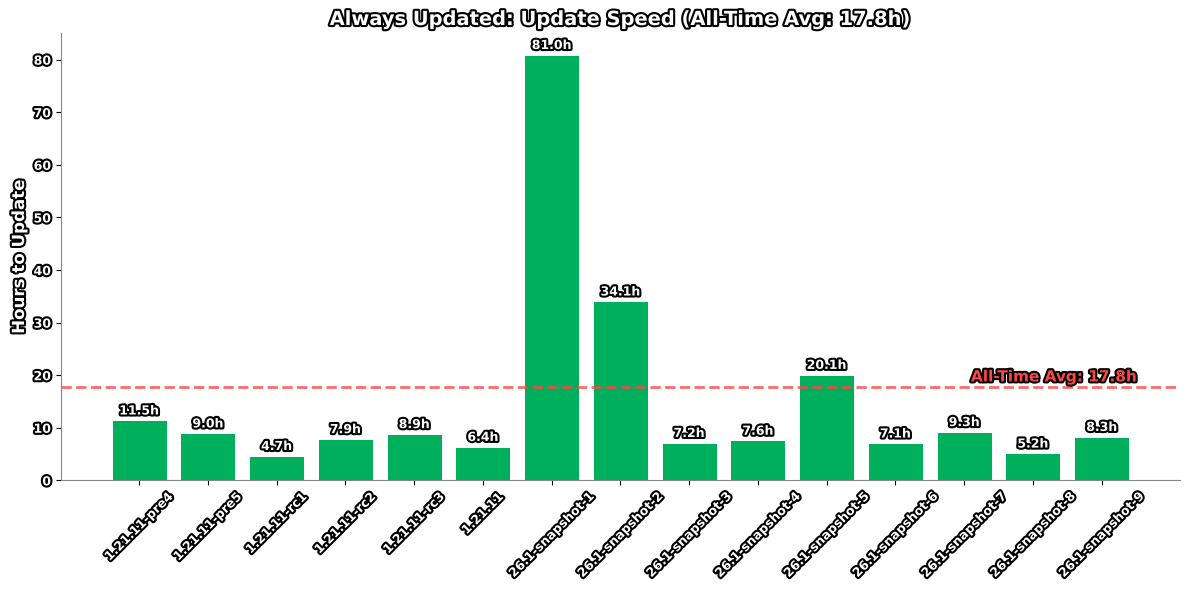
_This graph shows the delay in hours between a Minecraft snapshot release and this modpack’s update._
## Versioning
Always Updated uses a simplified versioning system as of January 22nd, 2026. Each release is identified by a single incremental number that increases by one with every update.
### Version History
**Current Format (January 22nd, 2026 – Present)**
Simple incremental numbering (1, 2, 3, etc.)
**Previous Format (December 1st, 2025 – January 21st, 2026)**
Format: `.–`
**Legacy Format (Prior to December 1st, 2025)**
[Semantic Versioning 2.0.0](https://semver.org/) specification
## FAQ
**Q:** Why is the “Game Version” on Modrinth showing as blank?
**A:** The “Game Version” may show as blank on Modrinth because their API isn’t always updated to the latest snapshot version.
**Q:** Will you backport or fix X version?
**A:** If an [issue request](https://github.com/Ironics-Side-Projects/Always-Updated/issues) is created I will.
_I made this because I play on the server [8bit.pt](https://www.youtube.com/@8bitpt) and most optimization modpacks dont update to snapshots._
[](https://pyro.host?ref=BZ8BMHHE)
Almanac
Almanac is a library used by my mods with mostly loader independent shared code between multiple mods to avoid duplication of code.
Almanac by itself does not add much other than a fix to empty tags leading to non stackable items.

(HARD) All-White Textures! (Joel’s 2022 Challenge)
Have you ever played Minecraft® and thought “hey, this is too many colors”?
No? Well… just _pretend_ like you did?
Because here and now, I present…
# THE ALL-WHITE CHALLENGE PACK!
I created this pack originally back in 2022 for 1.19 for a friend of mine to ~~suffer~~ **_enjoy his gameplay_** in!
But, you may say, “1.19? Who still plays in 1.19 when 1.21.5 is available and 1.21.6 is already announced!?”, well, I have a treat for you..
# **THIS PACK IS AVAILABLE FOR *EVERY* MINECRAFT® VERSION!**
_[Available in Easy (no GUI changes)](https://modrinth.com/resourcepack/all-white-2022-joel-challenge-pack-easy) and Hard (all textures changed)_
*Every single major version…*
– 1.21.5? You can use this pack!
– Beta 1.4? Still works!
– Alpha v1.2.2? I don’t know why, BUT IT WORKS!

*Even EVERY SINGLE DEV VERSION IS SUPPORTED*
– 22w44a? Yup, got it.
– 11w50a? Sure.
– Beta 1.6 Test Build 3? You’re crazy, but the pack works!

*Want to play your favorite “special” version? You can do it!*
– Combat Test 7b? This pack supports it!
– 2020’s 20w14infinite? Of course!
– 2013’s 2.0? Yup! (the Pink Wither looks better than ever)

*It even supports versions that don’t support Texture Packs, such as Infdev!*
*(Note: To play with this pack in versions before Alpha v1.2.2, you’ll need to manually modify your .jar file.)*
# So what are you waiting for?
Dive into the exciting, mind-boggling, seen-on-TV (not really), incredibly playable **world of**_… white._ Can you beat Minecraft® with no colors?
## Limitations
This pack isn’t perfect. In vanilla Minecraft®, you cannot change the water texture, and some foliage colors are hardcoded. In older versions, even less can be changed, therefore, this pack technically isn’t ***all*** white, but—especially in more modern versions—it is *mostly* white, as much as the game allows.
Additionally, the Modrinth API (as of writing this on 25.04.25), does not contain all versions of Minecraft®. This has resulted in me having to use some workarounds and marking a few versions wrongly. For example, v0.18 is marked as supporting *c0.30_01c*, when it actually supports *0.28_01*, *0.29*, *0.29_01*, *0.29_02*, *0.30 (Creative, 1900 Re-upload)*, *0.30 (Creative, Launcher Renew)*, and *0.30 (Survival, 1858 Re-upload)*.
If Modrinth adds these missing versions to their API, this notice shall disappear and the wrongly marked versions will be fixed.
For the time being, **the supported Minecraft® versions can be found in the description/changelog of every pack version, as well as its README.TXT**.
## License & Credits
_Concept and implementation of this texture pack © 2022–2026 PetByte. Minecraft® and all associated assets are © 2009–2026 Mojang Studios and Microsoft. This pack is not affiliated with or endorsed by Mojang Studios or Microsoft._
_Licensed under **CC-BY-ND 4.0**. You may use this pack for personal use, streaming, and content creation (monetized or not), but you **must credit PetByte**. Redistribution and modification are **not allowed**._
_For business inquiries, collaborations, or similar matters, please contact contact@petbyte.dev. For issues related to this pack, please contact issues@petbyte.dev. For anything else, feel free to leave a comment._
(EASY) All-White Textures! (Joel’s 2022 Challenge)
Have you ever played Minecraft® and thought “hey, this is too many colors”?
No? Well… just _pretend_ like you did?
Because here and now, I present…
# THE ALL-WHITE CHALLENGE PACK!
I created this pack originally back in 2022 for 1.19 for a friend of mine to ~~suffer~~ **_enjoy his gameplay_** in!
But, you may say, “1.19? Who still plays in 1.19 when 1.21.5 is available and 1.21.6 is already announced!?”, well, I have a treat for you..
# **THIS PACK IS AVAILABLE FOR *EVERY* MINECRAFT® VERSION!**
_Available in Easy (no GUI changes) and [Hard (all textures changed)](https://modrinth.com/resourcepack/all-white-2022-joel-challenge-pack-hard)_
*Every single major version…*
– 1.21.5? You can use this pack!
– Beta 1.4? Still works!
– Alpha v1.2.2? I don’t know why, BUT IT WORKS!

*Even EVERY SINGLE DEV VERSION IS SUPPORTED*
– 22w44a? Yup, got it.
– 11w50a? Sure.
– Beta 1.6 Test Build 3? You’re crazy, but the pack works!

*Want to play your favorite “special” version? You can do it!*
– Combat Test 7b? This pack supports it!
– 2020’s 20w14infinite? Of course!
– 2013’s 2.0? Yup! (the Pink Wither looks better than ever)

*It even supports versions that don’t support Texture Packs, such as Infdev!*
*(Note: To play with this pack in versions before Alpha v1.2.2, you’ll need to manually modify your .jar file.)*
# So what are you waiting for?
Dive into the exciting, mind-boggling, seen-on-TV (not really), incredibly playable **world of**_… white._ Can you beat Minecraft® with no colors?
## Limitations
This pack isn’t perfect. In vanilla Minecraft®, you cannot change the water texture, and some foliage colors are hardcoded. In older versions, even less can be changed, therefore, this pack technically isn’t ***all*** white, but—especially in more modern versions—it is *mostly* white, as much as the game allows.
Additionally, the Modrinth API (as of writing this on 25.04.25), does not contain all versions of Minecraft®. This has resulted in me having to use some workarounds and marking a few versions wrongly. For example, v0.18 is marked as supporting *c0.30_01c*, when it actually supports *0.28_01*, *0.29*, *0.29_01*, *0.29_02*, *0.30 (Creative, 1900 Re-upload)*, *0.30 (Creative, Launcher Renew)*, and *0.30 (Survival, 1858 Re-upload)*.
If Modrinth adds these missing versions to their API, this notice shall disappear and the wrongly marked versions will be fixed.
For the time being, **the supported Minecraft® versions can be found in the description/changelog of every pack version, as well as its README.TXT**.
## License & Credits
_Concept and implementation of this texture pack © 2022–2026 PetByte. Minecraft® and all associated assets are © 2009–2026 Mojang Studios and Microsoft. This pack is not affiliated with or endorsed by Mojang Studios or Microsoft._
_Licensed under **CC-BY-ND 4.0**. You may use this pack for personal use, streaming, and content creation (monetized or not), but you **must credit PetByte**. Redistribution and modification are **not allowed**._
_For business inquiries, collaborations, or similar matters, please contact contact@petbyte.dev. For issues related to this pack, please contact issues@petbyte.dev. For anything else, feel free to leave a comment._
AFK Display
# AFK Display
Free and open-source datapack for Minecraft 1.21 and higher that displays whether a player is afk or not next to their nickname.
## Features
If you remain afk (i.e. he doesn’t move at all) between 2 minutes 30 seconds and 5 minutes, you will be added to the afk team. Belonging to this afk team adds you after your nickname: [AFK].
This status will be automatically displayed next to each nickname in a list or sidebar or in the chat if the player speaks while afk.
If you move again while assigned to the afk team, you will be removed from that team and the [AFK] next to your nickname will be automatically deleted.
You can use the /trigger afk command to display afk for other players.
## Uninstall
To uninstall the datapack, simply run the following command : /function afk_display:uninstall
Adjustable Fullbright
How it works:
The modpack modifies the vanilla core shader lightmap.fsh to increase overall brightness (compatible with Sodium).
Lighting is first computed as in vanilla. The final lighting color is then blended with white by x%, as controlled by the vanilla brightness slider.
Advantages over alternatives that push the brightness slider beyond 100%:
Light gradients remain much smoother and less saturated.
Vanilla at 100% brightness :

Adjustable Fullbright at 33% brightness :

Adjustable Fullbright at 66% brightness :

At 100% brightness, it’s just fullbright with no light variation at all !
The pack also totally disable night vision at brightness value >= 25% and have a very reduced effect at brightness < 25%.
Before the fullbright is applied, The vanilla lightning brightness is calculated with a brightness between 50% (when the slider is at 0) and 100% (when it's at 100).
The changes are minor and easy to understand, so feel free to modify the shader directly in the pack to suit your preferences
Inspired by [Boosted Brightness](https://modrinth.com/resourcepack/boosted-brightness-rp) by Bluebird
Actual Half Hearts
Makes half hearts actually half by removing every other pixel in the center column (as seen in the icon). Other than that the texture is completely vanilla. Feel free to ask for support for other versions or additions on this resource pack’s [GitHub issues page](https://github.com/Mosnar23/Actual-Half-Hearts/issues)!
Accurate Iron Ore CTM
A more accurate look to one of the first ores in the game!
A very small resource pack that recolors the iron ore.

Includes support for the [Universal Ores](https://modrinth.com/mod/universal_ores) mod!
This is the connected and emissive textures version of the resource pack! If you want a version without these features, go here: [Accurate Iron Ore](https://modrinth.com/resourcepack/accurate-iron-ore)
## For connected textures and emissive textures, be sure to have [Optifine](https://optifine.net/downloads) or [Continuity](https://modrinth.com/mod/continuity) installed!
To install, just open your .minecraft/resourcepacks and throw the zip file in for your version. Then go into Minecraft, Options, Resource Packs, and add it, and you are good to go!
I hope you enjoy it!
Accurate Iron Ore
A more accurate look to one of the first ores in the game!
A very small resource pack that recolors the iron ore.
Includes support for the [Universal Ores](https://modrinth.com/mod/universal_ores) mod!
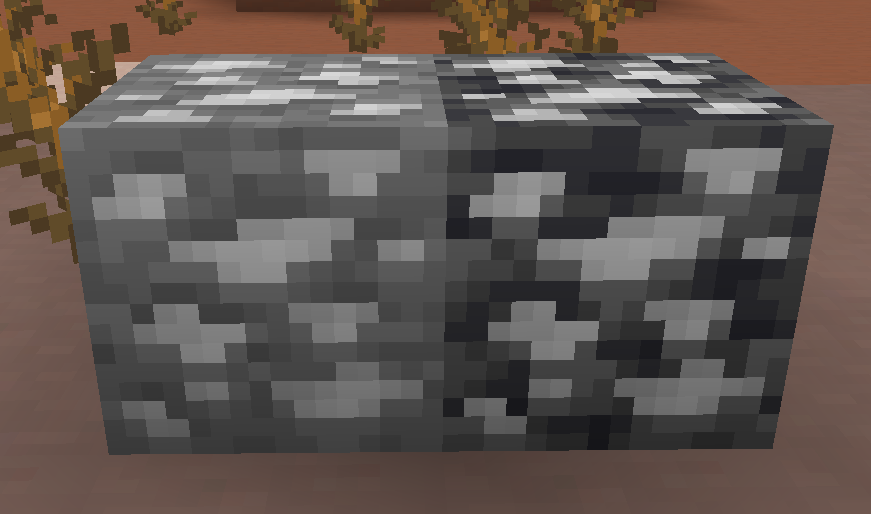
If you would like connected and emissive textures, go here: [Accurate Iron Ore CTM](https://modrinth.com/resourcepack/accurate-iron-ore-ctm)
To install, just open your .minecraft/resourcepacks and throw the zip file in for your version. Then go into Minecraft, Options, Resource Packs, and add it, and you are good to go!
I hope you enjoy it!