This plugin extends [AuraSkills](https://modrinth.com/plugin/auraskills) by introducing a dynamic XP boost system that helps lower-level players catch up with the rest of the server.
**Note:** The concept of this progression system is inspired by the content creator [SparkofPhoenix](https://www.youtube.com/@SparkofPhoenix). He used this kind of dynamic progression in their “Elements” streamer project.
## ✨ Features
– Automatically calculates the average level per skill
– Grants XP boosts to players below the average
– Fully configurable boost values and messages
## ⚙️ How It Works
The plugin continuously tracks the global average level for each skill.
Players who fall below this average receive a XP boost, allowing them to progress faster until they catch up.
## 🎯 Use Case
This addon is ideal for **small to medium-sized servers** where playtime varies between players.
Instead of forcing casual players to grind the same amount as highly active players, this system ensures a more balanced progression experience.
It is **not recommended for public servers** where a fully uniform progression system is desired.
AuraSkills

**Dev builds are available [here](https://aurelium.dev/auraskills/download?channel=dev)**
– [**Rewards**](https://wiki.aurelium.dev/auraskills/rewards) – Add fully custom rewards, like executing commands and giving items on level up.
– [**Menus**](https://wiki.aurelium.dev/auraskills/menus) – Intuitive and fully configurable menus show players everything they need to know about skills – accessed using /skills.
– [**Sources**](https://wiki.aurelium.dev/auraskills/sources) – Customize XP sources for each skill, with support for custom blocks and items.
– [**Loot**](https://wiki.aurelium.dev/auraskills/loot) – Customize loot from any specific block and mob XP source, with support for any item and commands.
– [**Stat Modifiers**](https://wiki.aurelium.dev/auraskills/stats/stat-modifiers) – Modify any stat value with commands or while using custom items or armor.
– [**XP Multipliers**](https://wiki.aurelium.dev/auraskills/skills/xp-multipliers) – Multiply skill XP with the power of permissions or link multipliers to items.
– [**Messages**](https://wiki.aurelium.dev/auraskills/messages) – Pre-translated messages for 15+ languages that are fully configurable and user-selectable.
– [**Item Requirements**](https://wiki.aurelium.dev/auraskills/skills/item-requirements) – Add skill level requirements to use a specific item or all items of a type.
– [**Placeholders**](https://wiki.aurelium.dev/auraskills/placeholders) – Numerous provided PlaceholderAPI placeholders, plus widespread placeholder support within the plugin.
– [**XP Requirements**](https://wiki.aurelium.dev/auraskills/skills/xp-requirements) – Configure XP required to level up for each skill with full equation support.
– [**Developer API**](https://wiki.aurelium.dev/auraskills/api) – A comprehensive developer API with support for adding custom skills, stats, and abilities.
– [**SQL**](https://wiki.aurelium.dev/auraskills/main-config/sql) – Support for database storage with MySQL for higher performance and cross-server syncing.
– Mana – A mana system used by mana abilities and interactable with commands and placeholders.
– Action/Boss Bar – Configurable action and boss bars for displaying health, mana, and when XP is gained.
– Leaderboards – Skill leaderboards and rankings, including power level and skill average.
– Backups – Automatic backups to protect your user data in case of an emergency.
## Supported plugins
– PlaceholderAPI – View the [list of placeholders](https://wiki.aurelium.dev/auraskills/placeholders), no e-cloud download needed
– Vault – Money level up rewards
– WorldGuard (1.13+) – Disable XP gain in certain regions, use the aureliumskills-xp– gain flag
– Holographic Displays and DecentHolograms – Damage indicators with critical hit colors
– LuckPerms – Permission rewards
– Eco series
## Dependencies
– AuraSkills has no required plugin dependencies, but Java 17 is required.
– ProtocolLib is an optional dependency.
## Incompatibilities
AuraSkills does not support or is not compatible with the following server software:
– CraftBukkit – Action bar will not work
– Modded hybrid servers (Mohist, Magma, CatServer) – Modded environments do not work well with Bukkit plugins in general
## Support Discord
Click [here](https://discord.gg/Bh2EZfB) to join the Discord server for support, suggestions, announcements, and to join the community!
## Wiki and Documentation
Click [here](https://wiki.aurelium.dev/auraskills) to view the Wiki and Documentation
You can find info about Configuration, Messages, Stats, Commands, Permissions, Rewards, and Placeholders on the Wiki.
## Messages and language
Change your personal language using /skills lang [language]. Change the default language using the default_language option in config.yml and restarting the server.
Help translate the plugin on [Crowdin](https://crowdin.com/project/aureliumskills), if you don’t see your language ask on the [Discord](https://discord.gg/Bh2EZfB) server for it to be added.
## Installation
How to install the plugin:
– Place the jar you downloaded into your plugins folder
– Restart the server (Do not reload)
AuraEssentials works normally without it using commands, native Minecraft interfaces, organized fallback menus and Bedrock Forms for Geyser/Floodgate players.
Once installed, AuraClient provides stunning visuals and instant logins.
AuraEssentials was built for servers that want a complete, modern and performance-focused core with a consistent style across social systems, administration tools, economy features and player experience.
Aura Tools
Aura Tools is a lightweight yet impactful 16×16 resource pack designed to give your equipment a modern and refined silhouette. Instead of the standard blocky vanilla textures, this pack introduces custom shapes and a more professional color palette while staying true to the classic Minecraft performance.
💎 Key Features
Optimized 16×16 Textures: Designed to be performance-friendly while offering a completely new look.
Custom Tool Shapes: Unique silhouettes for Swords, Pickaxes, Axes, and Shovels to make your gear feel special.
Complete Tier Overhaul:
Netherite: Dark, heavy, and powerful appearance.
Diamond: Sharp, crystalline, and iconic.
Gold: Brilliant, high-contrast royal textures.
Iron: Clean, polished, and industrial.
Copper: A special rose-gold aesthetic for early-game flair.
Stone & Wood: Refined, clean shapes for a better starting experience.
A lightweight, open-source GUI menu plugin for Paper & Folia 1.21.1+. The modern DeluxeMenus alternative with native Folia support, MiniMessage formatting, and zero required dependencies. One command migrates your existing DM configs.
—
## Key Things That Set It Apart
**01. Open source (MIT).** Fork it, modify it, no restrictions. Most menu plugins are closed source or paid.
**02. Native Folia & Paper support.** Built on the region-threaded scheduler from day one. No compat layer, no external scheduler library.
**03. Zero dependencies.** Drop the jar in and it works. Vault and PlaceholderAPI are optional, not required.
**04. Built-in DeluxeMenus migration tool.** One command converts your existing configs.
**05. Supports modern text formatting.** Gradients, hover text, click events. MiniMessage native, not bolted on.
—
## Features
### MiniMessage Formatting
Modern text formatting with gradients, hover text, and click events. Legacy color codes still work for migration.
### Requirement System
Conditions that control who can open menus, click items, and see items. Permissions, money, exp, items, metadata, regex, math expressions, location, and inverted checks. The expression engine handles `&&`, `||`, parentheses, and string methods natively. DeluxeMenus needs a JavaScript engine for the same thing.
### In-Game Editor
Drag and drop menu editing without touching config files. Move items around, add new ones, pick items up to clear slots. Closing the editor saves the YAML. DeluxeMenus does not have this.
### Pagination
Multi page menus for large item lists. Built-in `prev_page` and `next_page` actions, plus `{page}` and `{max_page}` placeholders that work in titles, item names, and lore.
### Smooth Menu Transitions
Page changes and same-size menu opens (like shop categories spread across multiple YAMLs) reuse the existing window instead of closing and reopening it. No flicker, even when the title contains the page number. No other menu plugin does this. Toggleable in `config.yml`.
### Target Player
View another player’s data through any menu by passing `-p:playername` to the command, or as the first argument with tab completion. Placeholders resolve against the target. Works online and (optionally) offline.
### Persistent Player Metadata
Store per player data (strings, numbers, booleans) that survives restarts. No database file, no extra storage. Backed by Minecraft’s PersistentDataContainer, stored on the player object directly. Set, add, subtract, switch, or remove via menu actions or `/am meta`. Read it back with PlaceholderAPI or check it in requirements.
### Anvil and Chat Text Input
Collect free text from players. Anvil input opens an anvil GUI where the player types into the rename field. Chat input closes the menu and waits for the next chat message. Build search menus, naming systems, custom forms. DeluxeMenus does not have this.
### Item Templates
Define a reusable item once in `templates/`, then use it across menus with variable substitution. Set `material`, `name`, `lore`, click actions, and requirements with `{variable}` placeholders, then fill in values per use. Write your shop entry once, reuse it for every item.
### Pattern Layouts
Lay out a menu with a character grid instead of counting slot numbers. Map characters to items and AuMenus places them automatically.
### Animated Items
Frame cycling items with configurable interval, reverse, and one-time playback. Each frame can override material, name, lore, and enchantments. Built in, no extra plugin needed.
### Progress Bars
Fill a row of slots based on a current/max value from placeholders. Set the filled and empty visuals separately. Works for XP, quests, dungeon progress, anything with a ratio.
### Dynamic Titles
Update an inventory’s title on a timer with live placeholders. Countdown timers, online player counts, balance displays, weather and time indicators. Updates ride the same flicker-free path as page changes.
### Player List Menus
Auto generate page items for every online player from a single template. Configure the head, name, and lore once. Click actions target the listed player. Build staff lists, friends menus, party invites, teleport menus.
### Predicate Menus
Open different menus based on a requirement check. Configure a condition and two target menus, pass and fail. AuMenus routes the player to the right one.
### Developer API
Other plugins can register custom action and requirement types, listen to menu events, and open menus programmatically. Available on JitPack. The codebase is open source so you can read exactly how it works.
### DeluxeMenus Migration
One command converts existing DeluxeMenus configs. Menu options, items, actions, requirements, placeholders, even JavaScript expressions. Original files left untouched.
—
## Extras
– Anvil and chat text input
– Per click type actions (left, right, shift+left, shift+right, middle)
– Offline player placeholder support
– BungeeCord and Velocity server switching
– Click cooldowns, global default plus per menu overrides
– Raw sound actions for resource pack custom sounds
– Built-in placeholders: `{page}`, `{max_page}`, `{target}`, `{player}`, plus `%aumenus_current_menu%` and `%aumenus_previous_menu%`
– Configurable plugin messages
– HeadDatabase, ItemsAdder, Oraxen, Nexo support
# AudioPlayer To CustomDiscs v1.2.0
### For Paper, Folia and Forks (Purpur, Leaf, …)
### 1.21.7 to 26.1.2
[](https://modrinth.com/plugin/audioplayer-to-customdiscs) [](https://modrinth.com/plugin/audioplayer-to-customdiscs) [](https://hangar.papermc.io/AtharDev/AudioPlayer-to-CustomDiscs)
—
## ⚠️ Dependency notice — PacketEvents required
**Since version 1.1.5, [PacketEvents](https://modrinth.com/plugin/packetevents) (v2.11.2+) is required.**
ProtocolLib is no longer used — it can be safely removed if no other plugin needs it.
## ⚠️ Java 25 required
**Starting with version 1.2.0, this plugin requires at least Java 25 to run on your server.**
—
A Paper based plugin to convert [AudioPlayer](https://modrinth.com/plugin/audioplayer) instruments into a [CustomDiscs](https://modrinth.com/plugin/customdiscs-plugin) compatible format.
> Any Paper’s forks should be supported. In case of issues, reach us on our [Discord server](https://discord.gg/rJtBRmRFCr).
Useful if you need to play a custom music disc, goat horn or player head initially created with AudioPlayer, then ported to a CustomDiscs-compliant server.
> No permission system is in place for now (unless requested).
Join our Discord for support: https://discord.gg/rJtBRmRFCr
—
## Dependencies
| Plugin | Required | Notes |
|——–|———-|——-|
| [PacketEvents](https://modrinth.com/plugin/packetevents) | ✅ Required | Since v1.1.5 — tested with v2.11.2 |
| [ProtocolLib](https://github.com/dmulloy2/ProtocolLib) | ⛔ Up to v1.1.4 only | No longer required as of v1.1.5 |
—
## How to Use
This plugin works in two modes: **automatic** and **manual**.
### Prerequisite — Audio Files
This plugin checks whether a corresponding audio file exists (by its ID) before converting. Ensure the following:
– Original AudioPlayer music files from `audio_player_data/` must be placed in `plugins/CustomDiscs/musicdata/`
– Failure to provide those files will cause the conversion to fail, **without modifying the original item**
### Automatic Mode
Enable it by setting `automaticConvert: true` in `config.yml`:
– **Goat horns** — converted on first use attempt. A second attempt will play it.
– **Custom discs** — converted when inserted by a player or any automated mechanism.
– **Player heads** — converted instantly on placement. When already placed on a note block, one or two triggers may be needed before playback.
### Manual Mode
Works regardless of whether automatic mode is enabled.
Hold the item in your **main hand** only, then run:
“`
/ap2cd convert
“`
### Audio File Type Override
If multiple file extensions exist for the same audio ID, the wrong one may be selected.
While holding the item in your **main hand**, use one of the following:
| Command | Effect |
|———|————————–|
| `/ap2cd setwav` | Force set to WAV format |
| `/ap2cd setmp3` | Force set to MP3 format |
| `/ap2cd setflac` | Force set to FLAC format |
—
## Configuration
**config.yml**
“`yaml
# [AP2CD Config]
# Disable or enable the automatic conversion process while items are being used.
automaticConvert: false
# Debug Mode – To display some more logging and Stack Trace information.
# You SHOULD NOT turn this on, unless you want to be spammed by a lot of messages (console and player side).
debugMode: false
“`
– This plugin may **(or may not)** work with earlier versions of PaperMC/Folia.
– While this plugin is marked as compatible with Paper’s forks, no extensive tests has been made on them. Report any issues on our Discord !
– Versions 1.1.0 to 1.1.4 required [ProtocolLib](https://github.com/dmulloy2/ProtocolLib). As of 1.1.5, it is no longer needed and is replaced by [PacketEvents](https://modrinth.com/plugin/packetevents).
– This plugin is available on both [Modrinth](https://modrinth.com/plugin/audioplayer-to-customdiscs) and [Hangar](https://hangar.papermc.io/AtharDev/AudioPlayer-to-CustomDiscs).
AudioPlayer
This server side Fabric mod enables uploading custom audio for music discs, goat horns and note blocks with heads.
This mod requires [Simple Voice Chat](https://www.curseforge.com/minecraft/mc-mods/simple-voice-chat) on the client and server.
For additional features check out [Audioplayer Roleplay](https://modrinth.com/mod/audioplayer-roleplay).
> IMPORTANT
> This documentation is for version 2.x.x of the mod only!
## Features
– On the fly audio uploading without needing to restart the server
– Support for `mp3` and `wav`
– Upload audio via a URL
– Upload audio directly to your server
– Upload audio via [Filebin](https://github.com/espebra/filebin2/)
– Upload using a website
– Server side only
– No server restart needed
– No resource pack needed
– No changes needed on the client
– Configurable upload limit
– Configurable command permissions
– Configurable audio range
– Per-item custom audio range
– Bulk applying audio to all items in shulker boxes, bundles and other container items
– Configurable goat horn cooldown
## Commands
Run `/audioplayer` to get general information on how to upload files.
### Uploading audio files via URL
Run `/audioplayer url “https://example.com/myaudio.mp3″` where `https://example.com/myaudio.mp3` is the link to your `.mp3` or `.wav` file.
### Uploading audio files directly to the server
Copy your `.mp3` or `.wav` file to the `audioplayer_uploads` folder in your server.
Run `/audioplayer serverfile “yourfile.mp3″` where `yourfile.mp3` is the name of the file you put on the server.
### Uploading audio files via Filebin
Run `/audioplayer filebin` and follow the instructions.
### Putting custom audio on an item
Run `/audioplayer apply ` and hold a **music disc**, **goat horn** or **head** in your main hand.
It’s also possible to bulk apply audio to more than one item at a time by holding a shulker box, bundle or other container item in your hand.
You can also apply custom audio by its original file name:
`/audioplayer apply ““`.
This command works with and without the file extension (like `.mp3` or `.wav`).
Note that the file name must be unique for this to work.
### Adjusting the range of an item
Run `/audioplayer range ` while holding an item or container with items that have custom audio in your main hand.
### Getting the audio info of an existing item
Run `/audioplayer info` while holding a music disc, goat horn or head with custom audio in your main hand.
### Searching audio files by name
Run `/audioplayer search ` to get all audio files that contain the search text.
*Note that the files you upload to Filebin are publicly available if the upload link is disclosed!*
Audio Engine Tweaks
# Audio Engine Tweaks
—
## News
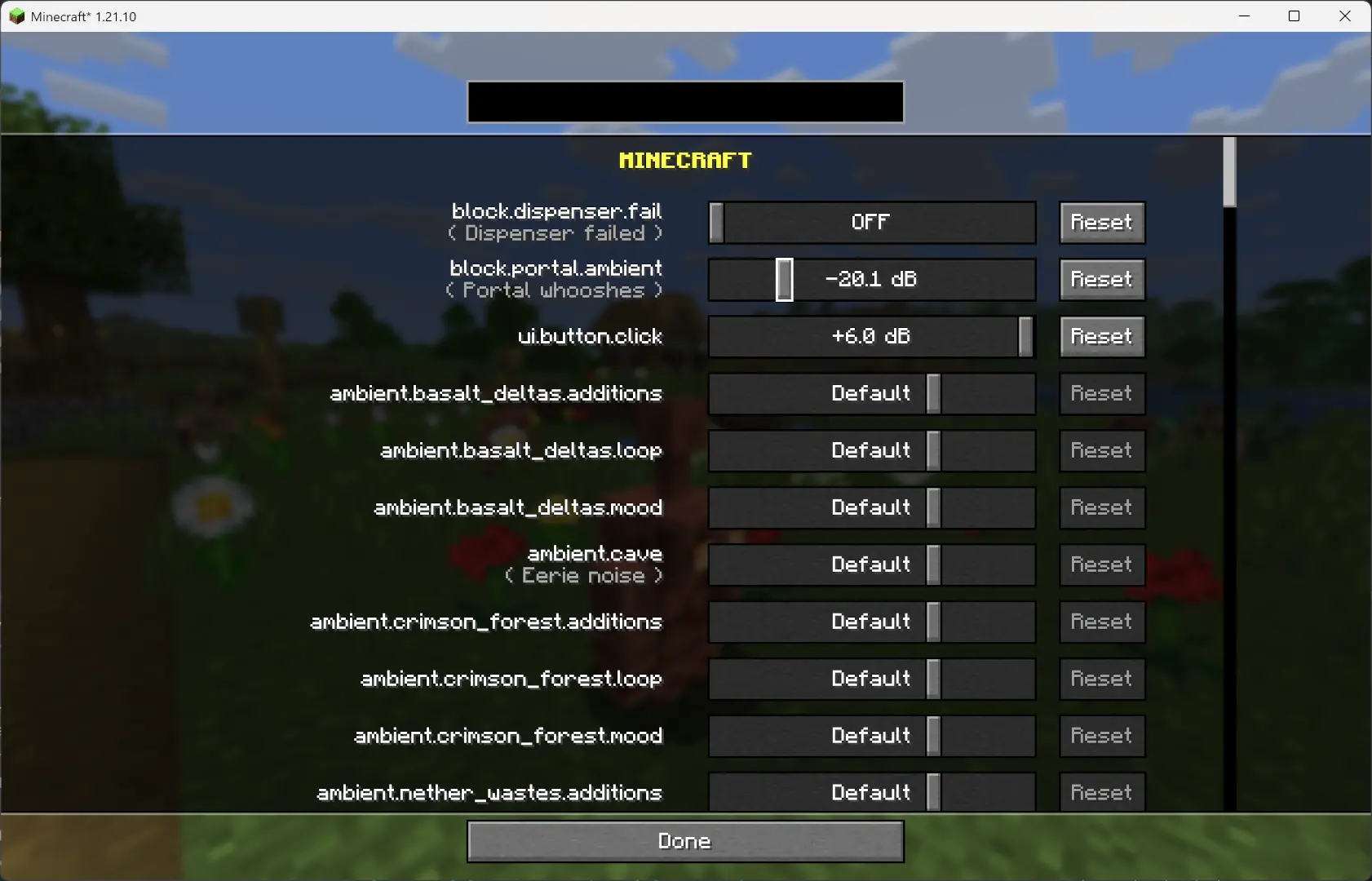
Since **v1.2.7**, you can now adjust the volume of each sound **independently** of the vanilla sliders.
—
## Overview
This mod changes how Minecraft schedules sounds to prevent the sound pool from filling up, or at least reduce the effects of a full sound pool.
### TL;DR
It fixes these common errors (and the related log spam):
“`
[Render thread/WARN]: Failed to create new sound handle
[Sound engine/WARN]: Maximum sound pool size 247 reached
“`
Without this mod, a full sound pool causes all in-game audio to stop until slots free up.
—
## How It Works
– Each tick, sounds are **collected and categorized** by type.
– **Lower category = higher priority**.
– Within categories, sounds are sorted by **distance from the player**.
– Depending on the **sound pool fill level**, only certain sound types are allowed to play. Others are skipped.
– If the pool somehow fills completely (shouldn’t happen with thresholds), new sounds are skipped entirely.
– **Duplication check**:
– Only a limited number of identical sounds can play from the same coordinate (1 block).
– Extra duplicates are skipped.
– **MASTER** and **MUSIC** sounds bypass the queue and duplication check (important for main menu or GUI events when the server is frozen).
– They still follow fill-level thresholds.
– Other categories, if requested to play instantly, are instead deferred to the next tick.
– All values are configurable through **ModMenu** or by editing the config file directly.
—
## Default Settings
“`yaml
MASTER : cat 0, always allowed
VOICE : cat 0, always allowed
PLAYERS : cat 1, up to 95%
HOSTILE : cat 2, up to 90%
BLOCKS : cat 3, up to 80%
MUSIC : cat 4, up to 70%
RECORDS : cat 4, up to 70%
NEUTRAL : cat 5, up to 60%
WEATHER : cat 6, up to 50%
AMBIENT : cat 6, up to 50%
5.0.0 fixes the redstone issues with non-rideable carts
BUT NOTE: You must install this mod client-sided as well now
Starting from v5.0.0 you can configure the max speed by using:
– /gamerule ace:speed_player
– If not 0, overrides speed only for player ridden carts
– default 20
– /gamerule ace:speed_other
– If not 0, overrides speed only for non-player ridden carts
– default 0
– /gamerule ace:speed_empty
– If not 0, overrides speed only for rideable carts that are empty
– default 0
## Video Showcase
Video: https://www.youtube.com/v/i9WxH_ehMRo
## New in Release 4.0
– Rebase mod on improved minecarts experiment
– The experimental code will be activated for all carts
– Rideable carts will be set to default 20 blocks per second
– All other carts will be set to 8 blocks per second speed
– Due to the new minecart experiment we now have the following features
– Full-Speed around corners
– Full-Speed around hills
– Consistent Jumps
– Perfect 1-tile brakes
– ROLLER COASTER MECHANICS
## New in Release 3.1
– Brakes now stop a ridden cart in exactly 1 brake tile
## New in Release 3.0
– 34m/s speed in *all* directions
– Now works full-speed on slopes & inclines
– Now works full-speed on diagonals
– Faster Direction Changes
## Other Features
– 100% glitch-free
– Redstone builds unaffected
– Hand-Designed & Play-Tested
– Designed for Vanilla Survival
– Fabric Only
## Foundation
Audaki Cart Engine offers well designed and properly balanced, competitive and viable cart-based passenger transportation.
This mod is a server-sided (and SSP) mod based on Fabric.
This mod was created since other mods I found which increased the speed of minecarts didn’t work with existing rail lines and they broke most redstone stuff when your cart moved with more than 10m/s.
I wanted a mod which works with existing rail lines and with redstone mechanisms!
## Quality Engineering
This mod is currently a huge overhaul of the vanilla minecart code to support higher speeds (up to 34m/s) while still supporting existing lines with curves, ascending and descending rail pieces are no problem.
Additionally redstone rails like detector and activator rail still work.
The Cart Engine was tested under a lot of different conditions but if you find an edge case it’ll be fixed
## Game Design / Balancing
The goal for this mod is not just to implement a new Cart Engine of course, but also to provide good game play!
To support this goal a whole lot of stuff was tweaked so the powered rail (i.e. Gold) required to reach certain speeds is well balanced, so creating a high-speed railway is actually a proper end-game goal.
Additionally the speed is balanced in a way that riding the railway is a lot of fun and it’s better than packed ice.
Due to the balanced acceleration curve railways can still be used early-game with lower speeds and less gold investment
* Raised maximum speed from 8m/s to 34m/s for carts with passengers
* Designed acceleration to require more powered rails for higher speeds
* Designed acceleration to feel good and somewhat train-y.
* Tweaked “kick-start” speed when starting from a standing block with a powered rail
* Carts temporarily slow down for direction changes, Detector & Activator Rails, but keep momentum and regain speed afterwards
* Fixed a long-standing vanilla bug that doubles the Cart Movement Speed when a block is skipped in a tick
* The mod can be added and removed at any time and everything will work. It’s 100% vanilla.
### For Players
– **Clean GUI** — Everything runs through inventory menus, no chat spam
– **Buy & Sell Confirmation** — Review before money moves
– **Mailbox** — Bought items and expired listings go to your mailbox, nothing gets lost
– **Container Preview** — See what’s inside shulkers before buying
– **Seller Info** — Right-click a listing to check the seller’s stats and other items
– **10 Categories** — Weapons, Armor, Tools, Blocks, Food, Potions, Redstone, Decoration, Mob Drops, Misc
– **Filters & Search** — Narrow down by category, price, seller, or keyword
– **Price History** — Real bar chart with weekly views, highs/lows, and trend arrows
– **Datapack Items** — Custom items show up correctly with their own price history
### For Server Owners
– **Listing Fees & Tax** — Flat fee, percentage, sales tax — all configurable
– **Vault + More** — Works with Vault, PlayerPoints, EssentialsX, XP economy
– **LuckPerms** — Set listing limits, expiry times, and fees per rank
– **SQLite / MySQL / MariaDB** — SQLite out of the box, switch to MySQL whenever
– **Import Tool** — Migrate from CrazyAuctions, zAuctionHouse, Fadah, or Akarian
– **Everything is Configurable** — Messages, GUIs, icons, features — change whatever you want
– **Discord Webhooks** — Get notified when items are listed or sold
– **PlaceholderAPI** — Placeholders for scoreboards and tab lists
– **WorldGuard** — Restrict the AH to certain regions
– **Folia Support** — Works on Folia out of the box
– **Anti-Exploit** — Atomic SQL, transaction locks, drag protection, dupe prevention
—
## 🔗 Part of the ilius Economy Ecosystem
AuctionHouse is the player-to-player marketplace of the ilius economy stack. Pair it with:
– [**EconomyProvider**](https://modrinth.com/plugin/economyprovider-by-ilius) — Modern Vault economy with banknotes, baltop GUI, and transaction logging
– [**EconomyShop**](https://modrinth.com/plugin/economyshop) — Server shop with dynamic pricing, chest shops, and categories
All three plugins integrate seamlessly — same config style, same database support, same Discord. Use one or all three.
—
## ⌨️ Commands
**Player**
| Command | Description |
|—|—|
| `/ah` | Open the auction house |
| `/ah sell [amt]` | List the item in your hand |
| `/ah search ` | Search listings |
| `/ah cancel ` | Cancel your listing |
| `/ah active` | View your listings |
| `/ah claim` | Claim mailbox items |
| `/ah help` | Show commands |
| Permission | Description | Default |
|—|—|—|
| `auction.use` | Open the AH | true |
| `auction.sell` | List items | true |
| `auction.buy` | Buy items | true |
| `auction.cancel` | Cancel own listings | true |
| `auction.admin` | Admin commands | op |
| `auction.admin.reload` | Reload config | op |
—
## 📥 Setup
1. Drop the jar in `plugins/`
2. Restart
3. Edit `plugins/AuctionHouse/config.yml` if you want
4. `/ah admin reload` and you’re good
**Want MySQL instead of SQLite?** Open `config.yml`, set `storage.type` to `mysql`, then fill in `host`, `port`, `database`, `username`, and `password` under the `storage.mysql` section. Restart and you’re done.
## 💬 Need Help?
Join the [Discord](https://discord.gg/ns3q9ejGwR) or open an issue.
—
## 🚀 Pro Edition — Available Now
Everything above, plus:
– **Buy Orders** — Full order book matching engine with escrow and market demand GUI
– **Admin Dashboard** — Live stats, module toggles, and moderation tools
– **Sell Wizard** — Guided listing with auction types and price suggestions
– **Bulk Listings** — List and buy partial stacks
– **Quantity Selector** — Pick exactly how much to buy
– **Sale Limits** — Per-player and per-group caps
– **CSV Export** — Dump transactions for external analysis
– **Price Deviation Guards** — Block manipulation attempts automatically
– **Price Drop Notifications** — Alert players when items hit their target price
### [» Get AuctionHouse Pro on BuiltByBit «](https://builtbybit.com/resources/auctionhouse-pro.103563/)
—
*Part of the ilius economy ecosystem. Built for servers that take their economy seriously.*


