April Fools’ Translation Pack
# April Fools’ Translation Pack
[](https://modrinth.com/mod/april-fools-translation)
[](https://crowdin.com/project/mcaf-resourcepack)
[Deutsch](https://github.com/mc-wiki/mcaf-resourcepack/blob/main/README.de.md) | English | [日本語](https://github.com/mc-wiki/mcaf-resourcepack/blob/main/README.ja.md) | [文言](https://github.com/mc-wiki/mcaf-resourcepack/blob/main/README.lzh.md) | [简体中文](https://github.com/mc-wiki/mcaf-resourcepack/blob/main/README.zh-hans.md) | [繁體中文](https://github.com/mc-wiki/mcaf-resourcepack/blob/main/README.zh-hant.md)
**Play April Fools’ snapshots with community translations from the Minecraft Wiki.**
[April Fools’ snapshots](https://minecraft.wiki/w/April_Fools’_Day_jokes) are not officially localized via Crowdin, but the Minecraft Wiki community provides translations for their features. This project makes these community translations available in game, in an effort to promote consensus on item names.
## Features
– Provides accurate and up-to-date localization for April Fools’ snapshots.
– Fixes missing translation keys and major typos (e.g., correcting `shepard_potato.png` to `shepherd_potato.png` in 24w14potato).
### Supported versions
– [15w14a](https://minecraft.wiki/w/Java_Edition_15w14a) (2015)
– [1.RV-Pre1](https://minecraft.wiki/w/Java_Edition_1.RV-Pre1) (2016)
– [3D Shareware v1.34](https://minecraft.wiki/w/Java_Edition_3D_Shareware_v1.34) (2019)
– [20w14∞](https://minecraft.wiki/w/Java_Edition_20w14∞) (2020)
– [22w13oneBlockAtATime](https://minecraft.wiki/w/Java_Edition_22w13oneBlockAtATime) (2022)
– [23w13a_or_b](https://minecraft.wiki/w/Java_Edition_23w13a_or_b) (2023)
– [24w14potato](https://minecraft.wiki/w/Java_Edition_24w14potato) (2024)
– [25w14craftmine](https://minecraft.wiki/w/Java_Edition_25w14craftmine) (2025)
– [26w14a](https://minecraft.wiki/w/Java_Edition_26w14a) (2026)
[Minecraft 2.0](https://minecraft.wiki/w/Java_Edition_2.0) (2013) is **not** included in this project since resource packs were unavailable in that version.
### Supported languages
Translations are provided by the community on [Crowdin](https://crowdin.com/project/mcaf-resourcepack); suggest new translations there.
| Code | Language | Endonym | Progress |
|———-|———————–|————————|———————————————————————————————————–|
| `de_de` | German | Deutsch (Deutschland) |  |
|
| `en_ud` | English (Upside Down) | ɥsᴉꞁᵷuƎ (uʍoᗡ ǝpᴉsd∩) |  |
|
| `enp` | Anglish | Anglish (Oned Riches) |  |
|
| `es_es` | Spanish | Español (España) |  |
|
| `fil_ph` | Filipino | Filipino (Pilipinas) |  |
|
| `fr_fr` | French | Français (France) |  |
|
| `he_il` | Hebrew | עברית (ישראל) |  |
|
| `it_it` | Italian | Italiano (Italia) |  |
|
| `ja_jp` | Japanese | 日本語 (日本) |  |
|
| `ko_kr` | Korean | 한국어 (대한민국) |  |
|
| `lzh` | Literary Chinese | 文言 (華夏) |  |
|
| `nl_nl` | Dutch | Nederlands (Nederland) |  |
|
| `pt_br` | Portuguese (Brazil) | Português (Brasil) |  |
|
| `pt_pt` | Portuguese (Portugal) | Português (Portugal) |  |
|
| `ru_ru` | Russian | Русский (Россия) |  |
|
| `th_th` | Thai | ไทย (ประเทศไทย) |  |
|
| `uk_ua` | Ukrainian | Українська (Україна) |  |
|
| `zh_cn` | Chinese (Simplified) | 简体中文 (中国大陆) |  |
|
| `zh_hk` | Chinese (Hong Kong) | 繁體中文 (香港特別行政區) |  |
|
| `zh_tw` | Chinese (Traditional) | 繁體中文 (台灣) |  |
|
You can request adding a new language [by creating an issue on GitHub](https://github.com/mc-wiki/mcaf-resourcepack/issues).
## How to use
1. Visit the [Latest Release](https://github.com/mc-wiki/mcaf-resourcepack/releases/latest) page (3 hours/sync) or [Modrinth](https://modrinth.com/resourcepack/april-fools-translation) (1 week/sync).
2. Download the resource pack for your language.
3. Install it in your game.
Need help installing? See the [wiki tutorial](https://minecraft.wiki/w/Tutorial:Loading_a_resource_pack).
## Contributing
Translations take place on [Crowdin](https://crowdin.com/project/mcaf-resourcepack); you can contribute to the translations there with other [translators](https://github.com/mc-wiki/mcaf-resourcepack/blob/main/README.md#translators). They are synced with this repository regularly.
## FAQ
**Q1: I see untranslated texts in-game. What should I do?**
A1: Contribute translations on [Crowdin](https://crowdin.com/project/mcaf-resourcepack). If the text isn’t on Crowdin, it’s likely hardcoded and can’t be fixed by a resource pack.
**Q2: I see raw translation keys (e.g., `rule.food_restriction.air_block`).**
A2: This usually means a missing entry in the language files. Please report it in the [Issues](https://github.com/mc-wiki/mcaf-resourcepack/issues) section.
**Q3: How can I add support for a new language?**
A3: You can request adding a new language [on Crowdin](https://crowdin.com/project/mcaf-resourcepack).
## Translators
anit CHAT
# Chat anit 一个自动屏蔽《Minecraft》中文脏话,和增加IP属地的开源项目。
本插件需要装在Velocity上。前置为SignedVelocity-Proxy需要在velocity和所以1.19.1+的子服上增加
IP属地api为*xiaotuo*提供,脏话屏蔽由*Uapi提供*
使用方法
1.下载本插件,放入velocity的pluging文件夹,启动客户端
>tip
>如果你有子服的Minecraft版本在1.19.1以上需要增加[signed velocity](https://modrinth.com/plugin/signedvelocity/version/1.3.0) 插件到velocity和每个1.19.1+的子服务器。
2.将velocity配置文件“`velocity.toml“` 中“`force-key-authentication“`改为false
3.将所有子服务的配置文件“`server.properties“`中的“`enforce-secure-profile“`改为false
4.启动服务端
**更新日志**: https://github.com/cdpyx/Chatanit/commits/release
English:
# Chat Anit is an open-source project that automatically blocks Chinese profanity in Minecraft and increases IP ownership.
This plugin needs to be installed on Velocity. SignedVelocity Proxy needs to be added on velocity and all 1.19.1+sub servers
The IP locality API is provided by * xiaotuo *, and the profanity blocking is provided by * UAPI*
Usage
1. Download this plugin, place it in the velocity plugin folder, and start the client
> tip
> If you have a sub server version of Minecraft above 1.19.1, you need to add [signed velocity]( https://modrinth.com/plugin/signedvelocity/version/1.3.0 )Plug in to velocity and every 1.19.1+sub server.
2. Change the ‘force key authentication’ in the velocity configuration file ‘velocity. toml’ to false
3. Change the ‘enforce secure profile’ in the ‘server. properties’ configuration file for all sub services to false
4. Start the server
**Update log**: https://github.com/cdpyx/Chatanit/commits/release
Among Us

But how to make **Among Uses**? 
All you need is an anvil and a carved pumpkin:
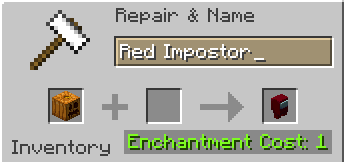
> Rename a carved pumpkin in the anvil to “Color” Impostor
* Example: Red Impostor
* Before snapshot 25w03a, using third-party mods, you could write things like “red impostor” instead of “Red Impostor”, or even “123 red impostor 123”
> After renaming, the item will automatically turn into its custom version
Make your impostors and have fun! 🎭
(HARD) All-White Textures! (Joel’s 2022 Challenge)
Have you ever played Minecraft® and thought “hey, this is too many colors”?
No? Well… just _pretend_ like you did?
Because here and now, I present…
# THE ALL-WHITE CHALLENGE PACK!
I created this pack originally back in 2022 for 1.19 for a friend of mine to ~~suffer~~ **_enjoy his gameplay_** in!
But, you may say, “1.19? Who still plays in 1.19 when 1.21.5 is available and 1.21.6 is already announced!?”, well, I have a treat for you..
# **THIS PACK IS AVAILABLE FOR *EVERY* MINECRAFT® VERSION!**
_[Available in Easy (no GUI changes)](https://modrinth.com/resourcepack/all-white-2022-joel-challenge-pack-easy) and Hard (all textures changed)_
*Every single major version…*
– 1.21.5? You can use this pack!
– Beta 1.4? Still works!
– Alpha v1.2.2? I don’t know why, BUT IT WORKS!

*Even EVERY SINGLE DEV VERSION IS SUPPORTED*
– 22w44a? Yup, got it.
– 11w50a? Sure.
– Beta 1.6 Test Build 3? You’re crazy, but the pack works!

*Want to play your favorite “special” version? You can do it!*
– Combat Test 7b? This pack supports it!
– 2020’s 20w14infinite? Of course!
– 2013’s 2.0? Yup! (the Pink Wither looks better than ever)

*It even supports versions that don’t support Texture Packs, such as Infdev!*
*(Note: To play with this pack in versions before Alpha v1.2.2, you’ll need to manually modify your .jar file.)*
# So what are you waiting for?
Dive into the exciting, mind-boggling, seen-on-TV (not really), incredibly playable **world of**_… white._ Can you beat Minecraft® with no colors?
## Limitations
This pack isn’t perfect. In vanilla Minecraft®, you cannot change the water texture, and some foliage colors are hardcoded. In older versions, even less can be changed, therefore, this pack technically isn’t ***all*** white, but—especially in more modern versions—it is *mostly* white, as much as the game allows.
Additionally, the Modrinth API (as of writing this on 25.04.25), does not contain all versions of Minecraft®. This has resulted in me having to use some workarounds and marking a few versions wrongly. For example, v0.18 is marked as supporting *c0.30_01c*, when it actually supports *0.28_01*, *0.29*, *0.29_01*, *0.29_02*, *0.30 (Creative, 1900 Re-upload)*, *0.30 (Creative, Launcher Renew)*, and *0.30 (Survival, 1858 Re-upload)*.
If Modrinth adds these missing versions to their API, this notice shall disappear and the wrongly marked versions will be fixed.
For the time being, **the supported Minecraft® versions can be found in the description/changelog of every pack version, as well as its README.TXT**.
## License & Credits
_Concept and implementation of this texture pack © 2022–2026 PetByte. Minecraft® and all associated assets are © 2009–2026 Mojang Studios and Microsoft. This pack is not affiliated with or endorsed by Mojang Studios or Microsoft._
_Licensed under **CC-BY-ND 4.0**. You may use this pack for personal use, streaming, and content creation (monetized or not), but you **must credit PetByte**. Redistribution and modification are **not allowed**._
_For business inquiries, collaborations, or similar matters, please contact contact@petbyte.dev. For issues related to this pack, please contact issues@petbyte.dev. For anything else, feel free to leave a comment._
(EASY) All-White Textures! (Joel’s 2022 Challenge)
Have you ever played Minecraft® and thought “hey, this is too many colors”?
No? Well… just _pretend_ like you did?
Because here and now, I present…
# THE ALL-WHITE CHALLENGE PACK!
I created this pack originally back in 2022 for 1.19 for a friend of mine to ~~suffer~~ **_enjoy his gameplay_** in!
But, you may say, “1.19? Who still plays in 1.19 when 1.21.5 is available and 1.21.6 is already announced!?”, well, I have a treat for you..
# **THIS PACK IS AVAILABLE FOR *EVERY* MINECRAFT® VERSION!**
_Available in Easy (no GUI changes) and [Hard (all textures changed)](https://modrinth.com/resourcepack/all-white-2022-joel-challenge-pack-hard)_
*Every single major version…*
– 1.21.5? You can use this pack!
– Beta 1.4? Still works!
– Alpha v1.2.2? I don’t know why, BUT IT WORKS!

*Even EVERY SINGLE DEV VERSION IS SUPPORTED*
– 22w44a? Yup, got it.
– 11w50a? Sure.
– Beta 1.6 Test Build 3? You’re crazy, but the pack works!

*Want to play your favorite “special” version? You can do it!*
– Combat Test 7b? This pack supports it!
– 2020’s 20w14infinite? Of course!
– 2013’s 2.0? Yup! (the Pink Wither looks better than ever)

*It even supports versions that don’t support Texture Packs, such as Infdev!*
*(Note: To play with this pack in versions before Alpha v1.2.2, you’ll need to manually modify your .jar file.)*
# So what are you waiting for?
Dive into the exciting, mind-boggling, seen-on-TV (not really), incredibly playable **world of**_… white._ Can you beat Minecraft® with no colors?
## Limitations
This pack isn’t perfect. In vanilla Minecraft®, you cannot change the water texture, and some foliage colors are hardcoded. In older versions, even less can be changed, therefore, this pack technically isn’t ***all*** white, but—especially in more modern versions—it is *mostly* white, as much as the game allows.
Additionally, the Modrinth API (as of writing this on 25.04.25), does not contain all versions of Minecraft®. This has resulted in me having to use some workarounds and marking a few versions wrongly. For example, v0.18 is marked as supporting *c0.30_01c*, when it actually supports *0.28_01*, *0.29*, *0.29_01*, *0.29_02*, *0.30 (Creative, 1900 Re-upload)*, *0.30 (Creative, Launcher Renew)*, and *0.30 (Survival, 1858 Re-upload)*.
If Modrinth adds these missing versions to their API, this notice shall disappear and the wrongly marked versions will be fixed.
For the time being, **the supported Minecraft® versions can be found in the description/changelog of every pack version, as well as its README.TXT**.
## License & Credits
_Concept and implementation of this texture pack © 2022–2026 PetByte. Minecraft® and all associated assets are © 2009–2026 Mojang Studios and Microsoft. This pack is not affiliated with or endorsed by Mojang Studios or Microsoft._
_Licensed under **CC-BY-ND 4.0**. You may use this pack for personal use, streaming, and content creation (monetized or not), but you **must credit PetByte**. Redistribution and modification are **not allowed**._
_For business inquiries, collaborations, or similar matters, please contact contact@petbyte.dev. For issues related to this pack, please contact issues@petbyte.dev. For anything else, feel free to leave a comment._
A Fresh Splash
This resorse pack adds more splash titles!
List of added splashes (commas seperate splashes)
No eating trashcans!
Big Bug!,
Just five minutes…,
May contain latex-infused polyunstaurated fats!,
Sticky stick!,
Why, there are cows!,
Mooo,
Thisisaverylongstringoftextthatyoumayormaynotbeabletoread!,
Mustard,
Minceraft, Not Minecraft!,
“New World”,
Hmmm, what does that button that says “Singleplayer” do?,
:),
Hurry up! What are you staring at me for?,
Mojangsoft!,
Insert text here,
Does not use bistatic radar!,
Me have socks!,
Tnt can explode!,
lllllllllllllllooooooooooooooonnnnnnnnnnnnnnnggggggggggggggg mmmmmeeeeessssssssssaaaaagggggeeeee,
Also try food!,
egg, gge, geg!,
Take eye breaks!,
Are you on a desktop or a laptop?,
java.lang.nullpointerexeption,
Yellow bobbing text!,
Creepier creeper!,
I spent five whole seconds writing this!,
Grrrrr Grrrrr,
Tntntnt!,
3d printer!,
If you type the number keys backwards while holding shift you get “)(*&^%$#@!”!,
Works on Mac, Linux and Windows!,
Use Modrinth for mods and more!,
Rubber Ball!,
PvP and PvE!,
Having fun?,
Minecraft is (usually) fun!,
Pixals!,
Water bucket!
48×48 items (GUI Scale 3x)
## 48×48 items
**You use 32×32 or 64×64 blocs but your GUI Scale is 3x?**
Check your items in your inventory closely (zoom in screenshot) you see that it is all wrongly upscaled by Minecraft? Get ride of that non-sense and try my 48×48 pack now!
(+3 items skin if optifine or any ctm mod: Netherite Pickaxe if it has Silk-Touch, Netherite Sword if it has Smite V or Sharpness V.)
**Design of items** based on “Accurate texture”. (Means it’s more **strict vanilla** than any faithful-like)
Design of campfire based on “Heroes II”.
*(May change in the future)*
## 3x Fonts
Each character use the same width as the original ones, so you can read/write panels and books the same way that original 16×16 players do.
## Other
Join my [Discord server](https://discord.gg/cMhvzmxkBY) to feedback.
[](https://www.curseforge.com/minecraft-bedrock/texture-packs/the-48×48-items-bedrock-edition)
[Minecraft BEDROCK version](https://www.curseforge.com/minecraft-bedrock/texture-packs/the-48×48-items-bedrock-edition)
*If you have a very big screen and want upscale x6, I can provide you some 96×96 textures… contact me somewhere…*
Гавкошмыг (Gavkoshmig) Totem of Undying
– **Gavkoshmyg** is a popular Russian post-ironic meme, and was also especially stifled on tiktok and VKontakte in 2017 during the era of post-ironic memes. This resource pack replaces the totem of immortality with a meme
– **Гавкошмыг** – популярный российский мем постироничного назначения, а также особенно был зафоршен в тиктоке и вконтакте в 2017 году в эру постироничных мемов. Этот ресурспак заменяет тотем бессмертия на мем
[ALL RESOURCEPACKS COLLECTION: MEMES + STREAMERS](https://modrinth.com/collection/sfDcDGAi)