Atmospheric
## **WELP ITS FINALLY DONE….**
After 3 months of work this datapack is done! this datapack has everything in it that you would expect to fine in a minecraft update.
more advancements
more features and mechanics
more items and enchantments
overhauling a game element making it better
this datapack is huge and id advise not using the worldgen version unless you got a good computer
so.. if youve seen my “void’s localized weather” this datapack is like that but better with all 3 dimensions having weather and each with there own gimmicks and stuff in addition to a new plant and a new tree, ill list off the weather elements:
Rainstorm
Snowstorm
Hailstorm
Lightningstorm
Windstorm
Tornado
Hurricane
Blizzard
Dust Devil
Sandstorm
Fog
Acid Rain
Firenado
Emberstorm
Endstorm
Voidnado
adding up to a total of 16 weather elements not including the wind mechanic and pressure mechanic then you get the corn and Morningstar tree.
id highly recommend watching the video for every piece of information about this datapack
and i hope you all have alot of fun!
also please dont press the quick download button. click on the actual version so you can get the resourcepack too!
ATM ORES EASY MODE
ATM ORES EASY MODE is a small, lightweight resource pack designed specifically for players of the All the Mods 9 modpack. Its goal is simple – to make it significantly easier to locate the three most important endgame ores – allthemodium, vibranium, and unobtanium. Bonus feature: suspicious soul sand and suspicious clay have also been recolored to make them easier to identify during exploration.
Instead of their normal textures, which can often blend into their environment, (especially in the end, nether, or deep underground) this pack replaces the ore blocks with a bright green texture, making them easy noticeable even at a distance or while mining quickly.
### What this pack changes:
– Allthemodium ore texture
– Vibranium ore texture
– Unobtanium ore texture
– Suspicious soul sand and suspicious clay texture
### Installation:
1. Download the .zip file.
2. Place it in your resourcepacks folder.
> To do this, press windows+r, type in curseforge, hit enter and follow this path – C:UsersYourUsernamecurseforgeminecraftInstancesAll the Mods 9 – ATM9resourcepacks
3. Enable it in the minecraft resource packs menu by switching it from the left to the right side.
4. Play and profit.
**This pack may, and i repeat may work in newer or older versions of ATM or other modpacks using the same ore names, but it was designed and balanced for ATM9. If you need any help be sure to message me on discord xstevenssl :D**
Edit 16.09.25: Uploaded a working version for ATM10.
ATM
a 3D model of an ATM I created for a personal server, you can use it without any worries
Just rename a stick “ATM” in an anvil and place it in an item frame !
ATG12’s Overlay
This pack can help you in any gamemode:
Features:
– Low fire
– Side shield
– Blue cobwebs
– Better Sword (Reducing the sword a little so it doesn’t take over the whole screen)
– Smaller Utils (Food, Wind Charges etc.)
– Buckets have better viewmodels
– No Food Eating Particles
– Unobstructive Particles
– No Explosion Particles
– Better textures of potions
– Ore Borders
– Cleaner GUI (Hotbar, inventory etc.)
– Density and Breach maces have custom textures (Need Variants CIT Mod)
– No Explosion sounds
– Cleaner Obsidian
– Bow and Crossbow charging animations
– Smaller In-hand totem and smaller pop animation
– Cleaner Glint
**Credits for some of the textures:**
• Sharpness 500k Texture pack
• JokingPvP Overlay
Creator’s Discord Username: realatg12_
ates’s CPvP PACK
This pack contains the Crosshair Crystal Obsidian Sword Set and everything more related to Crystal PvP! Download and start using it! For more packs and to support me, you can like the pack. Thanks in advance!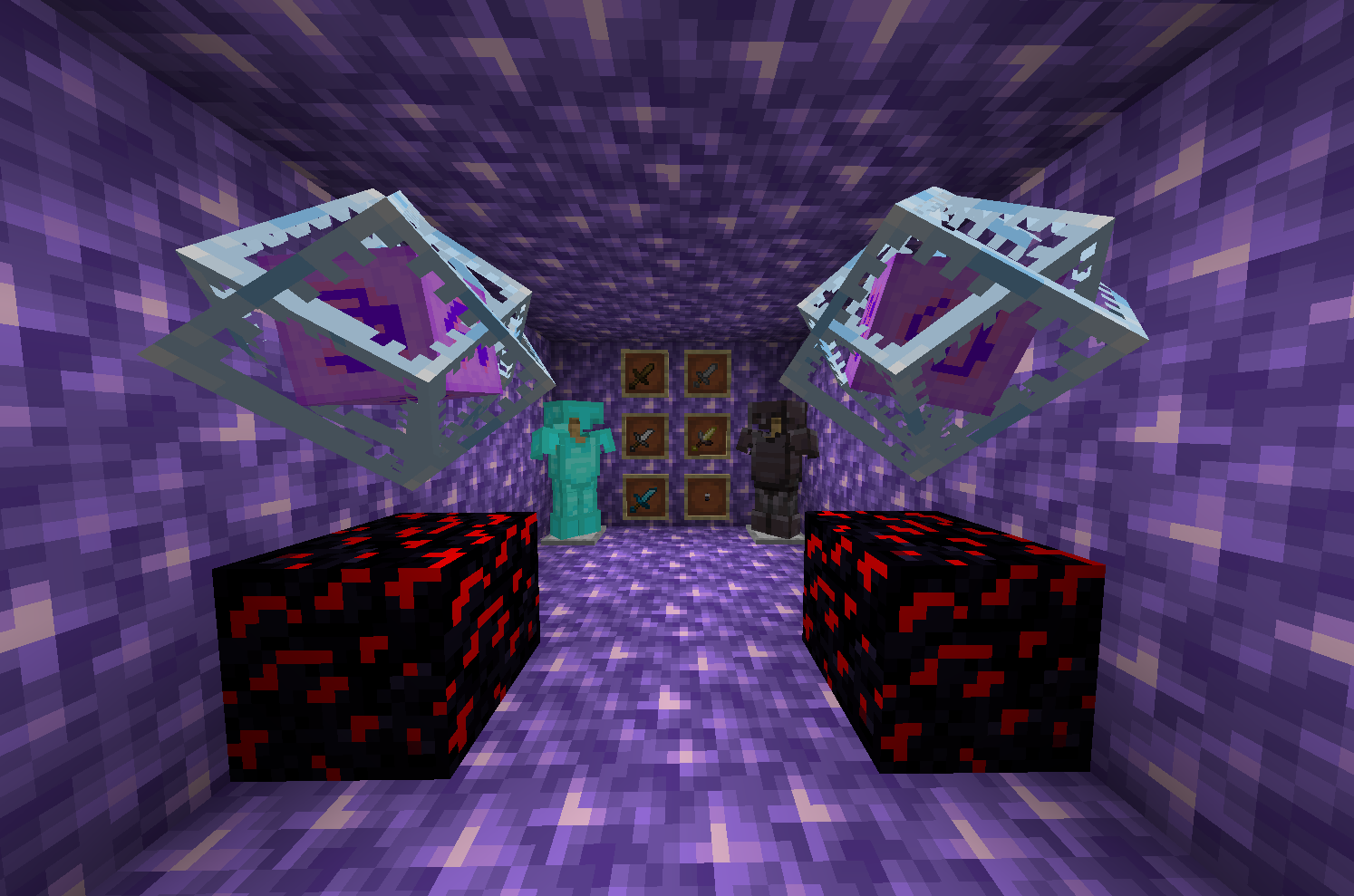
At a Glance
_You can finally tell your items apart…_
# At a Glance!
This resource pack adds brand new textures to existing items based on their finer details in a vanilla friendly manner.
## Tool Enchantments

Easily tell your enchanted weapons and tools apart with unique textures based on what enchantments they have! If the tool contains multiple enchantments, more textures are overlayed ontop, making each enchantment combination look unique!
Progress
– [✅] Sword Variants
– [🚧] Axe Variants
– [🚧] Pickaxe Variants
– [🚧] Shovel Variants
– [🚧] Fishing Rod Variants
– [🚧] Trident Variants
– [🚧] Mace Variants
– [🚧] Bow Variants
– [🚧] Crossbow Variants
– [🚧] Helmet Variants
– [🚧] Turtle Shell Variants
– [🚧] Chestplate Variants
– [🚧] Leggings Variants
– [🚧] Boots Variants
– [🚧] Elytra Variants
## Enchanted books
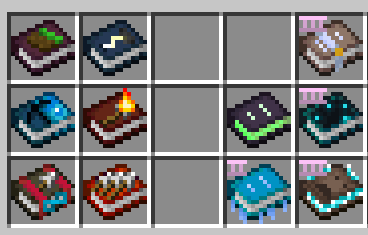
No longer struggle telling your enchanted books apart! Enchanted books change texture depending on what enchantments are stored inside. In case where the enchanted book contains multiple enchantments, the textures will be prioritised in following order:
1. Treasure enchantments (Mending, Soul Speed, Swift Sneak, etc)
2. Max Level 1 enchantments (Infinity, Silk Touch, etc)
3. Max Level 2 enchantments (Knockback, Fire Aspect, etc)
4. Max Level 3 enchantments (Luck of the sea, Fortune, etc)
5. Max Level 4 enchantments (Protection, Breach, etc)
6. Max Level 5 enchantments (Sharpness, Efficiency, etc)
*The order is subject to change based on feedback*
Progress
– [✅] Mending
– [✅] Frost Walker
– [✅] Soul Speed
– [✅] Swift Sneak
– [✅] Wind Burst (May revisit the texture in the future)
– [✅] Channeling
– [✅] Flame
– [✅] Infinity
– [✅] Aqua Affinity
– [✅] Multishot
– [✅] Silk Touch
– [🚧] Knockback
– [🚧] Punch
– [🚧] Fire Aspect
– [🚧] Loyalty
– [🚧] Quick Charge
– [🚧] Unbreaking
– [🚧] Lure
– [🚧] Luck of the sea
– [🚧] Fortune
– [🚧] Riptide
– [🚧] Sweeping Edge
– [🚧] Looting
– [🚧] Depth Strider
– [🚧] Respiration
– [🚧] Thorns
– [🚧] Piercing
– [🚧] Protection
– [🚧] Feather Falling
– [🚧] Fire Protection
– [🚧] Projectile Protection
– [🚧] Breach
– [🚧] Blast Protection
– [🚧] Efficiency
– [🚧] Power
– [🚧] Sharpness
– [🚧] Density
– [🚧] Bane of Arthropods
– [🚧] Smite
– [🚧] Impailing
## Potion contents

Spot enhanced (Level 2) and extended (Longer duration) potions ***at a glance*** from the thicker and thinner potion bottle designs! Tell the different effects apart with their unique animated visuals.
Progress
– [✅] Enhanced Potion Variant
– [✅] Extended Potion Variant
– [✅] Swiftness Animation
– [✅] Leaping Animation
– [✅] Slowness Animation
– [✅] Night Vision Animation
– [🚧] Invisibility Animation
– [🚧] Fire Resistance Animation
– [🚧] Water Breathing Animation
– [🚧] Instant Health Animation
– [🚧] Harming Animation
– [🚧] Poison Animation
– [🚧] Regeneration Animation
– [🚧] Strength Animation
– [🚧] Weakness Animation
– [🚧] Luck Animation
– [🚧] Turtle Master Animation
– [🚧] Slow Falling Animation
– [🚧] Infestation Animation
– [🚧] Oozing Animation
– [🚧] Weaving Animation
– [🚧] Wind Charged Animation
– [🚧] Ominous bottle variants
## Other additions
Minor additions this pack also includes
### Tropical Fish bucket textures
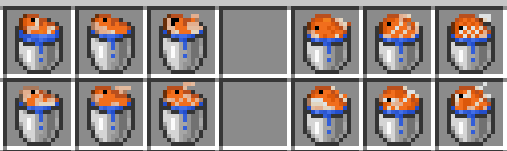
Each of the 12 different types of tropical fish patterns have their own unique textures and support all color variations.
### Axolotl bucket textures
### Explorer map textures
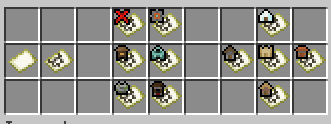
Spot explorer map target… at a glance! Each explorer map has the icon of the target visible on the item texture.
### Name tag textures
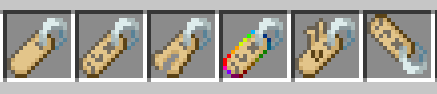
Blank name tag has a unique texture. If the nametag name is one of the easter egg names they also contain a unique texture.
## Future Plans
There are a lot of other textures I’d love to add to the pack but which are lower priority or still being planned out on how it would work. These include:
Planned additions
– Tipped arrow textures
– Unique textures for max enchant items
– Currently maxed out swords look too busy to my liking. Maybe should add a texture override to the textures once it detects the tool has max enchants.
– Firework variants based on flight duration
– Firework + Firework Star variants based on explosion contents
– Damaged Enchanted Tool variants (100%, 90%, 50% and 30% durability)
– This might be impossible due to how many different textures there already are.
– Entity tool variants
– It is possible to make texture variants to tools and weapons based on which mob is holding it. Could be interesting for example to make skeleton bows more bone textured etc.
– Lodestone compass variant
– Writable / Written book variants based off number of pages they have
– Suspicious Stew variants based on effect
– Goat horn instrument textures
– Be able to tell which sound the goat horn makes ***at a glance***
– Infested block inventory marker
– Matching trim pattern textures on equipment items
Currently impossible to add but would love to when possible
– Shield enchantment variant textures
– Equipped armor enchantment variant textures
– In Vanilla minecraft it is currently not possible to change equipped armor textures dynamically based on enchantments.
– Thrown trident projectile variant based on enchantments
– Fired arrow projectile variants based on potion effects
Asylum Notes (Font)
#  Asylum Notes
A font originally intended as a parody of street writings (namely russian “продам гараж”) but turned out looking more like it was written by a mentally unstable person.
## Usage
⚠️ This resourcepack doesn’t replace anything!
You’ll have to specify a font. This is done with formatting, namely [Raw JSON (Vanilla)](https://minecraft.wiki/w/Raw_JSON_text_format#Java_Edition) `{“text”: “Text”, “font”: “asylumnotes”}` or [MiniMessage (Recommended)](https://docs.advntr.dev/minimessage/format.html#font) `Text`.
## Contributing
If you want to improve this font in any way, please open an [issue](https://github.com/xllifi/asylum-notes/issues) or a [pull request](https://github.com/xllifi/asylum-notes/compare) on GitHub.
## License
You are free to use this font in any project as long as you credit me and/or provide links to modrinth page and/or GitHub page.
This project uses [CC-BY 4.0](https://www.tldrlegal.com/license/creative-commons-attribution-4-0-international-cc-by-4).
[](https://www.tldrlegal.com/license/creative-commons-attribution-4-0-international-cc-by-4)
## Supporting me
If you like my work and want to support me, please do so on [Boosty](https://boosty.to/xllifi)
AsYasya’s Legacy Copper
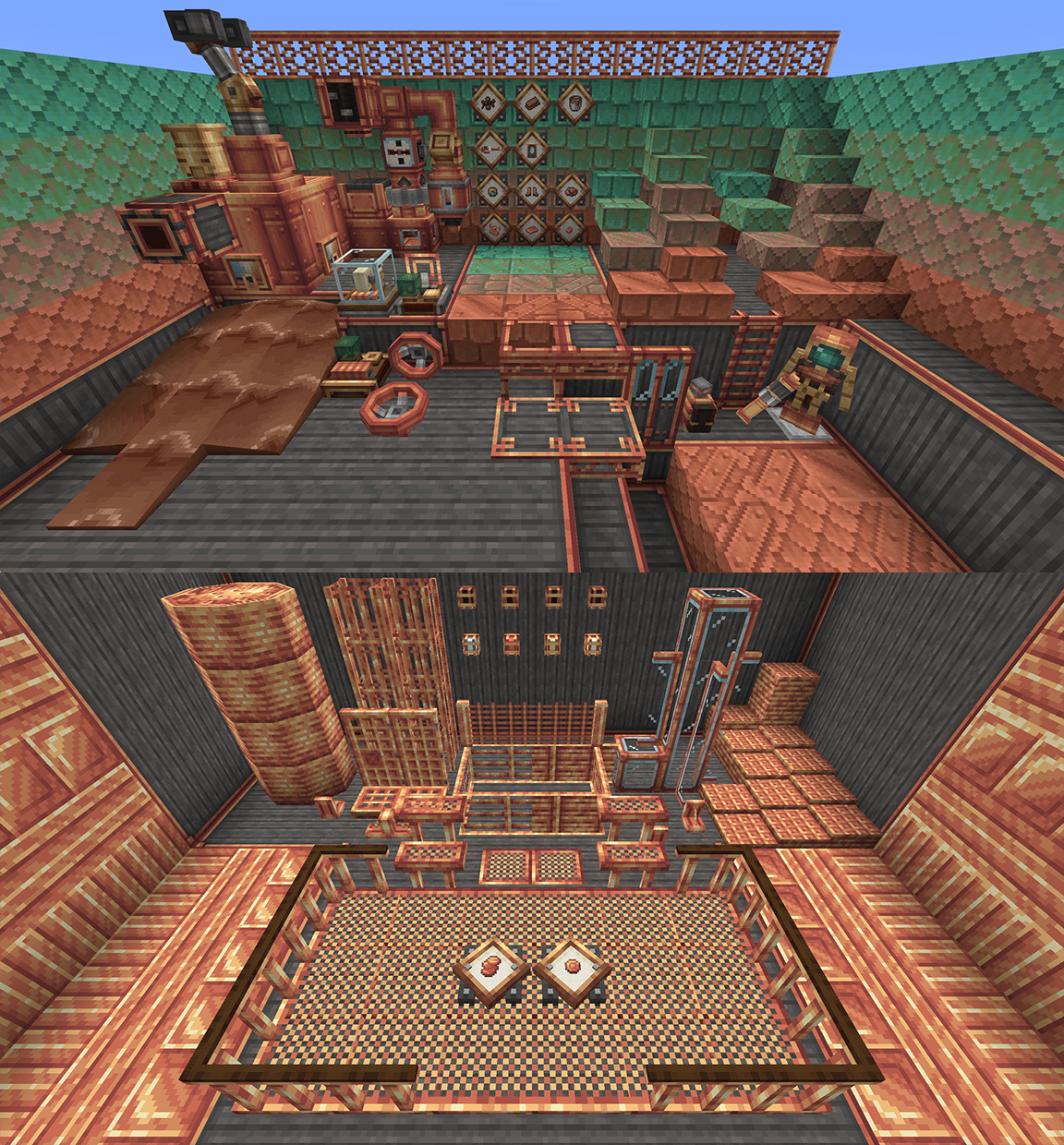
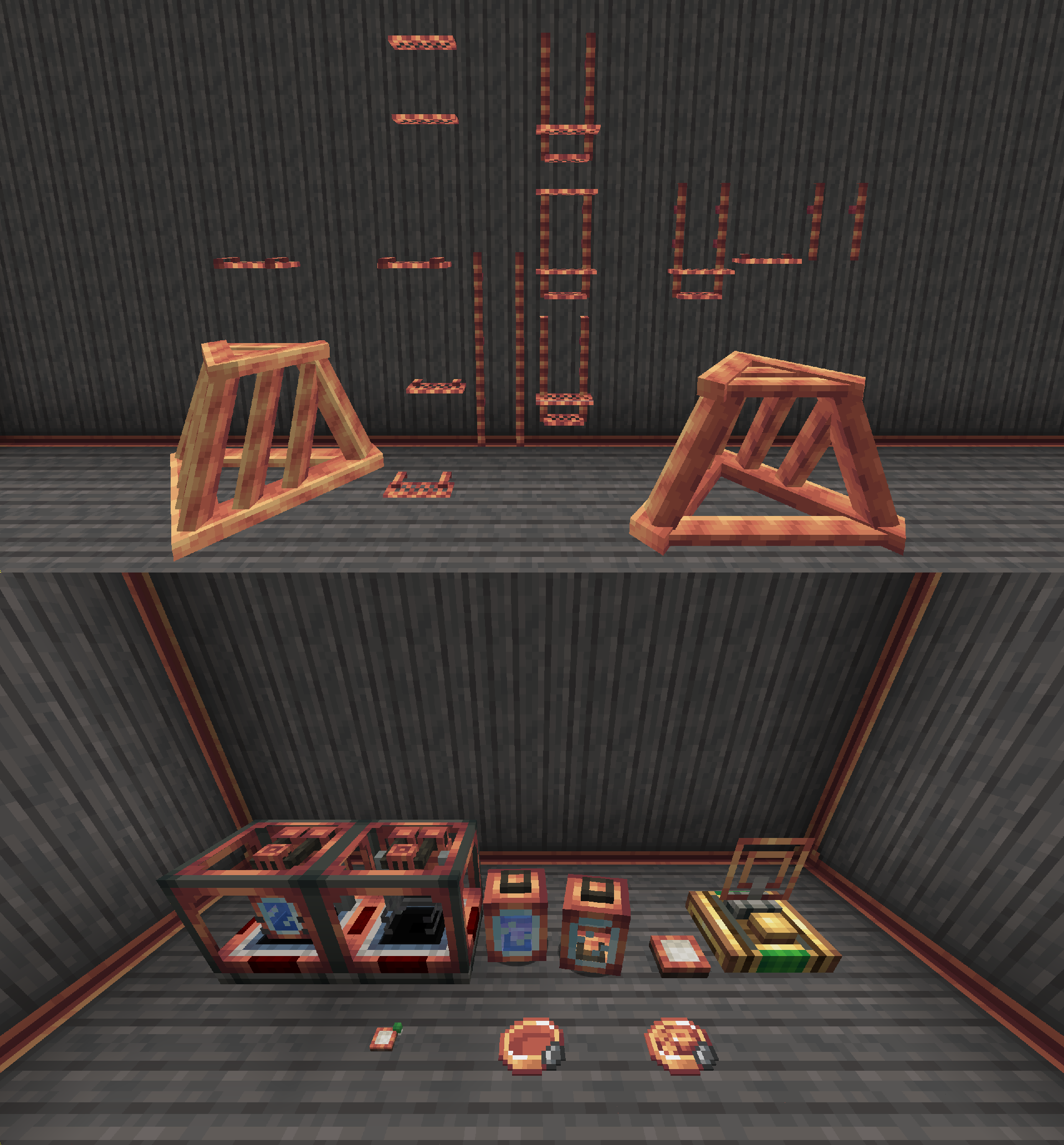
# This pack reimagines [Create 6.0.0’s](https://modrinth.com/mod/create/version/1.20.1-6.0.0) copper textures to match with the legacy style, as well as supports [Create Slice & Dice](https://modrinth.com/mod/slice-and-dice), [Create Factory Logistics](https://modrinth.com/mod/create_factory_logistics), [Create Deco](https://modrinth.com/mod/create-deco), [Create: Mixed Casing](https://modrinth.com/mod/create-mixed-casing), [Create Encased](https://modrinth.com/mod/create-encased), [Create: Bells & Whistles](https://modrinth.com/mod/bellsandwhistles) and [Create: Sound of Steam](https://modrinth.com/mod/create-sound-of-steam)!
## All decorative blocks from Create are unchanged, also chocolate is changed to not look like molten copper.
### There is also an OG Texture version that uses as many pre 6.0.0 textures and models as there are in these mods.
You may use this resource pack in your modpacks with credit!
!Astronyx 16x
Astronyx 16x is a PvP-focused Minecraft texture pack designed with a clean, polished style and a broad visual overhaul.
The pack includes over 75 customized block textures, including selected stone variants, wooden plank blocks, dirt textures, simplified glass textures, custom obsidian, custom end stone, and fully customized wool blocks.
Astronyx also features a transparent custom GUI, a custom moon and sun, improved End Crystal textures, and a customized font for a fresh visual style.
The pack also includes custom armor textures, alongside custom critical hit and sharpness particles. A No Pumpkin Blur texture is also included.
Many commonly used PvP items have been customized as well, including bows, golden apples, buckets, a wide variety of tools, shears, sticks, ender pearls, fire charges, and more.
**Features include:**
• 75+ customized block textures
• Custom armor textures
• Transparent custom GUI
• Custom moon and sun
• Improved End Crystal texture
• Customized font
• No Pumpkin Blur
• Custom critical hit and sharpness particles
• Customized PvP-related items and tools
Hope you enjoy using Astronyx 16x.
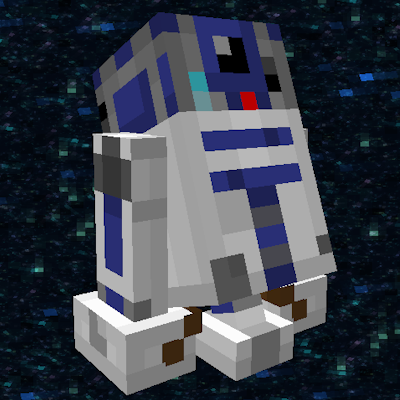
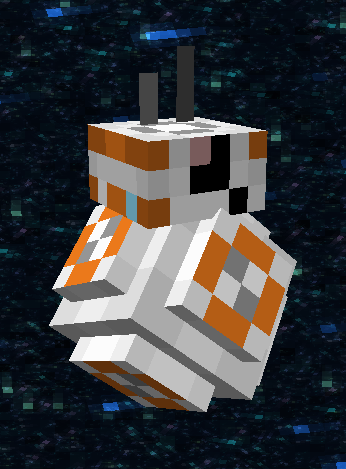
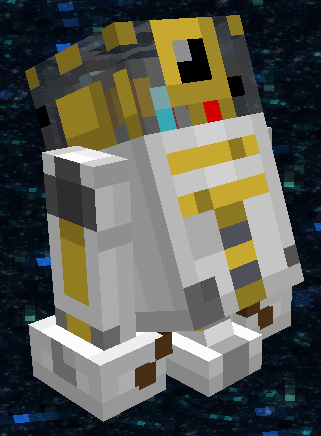
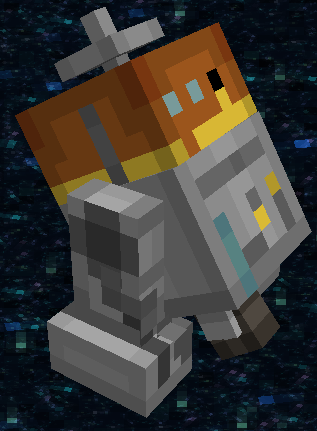
Fishy’s Astromech Wolves
Rename Your wolf to turn it into an astromech unit!
R2:
BB:
R3:
C1:
R5:
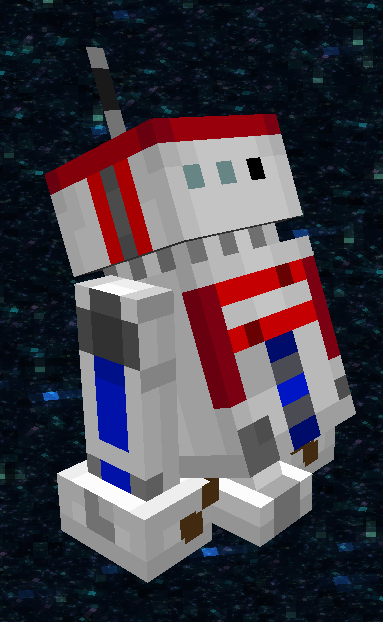
GONK(pig, not wolf):
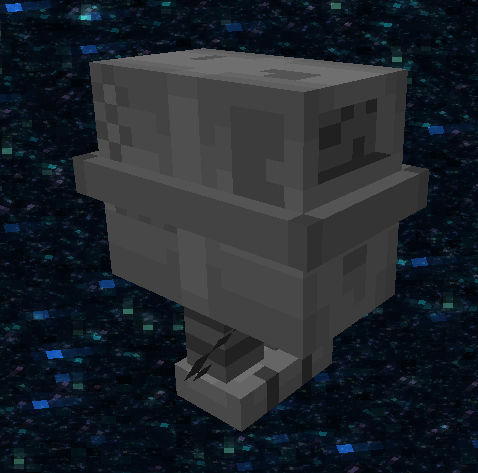
Protocol Droid (Villager):
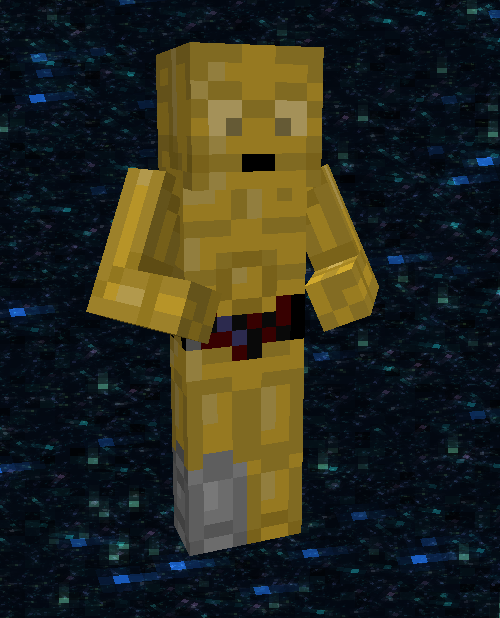
**Must have ETF, EMF and ESF installed:**
https://modrinth.com/mod/entitytexturefeatures
https://modrinth.com/mod/entity-model-features
https://modrinth.com/mod/esf
Any name with “r2”, “bb”, “R2”, “C1” or “R5” in it will work.
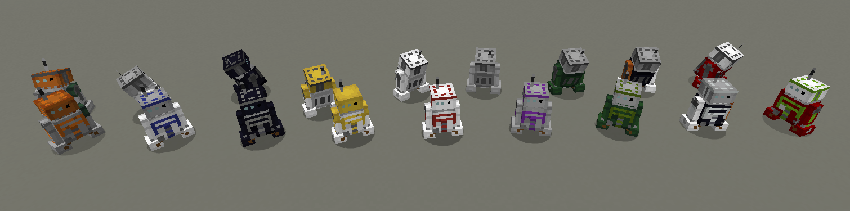
The wolf variant defines what base colors your astromech will have. You can change the accent color by dying the droid unit.
Here are a few examples (2 of each variant):




Here are the Villager Protocol droids:
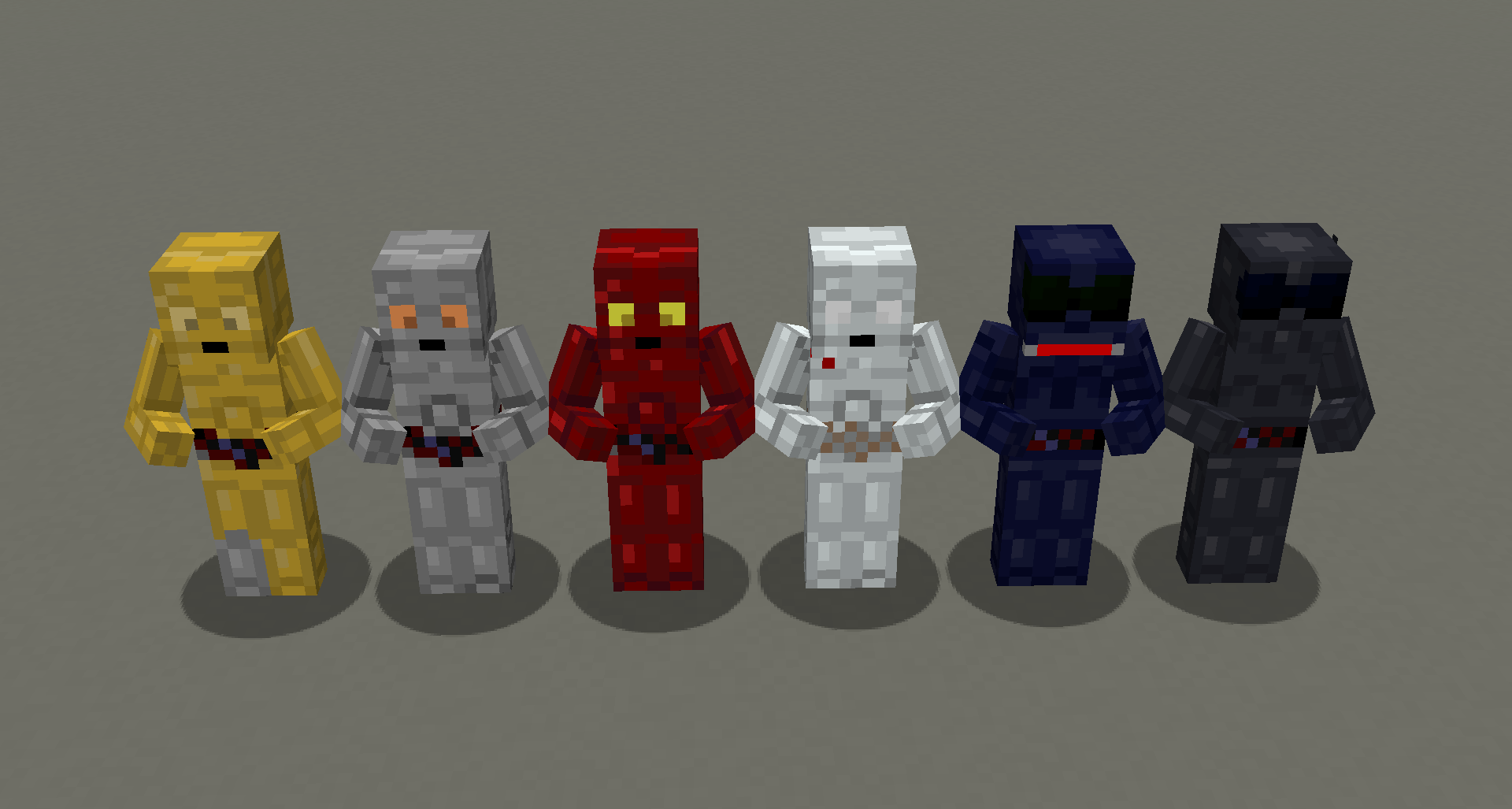
Specific Character names (will work no matter what type of wolf or collar color)
-“R2-D2” or “Arturito”
-“BB-8”
-“C1-10P” or “Chopper”
-“R5-D4”
[](https://billing.sparkedhost.com/aff.php?aff=3131)