Ask Merl
# Merl Mod*
Ever had a question you needed answers for, but didn’t want to have to exit the game to ask Merl? Then this mod is for you!
With this mod, you can use the /askmerl command to ask Merl a question! This chatbot provides you with extremely helpful answers, such as ‘I don’t know’ and ‘Your last message contains content that violates our content policy. Please reword your response.’
Includes subtitles and sound!
Possible future features include easter eggs and a built-in resourcepack of the official Mojang pack used in their trailers that was leaked by Merl.
*Since the API for Merl isn’t publicly available, I had to do my best to recreate the chatbot.
# FAQ
### This mod isn’t compatible with my favorite version. What should I do?
Please open an issue on my Github! I will be updating this 1.21.5 and up, however versions past modern will not get new updates unless by specific request.
### Are more Merl mods coming in the future!
Absolutely!
### Merl isn’t helping me with my problems!
Skill issue.
Ashen’s Zombie Apocalypse

# Features:
– Zombies can place and destroy blocks, wich depends on wich tool the zombie is holding.
– Zombies can swim.
– Rotten zombies can throw rotten flesh at you.
– Zombies can sprint.
– Zombies can jump over 2 block or below gaps.
– Rotten zombies will slowly backup if the player is close.
– Customizable settings in a custom GUI, type /trigger Give_Gui to use the GUI menu.
– Zombies can jump up and bite you.
– Zombies run away from TNT.
– Zombies replace most hostile mobs, and some neutral mobs, wich is customizable in settings.
– Zombies can carry TNT.
– Cave traders, to make caves more enjoyable.
– And more!
Ashen’s Better AI

Ashens Better AI is a datapack focused on improving the vanilla game AI by allowing mobs to jump, throw items, hunt, and more. This pack even has a working food chain to make the game even more immersive!
# Features:


All Land Mobs
All land mobs can now jump.
Zombies
Zombies can build up to you if they have any color of wool or dirt in their hand.
Zombies will kill sheep, pigs, chickens, cows, and wolfs.
Zombies will eat any dropped meat to gain lost health.
Zombies will destroy any blocks minable with a axe if they are holding a axe.
Zombies will destroy any block minable with a pickaxe if they are holding a pickaxe.
Zombies will kill other zombies that are lower then 4 health and will eat the rotten flesh.
Zombies will throw any logs, any striped logs, cobblestone, and cobbled deepslate that they are holding at the player.
Zombies can swim in water.
Phantoms
Phantoms will spawn with a random size.
Undead mobs will hunt phantoms.
Spiders
Spiders can throw spider webs at the player.
Spiders will hunt silverfish.
Skeletons
Skeletons will hunt spiders and cave spiders.
Skeletons will back away from the player while it is shooting.
Wolfs
Wolfs will hunt chickens, cows, and pigs.
Squids
Squids will hunt salmon and cod.
Dolphins
Dolphins will hunt squids.
Dolphins will attack the player when hit.
Polar Bears
Polar Bears will hunt skeleton, strays, husks, and zombies.
Hoglins
Hoglins will hunt striders.
Cave Spiders
Cave Spiders will hunt silverfish.
Spiders
Foxes will hunt silverfish.
Ashen Emissive Ores

___
Do you like seeing ores glowing in the dark? Disappointed that other Glowing Ores resource packs don’t work with Ashen 16x? Well, this Add-On is for you! This pack makes all Overworld and Nether ores (including Ancient Debris) glow for easy visibility.
This add-on **requires** Optifine, Continuity, or another equivalent in order to function!
Place this pack *above* Ashen in your load order.
___
[](https://bisecthosting.com/aim-boot)
Ascir’s Curses
# Ascir’s Curses
Adds some curse enchantments to Minecraft.
All new curses
## Curse of Hallucinations
Supported items: **Helmets**.
Maximum level: **1**.
Makes you hear things.
## Curse of Tripping
Supported items: **Boots**.
Maximum level: **1**.
Makes you fall off edges when sneaking. I recommend you don’t go end-busting with those.
## Curse of Vexing
Supported items: All **equippables**, including elytra, and all **weapons**, including axes and tridents.
Maximum level: **3**.
When hitting something using a weapon enchanted with this curse, or when being hit while wearing equipment that has this curse on it, there’s a small chance a vex might spawn. This chance increases with the level of the enchantment, and is applied separately for each piece of equipment, meaning it increases when more than one piece of equipment has the curse on it.
## Curse of Side Stitches
Supported items: All **armor**.
Maximum level: **1**.
You continuously take damage while sprinting. The damage is applied once for each armor piece with the curse.
## Where to find them
The new curses can, by default, appear everywhere the vanilla curses can appear, meaning they can appear as random enchantments on loot in chests, or can be bought as enchanted books from villagers.
## Compatibility with other datapacks / mods
All projects in my [Enchanting Stuffs](https://modrinth.com/collection/Zp7CFWob) collection are compatible with each other. Additionally, I have tested a few other projects for compatibility:
– [Combat+](https://modrinth.com/collection/LxgNym3J): ✅ Confirmed compatible.
– [Enchanting Tomes](https://modrinth.com/datapack/enchanting-tomes): ✅ Confirmed compatible.
– [Enchantment Descriptions](https://modrinth.com/mod/enchantment-descriptions) / [Idwtialsimmoedm](https://modrinth.com/mod/idwtialsimmoedm): ❌ Not supported – it won’t break, but since this is a datapack, I cannot add assets, which is what descriptions are. One day, I might make an addon resourcepack for this pack which adds descriptions, and/or a mod version of this pack that includes descriptions natively.
– [Neko’s Enchanted Books](https://modrinth.com/mod/nekos-enchanted-books): ❌ Not supported – for the same reason.
– [RPG Enchanting](https://modrinth.com/mod/rpg-enchanting/): ❌ Not yet compatible. Maybe I’ll add support for it in the future.
ASCII Shader
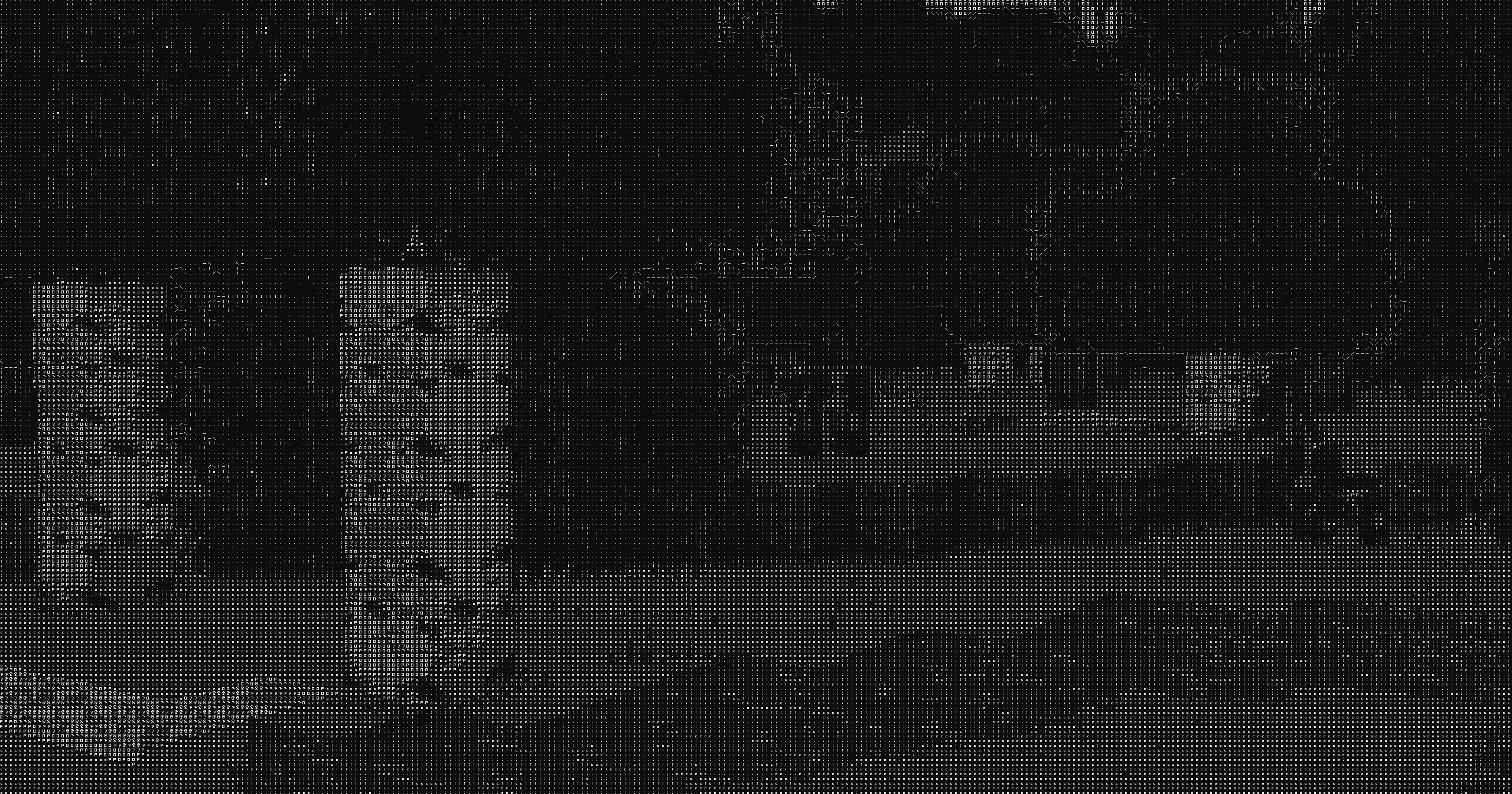
## ASCII Shader intends to make Minecraft render only with ASCII characters!
Current features include:
– Color Customisation for, background, dark, and light colors
– Using the in world colors as the text color
– Post proccesing effects like bloom, sharpness, and tonemapping
– Line detection including multiple line detecting modes and performance settings
– Premade color profiles
There is maybe something I want to add to the customizability this (for now at least) should be enough!
If you find any bugs or incompatibilities, you can always report them, it helps me and others out.
### Installation
First you need to install either OptiFine or the Iris mod to be able to load shaderpacks. (Choose Iris if you are unsure)
Then you need to launch the game, and get to the Shaderpacks/Shaders menu in Video Settings.
Open the shaderpacks folder by clicking the button in the menu.
Download the ASCII Shader and put it in the shaderpacks folder.
Get back in the game, and choose ASCII_Shader in the shaderpacks menu. (Refresh the menu if it doesn’t appear)
Ascii like shader
# ASCII Minecraft Shader
Inspired by [Acerola’s video](https://youtu.be/gg40RWiaHRY?si=B6kJ5t36mAW3lpr7) on ASCII art rendering, this shader project aims to recreate the iconic Minecraft visual style using ASCII characters. By translating the game’s visuals into ASCII art, the shader produces a unique and nostalgic aesthetic.
## Features
– **ASCII Rendering**: Converts the Minecraft world into a grid of ASCII characters.
– **Bitmap Font Texture**: Utilizes a bitmap font texture to map characters onto the screen.
– **Color and Black & White Modes**: Supports both colored and black & white rendering modes.
– **Edge Detection**: Integrates edge detection techniques for enhanced visual detail.
## Black & White Mode
In this mode, the shader renders the Minecraft world using only black and white ASCII characters, providing a classic and minimalist look.


## Color Mode
The color mode maintains the vibrant colors of Minecraft while still using ASCII characters to depict the scene, offering a modern twist on the retro aesthetic.


## Implementation Details
– **Fragment Shader**: The core of the shader is implemented in GLSL, where each pixel is mapped to an ASCII character based on its brightness or color value.
– **Bitmap Font Texture**: A 128×128 texture is used to store the bitmap font, with each character occupying an 8×8 pixel block.
– **Edge Detection**: Combines a Difference of Gaussians filter with a thresholded Sobel edge detection filter to enhance the details and edges of the scene before converting to ASCII.
# Github:
https://github.com/5weetdev/Ascii-shader
Feel free to contribute
Ascii Text Renderer
## Showcase
This is an example of the texture pack with the colors set to “minecraft” and “darkPurple” in the config.
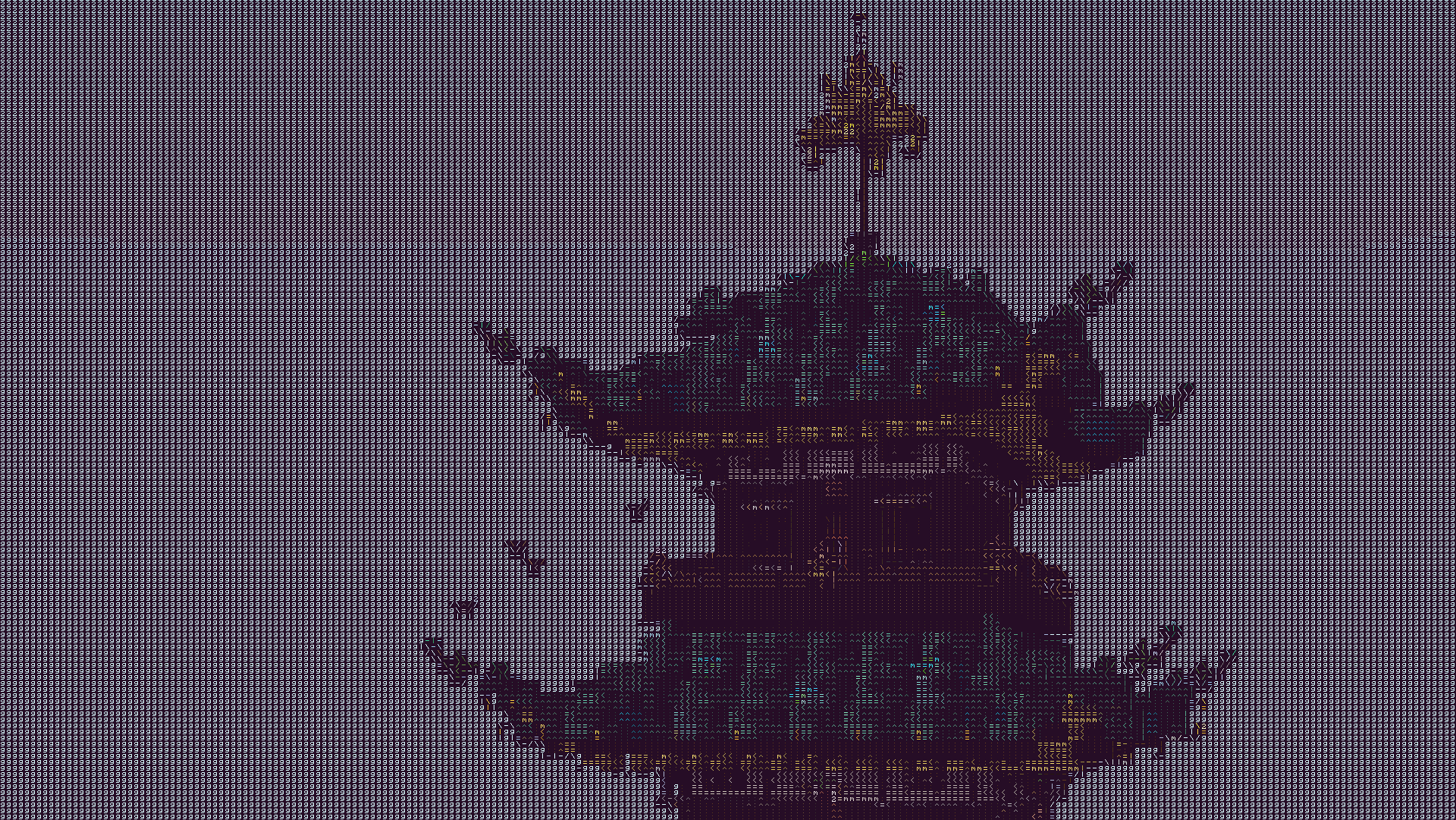
The text may look blurry since the image is a lot smaller than ingame. To show you what the text looks like up close, this is a zoomed in look at a part of the above image.
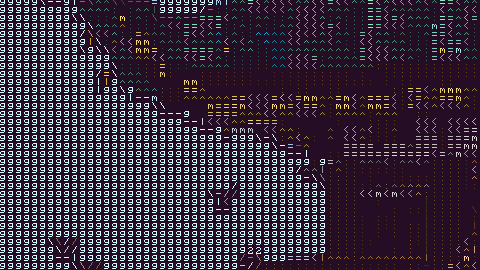
This is more accurate to what you will see ingame. You will see it as sharp as this image, but you will still see the entire image filling up your whole screen.
## Description
This texture pack renders your game as ascii art in completely vanilla minecraft. No mods at all are required for this pack to work. However, **YOU MUST HAVE GRAPHICS SET TO FABULOUS** in your minecraft video settings.
The image above doesn’t fully capture how it looks ingame due to scaling differences, so in order to see the pack in its full beauty you either need to look at the screenshot in fullscreen somehow or actually download the texture pack and look at it ingame.
## How to Use
1. Install the texture pack for one of the supported Minecraft versions.
2. Apply the texture pack ingame, and in your video settings make sure your graphics setting is set to *fabulous* or the pack will not work. Your graphics setting can also act as a toggle for the pack, as setting it to fast or fancy will disable the effect.
3. To configure the texture pack as seen in the gallery, open the texture pack and find the config file in `assets/minecraft/shaders/include/config.glsl`. There are only three options, and many color presets.
## Support
If you have an issue, you can join [my discord](https://discord.gg/gymTft2GbV) and ask in there. I also have frequent votes for my future texture packs, and take suggestions for packs.
https://www.alphaleo.li/resourcepacks
As light as a feather
This plugin gives you the ability to slowly fly down while holding a feather thats it. Can be useful in a pinch.
If there is a version that does not exist please email me here so i know to add it: zwhseton@gmail.com
Digital Circus Plushies
—————————————————————-
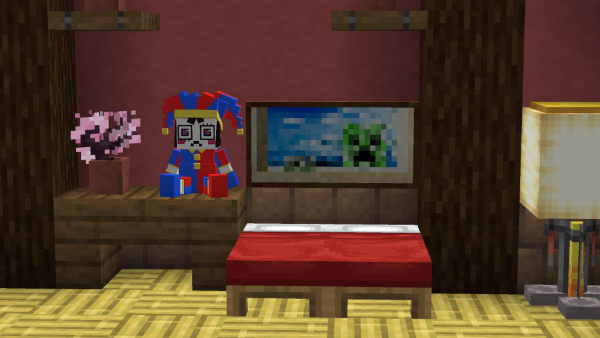
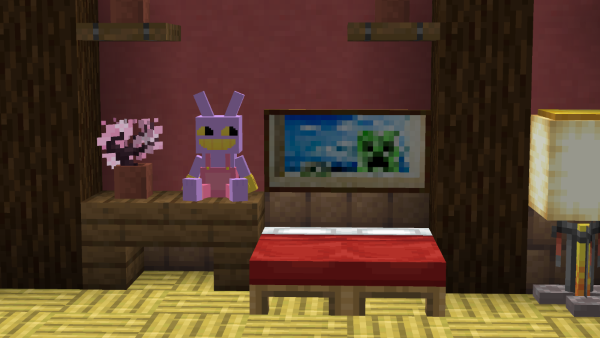
This resource pack through the use of Custom model data.
adds Pomni and Jax Plushies into the game.
**It does not replace any blocks/items**
It uses carved pumpkins as the base so that you can also wear them on your
head if you so choose to.
—————————————————————-
—————————————————————-
**Use These commands to give yourself the plushies in game**
(1.15-1.20.4)
/give @s minecraft:carved_pumpkin{CustomModelData:5001}
(1.20.5-1.20.6)
/give @s minecraft:carved_pumpkin[minecraft:custom_model_data=5001]
—————————————————————-
Those commands will give you the Pomni plush. replace “5001” with “5002” in the commands to get the Jax Plush.
Check out the “READ ME” text file that comes in the resource pack for some more info/help.
it has these commands and some other stuff.
I might add the Cain plush in the future, i’m unsure yet. currently adding Cain is not a priority for me since I want to work on some other things.
—————————————————————-
Spoiler
There is a “secret”/extra model included with this pack, and it will always be included with most of my custom model resource packs. (it shouldn’t be too hard to find with some messing around with the numbers)